One Adobe Commerce Instance.
Unlimited Storefronts.
Run separate brands, regions, languages, and B2B portals from a single Adobe Commerce installation. Redefine designs the multistore architecture so your team manages everything from one place while every customer sees a storefront built for them.

One Catalog. Managed Five Ways. Nothing Synchronized.
Brands that grow beyond a single market end up running separate installs, patching them separately, and reconciling data manually. Multistore architecture on Adobe Commerce eliminates that entirely.
Separate installs, separate headaches
- Each brand on a different platform — updates and patches multiplied by the number of installs
- Customer data siloed by storefront — no unified order history, no cross-brand loyalty
- Catalog changes deployed to five codebases — a two-hour task replicated across installs all week
- No single reporting view — revenue, inventory, and conversion data live in different dashboards
One instance. Full separation where it counts.
- One Adobe Commerce install runs unlimited websites, stores, and store views — one patch, everywhere
- Shared or scoped catalog, pricing, and customer data — unified or brand-isolated as your model requires
- Catalog and product updates pushed once, inherited by every storefront — override only where each brand needs to differ
- Unified reporting layer across all storefronts — one dashboard for every brand, region, and channel
Every Storefront. One Admin. Real-Time.
This is what your merchandising team sees after a Redefine multistore build. Live data across all stores, scope toggled by store view, updates pushed once and inherited everywhere.
Today's Revenue
$84,290
+12.4% vs yesterday
Orders
1,248
+8.1% vs yesterday
Conversion Rate
3.8%
-0.2pp vs last week
Active Storefronts
5
All healthy
Storefront Health
Updated 12s ago| Storefront | Status | Revenue (Today) | Orders | Last Deploy |
|---|---|---|---|---|
| brand-us.com | Live | $38,120 | 572 | 2h ago |
| brand-ca.com | Live | $13,520 | 191 | 2h ago |
| brand-eu.com | Live | $22,810 | 331 | 2h ago |
| b2b.brand.com | Live | $7,290 | 114 | 2h ago |
| outlet.brand.com | Staging | Pending launch | - | In progress |
Revenue by Storefront - Last 7 Days
How Adobe Commerce Multistore Works
Three-tier hierarchy: one instance, multiple websites, multiple store views. Shared catalog and checkout logic; independently themed, priced, and localized storefronts at every leaf node.
Tier 1
Adobe Commerce Instance
Shared catalog · Admin · Checkout logic
Tier 2 — Website A
Website A
North America
brand-us.com
brand-ca.com
Tier 2 — Website B
Website B
Europe
brand-eu.com
brand-fr.com
Tier 2 — Website C
Website C
B2B Portal
b2b-trade.com
outlet.brand.com
Tier 3: Store Views — individual languages, currencies, themes, and price rules
What Redefine Designs Into Your Multistore Build
Each capability below is an architectural decision made before a line of code is written. Get it right at scoping and every storefront inherits it automatically.

Multi-Website and Store View Architecture
Redefine maps your brand structure to Adobe Commerce's three-tier hierarchy before any build begins. We design the right scope boundaries — what is shared at the catalog level, what is scoped per website, and what is overridden per store view — so your team inherits logic rather than duplicating it.
Global Localization
Per-store-view language packs, currency rules, tax configurations, and shipping zones. Translatable attribute labels, category names, and CMS blocks scoped to each locale.
- Multi-language attribute sets
- Currency + tax per store view
- Shipping carriers scoped by region
Shared and Scoped Catalog
One product catalog serves all storefronts. Product visibility, pricing, and category trees scoped per website. Shared inventory pool or per-warehouse stock sources — configured to match your operations.
- Catalog rules per website
- MSI multi-source inventory
- Price rules isolated per store
B2B Company Accounts
Isolate a B2B portal within the same instance. Company accounts, buyer roles, requisition lists, negotiated pricing, and purchase order workflows — all scoped to the B2B website while sharing the same product data.
- Company accounts + buyer roles
- Negotiated pricing per company
- Purchase order workflows
Multi-Domain Store Routing
Each website maps to its own domain or subdomain — brand.com, brand.co.uk, trade.brand.com — with store codes, base URLs, and redirect rules configured at the architecture layer so customers land on the right storefront automatically.
- Custom domain per website
- Store code URL paths
- CDN + cache tags per storefront
Independent Theming Per Store
Each storefront inherits a base theme and overrides only what the brand requires. Brand A gets a dark luxury theme; Brand B gets a clean minimal layout. Same codebase, different visual identity. Updates to shared components propagate to all stores; visual overrides remain isolated.
Scoped Checkout and Payments
Checkout flows, payment gateways, and shipping methods are scoped per store view so each market runs the right acquirer, carrier, and tax logic — without duplicating the catalog or admin backend.
- Payment methods per store view
- Shipping carriers by region
- Tax + checkout fields per channel
What Determines Your Multistore Scope
Multistore complexity depends on your catalog strategy, localization depth, and integration surface. Use this to estimate your build tier before the discovery call.
Included
- Architecture scoping workshop
- Website + store view config
- Shared catalog + scoped pricing
- Base theme + per-store overrides
Timeline
6-10 weeks
Discovery to first live storefront. Additional stores add 2-3 weeks each at this scale.
Typical investment
Scoped per project
Priced by catalog complexity and integration surface. Proposal in 3 days.
Also included
- B2B company accounts module
- ERP integration + order routing
- Multi-currency + tax engine
- Unified reporting layer
Timeline
12-20 weeks
Phased rollout with core stores first, additional stores in 3-week sprints.
Typical investment
Scoped per project
Integration complexity and storefront count drive the estimate. Proposal in 3 days.
Full scope
- Global catalog + PIM integration
- Multi-ERP order routing
- Dedicated CDN + performance audit
- Ongoing managed retainer available
Timeline
24+ weeks
Phased global rollout with dedicated sprint teams. Core + regional + B2B tracks run in parallel.
Typical investment
Scoped per project
Dedicated architect + delivery leads. Priced to scope. Proposal in 3 business days.
From 30 Disconnected Stores to a Single, Unified Platform
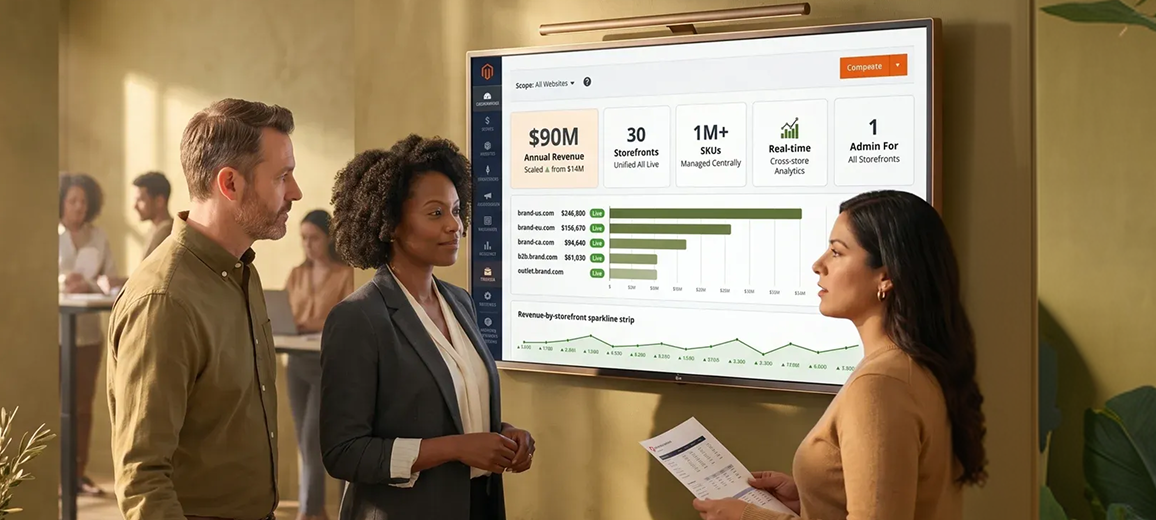
A major promotional products distributor ran 30 separate storefronts with no unified inventory view, no cross-store analytics, and manual catalog updates replicated across every site.
The Problem
30 stores, over one million inventory items, and multiple backend platforms with no unified visibility. Manual processes, limited analytics, and fragmented integrations slowed decision-making and constrained warehouse operations at every level.
The Outcome
Custom Power BI reports across all stores and Dynamics 365 ERP. A custom multi-storefront ecommerce solution with tight ERP integration, automated backend processes, and real-time unified analytics replacing every manual workflow.
Annual Revenue Scaled
From under $14M per year before the platform rebuild
0
Storefronts unified
1M+
SKUs managed centrally
Real-time
Cross-store analytics
1 admin
For all storefronts
Why Redefine for Multistore
Other agencies build capability lists. Redefine maps capabilities to operational outcomes, integration surfaces, and business results before a line of code is written.
Architecture before code
We spend the first sprint mapping your business structure to Adobe Commerce's three-tier model. Most agencies skip this — and you pay for it in rework when scope boundaries are wrong.
Integration surface mapped first
ERP, OMS, PIM, and marketing platforms are scoped before build starts. Data routing across storefronts is designed at the architecture layer, not bolted on at the end.
Phased rollout by design
Core storefronts go live first. Additional regions and channels launch in 3-week sprints. Your team sees revenue from the first store before the last one is finished.
Localization depth
More than translated strings. Redefine configures locale-specific tax rules, shipping carriers, payment gateways, and customer segments so each storefront operates correctly in its market.
Performance at scale
Each additional storefront adds indexing, cache warming, and database load. Redefine benchmarks performance against your projected peak traffic before launch and tunes the stack to match.
Full handoff documentation
Every scope boundary, config decision, and integration mapping documented and handed to your team at go-live. Your next hire will know exactly how the architecture works without asking us.
Integrations Across Every Storefront
Data flows from your back-office systems to all storefronts in one integration build. Redefine architects the routing layer so each store gets the right data without duplicating integration work.
See all Adobe Commerce integration services or Adobe Commerce development services.
Multistore Questions
Is Multistore Architecture Right for You?
- You operate two or more brands, regions, or customer segments that each need a distinct storefront
- You are patching and updating multiple installs separately and want to consolidate
- You sell B2B and B2C and want separate pricing, checkout, and catalog rules without separate platforms
- You need per-region pricing, currency, and tax with a single catalog management interface
- You plan to expand into new markets and want to add storefronts without starting from scratch each time
- You operate a single brand serving a single region — a standard single-store build is simpler and cheaper
- Your different storefronts need completely separate catalogs with no shared data — separate instances may be more appropriate
- You need each storefront on a different commerce platform — headless federation may be a better fit than Adobe Commerce multistore
Not sure? Tell us your situation and we will be straight with you.
Map Your Multistore Architecture
Submit your brief. We review your storefront model, map the right website and store view structure, and send a scoped proposal in 3 business days. No commitment. No pitch.

Brief Received
We will review your storefront model and send a scoped proposal within 3 business days. If we need to ask a clarifying question, you will hear from us sooner.
Every storefront you need. One Adobe Commerce instance. Built right the first time.
Redefine architects the multistore scope, builds every storefront, wires every integration, and hands you documentation your team can actually use. No commitment. No pitch.