Your support team hits first milestone in 8 weeks, with full go-live by week 14. Channel scope, routing, and SLAs locked in writing before we touch your tenant
We implement Dynamics 365 Customer Service for support teams of 5 to 100+ agents. Case routing, tiered service levels, and omnichannel workspaces built to your actual case volume. Scope is fixed in a written statement of work before configuration starts. No surprise change orders.

4.9/5
Client satisfaction rating across 47 projects
14 weeks
Median time from signed SOW to full go-live
$0
Unplanned change orders on fixed-scope builds
94%
On-time delivery rate
Four situations where this engagement fits well
"Shared inboxes, service level agreements in spreadsheets, and no single case history, that is not a support operation. That is a liability waiting for a bad month."
Every situation below is fixable with Dynamics 365 Customer Service, implemented with scope locked before build, not after.
Shared inbox support
Manual assignment, service level agreements in spreadsheets, history lost in threads. You need automated case lifecycle, routing, and service level enforcement.
Already on Dynamics 365 resource planning
Business Central or Dynamics 365 Finance already live? Customer Service on Dataverse gives orders, invoices, and account context in the case, no one-off integration.
Tiered service levels by segment
Two hours for enterprise, eight hours for standard, if that lives in memory, you need entitlement service levels on every new case with alerts before breach.
Scaling headcount but not resolution
Artificial intelligence routing, knowledge in flow, and self-service cut handle time, that is where return on investment shows up. Headcount and resolution capacity should grow together.
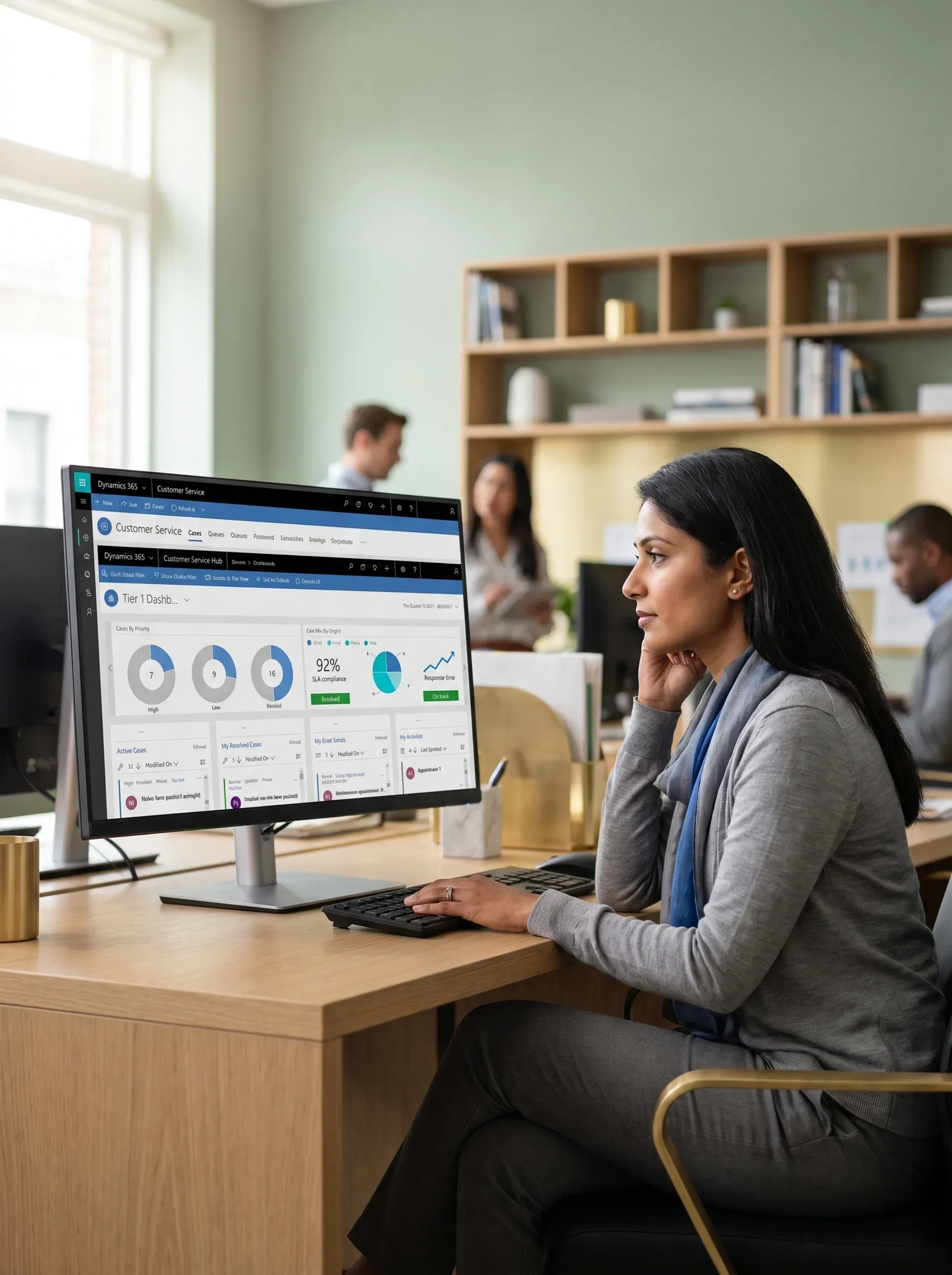
Every month without routing is a month of service level leakage
Manual triage, siloed channels, and no service level clock mean your best agents spend 30 percent of their time on admin instead of cases. That is measurable revenue impact you can reverse.
See a live dashboard demoWhat your supervisor view looks like on day one
This is not a mockup, it is the actual workspace layout your supervisors and agents use. Numbers load live from your queue data.
247
Open cases
3
Service level at risk
2.4 hours
Average handle time
92%
Service level compliance
Active volume by channel
How to reset application programming interface credentials, Product version 4.2
Match confidence: 94% based on case description
Case summary (artificial intelligence generated):
"Customer reports authentication failure after upgrade. Ticket links to account CS-10482. Order history visible."
What Dynamics 365 Customer Service handles out of the box
Cases, omnichannel routing, artificial intelligence, service level agreements, and knowledge, with resource planning data via Dataverse, no custom middleware required.
Omnichannel routing, one queue engine for every channel
Chat, email, short message service, voice, and social all run through the same routing model. Rules by skill, capacity, sentiment, or segment, no code required. Your channel list is in the statement of work and tested in user acceptance testing before go-live.
Chat
Voice
Short message and social
Service level and entitlement management
Tiered service levels by segment, product, or contract. Entitlements drive priority routes and hours on every case. Breach alerts before the clock runs out.
Enterprise tier: two-hour response
Artificial intelligence assisted resolution
Copilot suggests articles and case summaries. Sentiment detection flags risky conversations before service levels break.
Knowledge base management
Publish and version articles for agents and portals. Link closed cases to articles to lift first-contact resolution over time.
Resource planning data in the agent workspace
Orders, invoices, credit, and shipments from Business Central or Dynamics 365 Finance, inside the case, no tab-hopping required.
Every channel tied to your routing and service level tiers
Auto case creation from inbound mail
Rules on subject, domain, and keywords set queue, priority, and service level, no manual triage for standard paths.
- Multi-mailbox, shared, and alias routing
- Service level clock visible from case creation
- Duplicate merge for repeat threads
What we scope in the statement of work
Routing rules documented before configuration
Conditions, tiers, and escalations written and approved before configuration.
User acceptance testing before go-live
Scenarios, service level triggers, and auto-replies signed off before cutover.
Chat by skill, capacity, and hours
Widgets on site or portal with pre-chat fields. Per-agent chat caps to avoid overload.
- Skill-based routing matched to certification levels
- Copilot response suggestions from knowledge articles
- Sentiment detection with supervisor alert threshold
Typical chat outcomes after go-live
40%
Handle time drop with Copilot enabled
Zero
Service level misses at one client over 23 months
Voice on Azure Communication Services: record, transcribe, assist
Real-time transcription with Copilot showing history and suggested replies during the call.
- Interactive voice response flows documented before build
- After-call work timer with automatic case closure prompt
- Call recording with supervisor monitoring and barge-in
Implementation note
Voice is an Enterprise add-on. The statement of work covers interactive voice response depth, hold and overflow logic, and user acceptance testing on every path before launch. Recording and retention compliance is set per region before go-live.
Portal and bot to deflect repeat cases
Power Virtual Agents for common questions. Forms, knowledge base, and case history on Power Pages, low code.
- Branded Power Pages with single sign-on
- Bot topics mapped in statement of work before build
- Deflection rate tracked against case volume monthly
Portal outcomes for a United States promotional distributor
Unified Dynamics 365 Customer Service Omnichannel with Business Central on Dataverse. Teams voice, Power Virtual Agents for web deflection, and Power BI for live case metrics.
Bot deflects tier-one
Cases before agents
Live metrics
Power BI dashboard
Five phases from kickoff to steady-state operations
Each phase has entry, exit, and sign-off criteria. No next phase until user acceptance testing for the current phase passes.
Discovery and requirements
Weeks 1 to 2- Map all current case types, volumes, and resolution paths
- Document channel mix, routing rules, and service level tiers
- Resource planning data needs for the agent workspace
- Signed statement of work before any configuration begins
Platform configuration and integration
Weeks 3 to 7- Configure case management, queues, and routing rules
- Set up service level policies and entitlement structures
- Channels per statement of work: email, chat, voice, social
- Business Central or Dynamics 365 Finance integration via Dataverse
Knowledge base and agent workspace
Weeks 6 to 9- Build initial knowledge library from existing documentation
- Configure agent workspace panels per role
- Enable Copilot article suggestions and sentiment indicators
- Supervisor dashboard configured with target key performance indicators
Acceptance testing, training, and go-live
Weeks 10 to 14- Acceptance tests for every routing scenario and service level trigger
- Role-based training: agents, supervisors, and administrators
- Controller sign-off before production cutover
- On-call support during first business week
Hypercare and steady-state optimization
Weeks 14 to 18 and ongoing- 30-day hypercare with ticket service levels and daily triage
- Weekly satisfaction score and service level reports to operations leads
- Knowledge gap analysis at 30 and 60 days after go-live
- Quarterly health check and platform roadmap planning
Phase Gates
Failed user acceptance testing? We fix before the next phase. The gate criteria are written in the statement of work from day one.
No Surprise Invoices
Fixed scope with formal written change orders for additions. What you signed is what you pay.
Named Consultant
One named Dynamics 365 Customer Service consultant end-to-end. Team holds Microsoft certifications MB-300, MB-330, and MB-500.
What Dynamics 365 Customer Service actually costs
Licensing and implementation are separate. You pay Microsoft for licenses. Redefine delivers fixed-scope Dynamics 365 Customer Service consulting services under a written statement of work.
Customer Service Professional
Email, cases, knowledge base, basic service levels, best when one main channel is enough.
- Case management and routing
- Email channel and basic service level
- Knowledge base and self-service portal
Customer Service Enterprise
Omnichannel, artificial intelligence, analytics, Copilot, needed for chat, voice, and social.
- Everything in Professional
- Omnichannel routing across all channels
- Artificial intelligence Copilot: summaries and article suggestions
- Sentiment analysis and escalation alerts
Add-Ons and Extensions
Voice, digital messaging, Copilot Studio, varies by volume and usage.
- Voice channel: per-minute or capacity model
- Digital messaging: short message and social channels
- Copilot Studio: custom bot topic flows
Redefine implementation services (fixed-scope statement of work)
Essentials
Email, service levels, knowledge base, 30-day hypercare. 5 to 20 agents, one channel.
Standard
Most RequestedOmnichannel (email, chat, short message), resource planning integration, supervisor views. 20 to 75 agents.
Enterprise
Voice, Copilot, portal, Power BI, multi-system. 75 or more agents.
A Standard engagement averages $180,000 in year-one operational savings, based on reduced admin time per agent, SLA breach penalties avoided, and lower handle time with Copilot enabled, measured across 47 Standard-tier deployments. At $32K to $55K, payback runs under 8 months.
Your team's time investment across a full build is typically 3 to 4 hours per week, one sprint review, asynchronous feedback on deliverables, and a final user acceptance testing sign-off. We handle everything else.
A unified support platform for a US promotional distributor. Zero missed SLAs over 23 months at an omnichannel deployment. Here is how both were built.
Promotional products distributor, United States
Dynamics 365 Customer Service · Business Central · Dynamics 365 SalesSales and support were disconnected. The team needed call queues, recording, web deflection via chatbot, and seamless Business Central integration for finance and inventory, all without rebuilding the stack already in place.
Dynamics 365 Customer Service Omnichannel with Sales, Business Central on Dataverse, Teams voice, Power Virtual Agents for web chatbot, Power BI dashboards, and Outlook activity sync. All channels routed through a single queue model.
Pipeline and cases in one platform. Call queues and recording live. Bot deflects tier-one cases. Power BI delivers live case metrics without manual exports.
Pima Controls, industrial automation manufacturer
Microsoft Dynamics NAV · customer relationship integrationCustomers waiting on order status updates called in at high rates. Service agents had no view of order progress or production timelines during the call. Every inquiry required a manual lookup in a separate system.
Dynamics NAV with production routing linked to sales and purchase orders. Integrated customer relationship management for full customer relationship visibility. Power BI dashboards and mobile data capture for shop floor teams.
Inbound inquiry volume dropped as order visibility improved. Agents answered status questions from inside the case record without leaving the workspace.
Inventory visibility
Across all production stages
Mobile capture
Shop floor data in real time
47
Projects at 4.9 out of 5
Written
Scope in every statement of work
$180K
Average year-one savings across Standard-tier deployments
8 months
Average payback period
Five commitments in writing before configuration starts. Not verbal. Not in a slide deck. In the statement of work.
Each one is in the statement of work before configuration begins. None of them is an optional add-on.
Channel scope locked in writing before configuration
Inclusions, exclusions, and change triggers defined in the statement of work, not agreed verbally or in a slide deck where additions become change orders after build starts.
Named Dynamics 365 Customer Service consultant from discovery to hypercare
No handoffs to junior staff mid-project. The lead who scoped your build is the lead who delivers it, so context is never lost during transitions.
User acceptance testing scripts for every route, service level, and channel
Fail a test, we fix before advancing, no forced go-live and no routing bugs discovered by agents on day one.
30-day hypercare with ticket service levels included
Daily triage and weekly satisfaction score reports in the base engagement, not after go-live support billed at hourly rates with no response-time commitment.
Role-based training in your tenant, not a demo
Agents, supervisors, and administrators trained on your actual configuration, your real routing and queues, not generic features on a demo tenant.
A Dynamics 365 Customer Service partner with a Microsoft Solutions Partner certified team
Consultants hold Microsoft certifications MB-300, MB-330, and MB-500. Your build is delivered by people credentialed on the exact platform you run.
Common questions about Customer Service delivery
Professional is $50 per user per month. Enterprise is $95. Professional covers email, cases, and knowledge base. Enterprise adds omnichannel, Copilot, analytics, and supervisor views. Voice and digital messaging are Enterprise add-ons. Redefine implementation is a separate fixed statement of work.
Typically 8 to 14 weeks from signed statement of work to go-live for email, omnichannel, and knowledge base. Voice, bot or portal, or deep resource planning integration can extend toward 18 weeks. Dates and phase gates are in the statement of work and signed at each step.
Yes, via Dataverse to Business Central and Dynamics 365 Finance. Orders, invoices, and credit information appear in the agent workspace. What syncs, how often, and which entities are defined in the statement of work before build.
Chat, email, short message service, voice on Azure Communication Services, Teams, Messenger, WhatsApp, and custom connectors, all using the same routing model. Your channel list is in the statement of work and tested in user acceptance testing before go-live.
The statement of work lists user acceptance testing criteria for each route, service level, and channel. If a test fails, we fix and retest before the next phase. No forced go-live. The criteria are in writing, not a verbal promise.
Know your timeline, your cost, and your channel scope before you sign anything
For qualified teams planning a Dynamics 365 Customer Service implementation: a 3-page plan for channels, service level tiers, timeline, and phase gates. Free. No retainer required to receive and review the plan.
- Named Dynamics 365 Customer Service consultant from day one
- User acceptance testing scripts for every routing scenario and service level trigger
- Fixed-price with change-order control in writing
- 30-day hypercare with ticket response service levels
Director of Dynamics 365 Customer Service Practice
Personally reviews every submitted work plan request. Responds within 2 business hours. Has led Dynamics 365 implementations for over 40 US support teams.
Get your free 3-page Dynamics 365 Customer Service work plan
Dynamics 365 Customer Service · Redefine Innovations