Power BI Licensing Advisory That Stops You Overpaying
You may be paying for licenses your team never uses, or blocking viewers who belong on free access. We map your tenant to the right mix of Pro, Premium Per User, and Fabric capacity.
Submit your brief → call within 48 hours → scoped proposal in 3 days → first review within 1 week of sign-off
Your team's time investment across a licensing review is typically 2 to 3 hours total, one tenant walkthrough, a short usage export, and a final sign-off on the plan. We handle the analysis.
100+
Analytics Projects Delivered
Vendor
Neutral Advice, No Resale Quota
$0
To Receive a Scoped Proposal
Hero · Finance lead reviewing license spend

Most Tenants Pay The Wrong Amount For The Wrong Plan
After the April 2025 price change, Power BI Pro moved to fourteen dollars per user and Premium Per User to twenty four. The old assumptions stopped working. Independent power bi licensing help fixes that.
- Paid licenses sit on people who only ever open one report a quarter, or who left months ago.
- Every viewer is on a per user plan, when a single capacity could let them view for free.
- Premium Per User is bought for a whole team when only three authors need its advanced features.
- Nobody can answer the simple question of whether a capacity finally pays back at your headcount.
- You pay for the exact licenses your people use, with inactive seats reclaimed every cycle.
- Viewers read reports on free access behind a right-sized capacity, while authors keep the paid plans.
- A clear power bi premium versus pro advisory call sits behind every seat, backed by real usage data.
- Procurement gets a written plan with ranges, break-even points, and a renewal date to revisit.
Guesswork Is The Most Expensive License Of All
When no one owns the licensing math, the safe move is always to buy another paid seat. Over a year that caution quietly turns into thousands of dollars of shelf-ware. A short round of power bi licensing consulting replaces the guessing with a model you can defend.
Cost drivers · Admin reviewing tenant users

See Where Per User Stops Paying And Capacity Starts
Set your authors and viewers and watch the two licensing models trade places. This is the same break-even math behind our power bi sku advisory, using current Microsoft list prices.
People who build and publish reports. They always need a paid plan.
People who only read reports. They can be free behind a capacity.
Advanced features move authors from Pro at fourteen dollars to Premium Per User at twenty four dollars per user each month.
Every author and viewer carries a paid license each month.
Authors stay on paid plans and viewers read for free behind a capacity.
At this size, per user plans are cheaper. Keep everyone on Pro and revisit capacity as viewers grow.
Capacity starts to win at roughly 357 viewers, the point where free viewer access pays for the capacity.
Figures use Microsoft list prices, Pro at fourteen dollars, Premium Per User at twenty four dollars, and a representative reserved capacity near five thousand dollars per month. We confirm current rates for your region during the assessment.
Six Factors Decide What You Should Be Paying
Headcount alone does not set your bill. Our power bi licensing consulting weighs each factor below against real usage before recommending a plan.
Author To Viewer Ratio
A team of mostly viewers points toward capacity. A team of mostly authors usually stays on per user plans.
Advanced Feature Needs
Paginated reports, larger models, and frequent refreshes are where power bi premium versus pro advisory earns its keep, lifting only specific authors, not the whole team.
Capacity Size And Workloads
Fabric capacity unlocks free viewing, but the right size depends on refresh load, model size, and future workloads.
Existing Microsoft Agreements
Some enterprise suites already include Power BI Pro. Spotting that stops you from buying licenses you have paid for twice.
Actual Usage Versus Seats
Activity logs reveal dormant seats and shared accounts. Reclaiming them is often the fastest saving we find.
Growth Over The Next Year
A plan that fits today can break next quarter. We size for where your headcount and workloads are heading.
Want the cost side modeled end to end? Pair this review with a Power BI return on investment assessment, or browse rates across the Power BI pricing and evaluation hub.
Transparent Ranges Nobody Else Publishes
Here is what each Power BI plan costs and who it suits. This is the heart of any honest power bi premium versus pro advisory conversation.
The Number
$14
per user, per month, since April 2025
Best When
- Most authors and viewers can each hold a paid license without breaking the budget.
- Your audience is under a few hundred people and you do not need advanced model features.
- Some teams already get Pro inside an enterprise Microsoft suite, which we check first.
The Number
$24
per user, per month, advanced features included
Best When
- Specific authors need larger models, paginated reports, or far more frequent refreshes.
- You want premium features for a few people without committing to a whole capacity.
- The step up from Pro is roughly ten dollars, which is easy to justify per author.
The Number
$262+
per month, rising with capacity size
Best When
- You have a large viewer audience who only read reports and never build them.
- A larger capacity lets those viewers read for free, which is where big savings appear.
- You are planning broader Fabric workloads, so the capacity does more than serve reports.
List prices shown are Microsoft figures current through 2026. Our power bi sku advisory confirms capacity pricing for your region and reservation term before you commit.
Four Moves That Turn Spend Into Savings
Sound power bi licensing consulting pays for itself in the first cycle when it finds even a handful of wasted seats. A short power bi licensing assessment follows the order below.
Reclaim Idle Seats
We pull activity logs and flag paid licenses that have not been used, then hand them back.
Free The Viewers
When a viewer audience is large enough, we move them to free access behind a right-sized capacity.
Right Size Authors
Only the authors who use advanced features move to Premium Per User. The rest stay on Pro.
Set A Renewal Date
We leave a plan with a date to revisit, so the right mix holds as your team and workloads grow.
40%
The Power BI Pro price rise Microsoft applied in April 2025
357
Viewers where one capacity overtakes paying for Pro seats
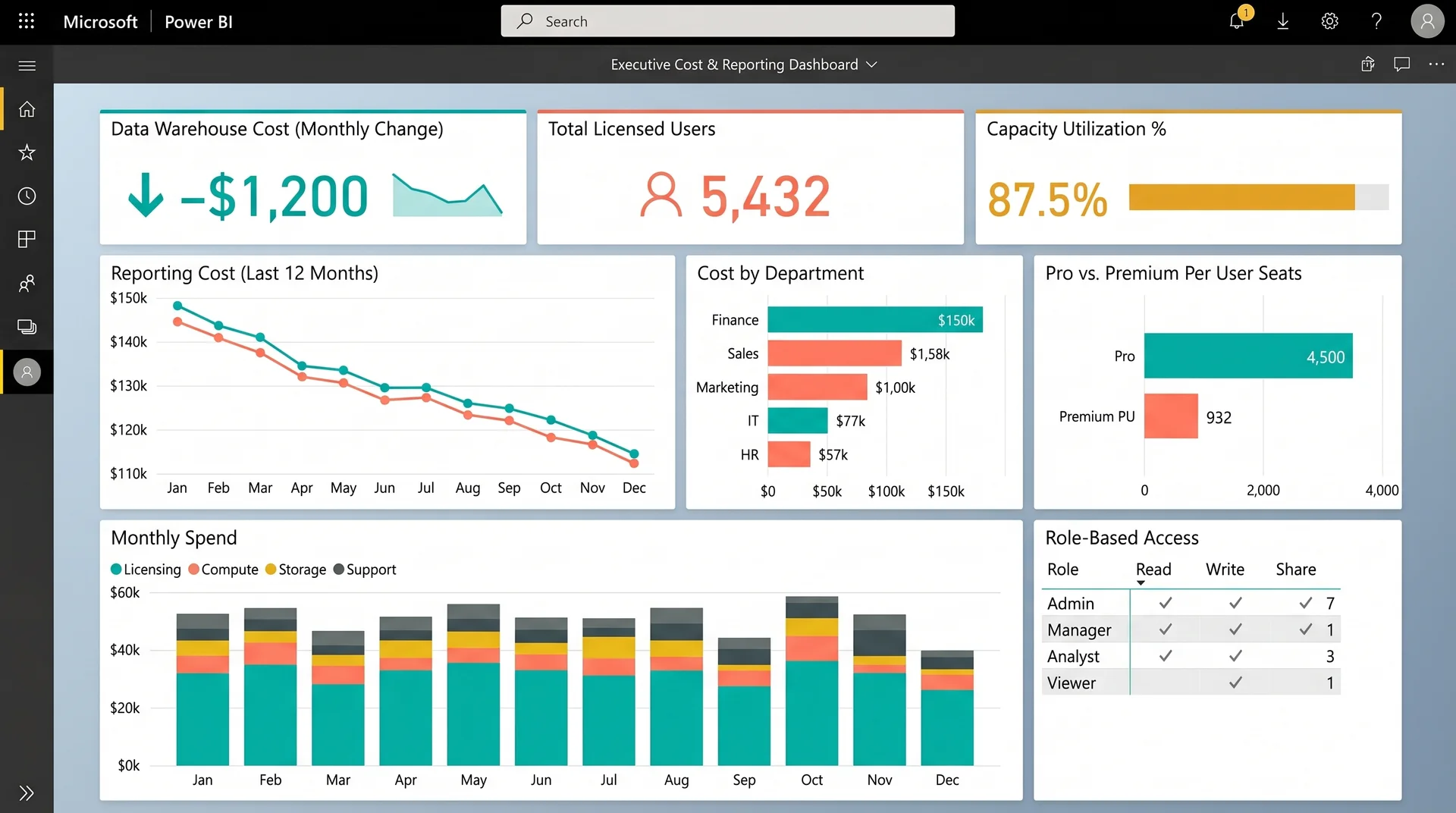
A Reporting Bill That Dropped Twelve Hundred A Month
An enterprise marine manufacturing and sales business ran reporting across disconnected sales and purchasing systems, on an expensive data warehouse with no role-based access.
We consolidated their data into a cost-efficient warehouse, built a Power BI semantic layer for consistent metrics, and added row-level security so each role sees only its own data. The infrastructure shrank without losing analytical depth.
$1200
Lower data warehouse cost, every month
Role
Based access for executives and operations teams
That is close to fourteen thousand four hundred dollars a year returned to the business, the kind of recurring saving a focused power bi sku advisory is built to surface.
Case study · Executive cost dashboard
Advice You Can Trust Because We Sell You Nothing
We hold no license resale quota, so the recommendation is whatever costs you least. Pick the engagement that fits, from a one-time review to advice bundled into a larger build.
One-Time Licensing Assessment
A fixed-scope review of your tenant, usage, and current plans, ending in a written power bi licensing assessment and a costed recommendation.
Ongoing Advisory Retainer
Light-touch power bi licensing consulting that revisits seats at each renewal and as your headcount and workloads shift.
Bundled With A Build
Folding the licensing call into a wider project, so the plan you build on is sized correctly from the first sprint.
Licensing rarely lives on its own. Many teams pair this advice with Power BI consulting services, a fresh Power BI audit, an implementation engagement, or a platform migration. Ongoing tenants lean on Power BI support services, and you can compare line-by-line rates across consulting pricing and support pricing.
The Questions Procurement Always Asks
We review your tenant, real usage logs, and current plans, then recommend the cheapest correct mix of Pro, Premium Per User, and capacity. You receive a written plan with ranges and a renewal date.
Our power bi premium versus pro advisory looks at which authors truly need advanced features like larger models or paginated reports. Only those authors move to Premium Per User. Everyone else stays on Pro.
Capacity wins once your viewer audience is large enough that free viewing behind it costs less than paid seats. For many tenants that crossover sits in the few hundreds of viewers.
No. We hold no resale quota, so this is independent power bi licensing help. The recommendation is whatever lowers your bill, even when that means buying fewer licenses than you have today.
A short walkthrough of your tenant and an export of user activity is usually enough. From there our power bi sku advisory does the analysis and returns a costed plan within a few days.
Tell Us About Your Tenant
Send a short brief. We respond within 48 hours with a scoped power bi licensing advisory proposal and clear next steps.
Call within 48 hours · proposal in 3 days · first review within 1 week of sign-off
Brief received
We will review your tenant details and send a scoped proposal within 3 business days.
Pay For The Licenses You Actually Use
Send your brief and get a costed power bi licensing advisory plan, built on a quick power bi licensing assessment, that you can take straight to procurement.
No commitment. No pitch. Just the numbers and a clear recommendation.