



Redefine Suite / Audit and traceability

See who changed what, and put it back.

An audit trail for every store. Each change shows who made it, when, from where, the old value and the new one.

  1. A finance manager reviews the Redefine Suite audit log of recent changes late in the evening

    01A price changes overnight

  2. A finance lead points to a line on an invoice and asks a store manager who changed a price

    02Finance asks who changed it

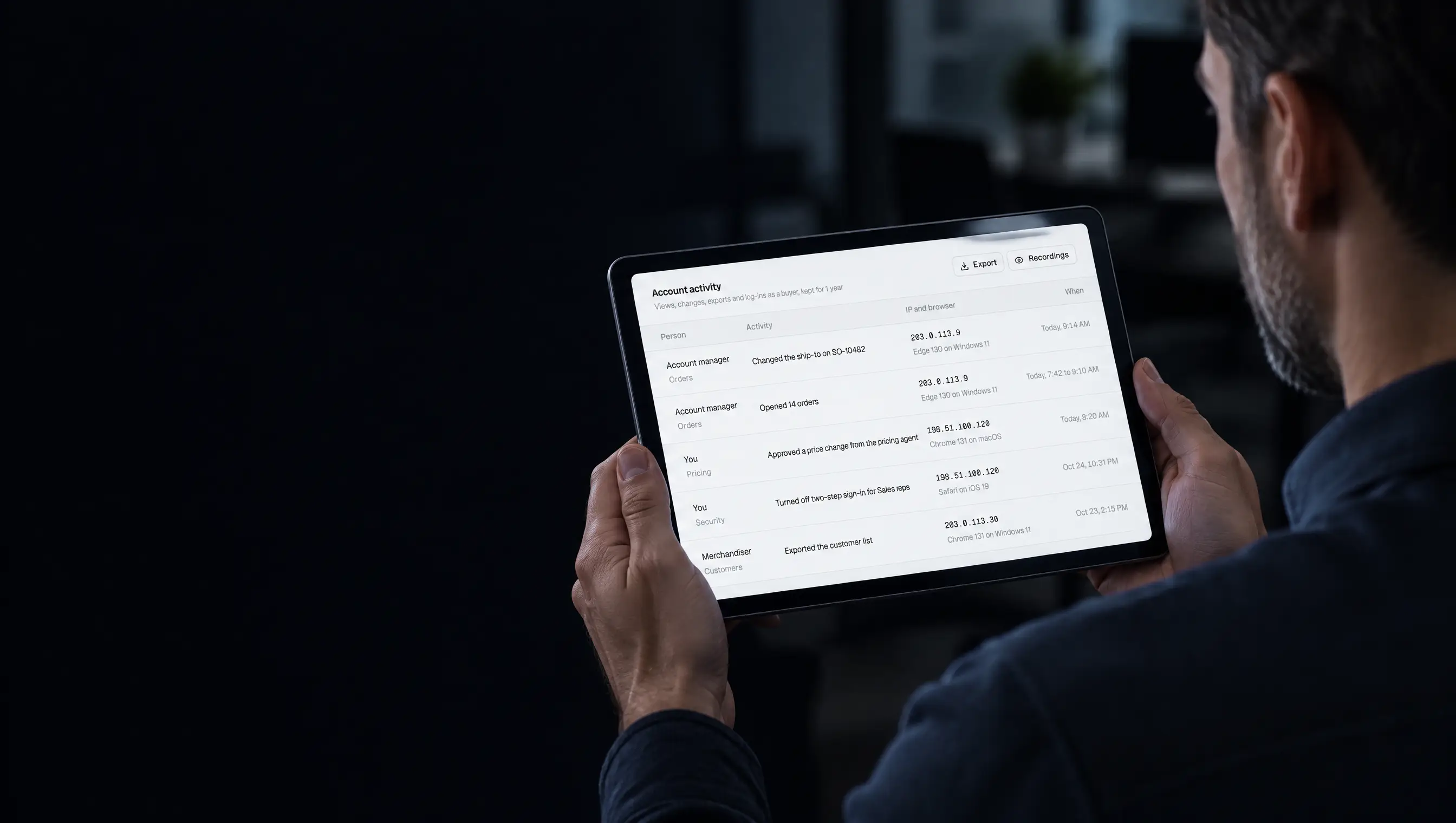
  3. A store manager checks account activity with the IP address and browser of each change on a tablet

    03The trail shows who, when and from where

  4. A merchandiser puts a fresh label on a shelf of steel tumblers after the price was put back

    04Put back, and the shelf is right again

See your own audit trail in a demo.

A demo built on your own stores, people and changes.

Book a personalized demo

Short answer

What is an audit trail?

Updated

An audit trail is a record of every change: who made it, when, from where, and what the value was before and after. In Redefine Suite by Redefine Innovations, the audit log covers people, AI agents and Business Central sync across every store, and nobody can edit or delete an entry, admins included.

Many stores only learn that something changed, not who did it or what it was before. So a wrong price or a lost address turns into a hunt through email and memory. An audit log ends the hunt.

Every record also keeps its own change log, so you can see one account or product's history and put a value back.

How the options compare

Three ways to answer "who changed this?"

OptionWhat you seeWhat you getSee also
Redefine Suite audit logWho, when, from where, old and new valueFilter by area, store, person and IPIdentity and security
Basic activity logThat something changedOften no old value, no agent or sync rowsAccess and permissions
Asking aroundEmail threads and memoryGone when people leaveCompliance and privacy

What each audit log entry holds

  • [1] The person, agent or synced system that made the change
  • [2] The old value and the new value
  • [3] The store, the IP address and the browser
  • [4] Who approved it, when someone did

Part of Governance, security and compliance in Redefine Suite.

From question to answer

Who changed this? Four steps to the answer.

Every store, agent and sync writes to the same audit log. Here is how a team finds one change and fixes it.

  1. 01 / Find

    Find the change in one log

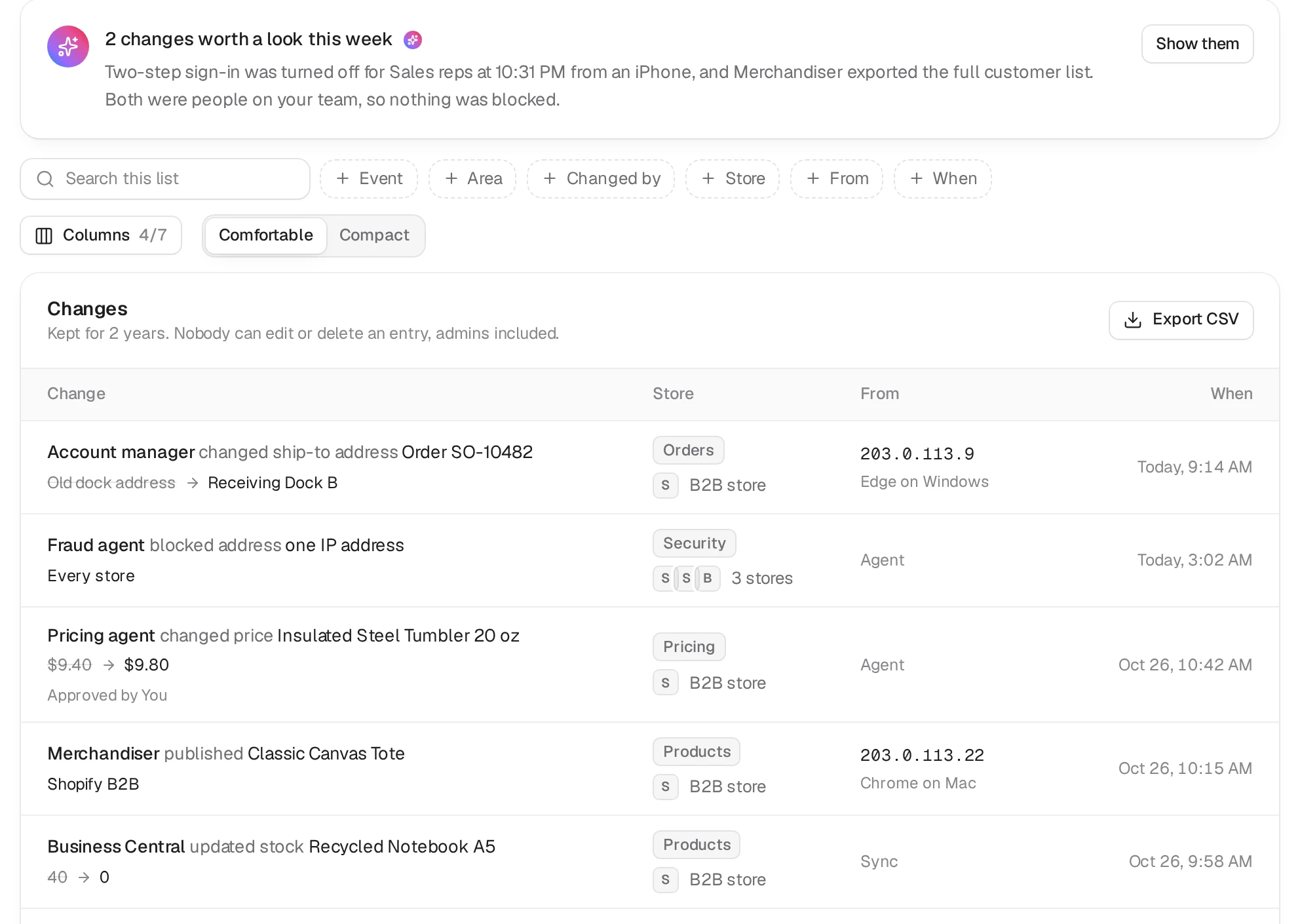
    Filter the audit log by event, area, store, person, IP or date. Each row shows the old value, the new value and who approved it. A short note on top points to the changes worth a look this week, like a setting turned off late at night.

    The Redefine Suite audit log with filters and changes by people, agents and Business Central sync, each with old and
  2. 02 / Check

    See what each person did

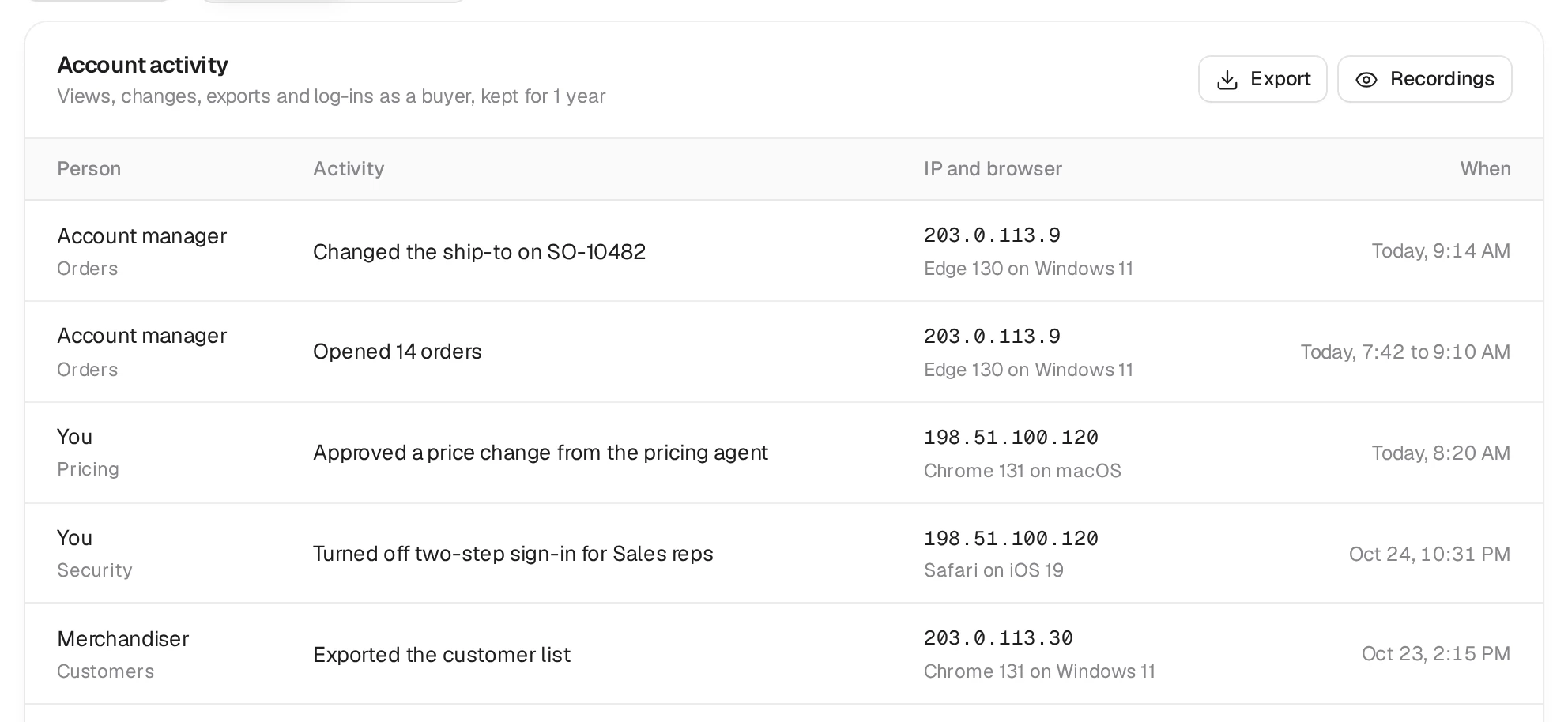
    Account activity lists views, changes, exports and log-ins, with the IP address and browser for each. Session recordings can be turned on, with card numbers and passwords hidden.

    Redefine Suite account activity showing each person, what they did, their IP address and browser, and when
  3. 03 / Fix

    Put the old value back

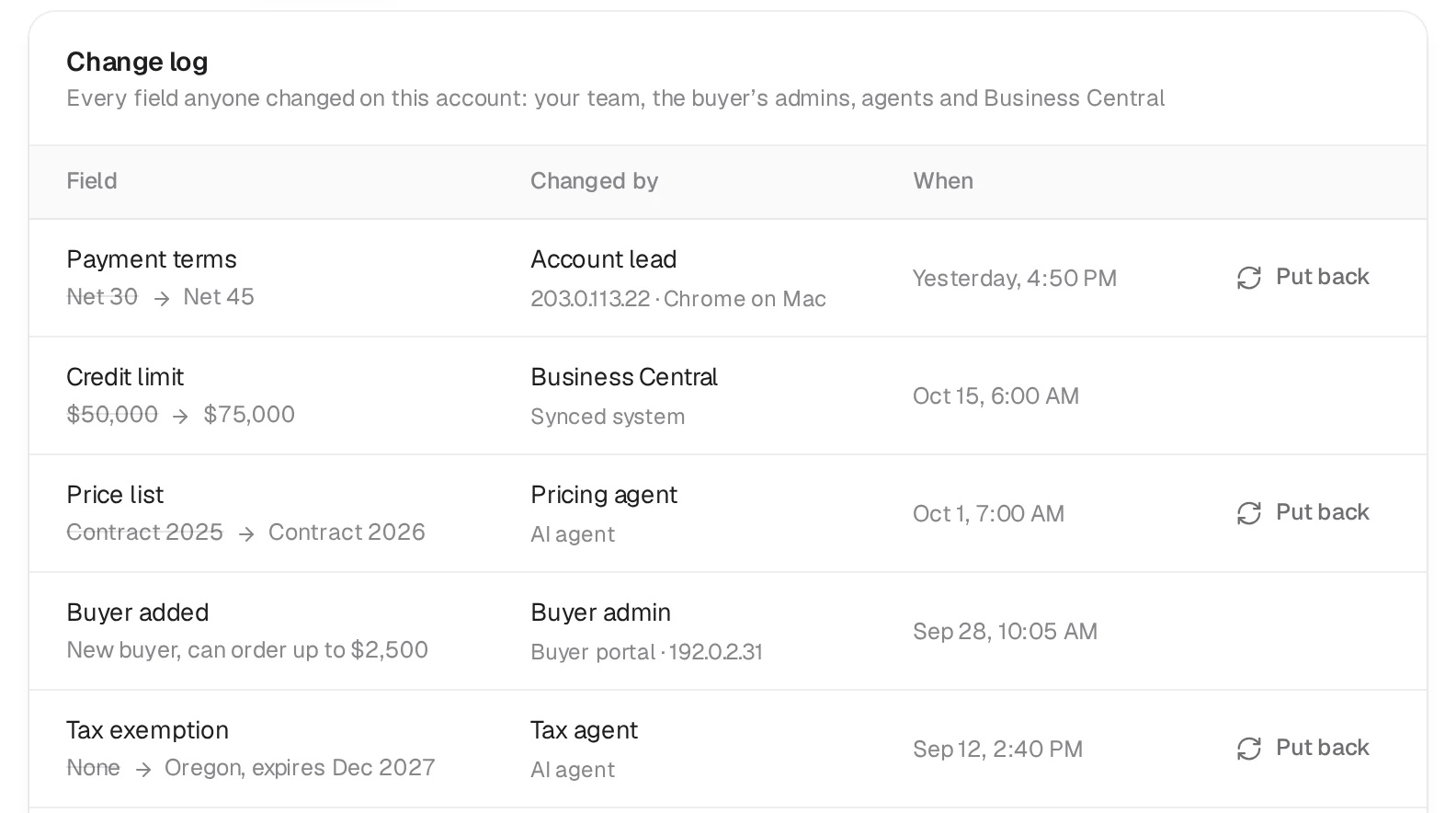
    Every account, product, price list, supplier and order keeps its own change log. It shows changes from your team, buyer admins, agents and Business Central, with Put back on the row. One click puts the old value back, and that fix is logged too.

    An account change log in Redefine Suite with payment terms, credit limit and price list changes and Put back buttons
  4. 04 / Keep

    Keep the trail as long as you need

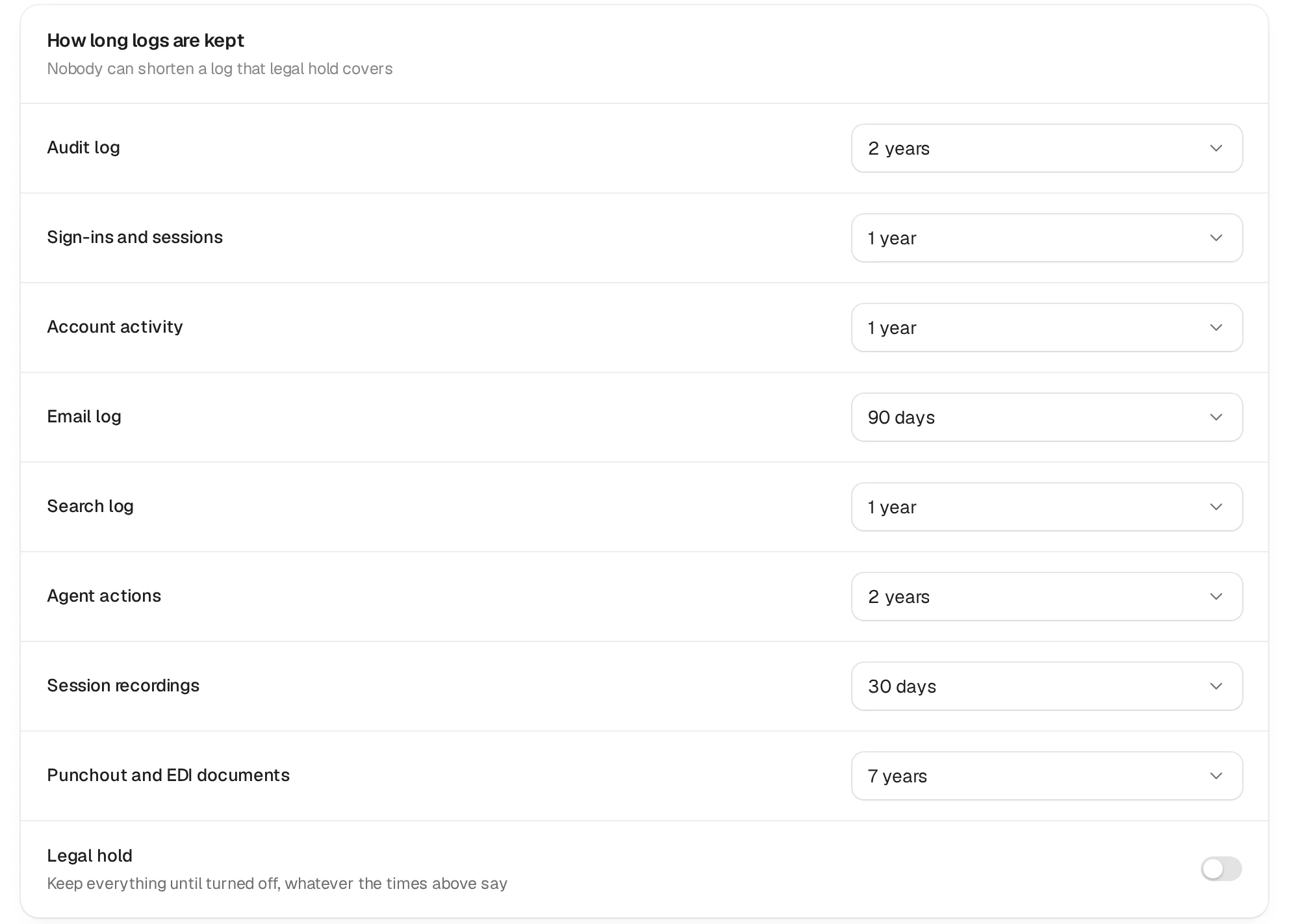
    Set how long each log is kept, like 2 years for the audit log and 7 years for punchout and EDI documents. Turn on legal hold, or send logs to Microsoft Sentinel every 5 minutes.

    Redefine Suite log retention settings for the audit log, sign-ins, agent actions, session recordings and EDI documents,
An outside auditor and an operations lead review a printed list of changes together
One trail for every changePeople, agents and synced systems in one log

Audit season

Answer the auditor in minutes, not days

Export the audit log as a CSV for the dates and areas they ask about. Entries are kept for 2 years and cannot be edited or deleted, admins included.

See scheduled reports and alerts

Who reads the trail

Two teams, one log

Finance wants to know why a number moved. IT security wants to know who got in and what they touched. Both read the same audit log.

A company controller highlights lines on a printed list of price and credit changes

Finance · why did it change

Prices, terms and credit

A price, payment term or credit limit changed. Finance sees who changed it, the old and new value, and who approved it, whether it was a person, the pricing agent or Business Central.

  • Old and new value
  • Approved by
  • Export CSV
An IT security lead with a headset and coffee stands at a server room door

IT security · who touched what

People, IPs and exports

Someone exported the customer list or turned off two-step sign-in. Security sees the person, the IP address and the browser, and can send every log to Microsoft Sentinel.

  • IP and browser
  • Exports
  • Sentinel

Who writes to the log

Every source, in one place

Changes come from more places than your own team. The log names each one, so nothing shows up as a mystery.

A changeIn the log
WhoWhen
  1. Your team

    With IP and browser

  2. Buyer admins

    From the buyer portal

  3. AI agents

    With who approved

  4. Business Central

    Marked as sync

Who can make each change is set in access and permissions. The rules a change must pass are in governance controls.

Undo what the agents did.

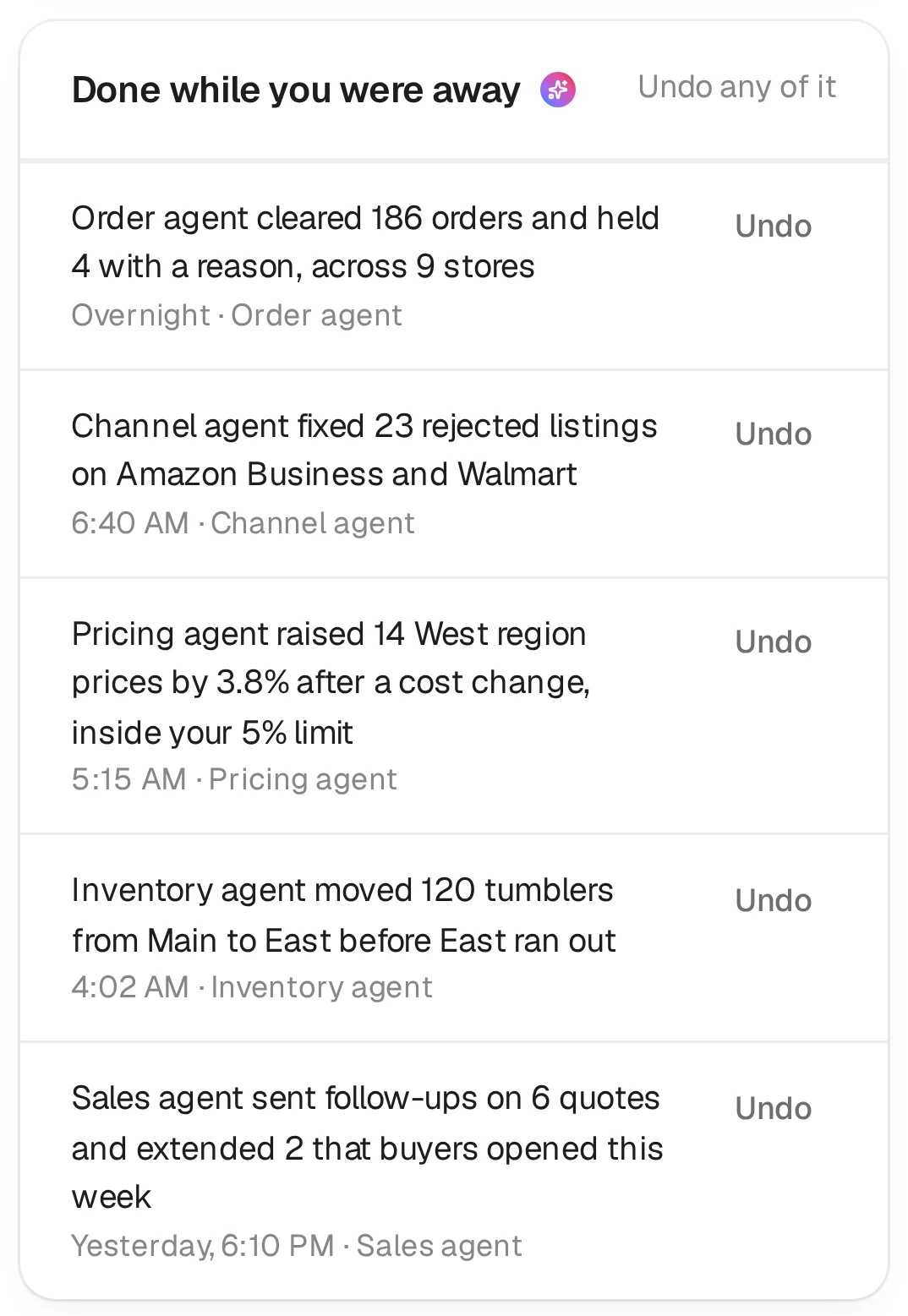
Agents on autopilot still write to the log, like any person on your team. Home lists what each agent did while you were away, across every store, and each line has its own Undo. Check it on your phone before work.

Done while you were away on a phone in Redefine Suite: what the order, channel, pricing, inventory and sales agents

Before and after

Stop asking around. Look it up.

Store owners say a basic activity log tells them that something changed, but not the value before or who did it. Here is the difference.

Without a trail

Asking around

  • Nobody knows who did it

    A price or address changed. The team asks in chat and checks email, and the answer depends on who remembers.

  • The old value is gone

    You can see the new value, but not what it was before, so putting it right is a guess.

    [!] Fixed by guesswork

  • History runs out

    Old entries drop off just when finance or an auditor asks for them.

With Redefine Suite

Look it up

  • Every change has a name

    People, agents and Business Central each show up by name, with the store, IP and time.

  • Old and new value side by side

    Each row shows the value before and after. On a record, Put back restores it.

    Put back on the record

  • You choose how long

    Keep the audit log 2 years, or turn on legal hold. Nobody can edit or delete an entry.

A desk with a messy pile of printed spreadsheets and sticky notes on one side and one neat page beside a closed laptop
From a pile of guesses to one page of answers.

Proof from an integration project

IMTRA

Manual ERP sync steps replaced
~85%

What changed

  1. Before

    Stock from 4 sources by hand

  2. Build

    Business Central connected

  3. After

    1 unified import

The problem

IMTRA, a marine supplier, kept stock from 4 sources by hand. This was Business Central integration work, not Redefine Suite. Read the IMTRA case study.

What changed

  • 01About 85% of manual sync steps now automated
  • 02Stock from 4 sources became 1 unified import
  • 03In Redefine Suite, each sync shows in the log

What does the audit log record?

Changes to orders, products, prices, customers, roles and settings. Each entry shows who made it, the store, the IP and browser or "Agent" or "Sync", the time, and the old and new value.

Sign-ins and sessions sit on their own screen. See identity and security

Can I see who approved a change?

Yes. When a person approves a change, like a price an agent suggested, the entry says who approved it.

Agent limits are set in AI governance. See AI governance for commerce

Can I undo a change?

A record's change log has Put back on the row, and Home lists what agents did while you were away, each with Undo.

Rules that stop bad changes up front live in governance controls. See governance controls

How long are logs kept?

You choose per log. The audit log is kept 2 years, account activity 1 year and punchout and EDI documents 7 years. Legal hold keeps everything until you turn it off.

Data requests and deletion are on the privacy page. See compliance and privacy

Can logs go to our security tools?

Yes. Audit, sign-in and account activity logs can stream to Microsoft Sentinel every 5 minutes. Splunk, Datadog and a weekly CSV export are options too.

Who can see the logs is set by role. See access and permissions

When is it not worth it?

If one person runs one small store, a basic activity log may be enough. It pays off when many people, agents and systems change things across stores.

In the demo, we load your stores and trace a change. See governance, security and compliance

Book a demo

Trace one of your own changes in the demo.

Tell us which change was hardest to trace last time. In the demo, we load your stores, make a change and follow it through the audit log and the change log. A demo built on your own stores, people and changes. You can also use the demo booking page.

An account manager points to a change log row with Put back while a finance colleague leans in
  • Built on your own stores
  • Your people and agents
  • Your own changes
  • 550+ projects delivered

Book a personalized demo

Tell us which problem costs you the most. We set up the demo around it.

  1. 1We confirm your request
  2. 2A short call about your stores
  3. 3Your personalized demo
  4. 4You decide what comes next