Let buyers shop your store from inside Coupa, Ariba or SAP.

See punchout work with your own catalog.

A demo built around your own buyers.

Book a personalized demo

Short answer

What is a punchout catalog?

Updated

A punchout catalog lets a buyer shop a supplier's store from inside their own procurement system, like Coupa or SAP Ariba. The cart goes back to that system for approval, and a PO comes back. Redefine Suite by Redefine Innovations runs punchout from the same store, prices and stock you already use.

Big buyers, like hospitals, schools and banks, often must buy through their procurement system. If you cannot connect, it is hard to get on their supplier list.

Redefine Suite connects to Coupa, SAP Ariba, Jaggaer, SAP OCI, Oracle and Workday. It matches each PO to the cart it came from.

How the options compare

Three ways to sell to procurement buyers

OptionHow it worksWhat you getSee also
Redefine Suite punchoutBuyers shop your live store at their own pricesCart back, PO in, and the order posts to the ERP when it matchesQuote-to-order workflows
Catalog file onlyA CIF or hosted file sent on a scheduleSimple to send, but prices can go stale between filesCustomer-specific pricing
Email and PDF ordersBuyers send POs by emailEvery PO typed in by handB2B commerce

What a punchout connection holds

  • [1] The store and price list they land on
  • [2] UNSPSC, units, cost centers and ship-to
  • [3] cXML, OCI and EDI documents
  • [4] The PO matched to its cart

See all of Redefine Suite.

What punchout covers.

Redefine Suite procurement, part by part. Tap any tile for more.

  • Receiving clerk at a hospital loading dock checking a delivery against a purchase order on a clipboard

    Receiving

    The PO, the order and the box match.

  • Fields

    Their codes, mapped to yours.

  • Documents

    Every message, logged.

  • Before go-live

    Test it first.

  • Networks

    Ready for the big ones.

Procurement

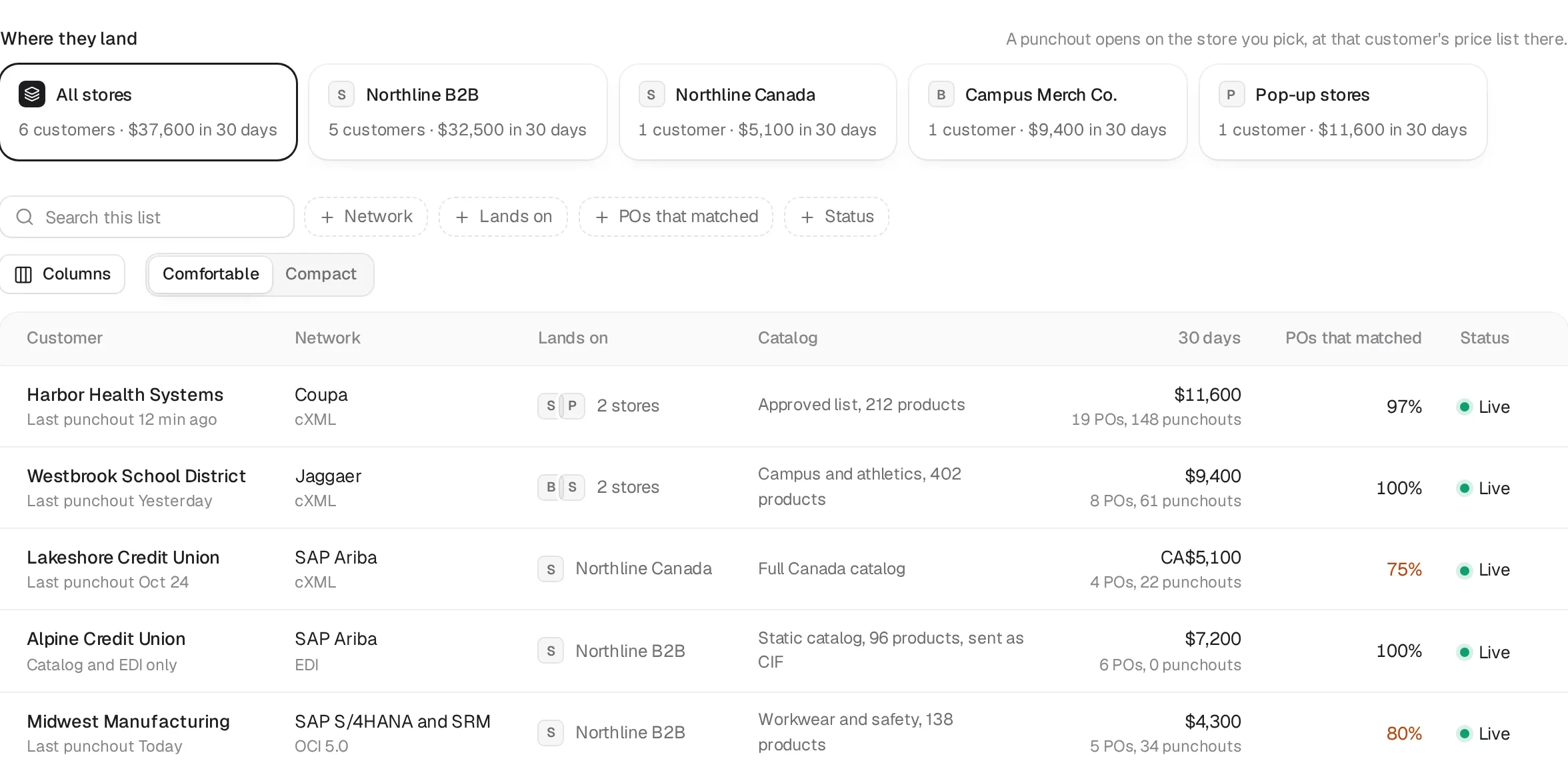
Every punchout customer in one place.

See where each customer lands, which network they use, their sales and how many POs matched. POs that need you sit up top.

Redefine Suite procurement: where punchout buyers land on each store, and each customer with its network, catalog,

How it works

From punchout to posted order.

Each connection has three parts. You set them once for each customer.

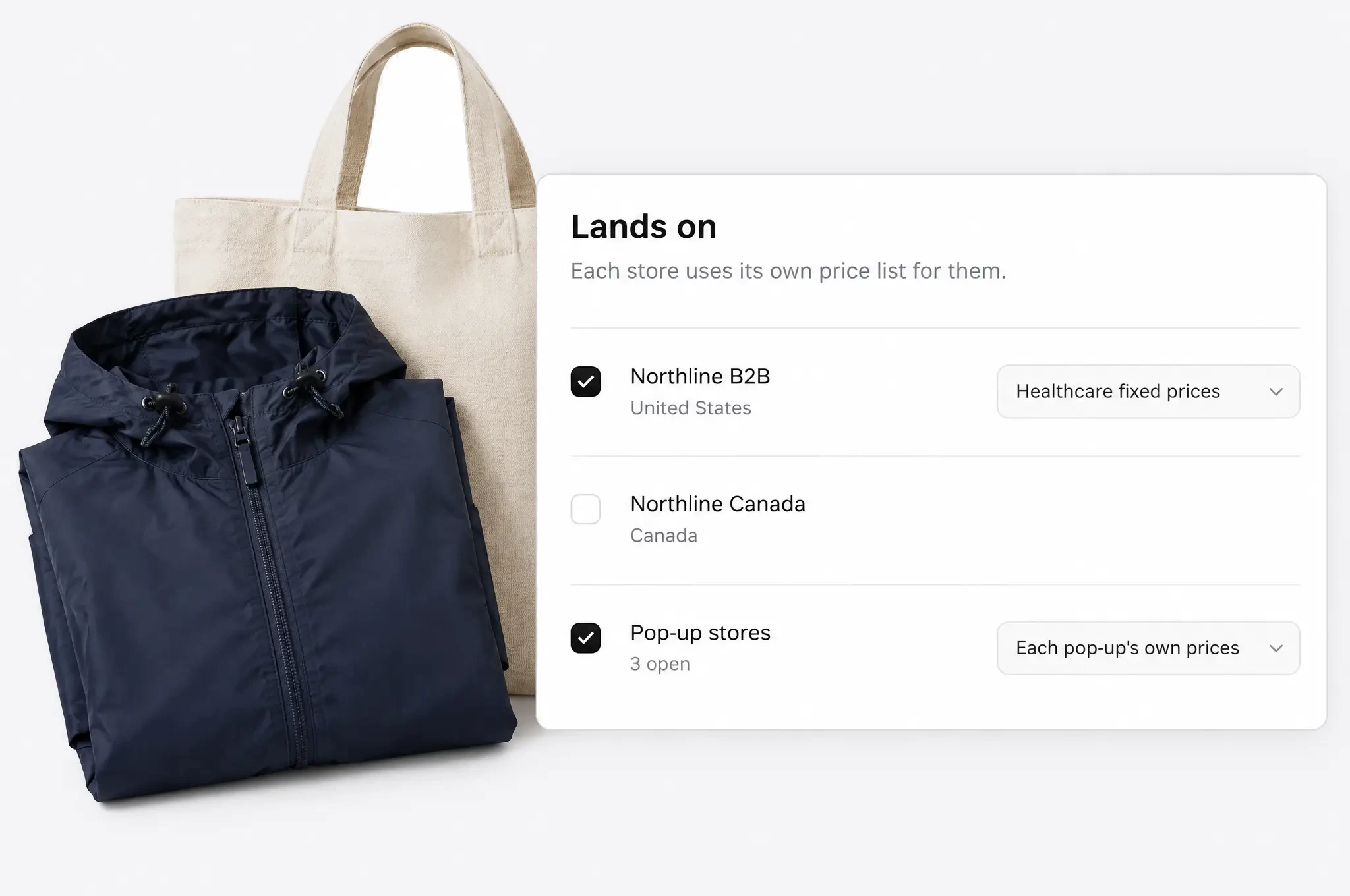
  1. A navy rain jacket and a canvas tote beside a Lands on card: the stores a punchout customer can buy on, each with its

    01 Land

    They land on the right store

    Their buyers open your store from inside their own system.

    1price list per store, just for them

    What happens
    Their buyers pick a store, or go straight in when there is only one. Each store uses its own price list for them.
    Where you set it
    On the punchout customer page, under Lands on
    Who uses it
    Their buyers, from Coupa, Ariba, SAP and more
    What you see
    Customers and sales for each store
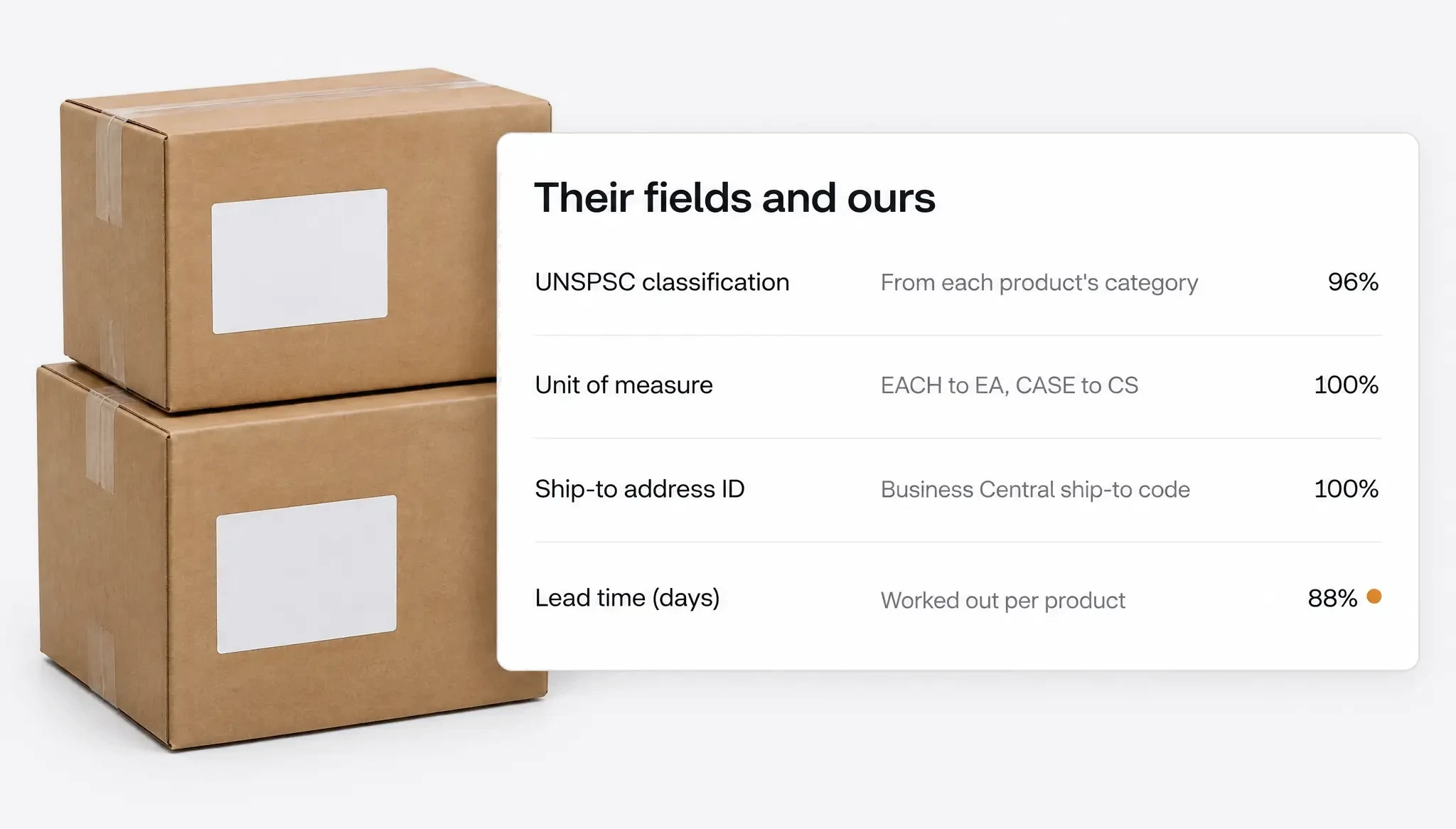
  2. Shipping cartons beside a field map card: UNSPSC classification, unit of measure, ship-to address and lead time, with

    02 Map

    Their fields match yours

    The cart goes back in a shape their system takes.

    6fields mapped

    What happens
    Each line gets the UNSPSC code, unit, cost center and ship-to code their system needs.
    Where it comes from
    Your categories, units and Business Central ship-to codes
    How often
    Set once for each customer, then used on every cart
    What you see
    How full each field is, so a gap is easy to spot
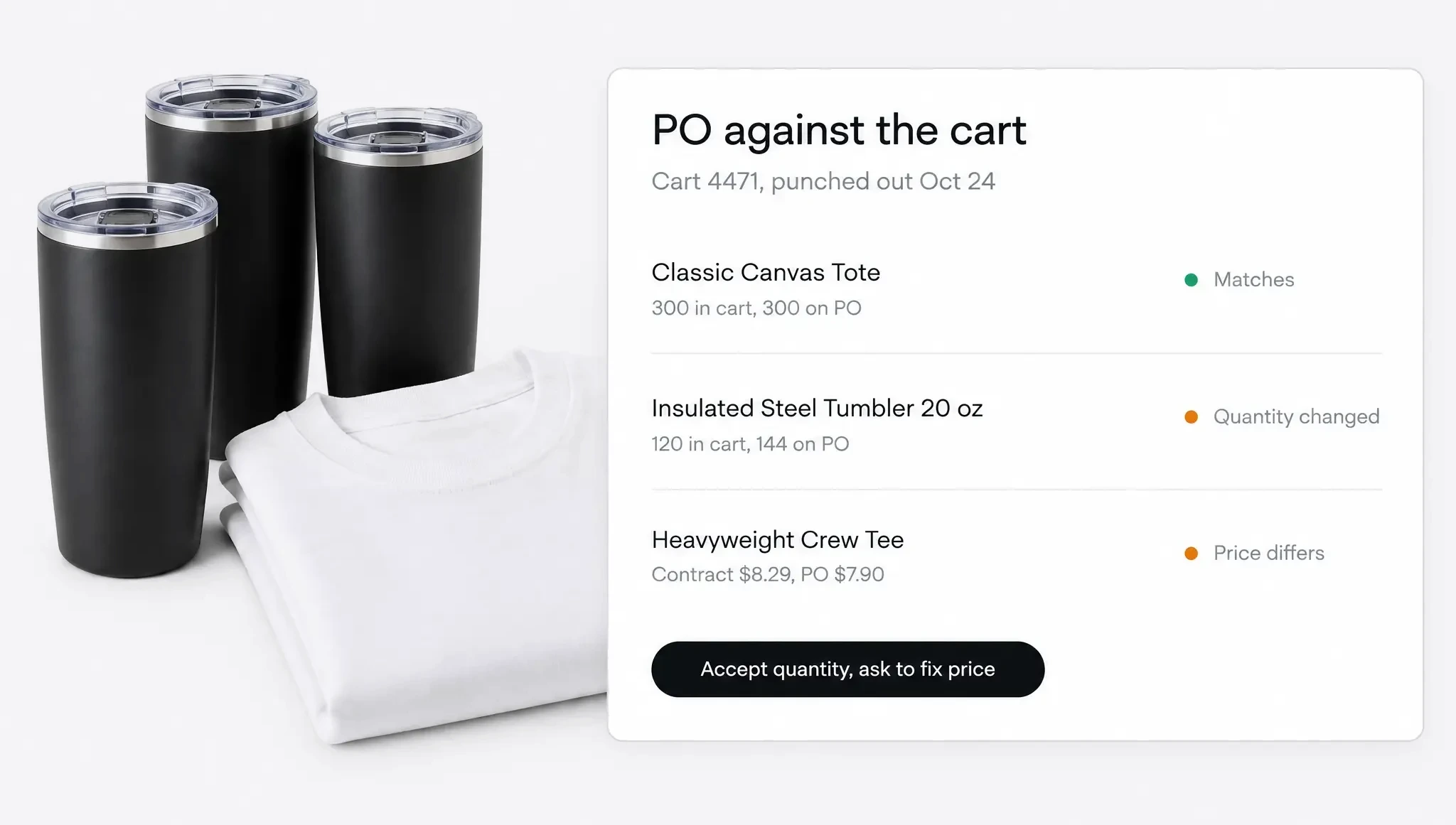
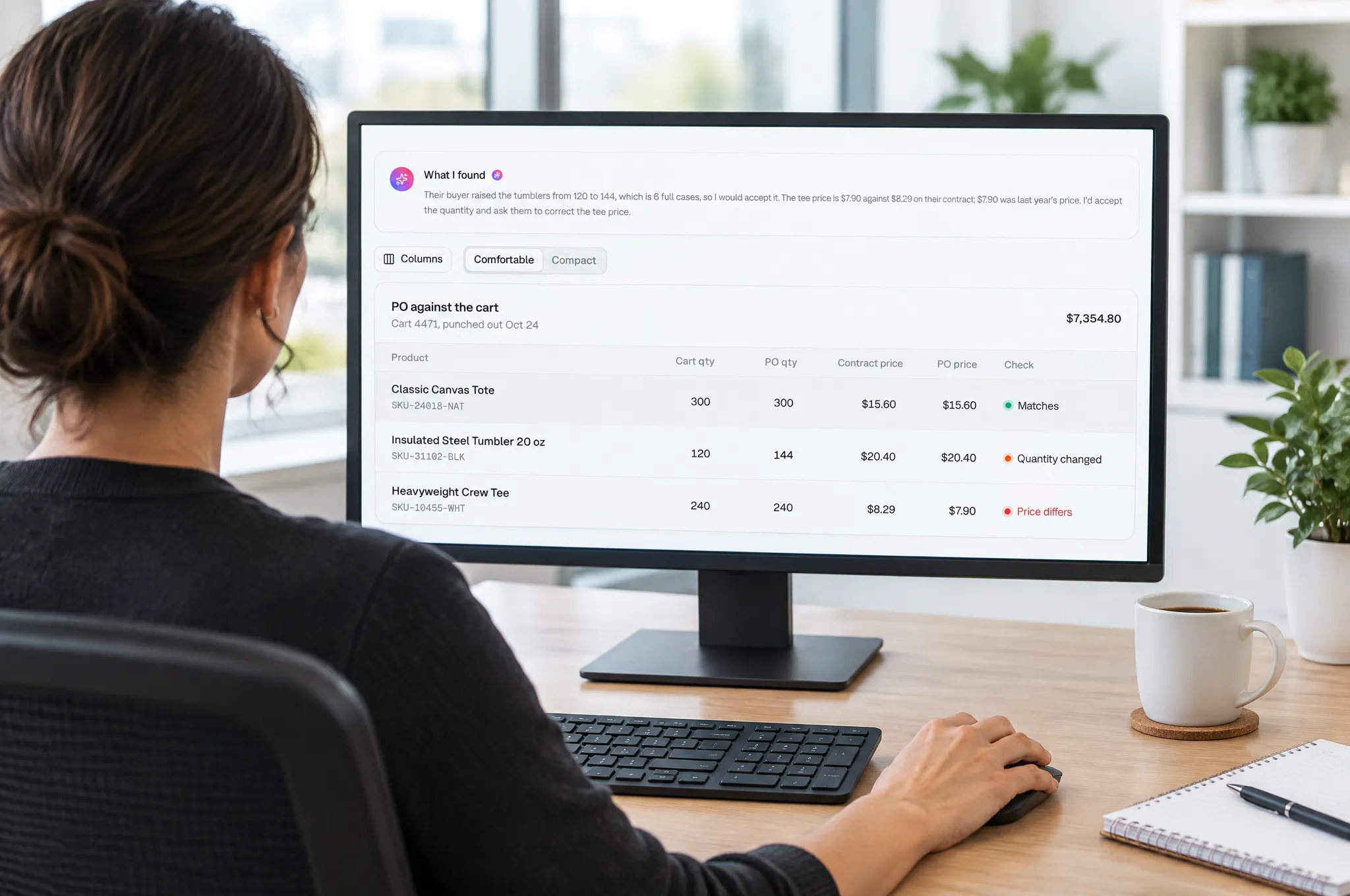
  3. Black tumblers and a white tee beside a PO against the cart card: one line matches, one quantity changed and one price

    03 Match

    Their PO matches the cart

    The PO comes back and is checked line by line.

    1PO, checked against its cart

    When it matches
    When the PO matches its cart, it posts to the ERP on its own.
    When it differs
    The agent shows what changed, like a new count or an old price, and what it would do.
    Who decides
    Your team says yes or asks the buyer to fix it
    What you see
    The PO next to the cart, line by line

Every connection gets a test punchout before the customer goes live.

Before and after

Your team handles the odd PO, not every PO.

Customer service rep at a desk monitor checking a customer PO against its cart in Redefine Suite

Odd POs only

POs that match post on their own. Only the ones that differ reach a person.

Before

A buyer emails a PO. Someone types it in and checks it against the cart by hand.

After

The PO is matched to its cart. When it matches, it posts to the ERP. When it does not, it waits for you.

  • Field map set once, used on every cart

  • Ship notices and invoices sent back as documents

  • A log of every document in and out

Which procurement systems can connect?

Coupa, SAP Ariba, Jaggaer, SAP OCI, Oracle and Workday.

Each network shows how many customers use it and if it is live. See the omnichannel commerce platform

Do you support cXML, OCI and EDI?

Yes. The document log tracks cXML, OCI and EDI 850, 855, 856 and 810.

Failed documents try again on their own. See B2B commerce

Do punchout buyers see their own prices?

Yes. You choose which store and price list each punchout customer lands on.

Their prices show in the cart they send back. See customer-specific pricing

What happens when a PO does not match the cart?

It waits for your team. The agent shows what changed, like a new count or an old price.

When a PO matches, it posts to the ERP on its own. See quote-to-order workflows

What if a buyer wants a catalog file instead?

You can publish CIF and hosted catalogs.

A buyer can get a nightly catalog with that day's prices. See dealer and distributor portals

Can we test before a customer goes live?

Yes. Run a test punchout session first.

The customer shows as testing until you switch them to live. See customer account management

Book a demo

See punchout run on your own catalog.

In the demo, we show a punchout session with a few of your own products and prices. A demo built around your own buyers. You can also use the demo booking page.

Sales and operations colleagues reviewing the Redefine Suite Procurement screen together on a monitor
  • Built on your own catalog
  • Your network questions
  • Your ERP setup, checked
  • 550+ projects delivered

Book a personalized demo

Tell us which procurement systems your buyers use. We set up the demo around it.

  1. 1We confirm your request
  2. 2A short call about your buyers
  3. 3Your personalized demo
  4. 4You decide what comes next