
Yes. .NET applications integrate with Dynamics 365 through several supported methods: the Dataverse Web API for model-driven apps like Sales and Customer Service, the Business Central API for financials and operations, and event-driven patterns using Azure Service Bus or Azure Event Grid for near-real-time sync. The catch most teams miss is licensing and throughput limits: Dataverse enforces API request limits per user per 24 hours, and Business Central OData endpoints throttle under sustained load, so integration architecture has to account for rate limits, not just connectivity.
- Yes, .NET applications integrate with Dynamics 365 through the Dataverse Web API, Business Central API, and event-driven Azure patterns in 2026.
- Dataverse apps (Sales, Customer Service, Field Service) use OData v4 REST calls or the Microsoft.PowerPlatform.Dataverse.Client SDK.
- Business Central exposes its own OData v4 and SOAP endpoints separate from Dataverse, so the integration method depends on which Dynamics 365 product you run.
- API request limits and throttling, not connectivity, are the real constraint on high-volume .NET integrations.
- Redefine Innovations builds custom .NET integrations and Dynamics 365 ERP implementations for mid-market and enterprise teams.
Why this matters
Most mid-market and enterprise teams already run custom .NET software: order management tools, internal portals, warehouse systems, or ecommerce middleware. The question isn't whether Dynamics 365 has an API. It does. The question is which Dynamics 365 product you're on, because "Dynamics 365" covers Dataverse-based apps (Sales, Customer Service, Field Service) and the separate Business Central and Finance and Operations platforms, and each exposes a different API surface.
Getting this wrong is the most common reason integration projects blow past timeline. A team scopes a connector against Dataverse's Web API, then discovers their finance team actually runs Business Central, which uses a completely different endpoint structure and authentication flow. If you're weighing a custom integration against a packaged connector, Redefine Innovations has scoped both paths for mid-market ERP rollouts and can tell you in one call which one fits your stack.
Can .NET Applications Integrate With Dynamics 365?
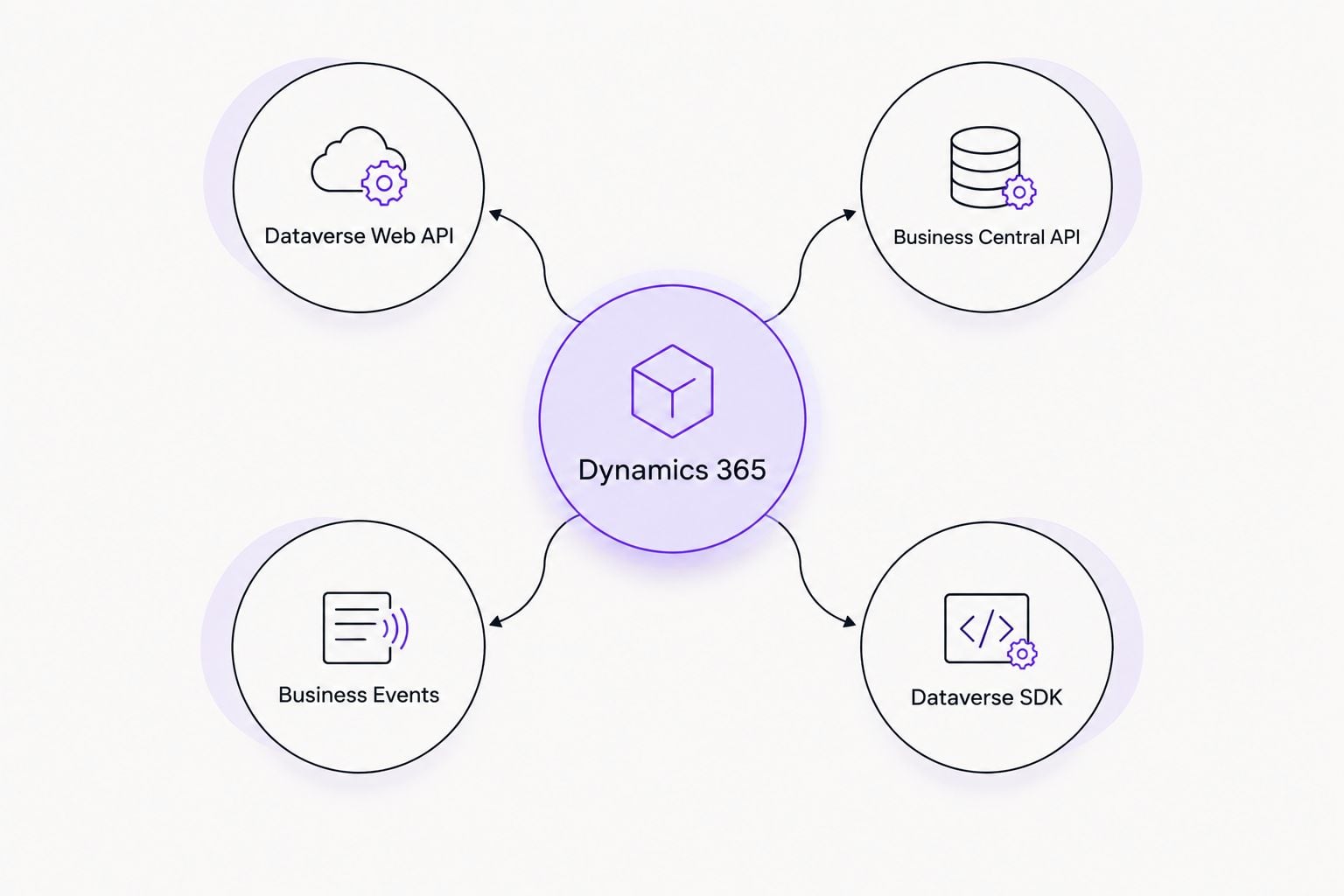
Yes, and there are four practical routes depending on the Dynamics 365 product and the data volume involved.
| Integration method | Best for | Protocol | Real-time? |
|---|---|---|---|
| Dataverse Web API | Sales, Customer Service, Field Service data | OData v4 REST (JSON) | Near-real-time, request-based |
| Business Central API | Financials, inventory, operations | OData v4 / SOAP | Near-real-time, request-based |
| Business Events + Azure Service Bus | High-volume event triggers | Azure Service Bus / Event Grid | True real-time (event-driven) |
| Dataverse SDK for .NET | Deep custom apps needing plugin-level access | Microsoft.PowerPlatform.Dataverse.Client | Near-real-time |
Microsoft documents the Dataverse Web API overview directly, including authentication and request structure, at learn.microsoft.com/power-apps/developer/data-platform/webapi/overview. Business Central's API reference lives at learn.microsoft.com/dynamics365/business-central/dev-itpro/api-reference/v2.0. Both are the authoritative source for endpoint structure, not a third-party summary.
Dataverse Web API: connecting .NET apps to Sales and Customer Service
If your Dynamics 365 environment runs Sales, Customer Service, or Field Service, your data lives in Dataverse. A .NET app talks to it two ways.
Direct REST calls. Any .NET app (ASP.NET, .NET 8, console app) can call the Dataverse Web API as a plain OData v4 REST service. Authentication runs through Microsoft Entra ID (formerly Azure AD) using OAuth 2.0. No special SDK is required for basic CRUD operations against records.
The Dataverse SDK. For deeper access, such as reading metadata, executing custom actions, or working with plugins, the Microsoft.PowerPlatform.Dataverse.Client NuGet package gives .NET developers a typed client instead of raw HTTP calls. Most enterprise integrations use the SDK because it handles connection pooling and retry logic that a hand-rolled REST client has to reimplement.
Verdict: direct REST calls work for simple read/write integrations. Buy into the SDK when you're building anything that runs in production at volume, because it manages throttling and connection resilience for you.
Business Central API: connecting .NET apps to financials and operations
Business Central is not Dataverse. It's a separate product with its own API layer, and this is where most integration scoping mistakes happen.
Business Central exposes standard OData v4 endpoints for entities like customers, sales orders, and general ledger entries, plus a legacy SOAP option for older integrations. .NET applications call these endpoints the same way they'd call any REST API: HTTP requests, JSON payloads, OAuth 2.0 bearer tokens issued through Entra ID.
Where it gets more involved is custom fields and workflows unique to a specific Business Central tenant. Those require either extending the API surface with AL code (Business Central's development language) or building custom API pages that a .NET client can then consume. This is typically the work an ERP implementation partner scopes upfront, because it changes both timeline and cost.
Finance and Operations: Data Management Framework and OData
Larger enterprise deployments often run Dynamics 365 Finance and Operations rather than Business Central. This platform uses its own Data Management Framework (DMF) for bulk data movement and a separate OData endpoint set for transactional integration.
.NET apps typically integrate here through recurring data jobs (scheduled imports/exports via DMF) for batch scenarios, and OData calls for transactional, record-level operations. This split matters for architecture decisions: a nightly inventory sync belongs in DMF, while a real-time order status check belongs in OData.
Why the integration approach varies
The right method for your .NET application depends on a handful of factors, not a single "best" API:
- Which Dynamics 365 product you run. Dataverse-based CE apps, Business Central, and Finance and Operations each have distinct endpoints.
- Data volume and frequency. High-frequency, high-volume syncs push toward event-driven patterns (Business Events, Service Bus) instead of polling REST endpoints.
- Real-time vs batch requirements. A live order status widget needs a different pattern than a nightly financial reconciliation job.
- Custom fields and workflows. Standard entities integrate easily; tenant-specific customizations may require extending the API surface first.
- Authentication model. Multi-tenant vs single-tenant Entra ID app registrations change how the .NET app authenticates and what scopes it needs.
- Existing infrastructure. Teams already running Azure Functions or Logic Apps often route Dynamics 365 events through what's already deployed rather than building new plumbing.
“If your Dynamics 365 environment runs on Dataverse, your .NET app already speaks its language: the Web API returns plain JSON like any other REST service.”
Does Dynamics 365 support REST APIs?
Yes, Dynamics 365 supports REST APIs across its Dataverse and Business Central products, both using the OData v4 standard for requests and JSON for payloads. Legacy SOAP endpoints still exist in Business Central for backward compatibility, but new integrations should default to OData v4 REST calls.
Can a custom .NET app write back to Dynamics 365, not just read from it?
Yes, a custom .NET app can create, update, and delete records in Dynamics 365, not just read them, through the same Web API or Business Central API used for reads. Write operations require the app's Entra ID registration to hold appropriate permissions (create, write, delete) on the specific entities involved, which is a separate configuration step from read access.
Is Azure required to integrate .NET with Dynamics 365?
No, Azure is not strictly required for basic Dataverse Web API or Business Central API calls, since both authenticate through Entra ID and respond over standard HTTPS. Azure becomes necessary when the integration needs event-driven, real-time triggers (Business Events routed through Azure Service Bus or Event Grid) or when the .NET app itself is hosted in Azure for scaling and monitoring.
Teams evaluating whether to build this integration in-house or bring in outside help often start by weighing custom development against off-the-shelf connectors. That tradeoff is covered in more depth in is custom software worth it for a mid-market business, which walks through the build-vs-buy math for exactly this kind of decision.
Redefine Innovations builds custom .NET integrations against Dataverse and Business Central as part of its Dynamics 365 ERP implementation work, scoping the API surface, authentication model, and data volume before writing a line of connector code. That scoping step is what separates a six-week integration from a six-month one.
If your team is still deciding between Dynamics 365 and a different ERP platform entirely, the comparison of NetSuite alternatives for 2026 covers where Dynamics 365 fits against other options at netsuite alternatives in 2026.
Frequently asked questions
Can .NET applications integrate with Dynamics 365?
Yes, .NET applications integrate with Dynamics 365 through the Dataverse Web API, the Business Central API, or event-driven Azure Service Bus patterns, depending on which Dynamics 365 product is in use.
What is the Dataverse Web API used for?
The Dataverse Web API is used for connecting external applications, including .NET apps, to Dynamics 365 Sales, Customer Service, and Field Service data using OData v4 REST calls.
Is Business Central's API the same as Dataverse's API?
No, Business Central's API is separate from Dataverse's Web API. Business Central runs its own OData v4 and SOAP endpoints because it is a distinct product from the Dataverse-based Dynamics 365 apps.
Do I need Azure Functions to integrate .NET with Dynamics 365?
No, Azure Functions are not required for basic REST integrations, but they are commonly used when the integration needs to respond to Dynamics 365 Business Events in real time.
Can .NET Core apps connect to Dynamics 365?
Yes, .NET Core and .NET 8 applications connect to Dynamics 365 the same way older .NET Framework apps do, using OData v4 REST calls or the Microsoft.PowerPlatform.Dataverse.Client SDK.
What authentication does Dynamics 365 integration require?
Dynamics 365 integrations authenticate through Microsoft Entra ID using OAuth 2.0, which requires registering the .NET application and granting it specific read or write scopes on the relevant entities.
How long does a custom .NET to Dynamics 365 integration take?
Timeline depends on data volume, the number of entities involved, and whether custom fields require extending the API surface, which is why scoping the integration before development starts matters.
One last thing
The detail that trips up most in-house teams isn't the API, it's the request limit. Dataverse enforces per-user, per-24-hour API request caps, and a poorly designed polling loop can burn through that allowance in a single afternoon. Design for webhooks and Business Events before you design for polling, and the throttling problem mostly disappears.
Scope your Dynamics 365 integration
Get a fixed-price plan for your .NET to Dynamics 365 build.
Related guides
Growth & strategy insights, no fluff
One short email a month on integration, ecommerce, and scaling smart.
You're in — check your inbox to confirm.