Broken Power BI report. Repaired in 10 business days.
A senior Power BI engineer repairs the broken report you already own. We fix the model, the DAX, the visuals, and the refresh, then you keep the PBIX. No replatforming, no rebuild from scratch, no long discovery loops.
Send your PBIX → triage call within 48 hours → repair plan in 3 days → repaired report inside 10 business days.
Reports repaired
Median repair window
Triage call service level
% repaired without rebuild

One bad number on a finance dashboard, and the whole report stops being trusted.

"Sales said the dashboard was wrong, finance said the GL was wrong, and the analyst spent two days reconciling a single number. After the third week of this, leadership stopped opening the report at all."

Finance director, mid-market apparel brand
After 9 months of in-house patching, before Redefine repair
61%
of repaired reports we audited had a measure that double-counted, undercounted, or silently filtered out a region.
3.5 hours
average refresh time on reports brought in for repair. Typical target after repair is under 12 minutes.
4 in 5
reports had a slicer, drillthrough, or bookmark that quietly returned no data on at least one page.
The same report, before the repair and after.
Click any panel to pause. Toggles auto-switch every 4 seconds across visuals, totals, refresh, drillthrough, and row-level security. The data model is the same. Only the repair changed.
Q3 Revenue (FY25)
MISMATCH$4.21M
GL says $4.06M · $148k gap
Q3 Revenue (FY25)
TIES TO GL$4.06M
GL match: $4,062,418 · 0 variance
Average refresh duration
3h 32m
Average refresh duration
9m 14s
No data for selection
Model error on drillthrough
Circular dependency detected
Drillthrough working
Circular dependency resolved
Customer table · visible rows
Row-level security leak: 2 of 4 rows outside region
Customer table · visible rows
Row-level security tested across 12 roles · 0 leaks
Every repair ships a fixed PBIX, a written diagnosis, and a one-page certificate.
You own the file, the model, and the documentation. We hand back what we touched, and we tell you exactly what was wrong and how the new version behaves.
A written diagnosis of every defect we find in your PBIX
You receive a numbered defect log covering every broken measure, failed relationship, and security gap in your file. Wrong measures, broken relationships, slow visuals, orphaned bookmarks, row-level security gaps. One line per defect, severity, business impact, fix effort.
- One numbered defect log, exported as PDF and Excel
- Severity rating per finding (blocker, high, medium, low)
- Plain-English summary for finance and information technology leadership
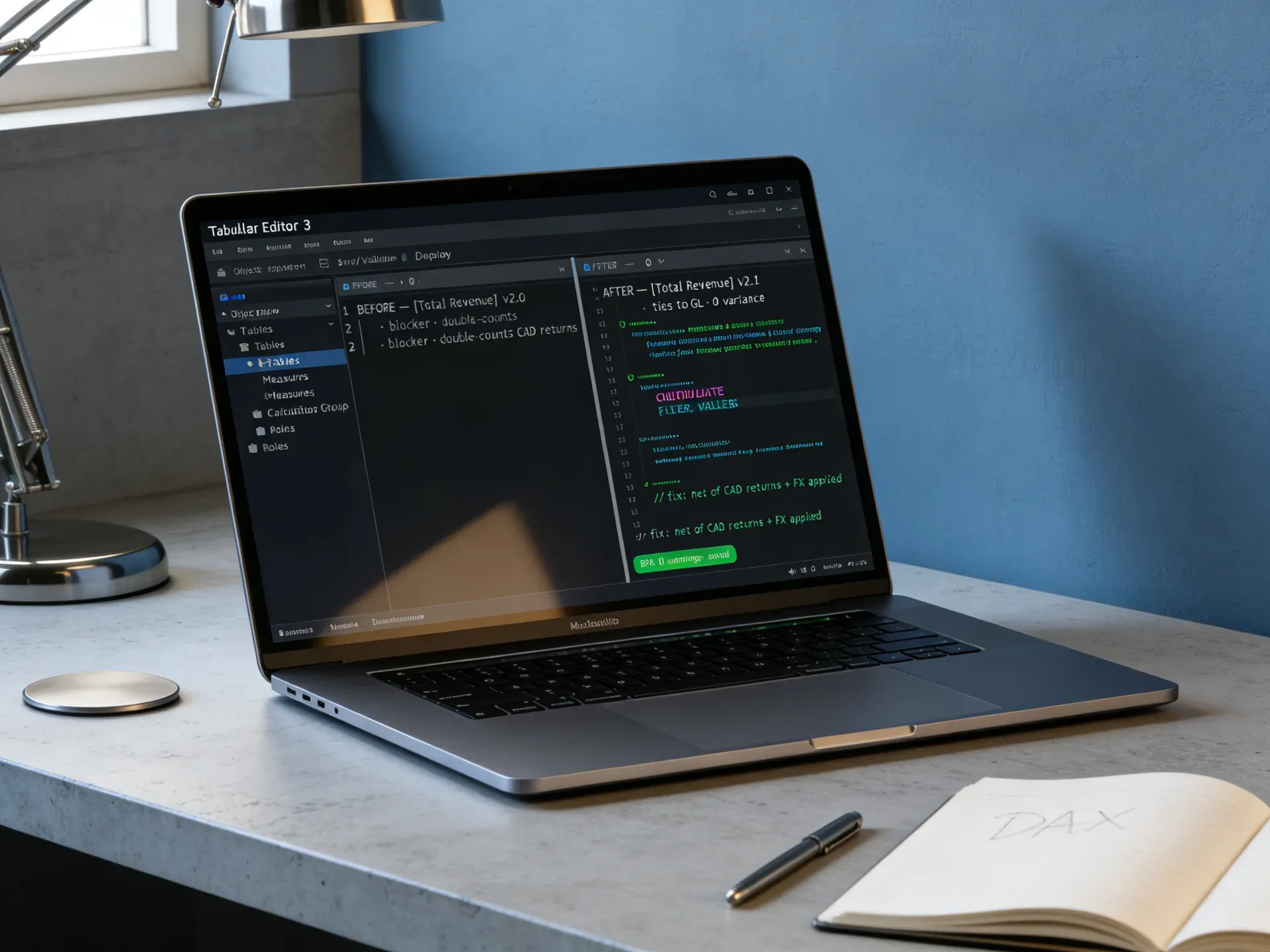
The actual repair work, written in your file with your conventions
We fix measures, relationships, calculation groups, and the storage mode strategy that is making the report slow. We do not rename things we did not need to rename, and we do not introduce new patterns the team has not seen.
- DAX measures rewritten with comments on what changed
- Relationships, cross-filter direction, and active flags repaired
- Storage mode review: Import, DirectQuery, dual, composite
- Row-level security roles tested across every role on the file, not just admin
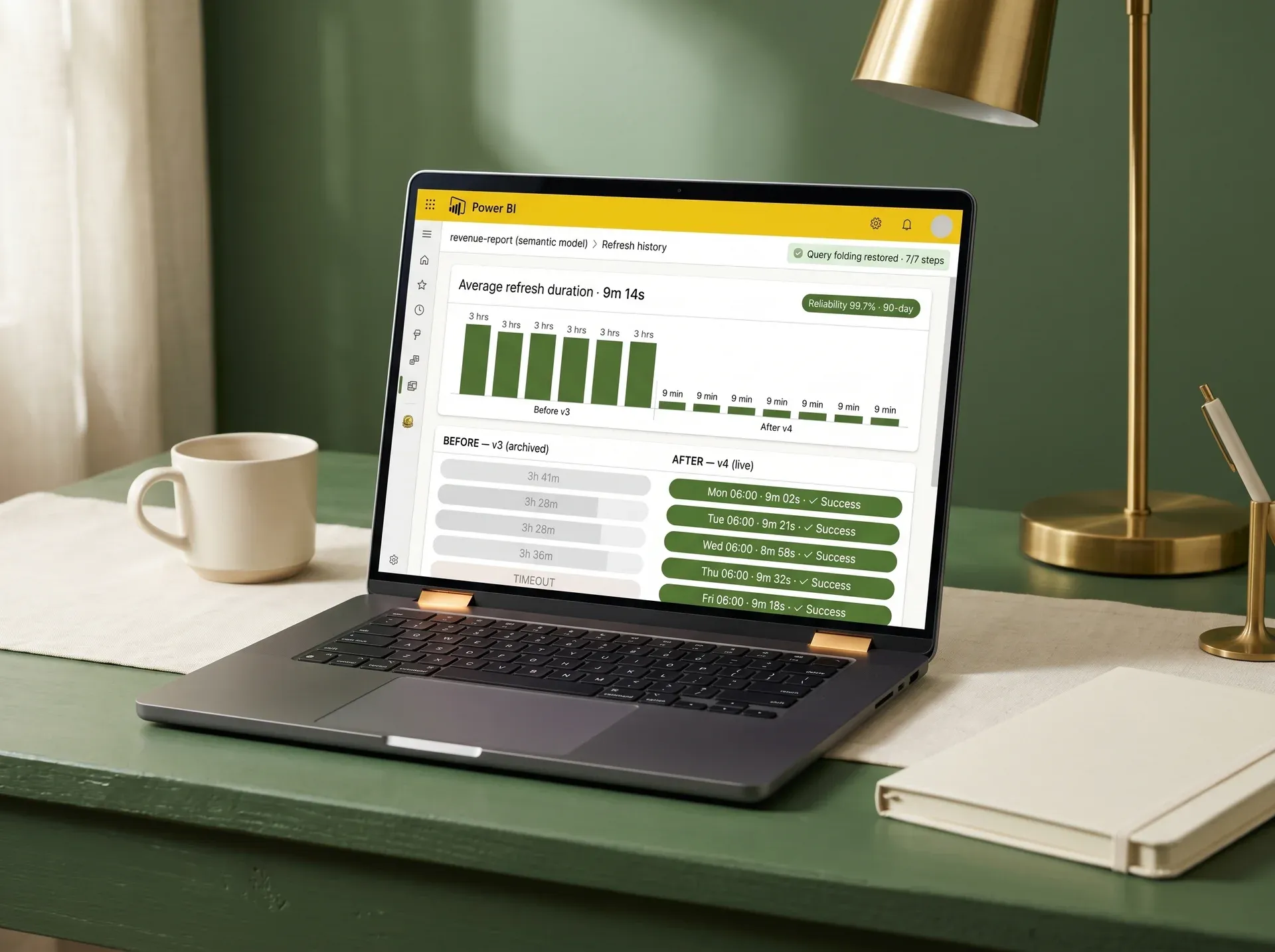
Refresh window cut, gateway pressure reduced, query folding restored
Your refresh window is cut and gateway pressure is reduced. We rewrite the query, column, or relationship causing the delay.
- Power Query folding restored on every staging step
- Incremental refresh policy set on fact tables
- Gateway and on-premises source pressure profiled and reported
Repair certificate
revenue-report.pbix
Signed: Redefine engineering / Date: today
User acceptance testing against your numbers, signed off by finance, not by us
You receive a signed repair certificate and a UAT script tailored to your defect log.
- User acceptance testing script tailored to the defect log
- One repair certificate per repaired report, signed and dated
- 30 days of post-repair stabilization on the touched objects
- Optional handover to SLA support or managed services
Three numbers a CFO should run before approving another patch.
11 hours
Median time finance and business intelligence analysts spend each week reconciling a single broken report. At a $95k fully-loaded cost, that is approximately $26,000 a year.
2 to 6 weeks
Average delay before leadership signs off on a pricing, hiring, or inventory call when the underlying report has unresolved variances.
1/8x
A scoped report repair typically costs approximately one-eighth of a full rebuild, and ships in days, not quarters.
Apparel and retail enterprise: revenue recovery report, repaired and back in production.

Who they are
An enterprise apparel and retail organization with a Power BI revenue recovery report covering unpaid invoices, customer segmentation, and collections targeting.
The broken state
The recovery report was the source of truth for the collections team, then it was not. Customer segments stopped agreeing with the ERP. Predictive scores returned blank for half the accounts. Finance lost confidence and went back to spreadsheets. The team had asked for a rebuild quote and was 8 weeks into discovery with another partner.
What we repaired
A single repair engagement against the existing PBIX. We rebuilt the customer segmentation measures, fixed the predictive scoring lookup, restored the relationship between Business Central and the custom ERP fact table, and tightened row-level security so regional collectors saw only their accounts. No rebuild. No replatform. Same dashboard, repaired in place.
Result after repair
0%
Improvement in recovery and targeting effectiveness
0%
Reduction in reporting and analysis time
10 days
From sign-off to repaired report in production
Source: Power BI Analytics for Revenue Recovery (Enterprise), Redefine engagement record.
Power BI report repair consulting that fixes what you already own, instead of a rebuild.
Most implementation partners are paid to start over. We are paid to fix the file. The math is different, the timeline is different, and the disruption to your finance close is very different.


| What you are buying | Typical Power BI implementation partner | Redefine report repair |
|---|---|---|
| Engagement starts with | 4 to 6 week discovery and statement-of-work cycle | 48-hour triage call against your PBIX |
| Their first instinct | Replatform to their own template | Repair the file you already own |
| Who opens your PBIX | Junior consultant, escalated later | Senior engineer from hour one |
| Time to first repaired visual | 8 to 12 weeks (after rebuild) | 5 business days |
| What you receive at end | A new PBIX, no defect log, no certificate | Fixed PBIX, defect log, repair certificate |
| Typical billing model | Open time-and-materials against a discovery document | Fixed-fee per repaired report |
| After go-live | New statement of work for every follow-up question | 30 days of free stabilization, then optional service level
agreement |
As a Power BI support company, we match the service to the problem you have today.
Power BI support hub
Start here if you are unsure whether you need repair, rescue, SLA support, or a health check.
Open the hubPower BI rescue partner
Whole estate is failing, not one report. Stalled projects, missing data, broken governance: pick rescue.
See rescue scopePower BI troubleshooting
Single defect, single visual, single error message. Quick incident-style fix, no full repair engagement needed.
Open a ticketSemantic model cleanup
The report is fine, the model is the problem. Hidden columns, snowflakes, calculated columns, ambiguous relationships.
Clean the modelPower BI health check
You are not sure what is broken or how badly. Diagnostic-first engagement with a risk-ranked report.
Book a health checkPower BI audit services
Full estate audit across workspaces, capacities, datasets, row-level security, lineage, and refresh.
Run an auditPower BI SLA support
Once repaired, keep it repaired. Response-time service level agreement, named engineers, monthly health report.
See SLA tiersPower BI managed services
Hand the report, gateways, and refresh to us. Roadmap-led ownership, monthly reporting cadence.
Hand it overData refresh support
Refresh is the only thing breaking. Gateway, incremental refresh, scheduled refresh, dataflows.
Stabilize refreshThe five questions finance and information technology leads ask before approving a repair.
A senior engineer opens your PBIX, profiles the model with DAX Studio and Tabular Editor, runs Performance Analyzer on every page, and writes a numbered defect log. They then repair measures, relationships, row-level security, visuals, and refresh inside the same file. You receive the repaired PBIX, the defect log, a user acceptance testing script, and a one-page signed repair certificate. Median window is 10 business days from triage to sign-off.
Repair is one report, one file, fixed in place. Rebuild starts a new PBIX from scratch and replaces what you have. Rescue covers a whole failing estate, multiple reports, governance, capacity, governance. If you have one report that has lost trust, repair is almost always the right service.
No. The defect log records what we propose to change before we change it. If your team uses a specific DAX style, naming convention, or folder structure, we match it. We do not rename measures, shuffle tables, or introduce calculation groups unless they are part of the agreed defect log.
Most repairs run on a masked or sampled dataset and we validate against your full data on the user acceptance testing call. We sign mutual non-disclosure agreements by default, we never store data outside the engagement workspace, and we delete the working PBIX 30 days after sign-off unless you ask us to keep it under SLA support.
Repair is fixed-fee per report. The triage call is free and produces a scoped quote against the defect log. You see line-by-line pricing before any work starts. Your team commits 2 to 3 hours per week: one data validation call, async sign-off on the defect log, and a final user acceptance testing session. We handle DAX, model, row-level security, refresh, and publishing.
Three questions tell you whether to repair, rebuild, or stop investing in this report.
Answer honestly. We will read the same answers on the triage call and we will be straight with you about which service fits.
Does the report still load and display visuals, even if some of them are wrong?
Is this one report, or is your whole Power BI estate degraded?
Does the business still need this exact report, or has the question moved on?
Not sure how to answer? Tell us your situation and we will be straight with you.
Send the broken report. We will tell you what is wrong inside 48 hours.
Our power bi report repair support starts on the triage call: a senior engineer opens it, points to the defects on screen, and gives you a fixed-fee quote against a numbered defect log. No commitment to repair. No pitch.

Triage call within 48 hours
Senior engineer on the call, not a salesperson
Numbered defect log in 3 business days
Severity, business impact, fix effort per finding
Repaired report in 10 business days
Median window across 180 repair engagements
Mutual non-disclosure agreement, data deleted 30 days post sign-off
We touch only what the defect log says we touch
Fixed-fee per report · scoped before work starts · line-by-line pricing · no commitment to receive a proposal
Book your triage call
Send brief → call within 48 hours → proposal in 3 days → repair starts within 1 week of sign-off
Service level
48 hours
Median repair
10 days
Engineer
Senior only
You own
The PBIX