Power BI and ServiceNow integration services that turn ticket data into decisions
Servicenow power bi integration done correctly turns your ServiceNow instance data, incident volumes, change success rates, SLA compliance figures, and asset lifecycle records, into live Power BI dashboards your service owners, operations leads, and executives can act on without opening a single export.
Your team's time investment across a full build is 3 to 4 hours per week, one sprint review, async feedback on deliverables, and a final quality assurance sign off. We handle everything else.
0+
projects completed
0+
Power BI engagements
0
source platform playbooks
Hero · ops team at Power BI monitors

ServiceNow is the system of record. Power BI is where the data gets used.
Every week IT leaders pull ticket counts from ServiceNow, paste them into spreadsheets, and circulate a report that is already hours old. ServiceNow reporting in Power BI replaces that loop with a model that refreshes automatically.
Before the integration
- Incident and SLA data lives only inside ServiceNow, visible to licensed users on ServiceNow screens.
- Reports require a ServiceNow administrator to run exports, reformat columns, and distribute files.
- By the time leadership sees the numbers, the incident window has closed and the SLA breach is history.
After you integrate Power BI with ServiceNow
- Every service owner, operations lead, and executive sees the same live data on their own dashboard, filtered to their scope.
- Refreshes run automatically. Power bi servicenow dashboards covering incidents, changes, assets, and SLA metrics update on schedule without an administrator in the loop.
- Row level security mirrors ServiceNow access controls, so sensitive records stay visible only to the people assigned to them.
Architecture · analyst reviewing fragmented data

From ServiceNow tables to every data type your teams need in Power BI
Tap a flow path to see how each ServiceNow data type moves through the connector into a governed semantic model and out to live Power BI dashboards. The architecture handles all four paths in parallel once built.
Incident Volume Report · Live
247
Open incidents
4.2h
Avg. resolution
93%
P1 resolved on time
Priority breakdown
Source: ServiceNow incident table via REST connector · refreshed 14 minutes ago
Change Success Dashboard · This Quarter
88%
Change success rate
3
Emergency changes pending
Change status by type
| Type | Total | Success |
|---|---|---|
| Standard | 142 | 97% |
| Normal | 58 | 89% |
| Emergency | 11 | 72% |
Source: ServiceNow change_request table via REST connector · updated hourly
Asset Utilization Dashboard · Active CIs
4,820
Total active CIs
96%
Lifecycle mapped
47
End-of-life within 90 days
CI class breakdown
Source: ServiceNow cmdb_ci table via REST connector · refreshed every 4 hours
SLA Compliance Report · Rolling 30 Days
91.4%
Overall SLA compliance
18
Active SLA breaches
SLA compliance by service
| Service | Met | Trend |
|---|---|---|
| Network | 97% | +2% |
| Applications | 94% | +1% |
| End User Computing | 88% | -3% |
| Infrastructure | 92% | +1% |
Source: ServiceNow task_sla and sla_definition tables via REST connector · refreshed every 30 minutes
Three ways to connect. One architecture decision.
Power BI servicenow connector consulting means choosing the right path before writing a query. The wrong choice when you integrate Power BI with ServiceNow means rebuilding the model in six months when your refresh volume grows.
ServiceNow REST table API
Power BI's native Web connector or a custom connector calls the ServiceNow Table API on a scheduled or on demand basis. No middleware required. Right for most scheduled refresh workloads and teams with existing ServiceNow API credentials.
Best for: scheduled dashboards
Power Automate push
A Power Automate flow triggers on ServiceNow record changes and pushes events to a Power BI streaming dataset. Latency drops to seconds. Right for live operations boards where incident counts and SLA breaches need to reflect the moment, not the last scheduled refresh.
Best for: live ops screens
Warehouse intermediary
ServiceNow records land in a SQL or cloud data warehouse first; Power BI reads the warehouse rather than the live instance. Adds infrastructure cost but reduces ServiceNow API load and enables joins with other enterprise data sources, including ERP and customer relationship management data.
Best for: multi source models
The right path depends on refresh frequency requirements, ServiceNow API rate limits, and whether the model will eventually need to join ServiceNow data with data from other systems. Integrating Power BI with ServiceNow through the wrong connector leads to rebuild work; this is what Power BI consulting services resolves before a line of code is written.
Power BI servicenow dashboards built for service owners, not administrators
Every deliverable below maps to a file, a dataset, or a workspace in your own Power BI tenant after you integrate Power BI with ServiceNow. Nothing lives in our environment after handover.
Scoped Power BI dashboards for ServiceNow
Power BI servicenow dashboards built for the data types you actually use: incidents, changes, assets, and SLA performance, each as a separate report page with the measures service owners ask about in every review. Servicenow reporting in power bi at this level means no administrator export in the loop.
A governed semantic model
One shared dataset normalizes ServiceNow table names and field values into named measures. When ServiceNow adds a priority level or renames an assignment group, the change cascades through every report without a rebuild.
Row level security mapped to ServiceNow roles
The Power BI security model mirrors ServiceNow assignment group rules. A helpdesk analyst sees their team's tickets. A service owner sees their service's SLA performance. An executive sees the organization wide view.
Connector configured and tested
The chosen connection path, whether REST API, Power Automate, or warehouse, is built, tested against your ServiceNow instance, and documented. Gateway or cloud connection credentials are set up under your tenant and are not managed by us after handover.
Handover documentation
A connector configuration document, refresh schedule setup, row level security mapping, and a guide for adding a new ServiceNow table to the existing model without rebuilding it from scratch. For additional integration scope, Power BI integrations covers the full hub.
A path to ongoing support
When ServiceNow upgrades change table schemas or when new data requirements emerge, Power BI support services picks up where the integration build ends, with the same team that designed the model.
Integration built for scale has a real return
When data stays in silos, every system becomes harder to operate. This is what a mature servicenow power bi integration looks like when it does not.
Promotional apparel and branded merchandise organization
A large scale promotional products distributor operating across 30 stores with over one million inventory items needed real time visibility across every system. Custom Power BI reports and dashboards were implemented to surface sales, operations, and financial performance, and RESTful application programming interfaces were built to integrate Dynamics 365, customer relationship management tools, Power BI, mobile applications, and third party systems including fulfillment and warehouse platforms.
The result was unified visibility across every system without manual consolidation, automated workflows that reduced overhead, and a foundation where new integrations could be added without rebuilding the existing model.
$0M+
in annual revenue, scaled from under $14M after integration, real time analytics, and cross system visibility replaced manual consolidation across 30 locations.
Explore the full Power BI implementation services that support engagements of this scale, or review the Power BI pricing and evaluation guide before the scoping call.
Proof · Power BI ServiceNow dashboard
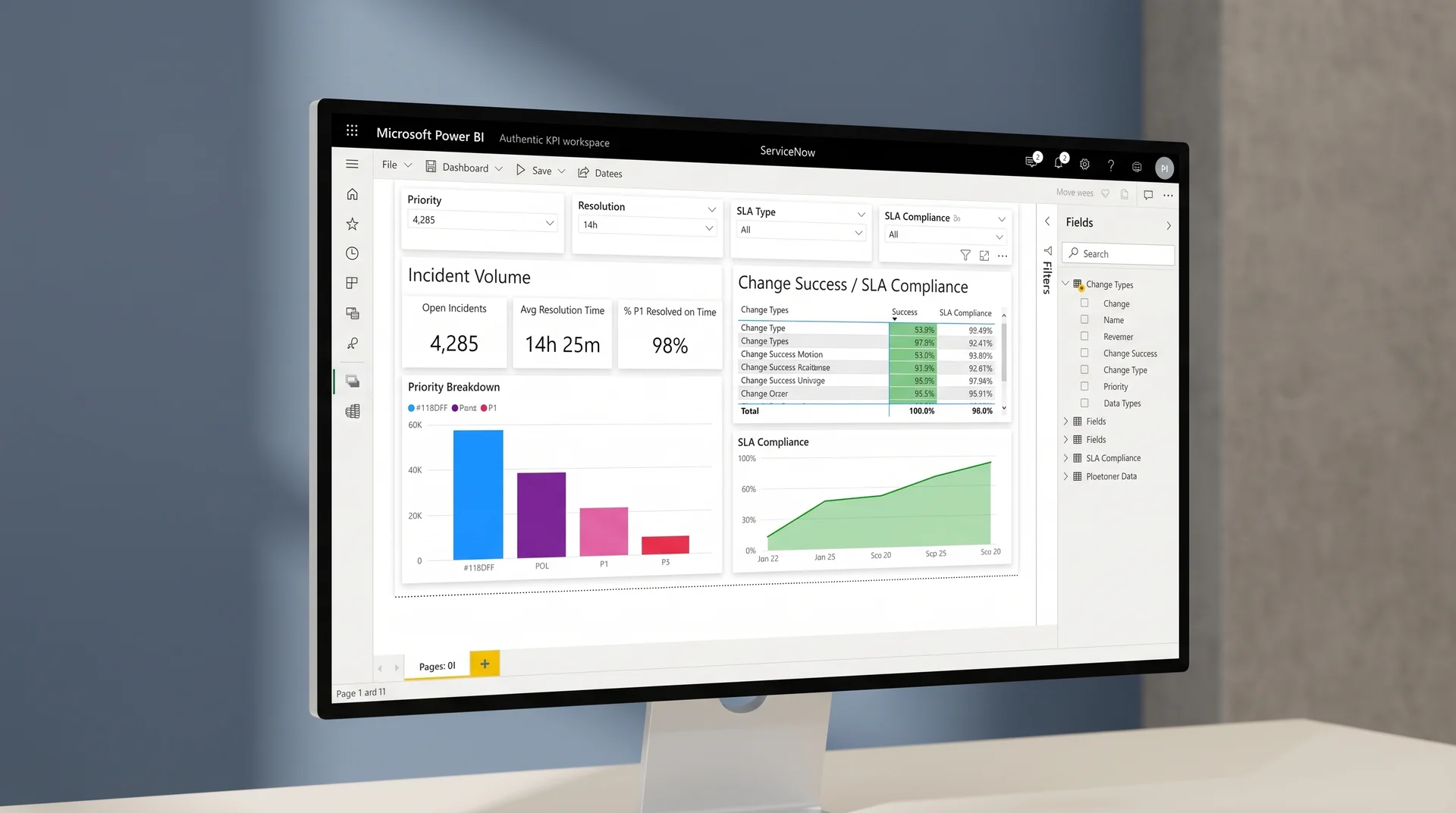
Most implementations stop at the connector. This one does not.
Servicenow power bi integration can mean many things. What it should not mean is a Web connector pointed at a table with no data model, no security, and no refresh monitoring.
Typical implementation partner
- Connects Power BI to a ServiceNow table and delivers a report file. No shared dataset, no refresh monitoring, no documentation.
- Row level security is either absent or applied manually in the report rather than in the semantic model, creating a maintenance burden every time roles change.
- When ServiceNow upgrades change a table structure, the connector breaks and the fix requires a call back to the original team.
How integrate Power BI with ServiceNow works here
- A shared semantic model sits between the connector and the reports. All measures are named and governed. Adding a new report page does not require touching the connector or the data queries.
- Security is in the model, not the report. When an assignment group changes in ServiceNow, the mapping document tells you exactly which role filter to update, and one change flows to every report automatically.
- You receive a guide for adding a new ServiceNow table to the model without rebuilding from scratch, so your internal team can extend the integration after handover without needing external help. Full playbook is linked from the Power BI integrations hub.
Teams also using servicenow reporting in power bi alongside Salesforce or Workday data benefit from a shared model that joins all three sources. See Power BI and Salesforce integration and Power BI and Workday integration for how the architecture extends. For customer relationship management alongside service data, Power BI and Dynamics 365 integration follows the same semantic layer approach.
Questions about servicenow power bi integration answered
The preferred path for most teams is the ServiceNow REST API combined with a Power BI dataflow or custom connector. ServiceNow exposes a Table API that lets Power BI pull records from any table, including incidents, changes, assets, and SLA definitions, on a scheduled or near realtime refresh. For teams already using Power Automate, a flow can push selected events directly to a Power BI streaming dataset. Which path fits your environment is part of what power bi servicenow connector consulting covers in the scoping call. The same power bi servicenow connector consulting call also reviews your ServiceNow API rate limits and Power BI license tier.
Any table the Power BI service account has read access to is accessible. The most common starting points for servicenow reporting in power bi are the incident table, the change request table — and when those are built, power bi servicenow dashboards typically expand to include problem records and service catalog data, the configuration item table, and the SLA definitions and task SLA tables. Beyond those, problem records, service catalog requests, and asset tables are brought in once the core model is validated. The semantic model normalizes table naming so analysts do not need to know ServiceNow's internal schema.
Import mode supports up to eight scheduled refreshes per day on Power BI Pro and up to 48 on Premium. For near real time requirements, a streaming dataset fed by Power Automate or a custom pipeline can push updates within seconds of a ServiceNow record change. The right approach depends on whether leadership needs a morning snapshot or operations teams need a live incident count throughout the day. The architecture decision is included in the scoped proposal.
Yes. Row level security filters are built directly into the Power BI semantic model, and the filter expressions reference the viewer's identity to mirror ServiceNow assignment group and role rules. A helpdesk analyst sees their team's incidents; a service owner sees their service's SLA performance; an executive sees the aggregated view. The security mapping is documented and maintained alongside the model so it can be updated when ServiceNow groups change.
You receive the Power BI dataset and report files under your own tenant, a connector configuration document, a refresh schedule setup with gateway or cloud connector settings, the row level security mapping, and a handover session for your admins. Documentation covers how to add a new ServiceNow table to the existing model without rebuilding it from scratch. Nothing in the handover depends on continued engagement with us.
Tell us about your ServiceNow environment
Three minutes of detail gets you a scoped, line by line proposal from your power bi and servicenow integration services team. No commitment to receive it.
Data types you want in Power BI
Submit your brief → call within 48 hours → scoped proposal in 3 days → Sprint 1 within 1 week of sign off
Brief received.
We will review your ServiceNow environment and send a scoped proposal within 3 business days.
See a plan for your ServiceNow data in Power BI before you commit
The assessment costs a brief and one call. It returns a connector recommendation from power bi servicenow connector consulting, a data model outline, a row level security plan, and a price for power bi and servicenow integration services, from a team that shows the architecture for power bi servicenow dashboards first.
No commitment. No pitch.
CTA · integration planning session