Connect every source with Power BI integrations services that finance, operations, and sales all trust
Dynamics 365, SAP, NetSuite, Salesforce, Snowflake, SQL Server, Excel, and 60+ more. Modeled, governed, refreshed on schedule. Your numbers match across every report.
Submit your data sources › 48-hour discovery call › scoped integration proposal in 3 days › first live data feed in 2 weeks.
Your team's time commitment across a full integration build is approximately 2 to 3 hours per week: source-access calls, data validation sign-off, and user acceptance testing before go-live. We handle modeling, connectors, gateways, DAX, publishing, monitoring, and documentation.

Numbers do not match because the systems do not talk.
Finance pulls one figure from the enterprise resource planning system. Sales pulls a different one from the customer relationship management platform. Operations pulls a third from a spreadsheet. Every meeting starts with a 20-minute argument about which number is right.
What Chief Financial Officers see every Monday morning
- Sales pipeline in Salesforce does not match billed revenue in NetSuite. Forecast accuracy lives or dies on a manual reconciliation.
- Power BI reports are five days stale. Someone is still exporting Excel files from SAP and dropping them in SharePoint.
- Customer master data is duplicated four ways. The customer relationship management platform has one spelling, the enterprise resource planning system another, marketing automation a third.
- Refreshes break overnight. No one knows until the 8 a.m. executive meeting opens to a report flagged in red.
- The FP&A team burns 60+ hours a month consolidating, deduplicating, and validating data. All of that before anyone trusts the dashboard.
What the same Monday looks like, 6 weeks later
- One conformed customer dimension. Salesforce and NetSuite reconcile in the model, not in a spreadsheet, not in a meeting.
- Reports refresh on schedule from a governed gateway. SAP, Dynamics 365, and the data warehouse pump fresh numbers every hour.
- Refresh failures alert the right engineer in Teams within 90 seconds. The board never opens a broken report.
- Financial planning and analysis reclaims those 60 hours a month and spends them on actual analysis. Forecasts ship on the first of the month, not the seventh.
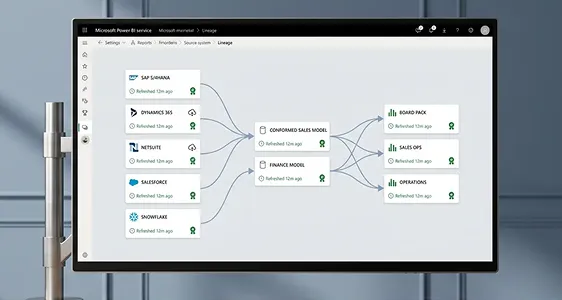
- Every Power BI report carries a lineage trail. When the Chief Financial Officer asks where a number came from, the answer takes 5 seconds.

Click any source. See exactly how it lands in Power BI.
Every Redefine integration follows the same pattern: governed source, staging, conformed model, Power BI report. Click a node to see the connector, refresh cadence, and what the buyer ends up looking at.
Dynamics 365 to Power BI
Pulls finance, operations, and customer relationship management entities via Dataverse and the bring-your-own-database export. Currency, fiscal calendar, and cost categories conform inside the model so consolidation does not happen in DAX.
SAP S/4HANA to Power BI
Reads core data services views from S/4HANA via the dedicated HANA connector. Cost center, profit center, and general ledger hierarchies land already structured so finance does not rebuild them in DAX. Native Business Warehouse queries supported.
NetSuite to Power BI
Token-based authentication into SuiteAnalytics. Pulls general ledger, transactions, subscription billing, and saved searches. Custom segments and subsidiaries flow into the conformed dimension model.
Salesforce to Power BI
Pipeline, accounts, opportunities, and activity history land in the same customer dimension as the enterprise resource planning system. Bulk API for large objects, regular API for incremental. Customer relationship management revenue reconciles to NetSuite billed revenue inside the model.
Snowflake to Power BI
DirectQuery against governed Snowflake marts via OAuth. No data leaves the warehouse. Aggregations and incremental refresh tuned per report. Row-level security inherited from Snowflake roles.
SQL Server to Power BI
On-premises SQL via the enterprise data gateway or Azure SQL direct. Stored procedures and views materialize the heavy joins so Power BI never grinds. Incremental refresh tuned per fact.
Excel and SharePoint to Power BI
Budgets and forecasts that finance owns in Excel get treated as a governed source, not a side file. Schema is locked. A row added to a budget file flows into the model. A column renamed throws a clear error before the report breaks.
Click any source on the left. Auto-advances every 4 seconds. Pause by interacting.
Eight things that define the best power bi integrations. Click to expand.
Every connector we ship to production carries the same eight artefacts. Your team does not have to ask. They show up in the project repository on day one.
Every system in scope catalogued: connector type, owner, refresh cadence, volume, sensitivity. A diagram you can read in 30 seconds and a spreadsheet your information technology team can audit.
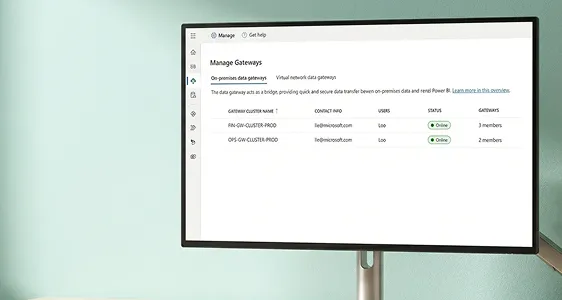
Service principals or OAuth, not personal accounts. Secrets in Key Vault. Gateway clusters where required. Connection strings documented and version-controlled, never in a Power Query window.
Raw data lands once. Cleaning, conforming, and currency translation happen in dataflows or a warehouse layer (Snowflake, Synapse, Fabric) before Power BI ever opens it. Eight datasets stop hammering the same source eight times.
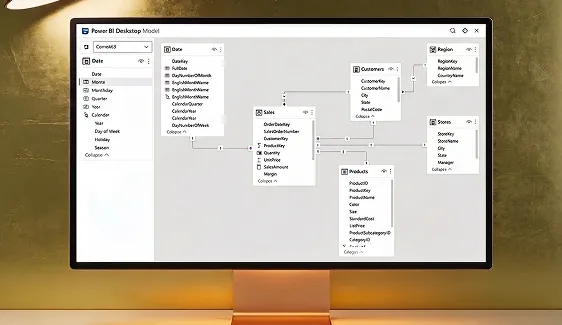
One Customer, one Product, one Date, one Account. Sales from customer relationship management and revenue from enterprise resource planning join the same fact via the same dimension. Certified DAX measures, no orphan tables, no bidirectional spaghetti.
Row-level security roles wired to Azure Active Directory groups. Sensitivity labels (confidential, internal, restricted) inherit from source. Region managers see their region. Sales representatives see their accounts. The Chief Financial Officer sees everything. Same report, different rows.
Refresh cadence tuned per fact, not per dataset. Incremental refresh for large facts (last 60 days hot, prior years cold). Gateway clusters sized for the workload. Slow facts never hold up fast ones.
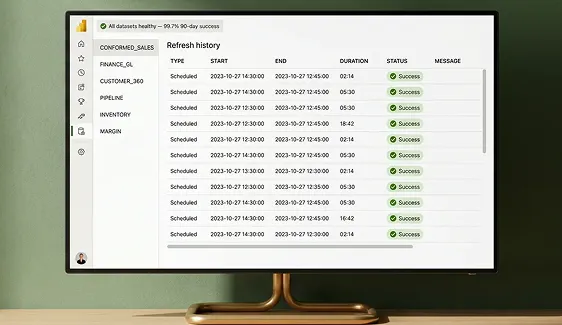
Every dataset monitored. Failure or two times baseline duration pings a Teams channel within 90 seconds. The 8 a.m. executive meeting never opens a broken report. The on-call engineer already knows.
Every column in every report traces back to a source field. A runbook tells your team how to add a new measure, register a new gateway, rotate a secret, and recover from a failed refresh. No tribal knowledge locked in one person's head.
60 hours a month back on the financial planning and analysis calendar.
That is the average time the financial planning and analysis team gets back from a typical Redefine integration project. At a fully loaded analyst cost, that is $84,000 a year in reclaimed capacity. The integration pays back in under 5 months.
Submit brief › call within 48 hours › proposal in 3 days › first live feed in 14 days
Animation Shop: fragmented channels, reconciled in one model
Animation Shop runs ecommerce across multiple channels and advertising platforms. Order data, advertising performance, and customer activity lived in four different systems. Numbers in the Monday meeting never tied out.
Animation Shop sells officially licensed t-shirts and apparel across Shopify, Facebook Marketplace, and paid social. They needed one place to see what was actually selling, what advertising was actually working, and which customers were actually buying.
Sales channels were fragmented. Order handling was manual. Facebook Marketplace visibility was inconsistent. Advertising performance was hard to track. Real-time order state did not exist, so scaling meant hiring more people, not running smarter.
A structured Facebook commerce integration plus a centralized order management system, all flowing into one reporting layer. Marketplace listings standardized. Ads Manager pulling engagement, conversion, and return on investment metrics on a schedule. Order management system consolidating inventory, orders, and customer data across channels into a single semantic model.

“We stopped arguing about numbers. The same Power BI report drives the Monday meeting, the advertising budget call, and the inventory forecast. One source, one truth.”
Operations Lead, Animation Shop

Most integration partners ship connectors. The right power bi integrations company ships reconciled numbers.
A working connector is table stakes. What Chief Financial Officers actually need is one number that ties across the enterprise resource planning system, customer relationship management platform, warehouse, and Excel forecast. Here is how we compare to the typical partner playbook.
| Capability | Typical implementation partner | Redefine |
|---|---|---|
Scope of work What you get when the project closes | Connector built. Refresh scheduled. Report wired to source. | Connector, conformed model, reconciliation rules, lineage documents, and Teams monitoring. |
Data reconciliation Numbers across systems | Out of scope. Your team owns the master data. | Conformed customer, product, date, and account dimensions baked into the model. |
Authentication and secrets Where credentials live | Personal accounts or one-off service principals. Secrets in Power Query. | Azure Active Directory service principals. Key Vault. Documented rotation procedure. Single sign-on inheritance. |
Refresh monitoring When something breaks | You find out at the Monday meeting. | Teams alert within 90 seconds of failure or two times baseline duration. On-call rota. |
Performance tuning Why reports are slow | Add more capacity. | Incremental refresh, aggregations, query folding, gateway sizing, DirectQuery tuning per fact. |
Handover artefacts What lives on after the project | An email with credentials and a PBIX file. | Git repository, runbook, lineage diagrams, row-level security matrix, refresh schedule, on-call procedure. |
Billing model How you pay | Time and materials, change orders for everything. | Fixed-scope sprints, line-item pricing before work starts, no surprise change orders. |
Source coverage Systems we connect | Whatever the partner has done before. New connectors are scope creep. | 60+ connectors in production: enterprise resource planning, customer relationship management, warehouse, finance, operations, marketing, support. |
Pick the system you need connected to Power BI.
Each page below covers the connector pattern, refresh strategy, common reconciliation rules, and what the live report ends up showing. Pull any of them up before our scoping call.
What Chief Financial Officers and information technology leads ask before they sign
First live data feed lands in 2 weeks. A full integration with conformed model, row-level security, monitoring, and handover documentation is 6 to 10 weeks depending on source count and reconciliation complexity. We scope it line-by-line before work starts.
Most slow Power BI integrations are slow because raw data lands directly in Power BI and every dataset hits the source again. We stage to dataflows or a warehouse first, model in a star schema, and tune refresh per fact. Refresh times drop 60 to 90 percent on the typical project.
We work with what you have. Snowflake, Synapse, BigQuery, Databricks, on-premises SQL, Fabric. If you do not yet have a warehouse, we will tell you honestly whether Power BI dataflows are enough or whether the project genuinely needs one.
Service principals for authentication, not personal accounts. Secrets in Azure Key Vault. Row-level security wired to Azure Active Directory groups so region managers see their region and sales representatives see their accounts. Sensitivity labels inherited from source. Single sign-on inheritance from your tenant.
A list of source systems with owners, read access (or a service principal) to each, and 2 to 3 hours a week of your team's time for clarification calls and acceptance. We handle modeling, connectors, gateways, DAX, publishing, monitoring, and documentation.
You get a documented handover and your team can run it. If you would rather we keep the gateways healthy, refresh schedules tuned, and new sources added as the business grows, look at our Power BI managed services or service-level agreement support.
No. Microsoft sources (Dynamics 365, Business Central, SQL Server, SharePoint, Excel, Synapse, Fabric) plus SAP, Oracle, NetSuite, Salesforce, HubSpot, Snowflake, BigQuery, Databricks, Workday, ServiceNow, Google Analytics, and any system with a REST API or a JDBC/ODBC driver.
3 questions. 30 seconds. Honest answer.
Click your answer in each row. We will tell you straight whether a Power BI integration project is worth your time right now, or whether something else (audit, health check, managed services) would land better first.
How many source systems feed your reporting today?
How often do the numbers fail to match across reports?
How much manual work goes into closing the month?
Click an answer in each card above.
Once you have selected one answer per question, we will tell you which Redefine service is the honest fit.
Book your integration scoping call
Tell us the source systems and the meeting that keeps falling apart. We will reply within 48 hours with a discovery call, a 5-day scoped proposal, and a 14-day target for your first live feed.
No commitment. No pitch.
Submit brief › call within 48 hours › proposal in 3 days › first feed live in 14 days
Call within 48 hours, proposal in 3 days, first feed live in 14 days. No commitment. No pitch.
We will be in touch within 48 hours.
Your brief is in the queue. A senior Power BI integrations engineer will read it personally, review your source list, and reply within 2 business days with a discovery call and a scoped proposal target date.
One number. Every system. Live in 14 days.
Fixed-scope sprints. Conformed model. Full lineage and documentation. Our power bi integrations services give your financial planning and analysis team 60 hours a month back.
Submit brief › call within 48 hours › proposal in 3 days › first live feed in 14 days