Surface Power BI Reports Inside Microsoft Teams Where Decisions Actually Happen
Power bi and microsoft teams integration services that publish governed reports as pinned channel tabs, adaptive card alerts, and meeting intelligence. Your team acts on data without leaving the tool they already use all day.
Hero · Team in meeting room acting on Power BI report surfaced in Teams

Your Power BI reports are accurate. They are just not where your team makes decisions.
Microsoft teams power bi integration solves the last mile of analytics: getting the right data in front of the right person at the moment they need it, without asking them to open a separate tool.
Without Teams integration
- Analysts publish updates to Power BI Service. Most team members never open it between reporting cycles.
- Key threshold breaches sit unnoticed in a report until someone logs into Power BI to check manually
- Meeting prep means switching between Teams and Power BI. Context is lost between tabs.
- Managers screenshot reports and paste them into Teams chats where they go stale immediately
- Row-level security means nothing when a screenshot bypasses access controls entirely
After power bi microsoft teams integration
- Live Power BI reports pinned as tabs inside the Teams channels where your teams operate
- Adaptive card notifications fire into the right Teams channel the moment a key metric crosses a threshold
- Power BI reports embedded as meeting tabs so teams review the same live data during standup calls
- Row-level security from the Power BI semantic model is enforced when the report opens inside Teams
- Power bi microsoft teams dashboards that refresh automatically and are always current
From Power BI workspace to Teams channel to decision in minutes
Microsoft teams reporting in power bi works through native integration points that require no middleware. Click any step to see what happens at each stage.
Refresh history · Sales Analytics
Sales Analytics workspace
Adaptive card notification
Power BI Alert · Sales Analytics
EMEA pipeline value dropped below threshold
Current: $2.1M · Threshold: $2.5M · View in Teams
Alert sent to Sales Operations channel 09:12
Live report · filtered to EMEA region
Interactive. No Power BI login required for EMEA team members.
Thread following alert
Sales Director · 09:14
Can see the issue. Three deals slipped to next quarter. Escalating now.
Revenue Operations · 09:16
Updated forecast in the report tab. Adjusted pipeline view now accurate.
Integration Build · Analyst configuring Power BI report tab inside Teams channel

Every delivery method configured, secured, and owned by your team
Power bi microsoft teams connector consulting and integration services that go beyond pinning a tab: alerts, governance, security, and training so the integration keeps working after the project closes.
Workspace and Channel Audit
We audit your Power BI workspace structure, report inventory, and Teams channel architecture before recommending which reports go where. Channel design is documented in writing before any tabs are pinned.
Pinned Report Tabs by Channel
Power BI reports pinned as live tabs inside the Teams channels that own each reporting area. Sales sees sales data in the Sales channel. Operations sees operational data in the Operations channel. No shared reports that show everything to everyone.
Adaptive Card Alert Configuration
Data alerts configured to post adaptive card messages to Teams channels when key metrics cross defined thresholds. Teams sees revenue drops, queue breaches, or budget variances within minutes of the next refresh, not at the next weekly meeting.
Row-Level Security Verification
Row-level security from the Power BI semantic model is validated inside Teams before go-live. Each user sees only the data their role permits, whether they open the report in Power BI Service or through the Teams tab. Security does not change at the channel boundary.
Subscription Delivery Schedule
Scheduled report snapshots configured to deliver report images to Teams channels on a cadence your team chooses. Weekly leadership summaries, daily operational dashboards, or on-demand report snapshots posted automatically at the schedule you define.
Governance Handoff and Training
Channel naming standards, alert ownership, subscription management, and an admin runbook delivered at project close. Two training sessions cover how to add a new report tab and how to configure a new alert. Your team manages the integration independently after go-live.
Integrating other platforms inside your Microsoft stack?
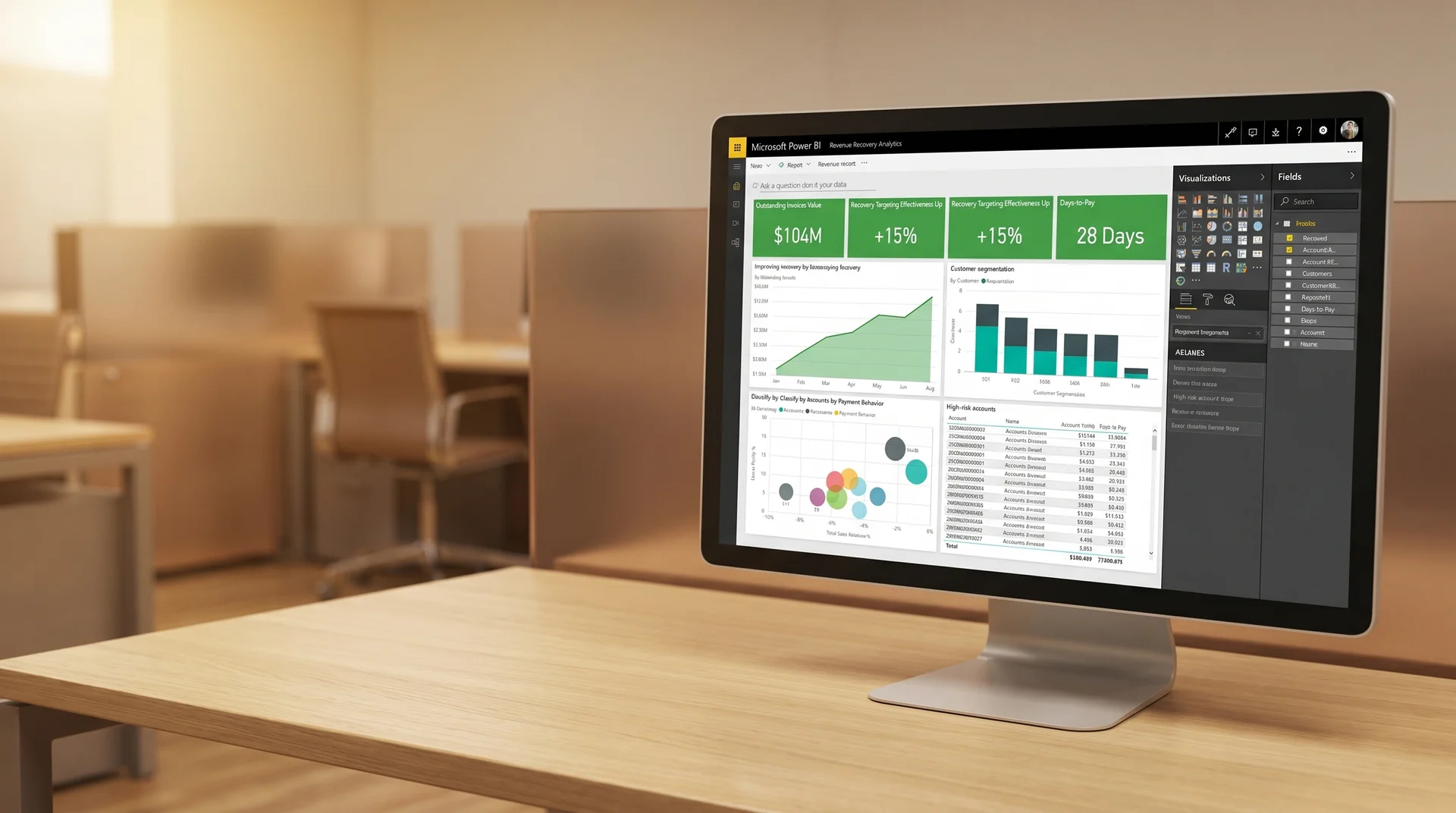
Revenue recovery targeting improved 35%. Reporting time cut 40%. Data delivered to the right team at the right moment.
An enterprise apparel and retail organization had no clear visibility into unpaid invoices or customer payment behavior across ERP systems. Reporting was fragmented and reactive, making it impossible to prioritize recovery efforts or get the right insight to recovery teams when they needed to act.
Recovery teams worked from static reports pulled manually from Business Central and a custom ERP, with no real-time visibility into which accounts needed immediate action
Manual analysis consumed hours each reporting cycle, reducing the time available for actual recovery outreach and customer engagement
A centralized Power BI analytics model was built integrating data from Business Central and the custom ERP system. Predictive analytics logic surfaced high-risk and high-opportunity accounts automatically. Customer segmentation models classified accounts by payment behavior. Dashboards were structured to support both executive oversight and operational recovery workflows.
Recovery teams received actionable views of their accounts in the tools they already used, without switching platforms or waiting for a scheduled report to land in their inbox.
Improvement in recovery targeting effectiveness
Reduction in reporting and analysis time per cycle
Case Study · Power BI revenue recovery dashboard on monitor in retail analytics office
Common Microsoft Teams Power BI integration failures that a scoped build prevents
Power bi microsoft teams connector consulting that skips channel design and security validation produces integrations that either surface the wrong data to the wrong audience or stop updating within weeks of launch.
Wrong Reports Pinned to Wrong Channels
Reports pinned without a channel mapping document end up in the wrong Teams workspaces. Sales operations sees an executive summary. Finance sees a regional breakdown. Channel design is part of the written scope before any tab is pinned.
Row-Level Security Bypassed in Teams
If the Power BI semantic model does not have row-level security configured at the model level, every Teams user who can open the tab sees the full dataset. Row-level security must be defined in the model before the Teams integration is configured, not after.
Licence Gaps Breaking Tab Access
Teams users who do not have Power BI Pro licences or access through a Premium workspace receive a licence error when opening a pinned tab. Licence requirements are validated across all intended channel members before go-live, not discovered by the first team member who tries to open the report.
Alerts Firing Too Frequently
Data alerts configured without threshold tuning produce noise that teams learn to ignore. Alert thresholds, recipient channels, and suppression rules are designed during the build, not set to defaults that fire every refresh cycle.
Stale Data in Meeting Tabs
Power BI reports embedded in Teams meeting tabs show stale data if the semantic model refresh schedule does not align with meeting cadence. Refresh timing is designed around the meeting schedule, not set to whatever the default was when the workspace was created.
No Admin Documentation at Handoff
When the person who configured the integration leaves, no one knows how to add a new report tab, adjust alert thresholds, or change a subscription schedule. Admin runbook and governance documentation are part of scope, not afterthoughts delivered if time allows.
What separates a governed microsoft teams power bi integration from one that creates confusion after six weeks
The two failure modes for Teams integration are noise and access problems. Both trace back to skipping the channel design conversation and the licence audit before build. Power bi microsoft teams connector consulting that starts with documented scope prevents both. Both are addressed in the scoped proposal.
How this engagement works
Channel mapping and licence audit before any tab is pinned. Every report, every channel, every audience documented before Sprint 1 begins.
Row-level security validated in the Teams tab environment, not just in Power BI Service. The two render different user contexts and security must be verified in both.
Alert threshold design with the team that owns each channel. Thresholds are set based on operational tolerance, not the default values Power BI populates when an alert is first created.
Admin runbook, channel naming standards, and training delivered at project close. Your team adds new report tabs and adjusts alerts independently after go-live.
How this typically goes elsewhere
Pin the first available report to the most active Teams channel. Teams members open it, see data they do not own, and stop using it within a week.
Configure alerts with default thresholds. Alerts fire eight times in the first two days. Team mutes the channel and the integration is declared broken.
No documentation. When the analyst who built it changes roles, no one knows how to change a subscription schedule or troubleshoot a broken tab.
Frequently asked questions about microsoft teams reporting in power bi
Power BI integrates with Microsoft Teams in three primary ways: pinning a Power BI report as a tab inside a Teams channel, posting Power BI data alerts and subscription updates as adaptive card messages to a Teams channel, and embedding Power BI visuals directly inside Teams meeting tabs. All three approaches use the native Microsoft integration available to Power BI Pro and Premium workspaces without third-party tools.
Yes. Power BI supports scheduled subscriptions that deliver report snapshot images to Teams channels on a daily or weekly schedule. For more dynamic delivery, adaptive card notifications can be triggered by data alert thresholds, pushing a message to a Teams channel when a specific metric crosses a defined value. Both approaches are configured inside Power BI Service and require no code changes to the report.
To integrate power bi with microsoft teams, the user adding the tab needs permission to access the report in Power BI Service. Viewers of the tab also need access to the underlying Power BI report. Row-level security set in the Power BI semantic model is respected when the report is viewed inside Teams, so each viewer sees only the data their Power BI role permits.
The Power BI Teams tab and subscription-based channel delivery are available to users with Power BI Pro licences or a Power BI Premium capacity. Users viewing a pinned tab need at least a Power BI Pro licence or access through a Premium workspace. Adaptive card notifications require a Power BI Pro licence for the user configuring the alert.
The engagement covers an audit of your Power BI workspace and Teams environment, design of the delivery architecture, configuration of pinned report tabs, channel subscriptions, and data alert notifications, row-level security validation, and a governance handoff with documentation and training. Everything is scoped in writing before development begins.
Get a scoped proposal for your Power BI Microsoft Teams integration
Submit your brief and receive a written channel design, delivery architecture, security plan, and governance recommendations within three business days. Scoped before work starts, no commitment required.
Brief received
We will review your Power BI and Teams setup and send a scoped proposal within 3 business days.
Response within 48 hours of brief submission
Written scoped proposal in 3 business days
60 plus projects completed across Power BI and analytics
Full documentation and ownership transferred at project close
Pre-footer · Operations team reviewing Teams messages with embedded Power BI charts

Your analytics and your communication tool belong in the same workspace.
No commitment. No pitch. A written channel design and integration scope in three business days so you know exactly what power bi and microsoft teams integration services cost, what is included, and when it goes live.