Dynamics 365, Salesforce, and HubSpot are all capable CRMs, but they solve different problems. HubSpot gets a lean sales and marketing team live fast with minimal IT support. Salesforce gives growing SMBs the deepest customization and the largest partner ecosystem once sales processes get complicated. Dynamics 365 makes the most sense when your business already runs on Microsoft 365, Teams, Outlook, or a Dynamics ERP, because it connects CRM directly to daily operations. Match the platform to your operating environment, not to whichever vendor has the loudest marketing this quarter.
Your ten-person sales team might love HubSpot right now. But what happens when you're at sixty reps, three business units, and an approval process that needs to talk to finance?
Salesforce can handle almost any sales process you can imagine. But do you actually need that much flexibility today, or would you be paying for headroom you won't use for years?
Dynamics 365 might feel like the obvious choice if your team already lives inside Outlook and Teams every day. But does that convenience justify the extra setup work compared with a CRM built purely for sales teams?
There is no universal winner here. The best CRM for your business depends on how complex your operations already are, and how complex you expect them to get. This guide walks through pricing, features, AI, integrations, and total cost of ownership so you can make that call with real numbers in front of you, not vendor talking points. If the decision touches more than just your sales team, Redefine's digital transformation consulting can help you map the CRM choice against your broader operations before you commit to a platform.
Dynamics 365 vs Salesforce vs HubSpot: the short answer
Here's the answer up front, because that's what you actually came here for.
| CRM | Best fit |
|---|---|
| HubSpot | SMBs that want ease of use, fast implementation, and sales and marketing working from one connected record |
| Salesforce | Growing SMBs that expect increasingly sophisticated sales processes, deep customization, and the largest CRM ecosystem |
| Dynamics 365 | Microsoft-first SMBs and mid-market businesses that need CRM tied directly into broader business operations |
Microsoft builds Dynamics 365 Sales around Microsoft 365 interoperability from the ground up, bundling Outlook, Teams, and Copilot access directly into every tier. Salesforce's SMB suites bundle sales, service, marketing, commerce, and generative AI into one subscription rather than a bare-bones sales tool. HubSpot positions its small-business CRM around a fast setup that does not require a dedicated developer or admin on day one.
Quick recommendation
- Choose HubSpot if simplicity and team adoption matter more than raw configurability.
- Choose Salesforce if CRM sophistication and long-term customization headroom matter most.
- Choose Dynamics 365 if the Microsoft ecosystem and back-office integration matter most.
These are fit recommendations, not a universal product ranking. If Dynamics 365 is the direction you're leaning, it's worth pressure-testing that assumption with a team that implements it daily. Redefine's Microsoft Dynamics 365 consulting practice can confirm the fit, and the real licensing cost, before you sign anything.
Dynamics 365, Salesforce, and HubSpot at a glance
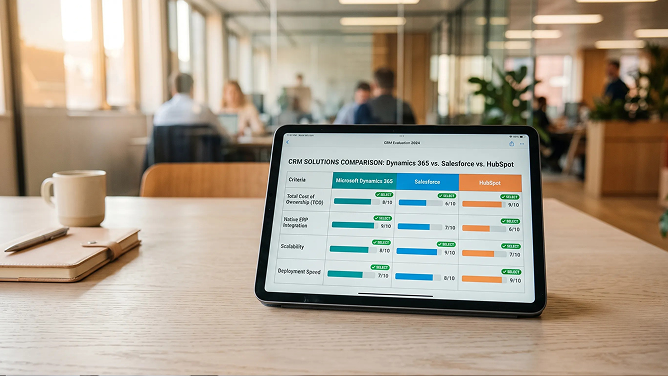
Use this table as a starting point, not a verdict. The strongest choice usually shows up once several rows point in the same direction.
| Criteria | Dynamics 365 | Salesforce | HubSpot |
|---|---|---|---|
| Best suited for | Microsoft-centric SMB / mid-market | Scaling SMB through enterprise | Startup through growing mid-market |
| Entry barrier | Moderate | Low to moderate | Low |
| CRM customization | High | Very high | Moderate to high |
| Sales automation | Strong | Very strong | Strong |
| Marketing capability | Separate, connected product | Broad ecosystem | Major strength |
| Microsoft 365 integration | Excellent | Good | Good |
| Ease of deployment | Moderate | Moderate | Strong |
| Complex sales processes | Strong | Excellent | Good |
| ERP connection | Major strength | Depends on integration | Depends on integration |
| AI ecosystem | Copilot and sales agents | Agentforce | Breeze and Agent Hub |
| Permanent free tier | No | Yes, up to 2 users | Yes, up to 2 users |
| Enterprise scalability | Excellent | Excellent | Strong |
A note on methodology: we're intentionally not scoring these platforms with star ratings like 4.5 out of 5 for integrations. Those tables look tidy, but without a disclosed scoring rubric they don't hold up, and they can quietly mislead a buyer who's trying to make a real decision.
CRM pricing comparison: what do SMBs actually pay?
This is the section with the most commercial-search value, and also the one vendors make hardest to compare directly, because every platform slices its tiers differently. Here's what each one lists as of August 2026.
Dynamics 365 Sales
Microsoft's official pricing page lists three editions, all billed per user, per month, paid yearly:1
- Sales Professional: $65 per user, per month
- Sales Enterprise: $105 per user, per month, adds Copilot and advanced customization
- Sales Premium: $150 per user, per month, adds 1,000 monthly Copilot credits and AI-powered sales insights
Sales Professional gives you core sales-force automation and Microsoft 365 interoperability. Enterprise unlocks custom apps built on Power Apps and Power Automate. Premium is the tier most SMBs actually need if AI drafting and recommended actions matter to the team.
Salesforce
Salesforce's small-business pricing page lists four relevant tiers:2
- Free Suite: $0, capped at 2 users
- Starter Suite: $25 per user, per month
- Pro Suite: $100 per user, per month, removes the user cap and adds custom objects
- Sales Cloud Enterprise: $175 per user, per month billed annually, once you outgrow the SMB suites
HubSpot
HubSpot's Sales Hub follows a similar shape, though the free-to-paid jump is steeper once you need automation:3,4
- Free CRM: $0, up to 2 users
- Starter: roughly $15 to $20 per seat, per month on annual billing
- Professional: roughly $90 to $100 per seat, per month, plus a required one-time $1,500 onboarding fee
- Enterprise: $150 per seat, per month, plus a required one-time $3,500 onboarding fee
Those onboarding fees are mandatory, not optional add-ons, and they're easy to miss until checkout. Independent pricing trackers that check HubSpot's live rate card confirm the same fee structure.4
Pricing checked August 2026. CRM pricing, promotions, AI credits, and packaging change frequently across all three vendors. Confirm current list pricing directly with the vendor before you budget a purchase.
License price is not the same as CRM cost
This is where most comparison articles stop, and it's exactly where the real decision starts. Industry pricing analysts who track Dynamics 365 projects put license fees at roughly 20% to 35% of the true three-year cost of a CRM rollout.11 The other 65% to 80% comes from everything Microsoft, Salesforce, and HubSpot don't put on their pricing pages.
Here's what actually shows up in a real CRM budget, across all three platforms:
- Subscription fees — your baseline, and the only number most buyers compare
- Implementation and configuration — pipelines, fields, permissions, and business logic
- Data migration — cleaning and moving records from spreadsheets or a legacy system
- Integrations — connecting ERP, marketing, and support tools so data doesn't live in silos
- Administrator time — someone has to own the system after go-live
- Training — the difference between a tool people use and one they route around
- Custom development — anything beyond out-of-the-box configuration
- AI usage and credits — Copilot credits, Agentforce actions, and HubSpot Breeze credits all meter separately from your seat price
- Premium support — faster response times almost always cost extra
- Marketing contacts and email sending — HubSpot in particular prices this separately from seats
- Third-party apps — marketplace add-ons that plug gaps in the core product
The TCO formula. 3-year CRM total cost of ownership = Licenses + Implementation + Integrations + Administration + Training + Add-ons + Usage charges.

What would each CRM cost a 25-person sales team?
Rather than quote implementation numbers we can't verify for your business, here's an illustrative scenario built around a common SMB profile:
- 25 CRM users, plus 5 sales managers
- Sales automation and forecasting required
- Outlook integration required
- ERP integration required
- Basic AI assistance and reporting dashboards required
- Dynamics 365: Sales Enterprise at $105 per user covers this profile, landing around $37,800 per year in licensing for 30 seats, before Copilot Premium credits or implementation.
- Salesforce: Pro Suite at $100 per user removes the SMB user cap and supports this team at roughly $36,000 per year, though forecasting depth and custom objects may push some teams to Enterprise at $175 per user.
- HubSpot: Sales Hub Professional at roughly $95 per seat lands near $34,200 per year for 30 seats, plus the one-time $1,500 onboarding fee in year one.
Illustrative licensing scenario. These figures cover base subscription cost only. They exclude taxes, third-party apps, implementation, data migration, negotiated discounts, and AI usage overages, all of which vary by vendor and by deal.
Notice how close the three license totals land to each other at this team size. That's exactly why the earlier total-cost-of-ownership breakdown matters more than the sticker price: the platform that costs the least to license is rarely the platform that costs the least to actually run.
Dynamics 365 vs Salesforce vs HubSpot: core CRM features
Contact and account management
All three handle companies, contacts, activities, opportunities, and account hierarchies without a fight. The differences show up in custom fields and custom objects: Salesforce and Dynamics 365 let you model genuinely complex account structures, while HubSpot keeps the data model simpler on purpose, which is exactly why lean teams find it faster to set up.
Pipeline and opportunity management
Multiple pipelines, deal stages, and quote management exist in every platform. Salesforce pulls ahead on territory management and opportunity scoring for complex B2B motions. HubSpot's pipeline view is the easiest for a rep to read at a glance, which matters more than it sounds like for adoption.
Reporting and analytics
Dashboards and custom reporting are table stakes now. Where it gets interesting is cross-system analytics: Dynamics 365 pairs naturally with Power BI, Salesforce has its own reporting engine plus Tableau in the ecosystem, and HubSpot's native reporting covers most SMB needs without requiring a separate business-intelligence tool.
Workflow automation
Don't just ask which platform has "better automation." Ask a concrete question instead: when a $50,000 opportunity reaches proposal stage, can the CRM automatically request discount approval, notify finance, create a task for the account executive, and update the forecast, all without a human stitching those steps together? Salesforce Flow, Power Automate inside Dynamics 365, and HubSpot workflows can all do this. The gap is in how much technical setup each one requires to get there.
Which CRM is easiest for SMB teams to use?
HubSpot
HubSpot leans hard into quick setup and a light IT footprint. HubSpot's own small-business CRM page promotes exactly this: a system a team can stand up without dedicated developer support.3
Salesforce
Salesforce has meaningfully lowered its traditional entry barrier through the Free, Starter, and Pro Suites. Guided onboarding ships with every SMB suite, and Pro Suite introduces custom objects, AppExchange access, and sandboxes once you're ready for them.10
Dynamics 365
Dynamics 365 offers significant flexibility, but your team gets the most out of it when Microsoft tools already run day-to-day work. Dynamics brings CRM data directly into Teams, so reps can work with records in the same environment they already live in for email and chat.5
Practical conclusion
Ease of clicking around is not the same as ease of operating the CRM at scale. A simple CRM that eventually needs five external integrations can become harder to manage over time than a more sophisticated platform that connects natively to your stack from day one.
Dynamics 365 vs Salesforce vs HubSpot for AI
Every CRM vendor now claims to be an AI company. The useful comparison isn't whether each platform has AI, it's what that AI actually does for a rep's day.
Dynamics 365: Copilot and Microsoft sales agents
Current Dynamics 365 AI capabilities include pipeline summaries, natural-language queries, lead research and qualification, recommended next actions, email drafting, meeting assistance, call summaries, forecast analysis, and CRM data enrichment. Microsoft is increasingly positioning its Sales Agent as the evolution of the Copilot experience, embedding agents like the Sales Qualification Agent and Sales Research Agent directly into Sales Enterprise and Premium.
Best fit: teams that already work heavily inside Outlook, Teams, and Microsoft 365.
Salesforce: Agentforce
Salesforce's Agentforce layer covers AI record summaries, AI-assisted drafting, autonomous prospecting agents, and pipeline activity generation, all grounded in Salesforce's own data model. Generative AI capabilities now extend across the Free, Starter, and Pro Suites, though exact allocations and capabilities vary by plan.
Best fit: companies pursuing extensive CRM-native automation and agentic workflows at scale.
HubSpot: Breeze and Agent Hub
HubSpot's AI, branded Breeze, covers a Breeze Assistant, a Prospecting Agent, a Data Agent, a Customer Agent, AI enrichment, buying-signal monitoring, and personalized outreach, with custom agents available at higher tiers.6 A meaningful share of that activity now runs on metered HubSpot Credits, which makes usage cost a real line item to model, not an afterthought.
Best fit: lean go-to-market teams who want AI woven into marketing, sales, and service without building agentic workflows from scratch.
Dynamics 365 vs Salesforce: which is better for SMBs?
| Choose Dynamics 365 when... | Choose Salesforce when... |
|---|---|
| Microsoft 365 is core to how your company already works | CRM is one of your strategic core platforms, not a supporting tool |
| Teams and Outlook dominate daily workflow | You need extensive CRM customization beyond standard objects |
| ERP integration is a real requirement, not a nice-to-have | You operate across a diverse, non-Microsoft application ecosystem |
| Power Platform skills already exist on your team | Complex, multi-stage selling processes are the norm |
| CRM and back-office operations need to converge | Sales and service capabilities take priority over ERP adjacency |
Independent comparison coverage lands on the same factors: Microsoft ecosystem fit, architecture, and total cost tend to decide this matchup more than raw feature count.9
Plenty of SMBs don't have to choose only one. If Dynamics 365 already runs your operations but your sales team wants Salesforce's depth, or the reverse, connecting the two beats ripping one out. Redefine's Dynamics 365 and Salesforce integration service syncs records between the platforms so operations and sales data both stay current, without forcing a single-platform bet before you're ready to make one.
Dynamics 365 vs HubSpot: which is better for a growing business?
This one comes down to two very different SMB profiles.
Choose HubSpot when
- You need fast implementation without a long IT runway
- Sales and marketing need one accessible, shared system
- Limited internal IT capacity exists
- Adoption is the immediate priority, not configurability
- Your processes stay relatively standardized
- Your go-to-market team wants a single customer platform
Choose Dynamics 365 when
- Microsoft already runs your business day to day
- ERP and finance data need to inform sales decisions
- You need more complex data models than a standard CRM offers
- Power BI and the broader Power Platform matter to your roadmap
- Workflows extend well beyond marketing and sales
- You expect mid-market or enterprise operational complexity soon
Salesforce vs HubSpot: which is better for SMBs?
HubSpot wins when
- Speed to launch matters more than depth
- Marketing sits at the center of your go-to-market motion
- Team adoption is a major, named concern
- CRM administration needs to stay lean, with no dedicated admin
Salesforce wins when
- Sales processes are becoming genuinely complex
- Custom objects are necessary to model your business
- Different business units need different workflows
- Advanced integrations are already on the roadmap
- Enterprise-grade scalability is becoming a real requirement
One nuance worth flagging: Salesforce's newer Starter and Pro Suites have narrowed the simplicity gap that used to separate it from HubSpot. Salesforce now offers genuinely lower-complexity SMB packages instead of forcing every small company straight into traditional enterprise Sales Cloud, which is exactly the kind of 2026-specific shift that older comparison pages tend to miss.
Which CRM integrates best with your existing tech stack?
If you use Microsoft 365, Outlook, and Teams
Likely advantage: Dynamics 365. Microsoft builds native integration between Dynamics 365 and Teams, Outlook, and the rest of Microsoft 365, so records, emails, and meetings stay in the same environment your team already lives in.5 If your business already runs on that stack, moving CRM into it usually reduces switching costs rather than adding them. Redefine's Dynamics 365 services can help you scope that implementation, including licensing right-sizing so you're not paying for tiers your team won't use.
If your company runs many different SaaS tools
Likely advantage: Salesforce or HubSpot, depending on complexity. Both platforms lean on large marketplace and API ecosystems rather than a single vendor's stack. HubSpot alone promotes over 1,900 app integrations for its CRM.3 But every one of those integrations is only as reliable as the sync layer connecting it, and that's rarely something you want to wire together by hand. Redefine's CRM integration services connect your CRM to the marketing, support, and finance tools you already run, with monitoring and error handling built in instead of bolted on later.
If CRM must talk to ERP
Don't automatically declare Dynamics 365 the winner here just because it's a Microsoft product. Ask a more useful set of questions first:
- Which ERP are you actually running?
- Is customer and account data mastered in the CRM or in the ERP?
- Where does pricing live, and where should it live?
- Where does inventory live?
- Where are orders actually created?
- Which system owns the invoice?
- Does synchronization need to happen in real time?
A CRM can look perfect during a sales demo and still become expensive fast if every closed opportunity requires manual middleware before finance can create the customer and process an order. Redefine's CRM ERP integration services build the sync layer with field-level conflict rules, so your CRM and ERP stop disagreeing about credit limits, pricing, and order status.
Which CRM offers the best customization?
Think about customization in three levels.
Level 1: Configuration
Fields, pipelines, reports, and dashboards. Every platform handles this comfortably.
Level 2: Workflow customization
Approvals, routing, automation, and notifications. Still comfortable territory for all three, with varying setup effort.
Level 3: Platform customization
Custom applications, business objects, APIs, and external workflows. This is where Salesforce and Dynamics 365 separate from HubSpot, which intentionally keeps this layer lighter.
General positioning across the three:
- HubSpot: easier configuration, lower initial complexity, less headroom at the platform layer.
- Salesforce: particularly deep CRM customization, backed by the largest partner and app ecosystem.
- Dynamics 365: deep customization plus the broader Power Platform and Microsoft ecosystem behind it.
More customization is only valuable when the business actually needs it. For an SMB, unlimited flexibility can also mean higher implementation costs, more administrator dependency, more technical debt, longer onboarding, and harder upgrades down the line.
Which CRM is best for sales and marketing alignment?
This is where HubSpot gets room to compete beyond pure sales CRM. Compare lead capture, marketing automation, email, lead scoring, lifecycle stages, attribution, campaign reporting, sales handoff, and customer-service data across all three.
Ask a practical question instead of a vague one: can marketing see which campaigns actually generated pipeline, while sales can see exactly what the buyer engaged with before the opportunity opened? That single question tells you more about fit than any feature list.
Which CRM is best for businesses already using an ERP?
This question matters more than most SMB buyers realize going in. Map the real architecture first:
A CRM decision that only considers sales-team needs can become expensive fast. A CRM may look perfect during a demo and still create hidden costs if every closed opportunity requires custom middleware before finance can create the customer and process the order.
- Dynamics 365 with a Dynamics ERP gives you the tightest native connection, since CRM and ERP share the same underlying platform family.
- Salesforce with a separate ERP works well, but plan for a dedicated integration rather than a native connection out of the box.
- HubSpot with a separate ERP is common and workable, especially for lighter-weight order flows, but the same integration planning applies.
When does an SMB actually need an enterprise CRM?
Employee count alone does not determine whether you need enterprise CRM. Process complexity does. A 60-person B2B distributor may need more sophisticated CRM architecture than a 300-person services company. Watch for these signs that you've moved past basic CRM requirements:
- Multiple sales teams or territories
- Complex account hierarchies
- Multi-step approval workflows
- CPQ (configure, price, quote) requirements
- Multiple business units operating under one CRM
- ERP synchronization needs
- Custom objects beyond standard fields
- Advanced, role-based permissions
- Compliance requirements tied to customer data
- Thousands or millions of customer records
- Multiple acquisition channels feeding one pipeline
- A dedicated RevOps or CRM administration function
Best CRM by business scenario
This table gives you a shortlisting starting point, not a universal product ranking.
| Business situation | Recommended starting shortlist |
|---|---|
| 5-person startup | HubSpot or Salesforce Free |
| Lean sales team wanting fast setup | HubSpot |
| Marketing-led SMB | HubSpot |
| Microsoft-first SMB | Dynamics 365 |
| Complex B2B sales organization | Salesforce or Dynamics 365 |
| Company already running a Dynamics ERP | Dynamics 365 |
| Highly customized sales process | Salesforce |
| Sales team heavily using Outlook and Teams | Dynamics 365 |
| Company expecting rapid enterprise scaling | Salesforce or Dynamics 365 |
| Minimal CRM administration resources | HubSpot |
| CRM, marketing, and service in one SMB package | HubSpot or Salesforce Suites |
CRM decision matrix: score the platforms against your business
Rate each platform from 1 to 5 on every factor below, multiply by the weight, and add up the results. The platform with the highest weighted score fits your business best, not the internet's.
| Factor | Weight |
|---|---|
| Ease of adoption | 15% |
| Sales-process fit | 15% |
| Integration fit | 15% |
| Total cost of ownership | 15% |
| Automation depth | 10% |
| Customization headroom | 10% |
| Reporting | 5% |
| AI capabilities | 5% |
| Marketing capabilities | 5% |
| Scalability | 5% |
The scoring formula. Weighted score = Rating × Business importance. Score the platforms against your own weighted priorities, not a generic industry checklist.
Don't choose a CRM until you answer these 10 questions
- 1. How many people will actually use the CRM?
- 2. What will the user count look like in three years?
- 3. Which system currently owns your customer data?
- 4. Does the CRM need to integrate with your ERP?
- 5. How complex are your approval processes?
- 6. Do you have internal CRM administrators, or will you need one?
- 7. How important is marketing automation to your go-to-market motion?
- 8. What reports does leadership actually need to see?
- 9. Which tasks should AI or automation handle, specifically?
- 10. What is your realistic three-year CRM budget?
If your vendor demo can't clearly answer these questions using your real workflow, you're not ready to make the platform decision yet.
Common CRM selection mistakes SMBs make
- Choosing based only on monthly license price and ignoring the total cost of ownership behind it.
- Buying enterprise functionality the company will never use just because it's available at a higher tier.
- Ignoring integration costs until after the contract is signed.
- Underestimating data migration as a quick export-and-import job instead of real project work.
- Optimizing for today's team instead of the team you'll have in three years.
- Customizing before validating the sales process that the customization is supposed to support.
- Ignoring user adoption as a metric until usage has already started declining.
- Assuming AI works before the CRM data is clean enough to make it useful.
- Evaluating CRM without finance and operations in the room, especially when ERP is involved.
- Letting vendor demos determine requirements instead of the other way around.
Our verdict: Dynamics 365 vs Salesforce vs HubSpot for SMBs
We're not naming one universal winner, because there isn't one. Here are three verdicts instead.
Best for ease of adoption and lean go-to-market teams: HubSpot
- Low entry barrier
- Integrated sales and marketing approach
- Fast SMB onboarding
- A growing set of AI tools built for lean teams
Best for sophisticated CRM and long-term customization: Salesforce
- Broad CRM capability
- Extensive customization headroom
- Strong automation
- Multiple SMB-to-enterprise upgrade paths
- A clear Agentforce strategy
Best for Microsoft-centric and operationally complex SMBs: Dynamics 365
- Native Microsoft 365 integration
- Teams and Outlook built in
- Power Platform access
- ERP adjacency
- Deep operational integration
"Don't ask which CRM has the most features. Ask which CRM matches the systems, processes, and team you already have, then determine whether it can support the business you expect to become."Central recommendation
Need help choosing between Dynamics 365, Salesforce, and HubSpot?
Redefine's CRM consulting team has found the same pattern across most CRM projects that underdeliver: the platform usually isn't the real problem. Weak strategy, unclear data ownership, and zero integration planning are. A demo can show you what a CRM can do. It can't show you what your CRM will actually look like connected to your ERP, your marketing stack, and your specific sales process.
Get a platform-neutral CRM assessment.
Map your sales process, integrations, current stack, team size, and growth requirements before you commit to a CRM license.
Frequently asked questions
Is Dynamics 365 better than Salesforce?
Neither is universally better. Dynamics 365 wins for SMBs already running Microsoft 365 or a Dynamics ERP, because it connects CRM to daily operations natively. Salesforce wins when you need deeper customization, a larger app ecosystem, or you're planning for complex, multi-stage sales processes as you scale. Base the decision on your existing stack and your sales process, not on brand reputation alone.
Is Dynamics 365 better than HubSpot?
It depends on your operating environment. Dynamics 365 is stronger when Microsoft 365, Teams, and Outlook already run your business, and when ERP integration matters. HubSpot is stronger when speed, ease of adoption, and combined sales-and-marketing functionality matter more than deep operational integration. Most lean SMB teams start faster on HubSpot; most Microsoft-first teams get more value from Dynamics 365.
Is Salesforce or HubSpot better for small businesses?
HubSpot generally launches faster and requires less internal IT support, which makes it the more common starting point for very small teams. Salesforce's Starter and Pro Suites have narrowed that simplicity gap considerably, so the two are closer than they used to be. Choose Salesforce if you expect to need deep customization soon; choose HubSpot if fast adoption matters more right now.
What is the best CRM for an SMB?
There is no single best CRM for every SMB. HubSpot suits lean teams that want speed and simplicity. Salesforce suits growing teams that need customization headroom and a large ecosystem. Dynamics 365 suits Microsoft-first teams that need CRM tied to ERP and back-office operations. The right answer depends on your team size, your tech stack, and your sales process complexity.
Which CRM is easiest to implement?
HubSpot typically has the fastest, lowest-friction implementation for small teams, since its free and Starter tiers require minimal configuration. Salesforce's Starter and Pro Suites have also simplified onboarding considerably. Dynamics 365 implementations usually take longer, largely because more businesses use it to connect CRM with ERP and Power Platform workflows, which adds legitimate setup complexity.
Which CRM is best for Microsoft 365 users?
Dynamics 365 Sales is the strongest fit for Microsoft 365 users. It integrates natively with Outlook and Teams, supports Copilot across Sales Enterprise and Premium tiers, and connects directly into Power BI and the Power Platform. Both Salesforce and HubSpot offer Microsoft 365 integrations, but neither matches the native depth Dynamics 365 provides inside the Microsoft ecosystem.
How much does CRM software cost for a small business?
As of August 2026, entry pricing runs from free (Salesforce and HubSpot both cap free tiers at 2 users) to roughly $65 to $150 per user, per month for fuller feature sets. HubSpot's paid tiers also carry one-time onboarding fees of $1,500 to $3,500. License price is only 20% to 35% of the real three-year cost once implementation, integrations, and training are included.
When should a business move from HubSpot to Dynamics 365 or Salesforce?
Move when HubSpot's data model or automation genuinely can't support your sales process anymore, not simply because you've grown. Common triggers include multiple business units needing different workflows, ERP synchronization requirements, complex approval chains, or a sales process that needs custom objects HubSpot doesn't support well. Validate the constraint before you migrate; migration itself has a real cost.
Match the platform to the business you're building
Dynamics 365, Salesforce, and HubSpot are all mature, capable CRMs in 2026. None of them is broken, and none of them is a mistake by default. The mistake is picking one based on brand recognition, a single glowing review, or whichever platform your last company happened to use.
Base the decision on your sales process, your existing tech stack, your team's technical capacity, and where the business is actually headed over the next three years, not just where it stands today. Then compare your top choice against a properly scoped alternative before you sign anything.
Key takeaways
- The goal isn't to buy the most powerful CRM on the market. It's to buy the CRM that removes your team's real constraint without creating three new ones.
- HubSpot wins on speed. Salesforce wins on customization headroom. Dynamics 365 wins inside a Microsoft and ERP stack.
- License price is usually 20% to 35% of three-year TCO. Model implementation, integrations, admin, and AI credits before you sign.
- Score the platforms against your own process and growth plan, not a generic feature checklist.
Not sure whether Dynamics 365, Salesforce, or HubSpot fits?
Assess your current stack, your team's real requirements, and your three-year total cost of ownership before you choose a platform.
Sources & citations
Primary documentation and current research used for pricing, features, AI, and market claims:
- Microsoft, Dynamics 365 Sales Pricing: official current pricing for Sales Professional, Enterprise, and Premium editions, and included Copilot capabilities.
- Salesforce, Small Business Pricing: official current pricing for the Free Suite, Starter Suite, and Pro Suite editions.
- HubSpot, CRM Software for Small Business: HubSpot's own positioning around fast setup, limited IT requirements, and its app ecosystem.
- saascrmreview.com, "HubSpot Pricing 2026: Plans, Seats, Contacts & Real Costs": independently verified HubSpot onboarding fee structure across Sales, Service, and Marketing Hub tiers, checked July 2026.
- Microsoft Learn, "Overview of Microsoft Teams Integration with Dynamics 365 Apps": native integration behavior between Dynamics 365 and Microsoft Teams.
- HubSpot, Breeze AI Tools for Marketing, Sales & Service: current HubSpot Breeze AI capabilities and the HubSpot Credits usage model.
- DemandSage, CRM Statistics 2026: CRM market size and adoption-rate figures referenced for market-context statistics.
- Axis Intelligence, "CRM Statistics 2026: Market, Adoption and ROI Data": SMB CRM vendor share and AI-adoption context, cross-referencing primary analyst and vendor sources.
- TechnologyAdvice, "Microsoft Dynamics 365 vs Salesforce: CRM Comparison": independent comparison of Dynamics 365 and Salesforce on ecosystem fit, architecture, and cost.
- Salesforce Help, Suites Features and Allocations: guided onboarding and feature allocation details across Salesforce's SMB suite tiers.
- SalesDorado, "Microsoft Dynamics 365 CRM: How Much Does It Cost in 2026?": analysis showing license fees represent roughly 20% to 35% of true three-year Dynamics 365 project cost.

Umang Patel
Co-owner | Ecommerce Architecture, Systems & Integrations
Umang Patel has worked in ecommerce and technology since 2001. He specializes in backend systems, ecommerce architecture, ERP and platform integrations, automation, and reverse engineering complex business processes. At Redefine Innovations, he leads technolo
Areas of expertise: Ecommerce Architecture • Backend Systems • ERP Integration • Automation • Headless Commerce • Reverse Engineering
CRM comparisons, no fluff
One short email a month on CRM fit, TCO, and what actually changes after go-live.
You're in, check your inbox to confirm.