Computer vision is a field of artificial intelligence that trains computers to interpret images and video and act on what they see. It uses deep learning models, such as convolutional neural networks (CNNs) and vision transformers, to classify images, detect objects, segment scenes, read text, and track movement. Common computer vision applications include quality inspection in manufacturing, medical image analysis, retail shelf monitoring, security and surveillance, and self-driving vehicles.
Have a camera feed and a problem worth solving?
- Which processes a camera can watch
- How much labeled data you need
- Edge, cloud, or hybrid deployment
Talk to the team that builds custom AI models end to end.
Your business already collects thousands of images a day. Almost nobody looks at them.
Camera feeds, product photos, and scans pile up in storage. Computer vision applications put that visual data to work, checking parts, reading labels, and flagging risks around the clock. Grand View Research valued the global computer vision market at $23.6 billion in 2025 and expects it to top $101 billion by 2033.1
You no longer need a research lab to use computer vision. Most teams now start with practical AI solutions built around one clear problem.
What Is Computer Vision?
Computer vision is the branch of AI that helps machines understand images and video. You glance at a shelf and know which product is missing. Computer vision gives software that same skill, at a scale no team can match.
A trained model learns which pixel patterns mean "dented can," "forklift," or "tumor," and improves with more labeled examples.
The goal of computer vision is never the image. It is a decision: pass or reject, restock or wait, alert or ignore. That is why many teams bring in AI consulting services to frame the business question before anyone trains a model.
How Computer Vision Works: From Pixels to Decisions
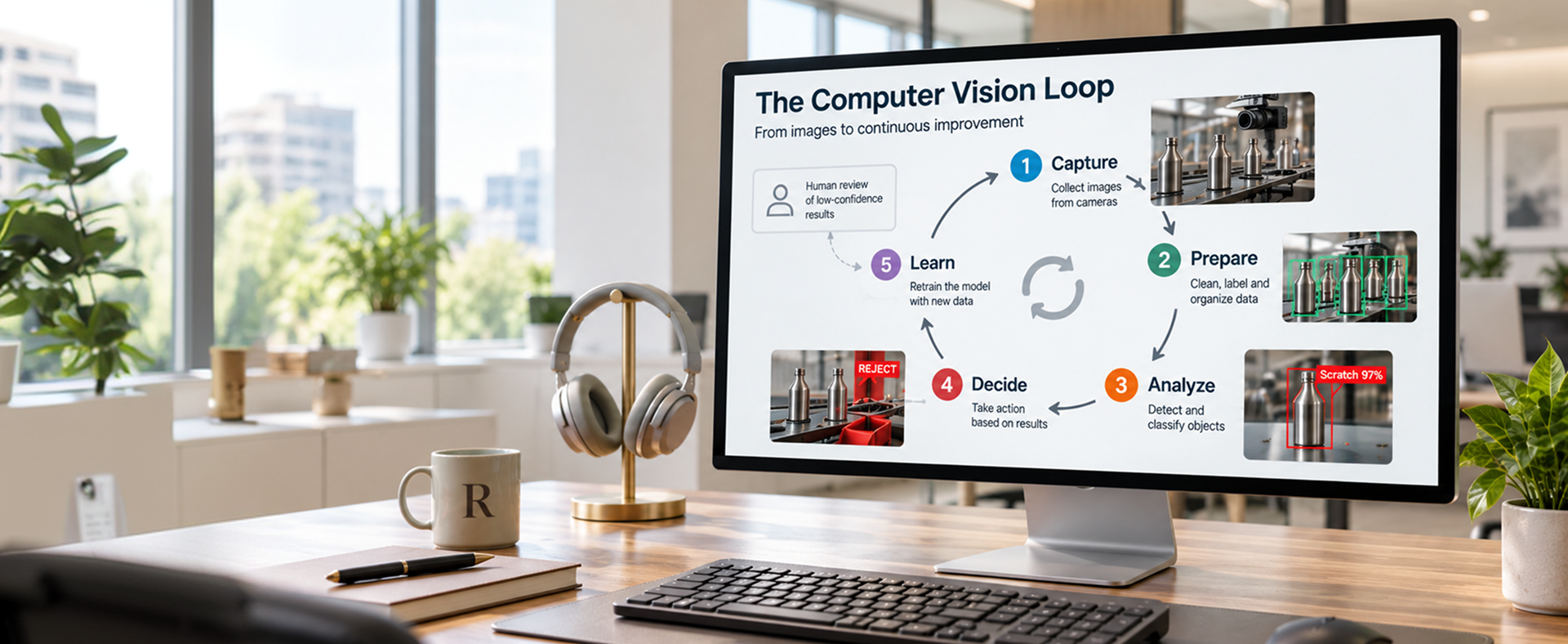
Every AI vision system follows the same five-step loop:
- Capture. A camera, scanner, drone, or phone records an image or video.
- Prepare. Software cleans and resizes the image.
- Analyze. A deep learning model, usually a CNN or a vision transformer, predicts what it sees.
- Decide. Business rules turn predictions into actions.
- Learn. Your team labels mistakes and retrains the model so accuracy improves.
Image capture and retraining decide most computer vision projects. Solid data engineering behind the camera matters as much as the AI in front of it.
Computer Vision vs Image Recognition vs Machine Vision
| Term | What it means | Typical example |
|---|---|---|
| Computer vision | The broad AI field of understanding images and video | A store camera that spots empty shelves |
| Image recognition | One task inside computer vision: naming what is in an image | Tagging a photo as "blue running shoe" |
| Machine vision | Industrial systems that use cameras and rules or AI to guide machines | A bottling-line camera checking every cap |
Computer vision is the umbrella over both image recognition and machine vision. Common building blocks include OpenCV, YOLO, AWS Rekognition, Azure AI Vision, and Google Cloud Vision. Custom models are usually built in Python, so Python development skills sit at the heart of vision teams.
Types of Computer Vision: The Core Tasks Behind AI Vision Systems
Recognition tasks
Image classification
Image classification labels a whole image, such as "defect" or "no defect." It is image recognition in its simplest form.
Object detection
Object detection finds and boxes each object, such as every pallet on a dock.
Segmentation
Segmentation outlines objects pixel by pixel, useful for measuring a wound or a crop field.
Reading and motion tasks
Optical character recognition (OCR)
OCR reads printed or handwritten text on labels, invoices, and forms.
Tracking and pose estimation
Tracking follows movement across video frames, such as a worker's posture or a vehicle's path.
Multimodal models can also answer questions about an image, which opens the door to AI products built on a simple photo.
Why Computer Vision Applications Are Growing Now
Three shifts made computer vision practical for everyday businesses:
- Cheaper hardware. Cameras and edge AI chips cost a fraction of what they once did.
- Pretrained models. You fine-tune an existing model instead of training from scratch.
- Edge computing. Models run next to the camera and decide in milliseconds.
Quality assurance and inspection formed the largest computer vision application segment in 2025, at 26.1% of the market.1 The real question is where to aim it first, which AI strategy consulting helps you rank.
Computer Vision in Manufacturing and Quality Control
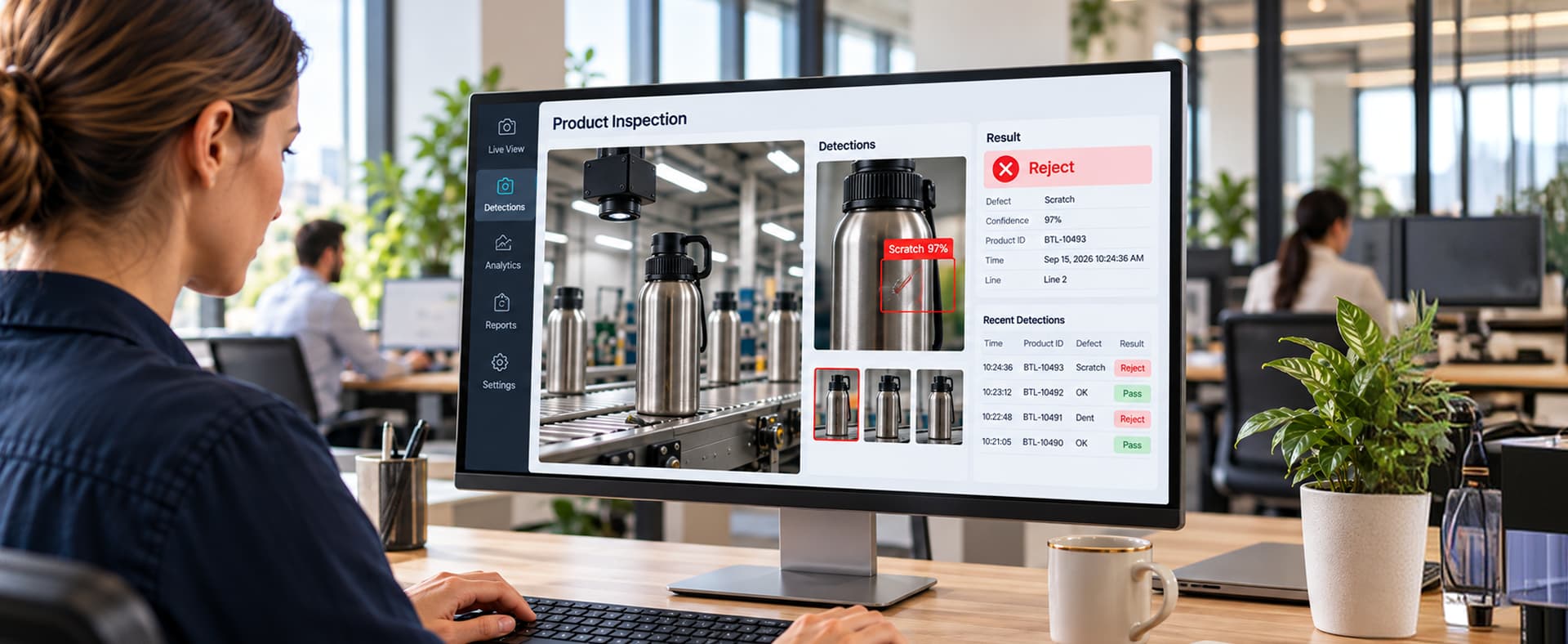
In manufacturing, computer vision inspects products for defects, verifies assemblies, measures parts, and monitors worker safety. A 2017 McKinsey report estimated that AI-based visual inspection can raise defect detection rates by up to 90% compared with human inspection.2
Where vision pays off on the line
Inspection and quality
Cameras check surfaces on metal, glass, textiles, and electronics, and confirm every screw, label, and connector is in place.
Rule-based machine vision vs deep learning inspection
Rule-based machine vision
Rule-based machine vision uses fixed rules for size, color, or position. It is fast and predictable but struggles with natural variation.
Deep learning inspection
Deep learning inspection learns from labeled examples, so it catches scratches, stains, and odd shapes that rules miss.
Measurement and safety
Cameras gauge parts without contact and check for helmets and vests.
Manufacturing vision pays off most when results flow into your MES or ERP. Custom manufacturing software development connects the camera to the rest of the plant.
Computer Vision in Retail and Ecommerce
In retail and ecommerce, computer vision monitors shelves, powers visual search, and tags product images.
In the store
- Shelf monitoring that spots out-of-stocks and misplaced items
- Self-checkout that recognizes produce and flags missed scans
Online
- Visual search: shoppers upload a photo and find similar products
- Automatic product tagging for color, style, and material
Automatic tagging saves catalog teams hours when the tags flow straight into your product information management system. Visual search features usually need ecommerce software development to fit the buying journey.
Computer Vision in Healthcare
In healthcare, computer vision analyzes X-rays, CT scans, MRIs, and retinal photos to help clinicians spot disease earlier. The FDA's list of AI-enabled medical devices passed 1,300 in December 2025, and radiology accounted for 1,039 of them, nearly 80% of the total.3
- Flagging suspected strokes, fractures, and lung nodules
- Screening retinal images for diabetic eye disease
Medical vision tools support clinicians rather than replace them. Strict privacy and regulatory rules apply, so work with a team experienced in healthcare software development from day one.
Computer Vision in Transportation and Logistics
In transportation and logistics, computer vision guides self-driving vehicles, reads package labels, and verifies deliveries.
Autonomous vehicles
Self-driving cars use cameras, alongside radar and lidar, to detect lanes, traffic signs, pedestrians, and other vehicles. Waymo reported 500,000 paid robotaxi rides per week across 10 U.S. cities in March 2026.4
Warehouses and delivery
- Reading barcodes and labels on moving packages
- Measuring package dimensions for accurate shipping costs
- Verifying proof of delivery with a driver's phone photo
Warehouse vision tools work best when they plug into your WMS and TMS through purpose-built logistics software. For drivers, a mobile app with on-device vision verifies deliveries even without a signal.

Computer Vision in Security and Surveillance
In security and surveillance, computer vision controls access, reads license plates, and flags unusual activity on camera feeds.
- Facial recognition: grants or denies access to buildings, rooms, and devices.
- License plate recognition: automates parking, tolls, and gate entry.
- Anomaly detection: flags loitering, abandoned bags, or after-hours movement.
Security vision systems process footage of real people, so privacy laws and bias risks apply. An AI governance and risk assessment sets rules for consent and retention before launch.
More Computer Vision Examples Across Industries
Agriculture
In agriculture, drones and field cameras spot crop disease, weeds, and water stress, so farmers spray and water only where needed.
Construction, insurance, and back office
- Construction: site cameras track progress against plans.
- Insurance: photo-based damage assessment speeds up claims.
- Back office: OCR plus AI reads invoices and forms, then routes the data.
Document processing is often the easiest computer vision starting point and a common entry into broader AI services.
Computer Vision Use Cases by Business Goal
| Business goal | Computer vision use case | Metric to track |
|---|---|---|
| Cut defects and returns | Automated visual inspection | Defect escape rate |
| Reduce manual data entry | OCR and document intelligence | Hours saved per week |
| Improve on-shelf availability | Shelf monitoring | Out-of-stock rate |
| Raise online conversion | Visual search and auto-tagging | Search-to-cart rate |
| Improve worker safety | PPE and zone monitoring | Incidents per month |
Track each metric before and after launch, ideally in Power BI dashboards your leaders already check.
How to Implement Computer Vision: A Six-Step Roadmap
Data is the most common reason vision projects stall. In February 2025, Gartner predicted that organizations would abandon 60% of AI projects unsupported by AI-ready data through 2026.5
Step 1: Pick one narrow problem
Choose a task with a clear cost, like manual inspection at one station.
Step 2: Check your data
Confirm you have enough labeled images, including rare defects. An AI data readiness assessment answers that before you spend on models.
Step 3: Fix the capture setup
Camera position, lighting, and resolution matter more than teams expect.
Step 4: Build a pilot
Test a fine-tuned model on real production images, not a clean demo set, and decide where it runs.
Edge processing
Runs next to the camera for fast, private decisions.
Cloud processing
Runs on remote servers for heavy models that can wait.
Step 5: Connect it to your systems
A prediction nobody acts on is worthless. Plan integrations to your ERP, MES, or WMS early.
Step 6: Monitor and retrain
Products, lighting, and seasons change, so model accuracy drifts. Ongoing AI operations support keeps the model reliable after launch.
Common mistakes to avoid
- Starting with a vague goal like "use AI on our cameras"
- Ignoring edge cases, like glare, dust, or new product variants
"A vision model is only as good as the images you train it on and the system it sends its answers to."A lesson from real computer vision projects
Computer Vision Readiness Checklist
Clear policies and AI governance keep a vision program compliant after launch.
Frequently Asked Questions
What are some real-world examples of computer vision applications?
Waymo robotaxis, FDA-cleared tools that flag strokes on CT scans, and factory cameras that reject defective parts.
Is image recognition the same as computer vision?
No. Image recognition is one task inside computer vision, alongside object detection, segmentation, and tracking.
What is the difference between machine vision and computer vision?
Machine vision is an industrial use of computer vision that guides or inspects machines on a production line.
What are the main types of computer vision?
Image classification, object detection, segmentation, OCR, and tracking or pose estimation.
Why is computer vision important?
It automates repetitive visual checks and turns image data into decisions.
How much data do I need to start?
Often a few hundred to a few thousand labeled images when you fine-tune a pretrained model.
Can computer vision run without the cloud?
Yes. Edge devices run models next to the camera for fast, private, offline decisions.
How accurate are AI vision systems?
Set a concrete target, such as a defect catch rate with a cap on false rejects, and measure it on your own production images.
How long does a computer vision project take?
A focused pilot often takes weeks, not months.
Do I need an in-house AI team?
Not always. Many companies start with a partner or hire AI developers for a single project.
The Bottom Line
Computer vision has moved from research labs to loading docks and clinics. Winning projects share one clear problem, good images, and a direct line from answer to action.
To build the business case, see how to calculate AI automation ROI.
"The cameras are already running. Computer vision decides whether that footage becomes a cost or an asset."The bottom line
Does someone on your team look at things all day?
Bring us the problem and a few sample images. We will tell you honestly whether computer vision fits.
Start with an AI discovery sprint
Sources & Citations
Primary research and industry reporting used for the statistics in this guide:
- Grand View Research, "Computer Vision Market Size and Share Report, 2026 to 2033": $23.6 billion market in 2025, $101.5 billion forecast for 2033, and quality assurance and inspection at 26.1% of 2025 revenue.
- McKinsey & Company, "Smartening Up With Artificial Intelligence (April 2017)": AI-based visual inspection may increase defect detection rates by up to 90% compared with human inspection.
- Radiology Business, "Dozens of New AI-Powered Devices Make FDA's List of Approvals (December 2025)": More than 1,300 FDA AI-enabled medical devices, with 1,039 in radiology (nearly 80%). Primary list: FDA, Artificial Intelligence-Enabled Medical Devices.
- TechCrunch, "Waymo's Skyrocketing Ridership in One Chart (March 2026)": 500,000 paid robotaxi rides per week across 10 U.S. cities.
- Gartner, "Lack of AI-Ready Data Puts AI Projects at Risk (February 2025)": Organizations will abandon 60% of AI projects unsupported by AI-ready data through 2026.