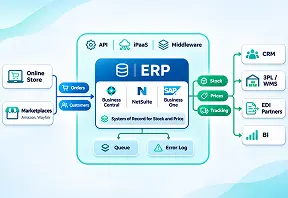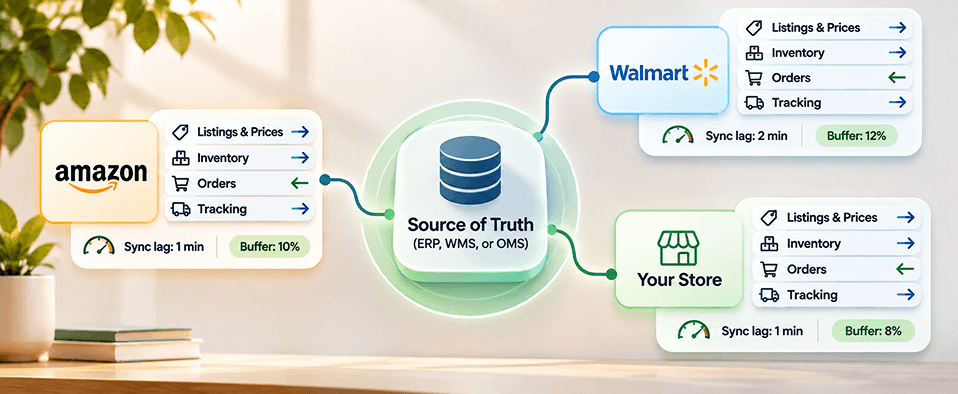
Ecommerce channel management is the process of keeping listings, inventory, orders, and prices consistent across every place you sell, such as Amazon, Walmart, and your own store. It uses one source of truth for stock, a sync schedule for each data type, and buffer and allocation rules so no channel sells a unit another channel already sold.
Who this is for: You run operations or ecommerce for a US manufacturer, distributor, or brand. You sell on Amazon, Walmart, and your own site, and you hear the same complaint every week: "We oversell on Amazon because stock doesn't update fast enough across channels." Each oversell means a cancelled order, a mark against your seller metrics, and another hour of manual fixes.
Selling on three channels should triple your reach. For many teams it triples the cleanup.
A unit sells on your website. Amazon still shows it in stock. An hour later you cancel an order you never could have filled. Most teams try to fix this by buying channel management software, and the software does help, but only after you decide what syncs, how often, and how much stock each channel gets to see. Those decisions are what ecommerce channel management actually is.
The stakes are bigger than one cancelled order. IHL Group's 2026 study puts the cost of inventory distortion, meaning out-of-stocks plus overstocks, at $1.7 trillion a year, or 6.2% of global retail sales.1 Overselling on a marketplace is the most visible version of that problem, and one of the most fixable.
This guide gives you rules, not just a tool list: the four data types to sync, a sync-frequency table, buffer and allocation examples you can copy, order routing logic, a tools-versus-custom guide, and a setup checklist in the order to do it. We build these setups for brands through our Amazon marketplace team and through Redefine Suite, so the examples come from real catalogs.
What Is Ecommerce Channel Management?
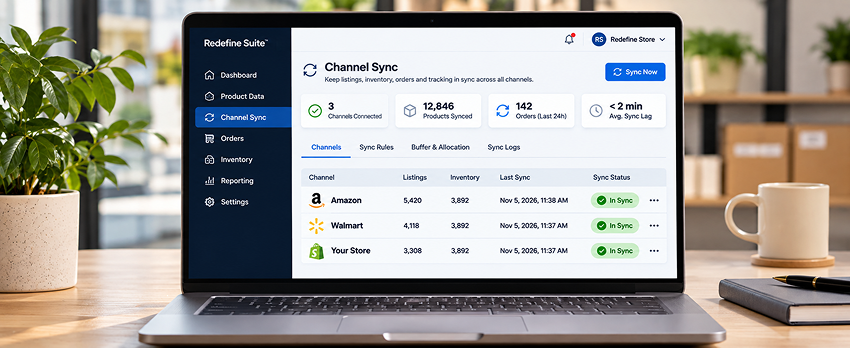
Ecommerce channel management means running every sales channel from one set of data. Your listings, stock counts, orders, and prices start in one system and flow out to Amazon, Walmart, your website, and any other marketplace on a schedule you control. When a unit sells anywhere, every other channel hears about it before it can sell again.
That is the model behind Redefine marketplace and channel management software: one catalog, one live stock count, and one order queue feeding Amazon, Walmart, your store, and 100-plus other channels.
A concrete example. A distributor sells a cast iron skillet on Amazon, Walmart, and its BigCommerce store, with 40 units in its ERP. Its channel rules publish 36 units to each marketplace (holding 10% back), route Walmart orders to the warehouse nearest the buyer, and set all three channels to zero the moment the ERP count hits four.
Channel management covers four jobs: keeping product content right for each channel, keeping available stock accurate, getting orders into your fulfillment system fast, and keeping prices correct after fees and promotions. Product content usually starts in a product information system, so a clean catalog comes first. Good PIM software gives multichannel sellers one record per product, channel-specific attributes, and validation before anything goes live.
One note on terms. In travel, a "channel manager" syncs hotel rooms across booking sites. This guide covers product channels only: marketplaces, your store, and wholesale.
The 4 Things to Sync: Listings, Inventory, Orders, and Prices
Overselling on Amazon and your website happens when one channel sells a unit before the other channels learn it is gone. The fix is to make one system the source of truth for inventory, push every change out within minutes, and hold a buffer that covers the gap you cannot close.
The gap is real, even with good software. Amazon tells developers to send one feed of the same type no more than once every 20 minutes, and warns that feeds can take up to eight hours to process under heavy load.2 Here are the four things you sync, and what breaks when each drifts.
1. Listings
Titles, images, attributes, and categories flow from your PIM to each channel. When they drift, marketplaces reject or suppress the listing.
2. Inventory
Available-to-sell quantity per channel, after reservations and buffers, flows from your ERP, WMS, or OMS. When it drifts, you oversell.
3. Orders
Orders flow into your order system; status and tracking flow back. Late orders leave sold stock published. Missing tracking makes an order look unshipped.
4. Prices
Base price, channel markup for fees, and promotions flow from your pricing rules. When they drift, you leak margin or lose the buy box.
Tools like Redefine Suite channel sync push inventory, orders, and prices from one record, and listing health diagnostics catch rejected listings before they cost sales.
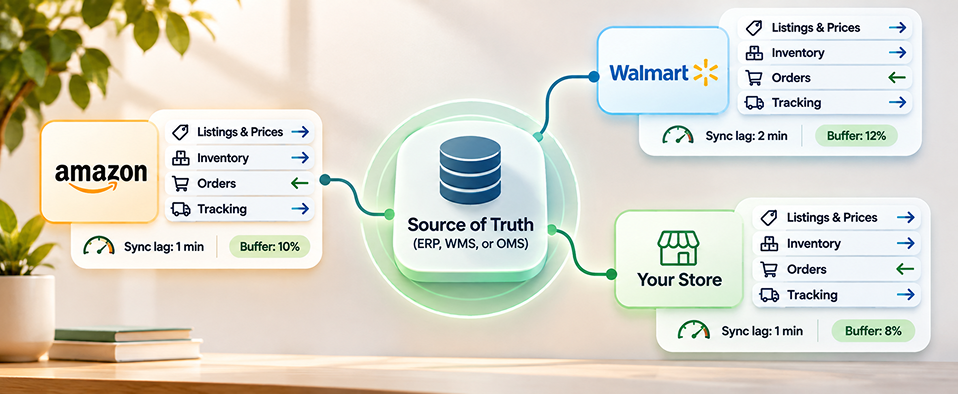
Recommended Sync Frequency for Each Data Type
Sync inventory on every change, then reconcile it on a schedule. Sync everything else as often as the channel's rules need and no more often than its API allows. Event-driven updates close the oversell window; the scheduled reconcile catches anything an event missed.
| Data object | Direction | Recommended frequency | Why it matters |
|---|---|---|---|
| Available inventory | ERP, WMS, or OMS to every channel | On every change, plus a full reconcile every 15 to 60 minutes | Closes the oversell window; the reconcile catches missed events |
| New orders | Each channel to OMS or ERP | Every 5 to 15 minutes, or by webhook | Reserves stock fast so other channels stop selling it |
| Order status and tracking | OMS to each channel | Within 1 hour of shipment | Protects late shipment and valid tracking rates |
| Cancellations and returns | Each channel to OMS, then inventory | Every 15 to 60 minutes | Puts resellable units back into available stock |
| Prices | Pricing rules or PIM to each channel | On change, plus a daily reconcile | Keeps channel markup and promo prices right |
| Listing content and attributes | PIM to each channel | On approval, batched daily | Avoids feed backlogs and repeat rejections |
| Fees and settlements | Each channel to finance or BI | Daily | Shows true margin by channel |
These are Redefine's recommended starting points, not platform rules. Tighten the inventory cadence for your fastest sellers, and check each marketplace's API limits before you schedule anything. A schedule that sends more feeds than a channel accepts just builds a queue, and a queue is another form of sync lag.
The one rule: One system writes inventory. Every channel reads it. If two systems can change stock, you will oversell.
What Overselling Costs You on Amazon and Walmart
Every oversell becomes a seller-cancelled order, and both marketplaces measure cancellations against hard limits. Miss them and you risk suppressed listings, lost buy box share, or account suspension.
As of November 2026, Walmart's published standards (last updated July 28, 2026) require a cancellation rate of 2% or less, on-time delivery of 90% or more, valid tracking on 99% or more of orders, and a late shipment rate of 5% or less, measured over 30 or 60 days.3 Amazon's seller performance policy sets an order defect rate below 1% over 60 days, a cancellation rate below 2.5% over 7 days, and a late shipment rate below 4% over 10 or 30 days, with the last two applying to seller-fulfilled orders.4 Exceeding any of them can lead to deactivation.
| Metric | Amazon target | Walmart target | How overselling hurts it |
|---|---|---|---|
| Cancellation rate | Below 2.5% over 7 days (seller-fulfilled) | 2% or less | Every oversell you cancel counts against you |
| Late shipment | Below 4% over 10 or 30 days | 5% or less | Orders stuck in sync miss their ship-by date |
| Tracking | Valid tracking expected on seller-fulfilled orders | 99% or more valid tracking | Tracking that never syncs back looks missing |
| Defects and delivery | Order defect rate below 1% over 60 days | On-time delivery 90% or more | Routing to the wrong warehouse delays delivery |
Do the math on your own volume. Ship 1,000 Walmart orders in a 30-day window and 21 cancellations put you over the 2% line. For a fast-moving SKU with a two-hour sync gap, that can be one busy afternoon.
If your Amazon metrics are already slipping, our Amazon account management services team can audit what is driving cancellations before you change any rules.
"Overselling is rarely a stock problem. It is a timing problem."Why sync lag, not stock levels, drives most marketplace cancellations
Inventory Buffers and Allocation Rules
An inventory buffer is stock you hide from a channel on purpose, so the sync gap cannot cause an oversell. An allocation rule decides how much of your available stock each channel can see. Together they turn "we hope the sync is fast enough" into a number you control.
Buffer and allocation rule examples
| Rule type | Example rule | Best for |
|---|---|---|
| Percentage buffer | Publish 90% of available stock to Amazon and Walmart; hold 10% back | Most SKUs, as your default |
| Low-stock floor | When available stock drops to 5 units, set marketplaces to 0 and keep your own store live | Slow movers and last units |
| Fixed allocation | Top 50 SKUs: 40% Amazon, 20% Walmart, 40% store and wholesale | Hero products with steady demand |
| Velocity buffer | Buffer = units sold per hour on that channel x worst-case sync lag in hours, plus 2 | Fast sellers and promo days |
| Event override | Raise the marketplace buffer to 25% for Prime Day or a flash sale | Short demand spikes |
| Pool separation | Count FBA or WFS stock only for its own channel; never share it with your store | Sellers using marketplace fulfillment |
Worked example. You have 200 units of a SKU. A 10% buffer publishes 180. A Walmart cap of 50 means Walmart shows 50 and Amazon shows 180. If Amazon sells 6 units an hour and your worst measured sync lag is 2 hours, the velocity rule says hold at least 14 units (6 x 2, plus 2). Your 10% buffer already holds 20, so you are covered. Double the velocity on Prime Day and you need 26, which is exactly why the event override exists.
How to Set Up Inventory Buffers in 8 Steps
Set up inventory buffers by measuring your sync lag, setting a default buffer, then layering floors, allocations, and event overrides on top. Each step below starts with a verb and shows roughly how long it takes.
- Segment your SKUs by velocity. Split them into fast, medium, and slow movers from a 90-day sales export. Effort: about 2 hours.
- Measure your real sync lag per channel. Change stock on a test SKU and time how long each channel takes to show it. Repeat at a busy hour. Effort: 1 day.
- Set a default percentage buffer. Start at 10% for marketplaces and 0% for your own store. Effort: 30 minutes.
- Add low-stock floors per segment. Use a higher floor for fast movers than for slow ones. Effort: 1 hour.
- Assign fixed allocations to hero SKUs. Agree on channel splits with sales and marketing for your top 50 products. Effort: 2 to 3 hours.
- Separate fulfillment pools. Keep FBA and WFS stock out of your shared pool. Effort: about 1 hour per channel.
- Schedule event overrides. Put buffer increases on the promo calendar with start and end dates. Effort: 30 minutes per event.
- Review oversells weekly and adjust. Raise buffers on SKUs that oversold and lower them on SKUs that sat idle. Effort: 30 minutes a week.
Buffers only work if the number underneath them is right. Inventory visibility software gives you one live count across locations, and multi-location inventory control lets you allocate by warehouse as well as by channel.
Order Routing Across Channels
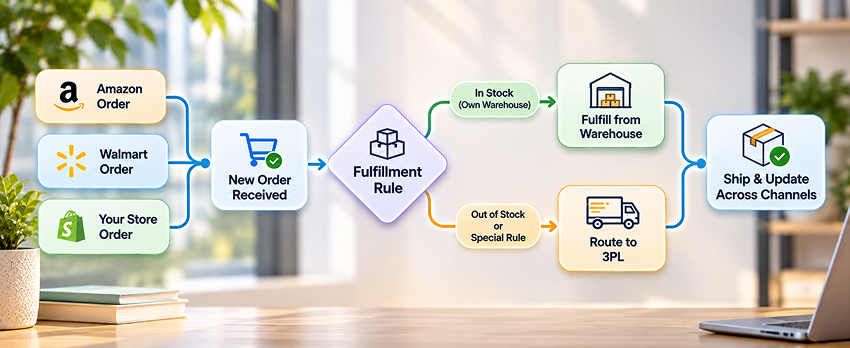
Order routing decides which warehouse, store, or supplier ships each order. Good rules ship from the closest location with stock, protect each marketplace's delivery promise, and keep marketplace-fulfilled orders out of your own queue.
Set your rules in this order, so each one only sees the orders the one before it passed on:
- Channel rule: FBA and WFS orders go to the marketplace; everything else enters your queue.
- Stock rule: only locations that hold the full order are candidates.
- Promise rule: orders with a 2-day promise go to the location that can meet it, even if shipping costs more.
- Distance rule: among candidates, pick the one closest to the buyer.
- Split rule: split a shipment only when no single location can meet the promise.
- Fallback rule: send leftovers to a dropship supplier or a backorder queue, and alert someone.
Example. A Walmart order for two items has a 2-day promise. Warehouse A, 300 miles away, has both. Warehouse B, 80 miles away, has one. The promise rule picks A, because it can ship the full order on time, and the order never needs a split.
An order routing engine applies these rules automatically. If your ERP already owns fulfillment, order synchronization integration gets marketplace orders into it fast enough for routing to matter.
Channel Management Software vs Custom Integration
Buy channel management software when your rules are standard and your catalog lives in one place. Build a custom integration when your ERP owns complex rules, such as account pricing, kits, or multi-warehouse allocation, that off-the-shelf tools cannot model.
How to choose channel management tools
- Native connectors for today's channels and the next two you plan to add
- Reads inventory from your source of truth instead of becoming a second one
- Buffer, floor, and allocation rules per SKU and per channel
- Event-driven sync with an update time you can test
- Order routing, an ERP connector, and listing error reasons, not just error flags
- Pricing that still works at your order volume in two years
Common options and who each fits
| Option | Best for | Check before you buy |
|---|---|---|
| Sellbrite (a GoDaddy brand) | Smaller sellers that want simple listing and inventory sync across Amazon, Walmart, eBay, and Etsy | Rule depth for kits, bundles, and several warehouses |
| Linnworks | Growing retailers that want inventory, orders, and shipping in one tool | How it treats your ERP as the source of truth |
| Rithum (formerly ChannelAdvisor and CommerceHub) | Larger brands that need marketplace, dropship, and retail network reach | Setup time and enterprise pricing |
| Sellercloud | Sellers that run their own warehouse and want WMS features with channel sync | Overlap if you already run a WMS |
| ChannelEngine | Brands expanding to many international marketplaces | Depth of the US marketplaces you need |
| Redefine Suite | Teams that want PIM, orders, inventory, and channel listings on one record, with no separate sync tool | Not built for single-channel sellers or catalogs under 100 SKUs |
| Custom integration | Unusual rules owned by your ERP, plus an IT team to maintain them | You own every API change and outage |
Go custom when the marketplace connection itself is the hard part, for example a Walmart integration that has to respect ERP allocation logic, or an ecommerce and ERP integration where the ERP must stay the record for stock and orders.
An honest note on our own product: Redefine Suite fits sellers who list one catalog on three or more marketplaces and spend over a fifth of their week on channel upkeep. Redefine reports new channels going live in 3 to 5 days on the Suite, against 6 to 8 weeks manually. On one channel, a lighter tool is the better call.
Channel Management Setup Checklist, in the Order to Do It
Set up channel management in this order: source of truth first, SKUs second, sync third, rules fourth, launch last. Skipping ahead is how teams end up with two systems writing inventory.
- Pick one source of truth for inventory. Your ERP, WMS, or OMS. Write it down and turn off stock edits everywhere else.
- Normalize SKUs across channels. Build one SKU map, including variants, bundles, and marketplace IDs such as ASINs and Walmart item IDs.
- Map listing attributes to each channel. Match your PIM fields to each marketplace taxonomy once, then reuse the map.
- Connect orders before inventory. Fast order intake reserves stock, which makes every inventory number after it more accurate.
- Set sync frequency per data type. Use the table above as your starting point and test each channel's real lag.
- Configure buffers and allocations. Default buffer first, then floors, then hero-SKU allocations.
- Set order routing rules. Channel, stock, promise, distance, split, fallback.
- Pilot 20 SKUs on one channel for two weeks. Pick a mix of fast and slow movers and track every oversell.
- Roll out channel by channel. Add the next marketplace only when the last one runs clean for a week.
- Review weekly. Oversells, cancel rate, late shipments, and sync lag, with an owner for each.
Adding new marketplaces later? Marketplace launch management reuses your attribute maps and pricing rules, so channel four takes days, not a new project.
Before you go live
- Only one system can change stock
- Every SKU maps to every channel listing, including bundles
- Buffers and floors are set for every velocity segment
- Tracking syncs back to each channel within an hour of shipment
- Someone owns the weekly oversell review
Example: How Off Grid Knives Reports Amazon and Its Store in One View
Off Grid Knives shows the reporting side of channel management: its store, Amazon, and email report into one Power BI view, and Amazon grew to 22% of revenue as annual revenue rose from $1M to $3.8M over three years. It did that with zero paid ad channels.
Off Grid Knives is a premium camping and outdoor knife brand. Knife ads are restricted, so every sale had to come from owned channels. Redefine built a custom BigCommerce store with order processing through BigCommerce APIs, built the Amazon Store and A+ product content, set up Klaviyo segmentation and flows, and created Power BI dashboards that show store and channel data in one view.
| Revenue source | Share of revenue |
|---|---|
| Organic search | 32% |
| Klaviyo email | 28% |
| Amazon | 22% |
| Social and direct | 18% |
The lesson for channel management: once a marketplace carries a fifth of revenue, you cannot judge it from a separate spreadsheet. One dashboard across the store, Amazon, and email let the team see which channel moved which product, which is the view you need before you set allocation rules by channel. Read the full Off Grid Knives case study, or see how marketplace reporting tracks the ecommerce KPIs that matter by channel.
Source: Redefine case study, Off Grid Knives, BigCommerce, Klaviyo, Amazon, and Power BI.
Common Channel Management Mistakes
Most oversells come from setup choices, not software bugs. These are the ones we see most often.
- Two systems writing inventory. A connector app and the ERP both update stock, and each overwrites the other.
- Syncing from the storefront instead of the ERP. Your store becomes the record by accident, and wholesale orders never reach it.
- One buffer for every SKU. Fast movers oversell and slow movers sit hidden from buyers.
- Mixing FBA or WFS stock with your own pool. Your store sells units that are sitting in an Amazon warehouse.
- Mismatched SKUs and bundles. A three-pack sells on Walmart and only one unit comes off the count. Treat a bundle as a recipe: deduct its components and publish it from its scarcest one.
- No scheduled reconcile. One missed event leaves a wrong number live for days.
- Forgetting promotions. Prime Day doubles velocity, and the buffer stays at 10%.
- Mapping categories by hand for every channel. Each new marketplace becomes a rebuild. Category and attribute mapping done once in the PIM fixes this.
Frequently Asked Questions
What is the difference between multichannel and omnichannel ecommerce?
Multichannel means you sell on several channels, such as Amazon, Walmart, and your store. Omnichannel means those channels share one customer, catalog, and inventory record, so a buyer gets the same price, stock, and service everywhere. Channel management is the operational layer that makes multichannel selling behave like omnichannel: one source of truth, shared rules, and no channel selling stock it cannot ship.
Can Shopify or BigCommerce manage Amazon and Walmart on their own?
Both platforms offer marketplace connectors that list products and sync stock, and they work well for simple catalogs on one warehouse. They get harder to manage when your ERP owns inventory, when you sell bundles or kits, or when you need per-channel buffers and order routing. At that point most teams add a channel management tool or a custom integration.
How much does channel management software cost?
Order volume drives the price more than features do. Capterra's 2026 listing shows Sellbrite free up to 30 orders a month, then $29 for 100 orders, $79 for 500, and $179 for 2,000.5 Linnworks prices by monthly order volume, with add-ons and a one-time onboarding fee but no percentage-of-revenue fees.6 Enterprise platforms quote case by case. Price your order volume two years out, plus the ERP connector and setup.
Does FBA or WFS stop overselling?
Partly. Marketplace fulfillment keeps those units on one channel, so Amazon cannot oversell stock sitting in its own warehouse. The risk moves to your remaining pool: if you also sell from your own warehouse, that stock still needs buffers. Never count FBA or WFS units as available for your store or Walmart, or you will sell units you cannot reach.
What is the difference between an inventory buffer and safety stock?
Safety stock is extra inventory you keep on hand to cover demand spikes or late supplier deliveries, so it is a purchasing decision. An inventory buffer is stock you already own but hide from a sales channel to cover sync lag, so it is a publishing decision. Most multichannel sellers need both: safety stock stops you running out, and a buffer stops you selling the same unit twice.
Which marketplaces can I connect, and how do I sync inventory with my ERP?
Most tools cover Amazon, Walmart, eBay, Etsy, and Google Shopping, and Redefine Suite lists its supported marketplaces publicly. For ERP stock, the cleanest setup makes the ERP the record and pushes changes out by event. Our inventory synchronization integration services connect SAP, NetSuite, Dynamics, and other ERPs this way.
The Bottom Line
You cannot make sync lag zero, but you can make it harmless. Pick one source of truth, sync each data type on its own schedule, hold a buffer that covers the gap, and route orders by rule instead of by habit. Then review oversells every week until there is nothing left to review.
Start with the two steps that cost nothing: measure your real sync lag on one SKU this week, and set a 10% marketplace buffer on your fastest sellers. Both take less than a day and need no new software.
Your next step: if you sell one catalog on three or more marketplaces and still fix oversells by hand, book a Redefine Suite walkthrough on your own catalog and we will show where your sync lag comes from. For more on the systems behind your channels, read 7 signs your ecommerce platform is holding back growth and how agentic AI is changing ecommerce operations.
"You cannot make sync lag zero. You can make it harmless."The bottom line on ecommerce channel management
Overselling again this week?
Send us your channel list and one SKU export. We will measure your sync lag, suggest buffer and allocation rules for your top 50 SKUs, and tell you honestly whether you need new software or just better rules.
Sources & Citations
Primary research, official marketplace pages, and documentation used for the statistics in this guide:
- IHL Group, The 2026 Inventory Distortion Study: inventory distortion (out-of-stocks plus overstocks) costs retailers $1.7 trillion a year, 6.2% of global retail sales. Published 2026.
- Amazon Selling Partner API, Feeds API Best Practices: submit one feed of the same type no more than once every 20 minutes; feeds can take up to eight hours to process under high load. Accessed November 2026.
- Walmart Marketplace Learn, Seller Performance Standards (last updated July 28, 2026): cancellation rate 2% or less, on-time delivery 90% or more, valid tracking 99% or more, late shipment 5% or less, over 30 or 60 days.
- Amazon Seller Central, Seller performance policies and Account Health metrics: order defect rate below 1% (60 days), cancellation rate below 2.5% (7 days), late shipment rate below 4% (10 or 30 days). No date on the page; accessed November 2026.
- Capterra, Sellbrite Pricing 2026: Forever Free up to 30 orders a month; Pro 100 at $29, Pro 500 at $79, and Pro 2K at $179 a month. Accessed November 2026.
- Linnworks, Linnworks Pricing: plans priced by monthly order volume, add-ons billed monthly, one-time onboarding fee, no percentage-of-revenue fees. Page last modified November 28, 2025.

Umang Patel
Co-owner | Ecommerce Architecture, Systems & Integrations
Umang Patel has worked in ecommerce and technology since 2001. He specializes in backend systems,
ecommerce architecture, ERP and platform integrations, automation, and reverse engineering complex
business processes. At Redefine Innovations, he leads technology and project teams building scalable
systems across both B2B and DTC ecommerce environments.
Areas of expertise: Ecommerce
Architecture • Backend Systems • ERP Integration • Automation • Headless Commerce • Reverse Engineering