Redefine Suite / Quote-to-order

Turn an accepted quote into an order in one step.

See your own quotes turn into orders.

A demo built around your own quotes.

Book a personalized demo

Short answer

What is quote to order?

Updated

Quote to order is the path from a buyer's request to a placed order. A rep builds a quote, the buyer accepts it, and the quote becomes an order. Redefine Suite by Redefine Innovations keeps every step in one admin, so nothing is typed twice.

Many teams build quotes in a spreadsheet or an email. Then someone types the accepted quote into the ERP by hand, and a price or a count slips.

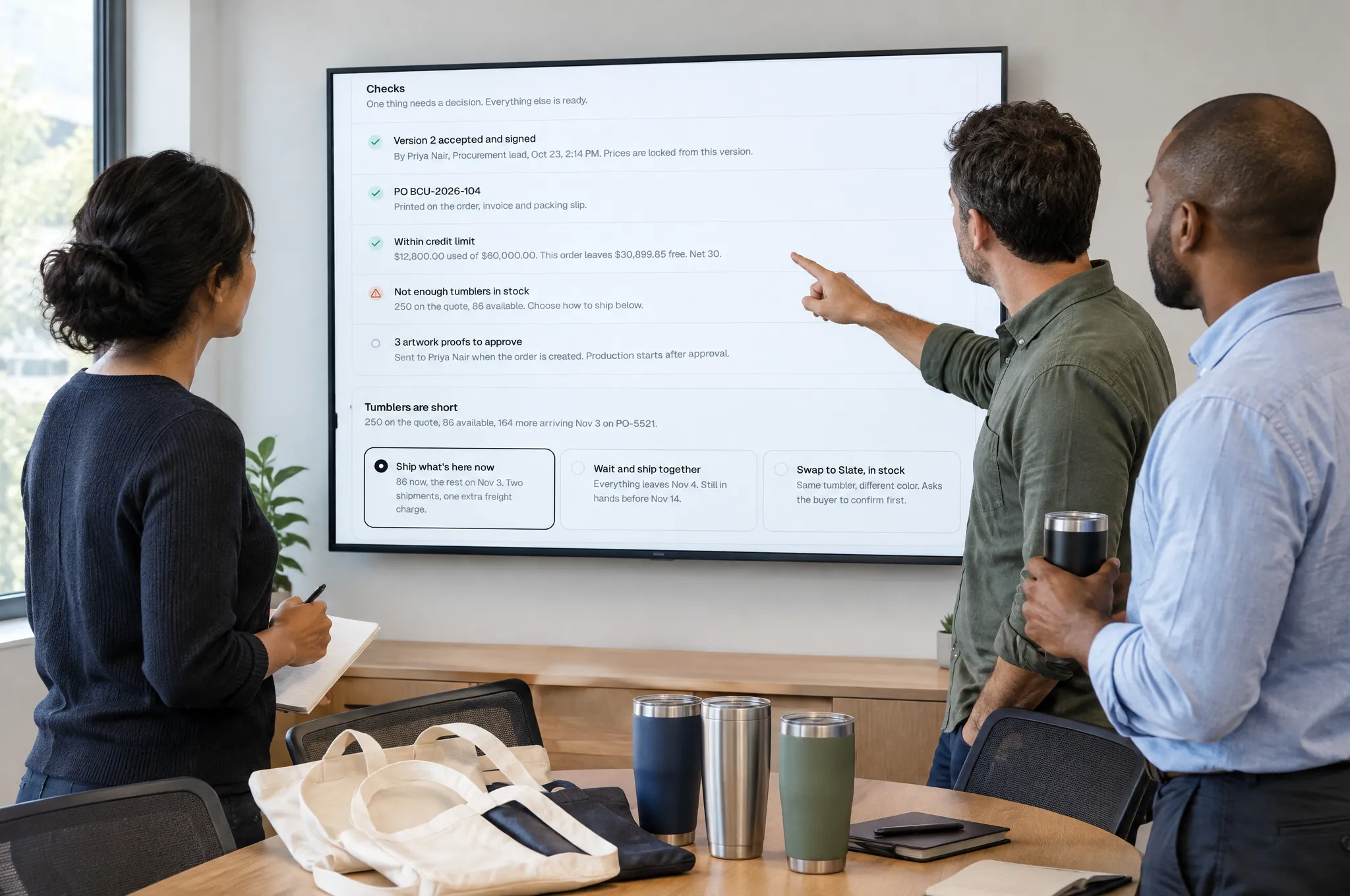
Redefine Suite checks the version, PO, credit and stock first. Then the Business Central sales quote becomes the sales order.

How the options compare

Three ways to handle quotes

OptionHow it worksWhat you getSee also
Redefine Suite quotesQuotes live in the admin, tied to a store and its pricesThe buyer accepts online, then one step to an orderCustomer-specific pricing
Spreadsheet and emailQuotes built by hand and sent as filesOrders typed again, with room for mistakesB2B commerce
Separate quote toolA quote builder that sits apart from the storeOne more tool to keep in step with the store and the ERPProcurement and punchout

What a quote holds

  • [1] Lines, prices and decoration
  • [2] Versions and buyer notes
  • [3] A valid-until date
  • [4] PO, payment choice and credit

See all of Redefine Suite.

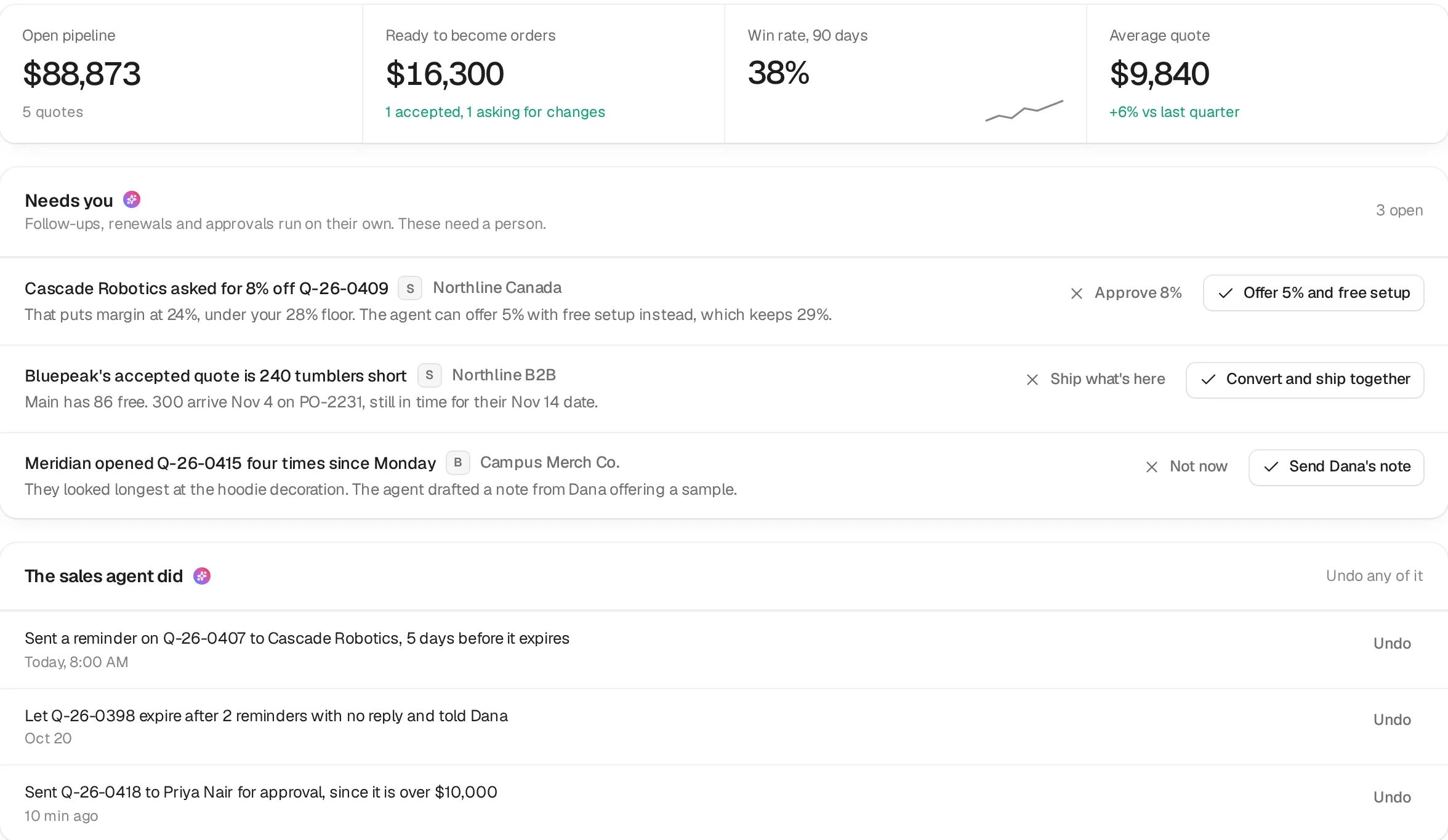
Redefine Suite quotes: open pipeline and win rate, three quotes that need you, and what the sales agent did on its own

Quotes

Every quote, from draft to order, in one list.

See what is open, what is ready to become an order and what needs you. The sales agent sends reminders and asks you before a big discount.

See how a quote becomes an order

From request to order

One quote, start to finish

Step from accepted quote to order
1

Timeline

  1. Request

    A buyer asks from a cart or by email

  2. Accept

    The buyer accepts with a PO

  3. Order

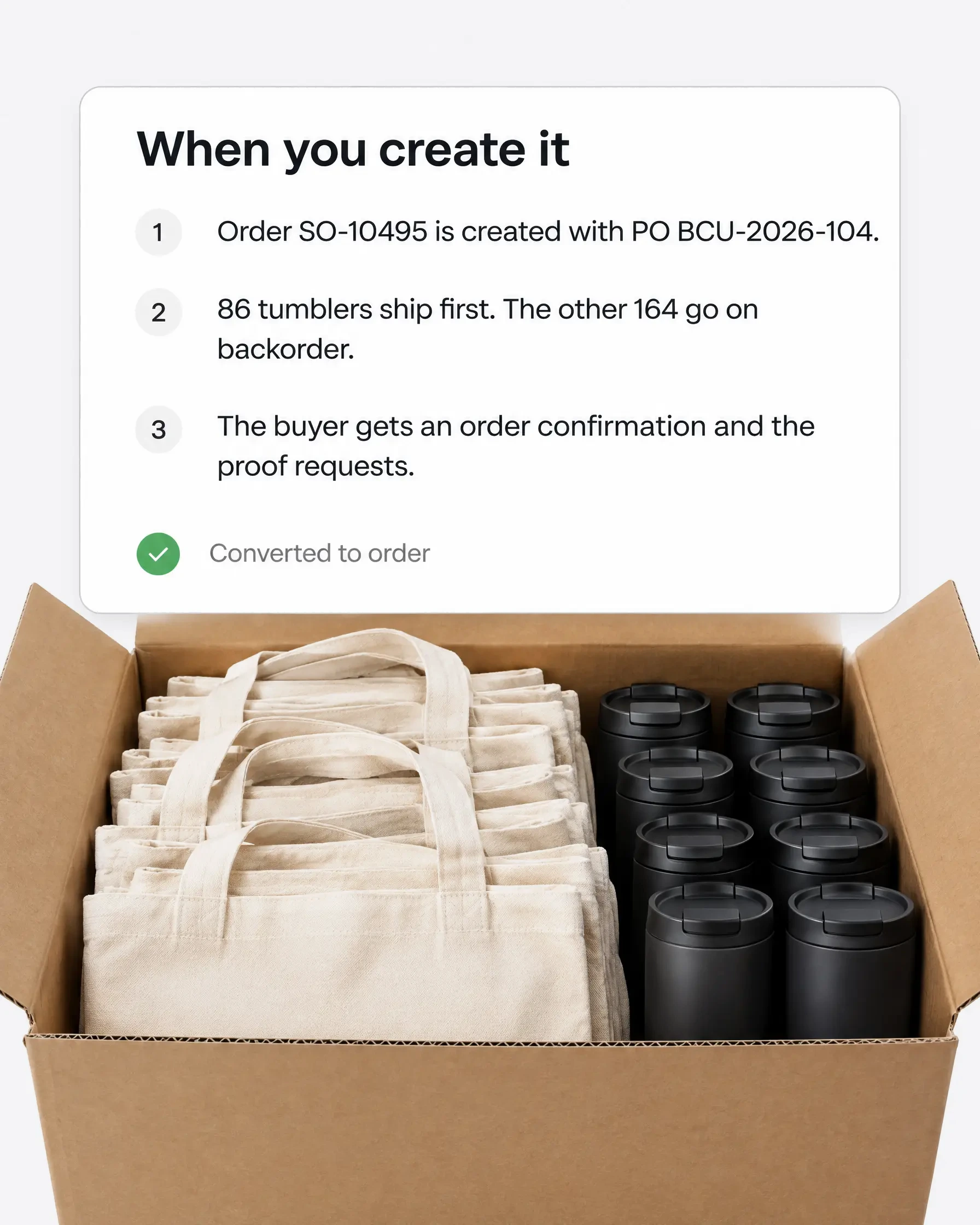
    The sales order is made in one step

Before

A rep emails a quote file. The buyer writes back. Then someone types it into the ERP by hand.

With Redefine Suite

  • 01Buyers turn a cart into a quote request
  • 02Every version is kept, with the buyer notes
  • 03The accepted version becomes the sales order

How it works

From accepted quote to sales order.

Three steps do the work. The buyer says yes on your store. The admin checks the order before it is made. Then Business Central gets the sales order. Pick a step below to see how it looks for your team and your buyer, from the first yes to the sales order.

A canvas tote, a black tumbler and a rust cap beside the buyer view of a quote: three items, a $16,300.15 total, pay on

What the buyer sees

The buyer opens the quote on your store. They see each line, the price, the total and the valid-until date. They accept with a PO and a way to pay, or they ask for changes and you send a new version.

What it saves

No file goes back and forth by email. The answer lands on the quote with the buyer name and the time, so your team knows what was signed.

What stays private

Buyers see their own prices and the total. They never see your cost or your margin, even when they ask for changes.

Built for teams that sell by quote.

Distributors, makers and branded goods sellers who quote large orders.

  • The path

    Five steps. One record.

    1. Request
    2. Quote
    3. Accept
    4. Check
    5. Order
  • 1

    record from the first request to the sales order.

  • University events coordinator unpacking a delivery of branded tote bags and tumblers in an office

    Delivery

    Your buyer gets what the quote said.

  • Why it matters

    The PO prints on the order, the invoice and the packing slip. Nobody has to check them line by line.

  • Where to start

    Start with your open quotes.

    See them in a demo

Features

Small details that keep quotes right.

Open any item to see what it does.

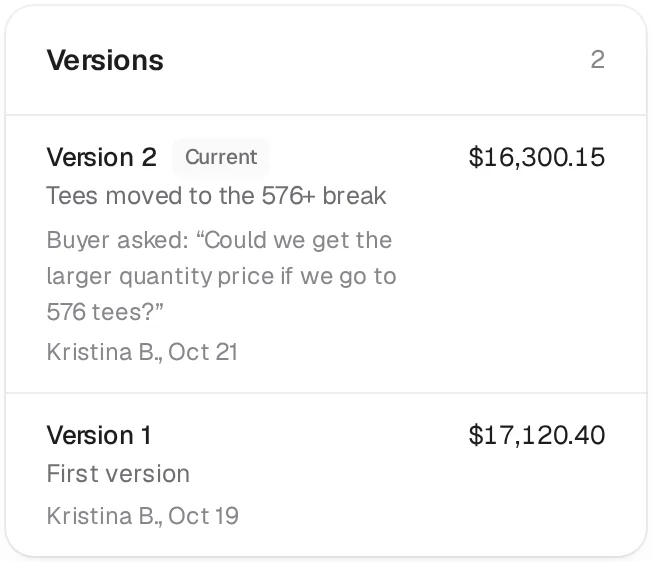
Versions and history

Revise a quote and keep every earlier one.

Buyers ask for changes. You make a new version. The old one stays, with the buyer note, the total and the date.

3 parts

  • Every version kept

    See what changed and when.

  • Buyer notes

    Their ask sits next to the version.

  • Save and extend

    Keep drafts and push the end date out.

Cart to quote

Buyers ask for a quote from their cart.

Big orders often need a quote first. Buyers can turn a full cart into a quote request on your store.

2 parts

  • A quote per store

    Each quote uses that store's prices.

  • Custom lines

    Add items that are not in the catalog.

Your margin stays private

Buyers see totals, never your margin.

Your team sees the margin on every quote. The buyer page never shows it. The sales agent asks you before a big discount.

2 parts

  • Margin on each quote

    Seen in the admin only.

  • Discount checks

    A discount under your floor waits for you.

Sales rep and sales manager at a desk monitor reviewing a quote in Redefine Suite
Redefine Suite quote versions card: version 2 is current after the buyer asked for a bigger quantity price, version 1

How does a buyer accept a quote?

They open the quote on your store and accept it with a PO number and a way to pay.

Or they ask for changes, and you send a new version. See B2B commerce

Can we see earlier versions of a quote?

Yes. Each time you revise a quote, the earlier version is kept.

You see what changed, who changed it and when. See customer account management

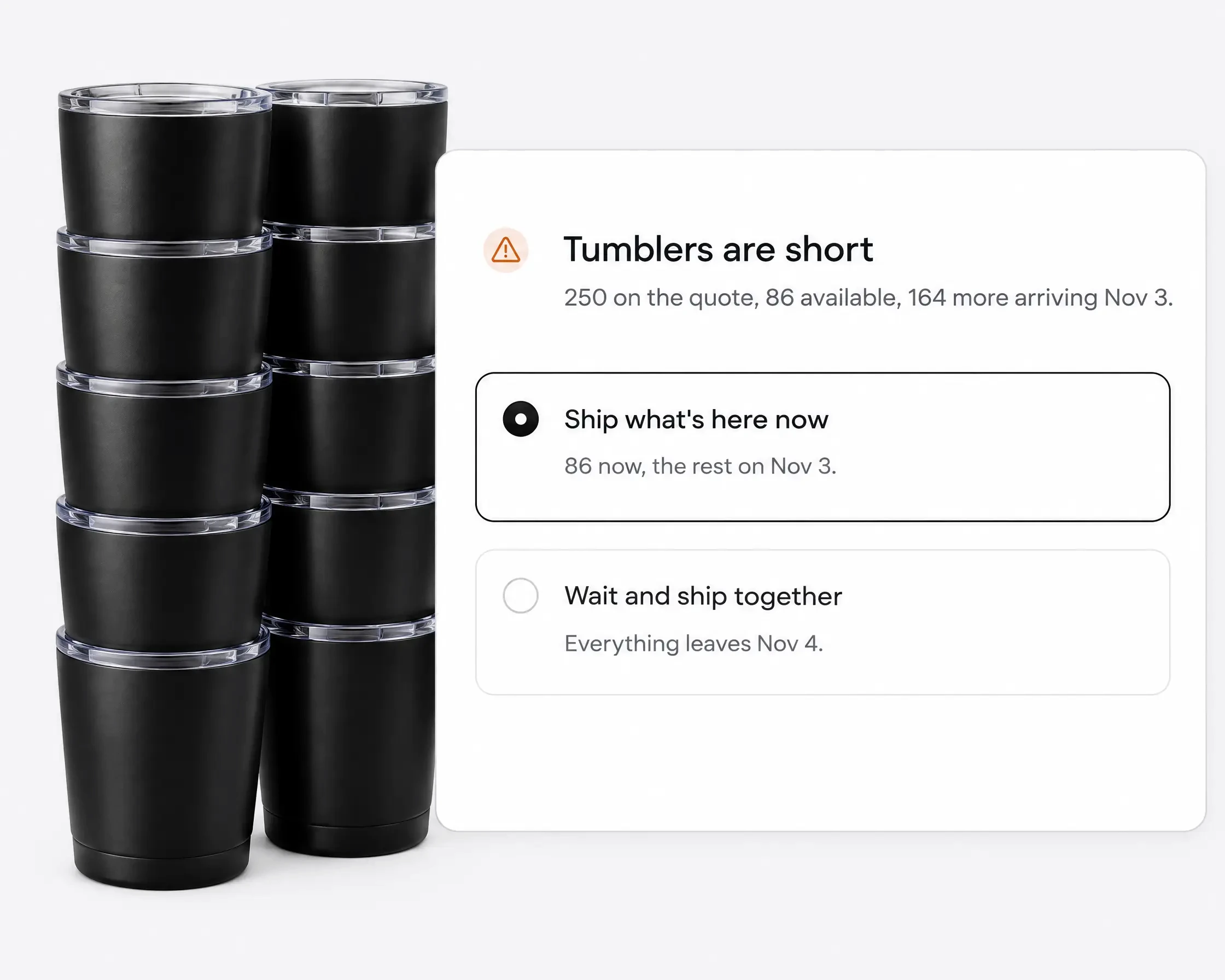
What if an item is short when the quote is accepted?

You choose. Ship what is here now, wait and ship together, or swap to an item in stock.

A swap asks the buyer to say yes first. See the omnichannel commerce platform

Does it work with Business Central?

Yes. The Business Central sales quote becomes the sales order with one action.

The order keeps the PO number, so nothing is typed twice. See customer-specific pricing

Can buyers see our margin?

No. Buyers see their prices and totals, never your margin.

Your team sees the margin on each quote in the admin. See promotions and merchandising

What happens when a quote is about to end?

Each quote has a valid-until date, or no end date at all.

The sales agent can send a reminder before it ends, and you can add 30 more days. See procurement and punchout

Book a demo

See your own quotes become orders.

In the demo, we load a few of your real quotes and walk each one to an order. A demo built around your own quotes. You can also use the demo booking page.

Three colleagues at a wall display reviewing the convert to order checks in Redefine Suite
  • Built on your own quotes
  • Your stock questions
  • Your ERP setup, checked
  • 550+ projects delivered

Book a personalized demo

Tell us what slows quotes down today. We set up the demo around it.

  1. 1We confirm your request
  2. 2A short call about your quotes
  3. 3Your personalized demo
  4. 4You decide what comes next