Redefine Suite / Conversational Commerce AI

Every buyer question gets an answer.

Conversational commerce AI in Redefine Suite. Buyer requests, questions and quotes in one place. The agent answers simple ones and drafts the rest.

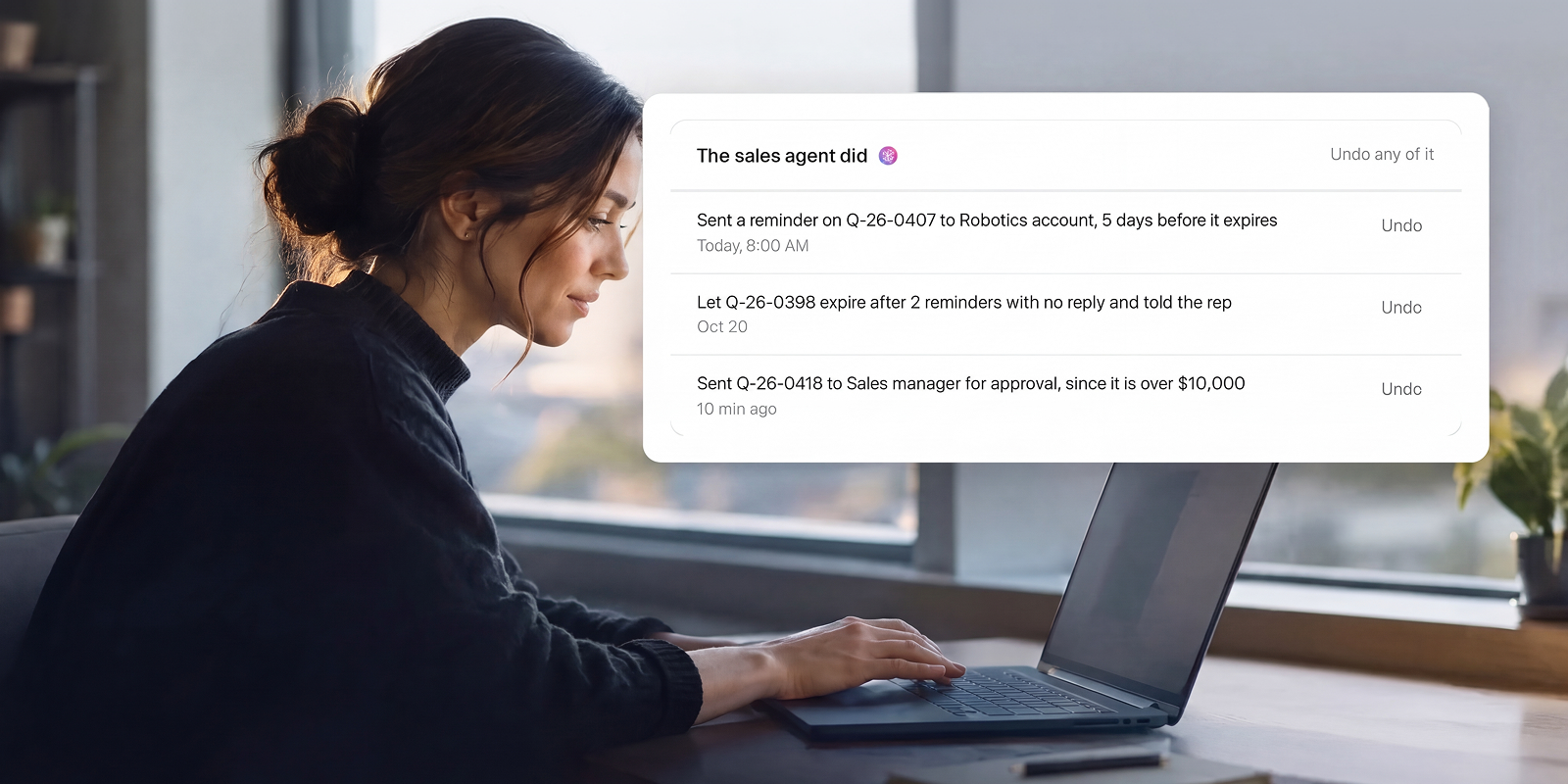
A sales rep with a headset replies to a buyer, with the real Redefine Suite Inbox card: what the inbox agent did, each
Proof from a chat app we built: buyer engagement rose 38% on mobile over web, with a 4.7-star rating. A live chat app Redefine built, not Redefine Suite AI. Source: Live Support case study The linked story documents 99.6%..

See every buyer conversation in one place.

A demo set up with your own Inbox, quotes and product questions.

Book a personalized demo

Short answer

What is conversational commerce?

Updated

Conversational commerce is selling through conversations: buyer questions, requests and quotes handled in one place. In Redefine Suite by Redefine Innovations, an AI agent answers simple questions, drafts replies and follows up on quotes. Choices about price, dates and credit wait for your team.

Many B2B sales are lost in the gaps: between a question and a reply, or a quote and a yes. Conversational commerce AI closes those gaps, so buyers do not wait or chase you.

The agent does the routine replies and reminders. Your team handles discounts, rush dates and credit, each with clear choices to tap.

How the options compare

Three ways to answer buyers

OptionHow it worksWhat you getSee also
Redefine Suite agentsAnswer and draft inside your limitsSees requests, quotes, carts and accountsAI workflow assistance
A chat box on one siteTalks to shoppers on that siteDoes not see quotes or accountsAgentic commerce AI
A shared email inboxStaff read and answer each messageSlow, and quotes go coldForms workflow software

What the agents work on

  • [1] Inbox requests from every store
  • [2] Product questions and reviews
  • [3] Quotes and buyer accounts
  • [4] Open carts and wishlists

Part of AI & Automation in Redefine Suite.

Every buyer request in one Inbox.

Forms, custom orders and quote requests from every store land in one queue.

Your Inbox, each morning Live

One queue

Order status

Answered

Quote requests

Drafted

Rush and credit

Asks you

What the inbox agent does with each request.

Three kinds of buyer talk

Requests, questions and quotes

Most buyer conversations are one of three kinds. Each has its own place in Redefine Suite, and the agent works on all three inside your limits.

In the admin

Inbox

Buyer requests

Contact us, consultations, custom products, catalog requests, form submissions, quote requests and account applications, from every store.

8types

  1. Reply drafted

    The agent reads the request and writes a reply. Send it, change it, or tap Make it shorter.

  2. One-tap choices

    When a date or price needs a person, it asks with two clear buttons, like add a rush fee.

  3. Turn into a quote

    Budget, quantity, dates and logo come with the request, so the quote starts filled in. See quote to order.

Each request keeps who sent it and from which store.

Accepted quotes become orders in one step on quote to order. Request forms are built in forms workflow software, and buyer accounts live in customer account management.

Reviews and questions

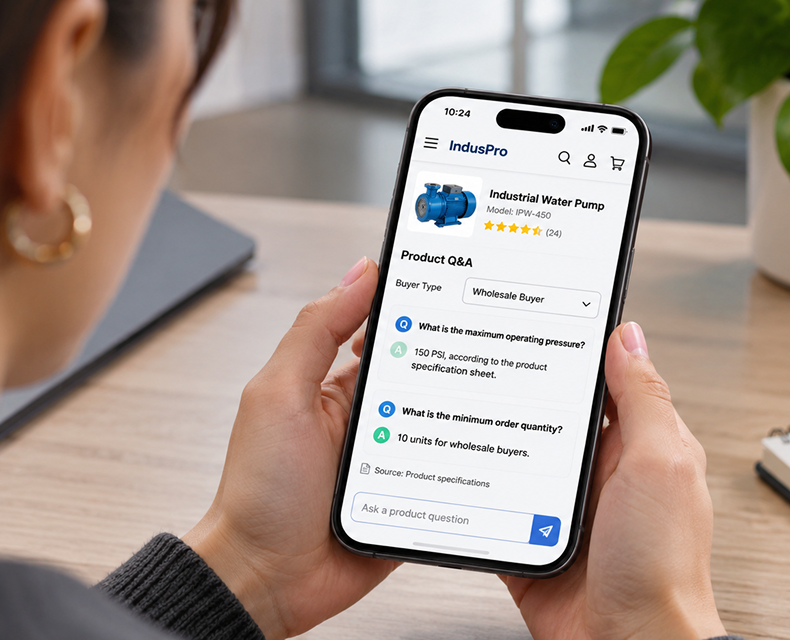
Product questions, answered with a source

Two kinds of buyer talk on every product page.

A merchandiser at a laptop reviews product questions the agent answered, each with its source
A buyer asks a question on a product page, and the answer shows where it came from.
A buyer in a stockroom reads a product answer on a phone before ordering

Part 01 Answered by the agent

Questions

The agent answers common questions from your spec sheets and FAQ library.

  • A1Shown on the product page
  • A2Filtered by buyer type
See AI catalog intelligence
A store manager reads a review with a reply drafted before publishing it

Part 02 Reply drafted

Reviews

A complaint waits with a reply drafted, and a fix to try.

  • B1Publish with the reply
  • B2From every store and marketplace
See product information management

One quote request, from form to order

A buyer at an office desk fills in a custom order request on a laptop

Stage 1 of 4

A buyer sends a request from your store.

The form keeps the products, quantity, in-hands date, ship-to and logo. The agent matches it to the buyer account.

Guardrails

What the agent never says alone

  1. A buyer asks for a lower price

    Your quotes

    Under your margin floor
    Waits

    The agent asks you first

    Inside your limits
    Offered

    The agent can offer it

    Your margin floor decides what the agent may offer.

    Prices

    A price cut under your floor always asks

    The sales agent follows up and extends quotes on its own. A discount under your margin floor waits for a person.

    • Buyers see totals, never your margin
    • Large quotes go to an approver
  2. Waiting for you

    Needs you

    [Rush] Custom quote request

    The in-hands date is sooner than the work allows

    2clear choices to tap

    Add a rush fee, or offer an item that ships in time.

    A request the agent will not answer alone.

    Facts

    Answers come from your own facts

    The agent answers from your spec sheets, product data and FAQ library. It does not make up sizes, materials or dates.

    • Each answer cites its source
    • Every action is logged, with undo

Is this a chatbot on our store?

No. It works on the buyer conversations you already get: Inbox requests, product questions, reviews, quotes and left carts. The agent answers the simple ones and drafts the rest for your team.

Every action is logged, with undo. See AI workflow assistance

Which buyer requests come into the Inbox?

Contact us, consultations, custom products, catalog requests, form submissions, quote requests and credit or account applications, from every store.

Each one can become a quote, an order or an account. See forms workflow software

Can the agent give a discount?

Only inside your limits. A price under your margin floor waits for you, often with an offer that keeps your margin. Buyers see totals, never your margin.

Quotes keep every earlier version. See quote to order

Where do product answers come from?

From your own spec sheets, product data and FAQ library. Each answer shows its source. Questions that are not simple wait with a reply drafted.

Clean reviews go live on their own. See AI catalog intelligence

Does it follow up on quotes and carts?

Yes. The sales agent sends a reminder before a quote expires and tells the rep when a buyer goes quiet. The cart agent reminds shoppers who left a cart, inside the limits you set.

A B2B cart over a buyer limit can become a quote for their approver. See the AI personalisation engine

Will it change our ERP?

Not on its own. Accepted quotes become orders in one step and post to Business Central as sales orders. Agents never create or delete Business Central records or decide credit without asking.

Credit requests go to the right person in finance. See the order management system

When is it not worth it?

If you get few buyer requests, sell simple products, and your team already replies fast, you may not need it. It pays off when buyers wait for answers or chase quotes.

A demo on your own requests shows which case you are. See agentic commerce AI

Book a demo

See every buyer conversation in one place.

Tell us where buyers wait on you today. In the demo, we load your own requests, quotes and product questions, set your limits, and walk through the Inbox, Needs you and the log. A demo set up with your own Inbox, quotes and product questions. You can also use the demo booking page.

A sales rep and a customer service lead go through the Inbox together at a laptop
  • Built on your own limits
  • Your stores and marketplaces
  • Business Central ready
  • 550+ projects delivered

Book a personalized demo

Tell us which problem costs you the most. We set up the demo around it.

  1. 1We confirm your request
  2. 2A short call about your buyer requests
  3. 3Your personalized demo
  4. 4You decide what comes next