
Submission management software

One list for every submission, with a next step on each.

Redefine Suite puts every form, quote request and application from every store in one list. The agent matches each one to a customer and drafts the quote or order. It asks you only when it is not sure, and you answer in one click.

Folded tees and a canvas tote beside a list of three submissions: a tee and tote order with a quote drafted, a reorder
A buyer sends a form → the agent matches and drafts → you answer what needs you → it becomes a quote, order or account
Projects delivered
550+
Request types in one list
8
List for every store
1

See your own forms sorted in one list.

A demo built on your own forms and stores.

Book a personalized demo

Short answer

What is submission management software?

Updated

Submission management software collects every form people send you, sorts it, and moves it to the next step. Redefine Suite by Redefine Innovations does this for commerce: each quote request, order form and application becomes a quote, an order or an account, and a person decides anything the agent is not sure about.

Many teams get form answers by email. Some land in spam. Others sit in one inbox while the buyer waits for a price, and someone types each answer into the ERP by hand.

Redefine Suite puts every request from every store in one list. Each one is matched to a customer and gets its next step.

How the options compare

Three ways to handle what buyers send

OptionHow it worksWhat you getSee also
Redefine SuiteOne list tied to your customers, prices and ERPEach form becomes a quote, an order or an accountOnline form builder
Form emails to a shared inboxSomeone reads and copies each answer by handSlow replies and lost requestsWorkflow routing
A grant or review toolBuilt to score and rank entriesNo link to prices, stock or ordersApproval workflow software

What one submission can hold

  • [1] Products and how many
  • [2] An in-hands date and where to ship
  • [3] A PO number or a budget
  • [4] A logo or other file

See all of Redefine Suite.

One inbox

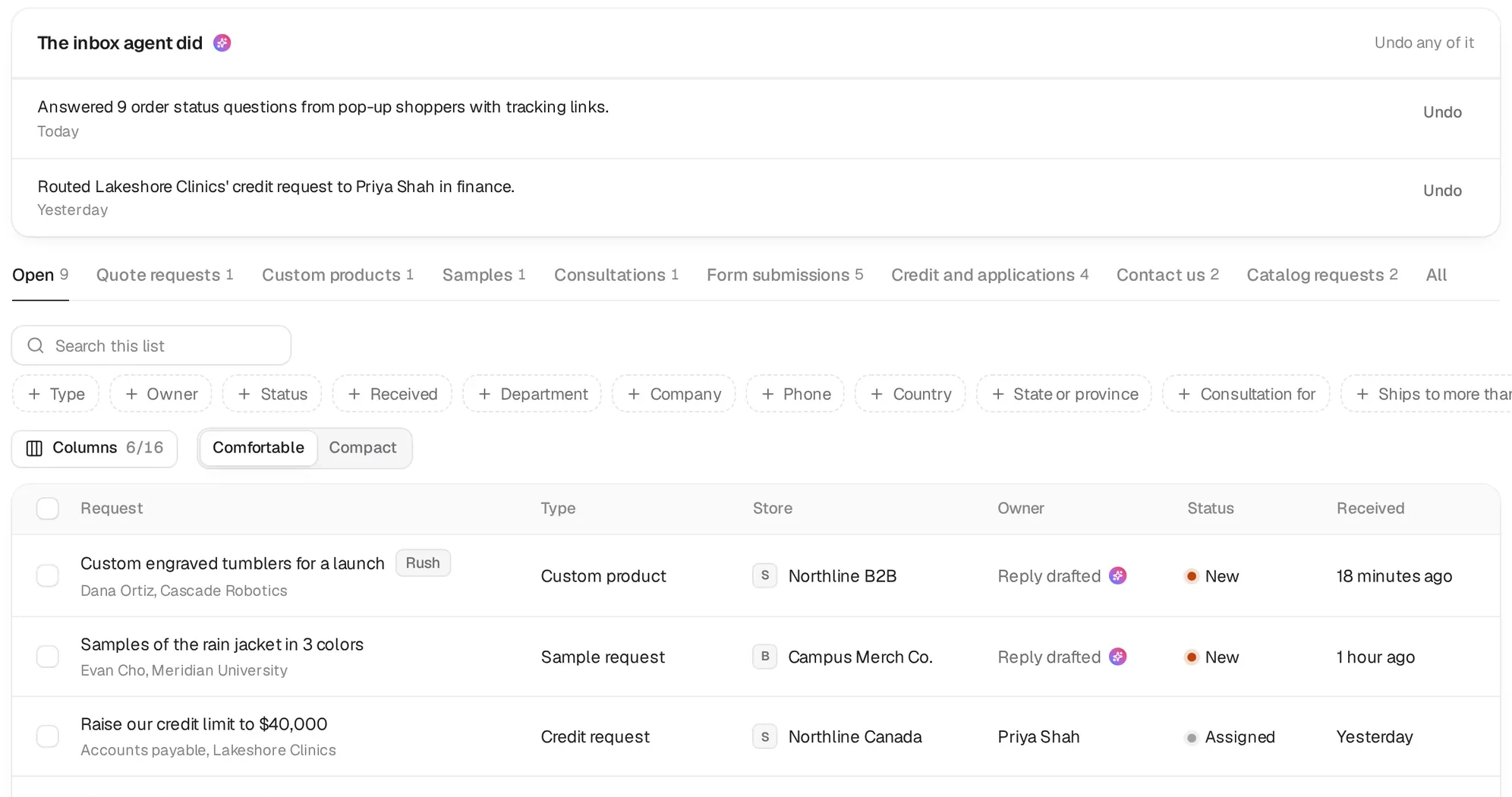
Every request from every store, in one list.

Quote requests, samples, catalog requests and credit applications all land here. You see what is open, how fast your team replies, and what the agent did. You can undo any of it.

Redefine Suite Inbox with open requests, reply time, quotes created, what the inbox agent did, and a list of requests

Needs you

The agent asks only when it is not sure.

Most submissions need no one. When one does, you see the problem and the choices side by side, so the call takes one click. Every choice shows what it costs and what the buyer will see.

  1. A steel tumbler beside a submission for 600 laser engraved tumblers that needs you: the in-hands date is three days

    01 Dates

    A date that comes too soon.

    A school asks for 600 engraved tumblers. Its date is three days sooner than engraving takes. The agent gives you two ways out: add a rush fee of $180, or offer a tumbler that ships in time. You see the cost before you say yes.

    See approval workflow software


  2. A navy rain jacket beside a submission for 200 jackets that needs you: only $900 of credit is left and the quote is

    02 Credit

    A quote bigger than the credit left.

    A company has $900 of credit left and asks for $8,600 of jackets. The quote is drafted already. You pick: ask for a 50% deposit, or send it to finance. Either way, the buyer hears back the same day.

  3. A stack of navy caps beside a reorder of 500 caps marked ordered: the buyer accepted the quote and order SO-10497 was

    03 Orders

    A yes that turns into an order.

    When the buyer says yes to the quote, it becomes an order. Here a reorder of 500 caps went into Business Central as an order. No one typed it in. The buyer gets the order number by email.

    See the online form builder

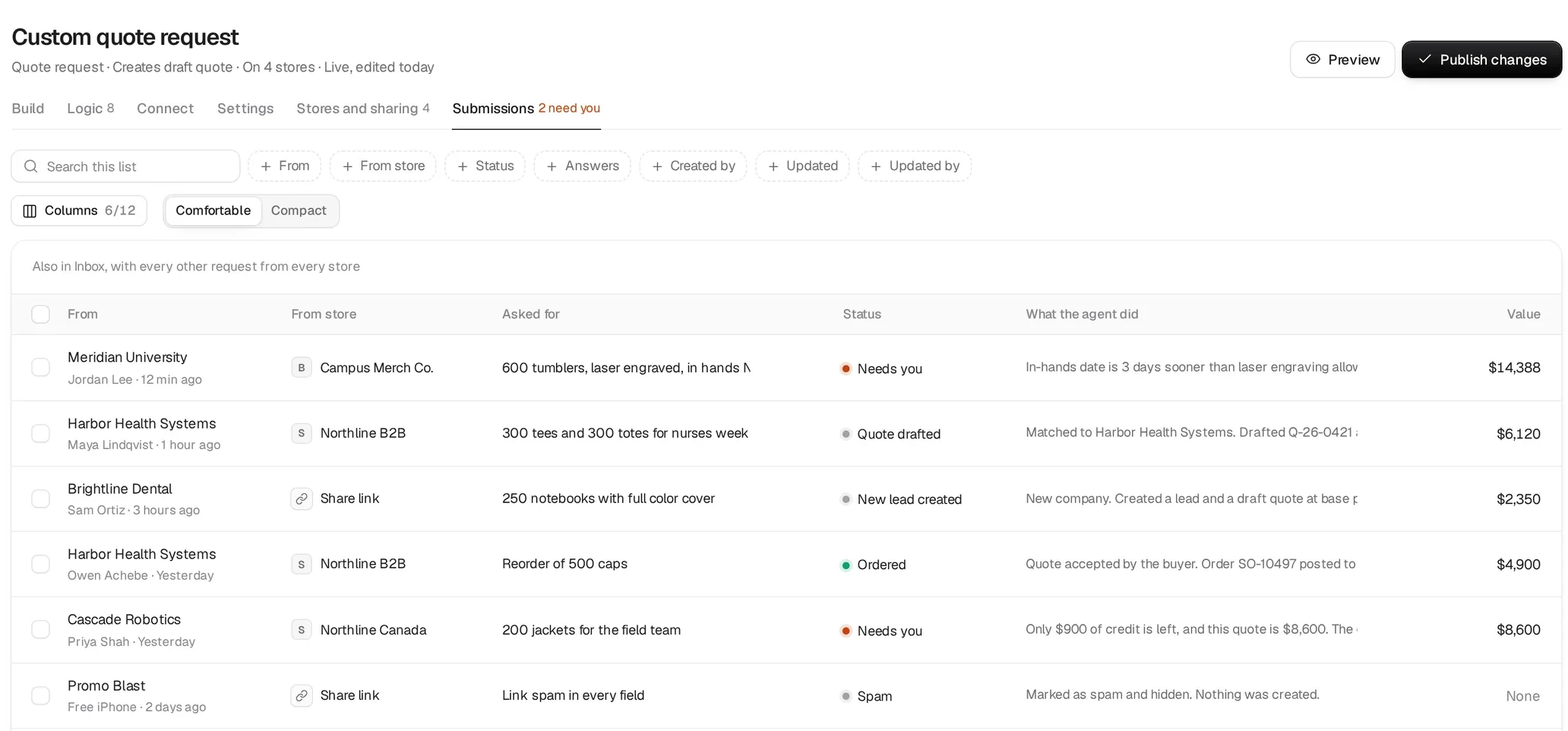
Each submission shows what the agent did.

This is a real screen. Tap a point to see what each part tells you.

Redefine Suite list of submissions for one quote form: who sent each one, the store, what they asked for, the status,
A list of submissions with four points explained.
  • Where it came from

    Each submission shows the store or the link it came from. One form can sit on many stores.

  • Its status

    Needs you means the agent wants a person. The rest are a quote, an order or a new lead already.

  • What the agent did

    Read the line to see what happened, like a quote drafted at the contract price.

  • What it is worth

    The value shows what each request could bring in, so the big ones get seen first.

Your team

Your team answers people, not inboxes.

One person can watch every store. The agent answers the simple questions and drafts the rest, so your team spends its time on buyers.See forms and workflow

A service lead at his desk looking at the Redefine Suite Inbox, with every open request from every store in one list

On its own

What the agent handles without you.

  • A shipping box beside a note that the inbox agent answered 9 order status questions from pop-up shoppers with tracking

    Order questions

    Shoppers ask where their order is. The agent answers with a tracking link, and you can undo any reply.

    See the online form builder
  • A submission with link spam in every field, marked as spam and hidden, with nothing created

    Spam

    Junk with links in every field is marked as spam and hidden. Nothing is made from it.

    See document collection
  • Two teal notebooks beside a request for 250 notebooks from a new company: a lead and a draft quote at base prices were

    New buyers

    A new company sends a request. The agent makes a lead and a draft quote at base prices.

    See workflow routing

What kinds of submissions can it handle?

Quote requests, order forms, artwork uploads, credit applications, returns and contact forms. They all land in one list.

Each one can become a quote, an order or an account. See the online form builder

Does the agent decide things on its own?

It handles simple work, like order questions and spam. When it is not sure, it asks you with one-tap choices.

You can undo what it did. See approval workflow software

Can each store send requests to its own team?

Yes. One form can sit on many stores, and each store can go to its own team.

You can also filter the list by department. See workflow routing

What about logos and other files?

A form can take files, like a logo for a print job. The file stays with the submission.

Your team sees it next to the answers. See document collection workflows

Does it connect to our ERP?

Yes. An accepted quote becomes an order in Business Central, and an approved credit application can create the customer there.

No one types it in twice. See forms and workflow software

How does it deal with spam?

Junk sends are marked as spam and hidden. No lead, quote or order is made from them.

Your list stays clean for real buyers. See all of Redefine Suite

Book a demo

See your own submissions sorted in Redefine Suite.

In the demo, we take one of your real forms and show where each answer goes: a quote, an order or an account. A demo built on your own forms and stores. You can also use the demo booking page.

Two team members looking at a custom tumbler request in the Redefine Suite Inbox, one pointing at the Turn into a quote
  • Built on your own forms
  • Your stores and teams
  • Your review steps
  • 550+ projects delivered

Book a personalized demo

Tell us which forms you use. We set up the demo around them.

  1. 1We confirm your request
  2. 2A short call about your forms
  3. 3Your personalized demo
  4. 4You decide what comes next