
Ecommerce platform limitations are technical, operational, or commercial restrictions that prevent an online store from supporting higher traffic, more complex workflows, new customer experiences, additional markets, or efficient day-to-day operations.
Your traffic is climbing. Your catalog keeps expanding. New sales channels keep opening up. And yet, website changes take weeks, integrations break without warning, checkout slows down during your biggest campaigns, and your team spends more hours fixing systems than improving what customers actually experience.
Those problems can look unrelated on any given day, but they usually trace back to one root cause: your business has outgrown your ecommerce platform. A platform that ran a smaller, simpler store well does not automatically keep working as your order volume, SKU count, integrations, and customer expectations grow around it. Most merchants only notice once several of these signs are already stacking up, which is exactly when a broader unified commerce platform starts looking less like an upgrade and more like the fix for all of them at once.
That does not mean replatforming is the automatic answer every time something breaks. Recent industry analysis makes the same point: identify the precise constraint before you assume the platform itself is the problem. Some issues are configuration mistakes. Some are operational habits. Only some are genuine architectural limits that no amount of tinkering will fix. This guide walks through the seven warning signs, a scorecard to measure how serious they are, and a practical way to decide what to fix, integrate, modernize, or finally replace.

What do ecommerce platform limitations look like in practice?
Platform limitations rarely show up as one dramatic outage. They build gradually, as friction across several teams at once. Revenue grows while margins quietly fall, and it is often reporting and analytics that surfaces the pattern first, once someone finally lines the numbers up side by side. Developers spend most of their week on maintenance instead of new features. Marketing campaigns cannot launch without engineering help. Store data lives in three places that disagree with each other. Traffic spikes create slowdowns instead of sales. New markets require expensive workarounds instead of a configuration change. Customers get a different experience depending on which channel they land on.
Before you blame the platform, it helps to separate three very different kinds of problems.
| Type of problem | Example | Likely response |
|---|---|---|
| Configuration issue | Caching set up poorly, or unused apps still loading scripts on every page | Optimize the existing platform |
| Operational issue | Inventory counts updated manually on an inconsistent schedule | Fix workflows and governance, not the platform |
| Platform limitation | The architecture cannot support real-time inventory across channels at all | Integrate, modernize, or replatform |
Keep that distinction close by as you read the seven signs below. A sign only becomes a genuine platform limitation once you have ruled out a quick configuration fix or a process change as the real cause.
Not sure which category your issues fall into?
We run a structured audit against your platform, integrations, and checkout, and tell you exactly where the constraint sits.
1. Website performance declines as traffic and catalog size grow
A healthy platform should stay stable as traffic, transactions, SKUs, customer records, and concurrent shoppers increase. When ordinary growth causes slow pages, timeouts, database strain, or failed checkouts, scalability has stopped being a technical footnote and become a business problem. Scalability simply describes how well your commerce system handles rising traffic and transaction volume without performance dropping off.
- Product and category pages load more slowly as the catalog expands.
- The site struggles during promotions, launches, or seasonal peaks.
- Shoppers see timeout errors or carts that will not load.
- Search and filtering slow down as your product data grows.
- Checkout errors climb during your highest-traffic periods.
- Your team has to manually scale infrastructure before every campaign, just in case.
Slow pages hurt more than the customer sitting in front of them. Paid traffic becomes less efficient the moment landing pages perform poorly, teams grow reluctant to run big promotions because of the risk, and speed can influence organic visibility too. Google's Core Web Vitals measure loading performance, responsiveness, and visual stability, and it recommends checking performance at the 75th percentile across mobile and desktop traffic rather than on a single test run.
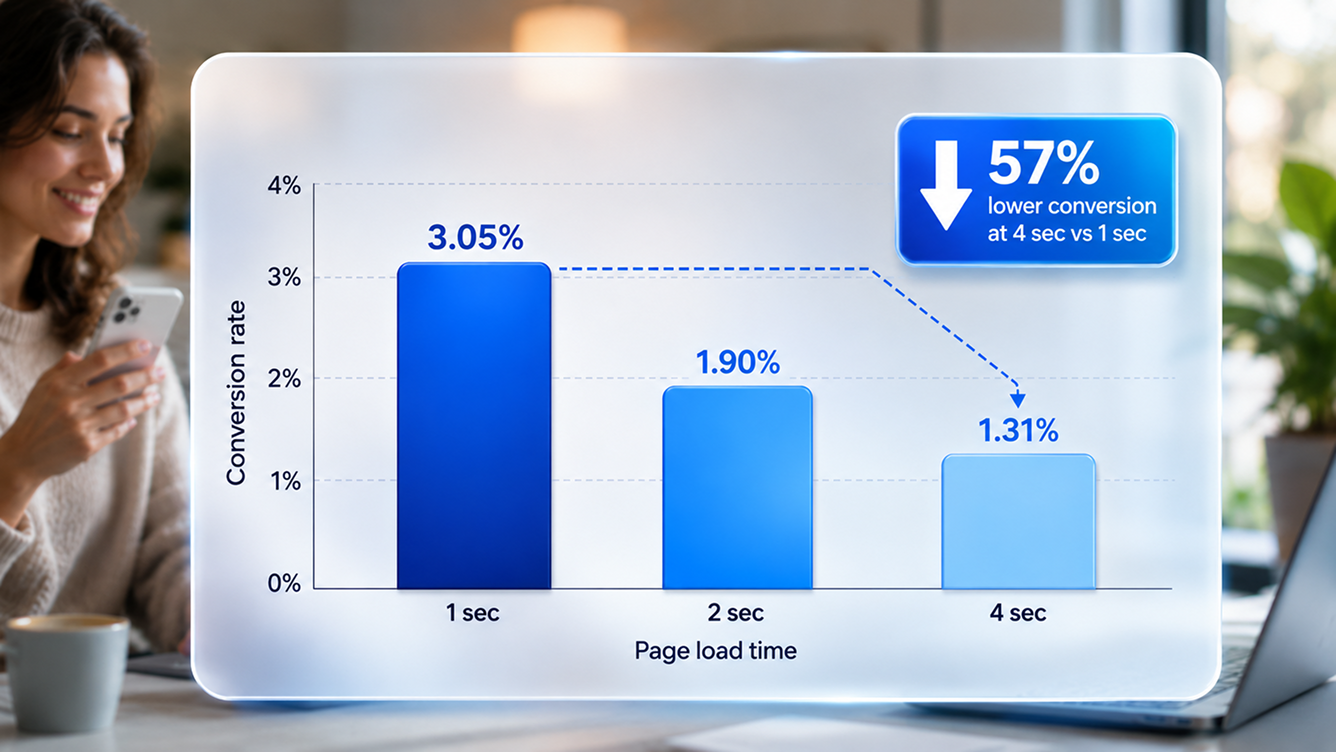
The revenue impact is well documented. Ecommerce sites that load in under two seconds convert at 3.05%, compared with 1.94% for sites in the three to four second range, a 57% difference from roughly one second of speed. A separate Google and Deloitte study found that every 0.1 second improvement in mobile retail load time lifted conversions by about 8.4%. Put plainly, speed is a revenue lever, not a cosmetic detail.
- Diagnostic questions to ask: Does performance get worse specifically when traffic increases? Can the platform scale automatically without manual intervention? Are third-party scripts slowing down your most important pages? Are your Core Web Vitals within Google's recommended thresholds at the 75th percentile?
A unified commerce platform built to scale handles traffic spikes without manual scrambling, because storefronts, catalog, and checkout share one data layer instead of syncing between disconnected tools.
2. Routine store changes require developers, workarounds, or long release cycles
A growing business needs to launch pages, promotions, content, and merchandising tests quickly. Your platform becomes a real constraint the moment every commercial change turns into a development project with its own backlog and timeline.
- Marketing cannot build landing pages without engineering help.
- Updating navigation or a category structure requires a code change.
- New product attributes need database or template work before they can go live.
- A/B tests take weeks to implement instead of hours.
- SEO metadata cannot be edited at scale across the catalog.
- Teams keep spreadsheets on the side because the platform lacks a usable workflow for the job.
The clearest way to see this friction is to time it. Track the average gap between requesting and publishing a landing page, a promotion, a new payment method, or a checkout improvement.
On a platform with real content and merchandising tools, that same flow collapses into hours because marketing owns the change directly. Replatforming guidance increasingly flags slow content and SEO changes as a genuine competitive disadvantage, especially when restructuring a page takes weeks instead of hours while a competitor ships same-day. A content system built into the commerce platform lets your team publish product pages, promotions, and locale variants directly against live catalog data, with no headless plumbing and no waiting on a sprint.
Worth remembering: A scalable platform does not just handle more visitors. It also lets your organization move faster without multiplying risk, cost, or dependency on engineering for every small change.
3. Integrations are fragile and data does not move reliably between systems
Your commerce platform sits inside a wider technology stack. It has to exchange accurate information with your ERP, CRM, product data, warehouse, shipping, payment, and marketing tools. When those integrations depend on manual exports, duplicated records, or custom patches nobody fully understands, growth increases operational risk rather than revenue.
- Inventory numbers differ between the website, the ERP, and the warehouse floor.
- Orders need manual re-entry into back-office systems.
- Customer information is scattered across several disconnected tools.
- Data only syncs once or twice a day, so nothing is ever quite current.
- Adding a new system threatens to break an existing integration.
- Nobody on the team fully understands how the current middleware works.
The downstream effects are expensive: customers order products that are not actually in stock, refunds and cancellations climb, customer service cannot see a unified order history, and automation projects stall before they start because the underlying data cannot be trusted. Aging commerce and ERP setups tend to accumulate exactly this pattern, brittle integrations, technical debt, and slower fulfillment, until innovation quietly stops.
A single product information record shared across every channel removes the nightly sync problem at the source, and connecting your order and inventory operations directly to your ERP means stock, pricing, and order status stay accurate everywhere at once, not just on the channel someone remembered to update.
"Most 'integration problems' are really one product record trying to live in five different places at once."Redefine Platform Team
4. Checkout restrictions prevent you from improving conversion
Checkout sits closest to revenue of anything on your site. A platform limitation becomes especially expensive when you cannot change checkout flows, payment options, shipping logic, or B2B purchasing rules without a custom development project.
- You cannot simplify checkout fields or reduce the number of steps.
- Payment options cannot be tailored by country or customer type.
- The platform does not support one-click or accelerated payment options.
- Shipping logic produces inaccurate rates at the cart.
- B2B buyers cannot use purchase orders or multi-level approval workflows.
- Mobile checkout performs noticeably worse than desktop, and you cannot fix it.
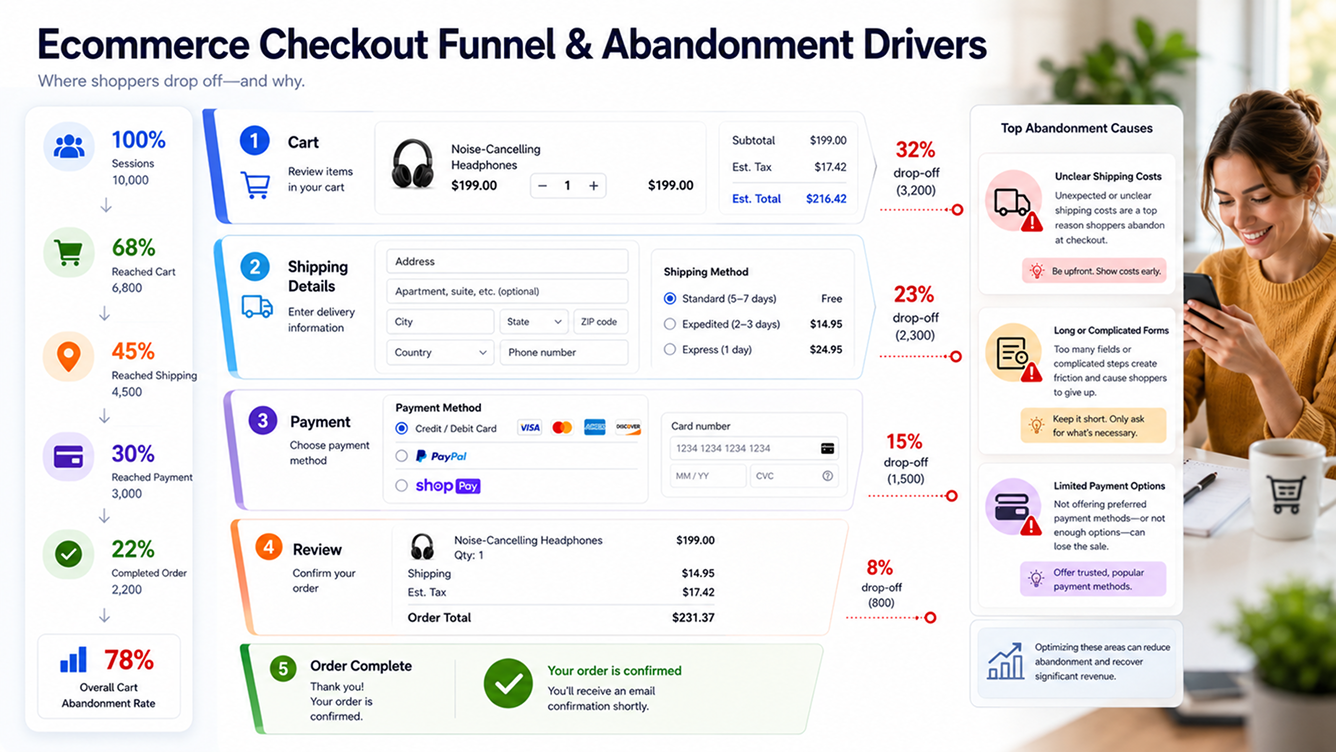
Checkout friction is already an industry-wide problem. Baymard Institute's meta-analysis of roughly 50 studies puts the average cart abandonment rate at 70.22%, and its checkout usability research suggests that solvable design issues alone could unlock a 35% average conversion lift for large ecommerce sites. Not every abandonment is your platform's fault, plenty come down to price, shipping cost, or simple comparison shopping. But your platform becomes the constraint the moment it stops you from fixing the checkout friction you already know is there.
Diagnostic metrics worth tracking include cart abandonment rate, checkout completion rate, payment failure rate, the gap between mobile and desktop conversion, average checkout duration, and the share of orders that need manual correction after the fact. An omnichannel commerce platform that supports B2B, direct-to-consumer, and account-based pricing on the same checkout layer lets you fix these issues without waiting on a separate checkout vendor's roadmap.
5. Personalization, search, and merchandising cannot match customer expectations
Today's shoppers expect relevant product discovery, offers, and content. A platform that keeps customer and product data locked in rigid silos cannot deliver that, no matter how much marketing effort you put behind it.
- Search results frequently surface irrelevant products.
- Merchandisers cannot control rankings or manually boost products.
- Recommendations rely only on basic, static rules.
- Different customer segments all see the same generic experience.
- B2B customers cannot see contract-specific catalogs or negotiated pricing.
- Product data is too inconsistent to support AI-driven discovery at all.
This gap is widening fast. Salesforce's Connected Shoppers Report found that 39% of consumers already use AI for product discovery, a figure that climbs past half among Gen Z shoppers, and 88% of retailers now say unified commerce will meaningfully affect whether they hit their goals. Yet many retailers still cannot turn their own data into a real-time personalized experience, because pricing, inventory, and customer history sit in separate systems that were never meant to talk to each other.
A quick AI-readiness check
- Is your product information structured and genuinely complete?
- Can outside AI tools access your inventory and pricing through an API?
- Can your system provide real-time customer context at the moment of a search?
- Are pricing rules and permissions actually enforceable, not just documented?
An AI layer wired directly into your live catalog, orders, and workflows can only work as well as your underlying product data. That is why personalization projects so often stall before they start, and why fixing the data foundation usually matters more than picking a flashier AI tool.
6. Expanding into new markets, channels, or business models means rebuilding core functions
A platform ready for growth should support new countries, storefronts, customer types, and revenue models without forcing you to duplicate systems or rebuild basic commerce capability from scratch every time.
- Each new country needs its own separate platform instance.
- Multi-currency or multilingual support is incomplete or bolted on.
- Marketplace inventory does not stay synchronized with your storefront.
- The platform cannot support both B2B and B2C customers at once.
- Managing multiple brands duplicates content and catalog work every time.
- Pricing cannot vary by region, account, or contract without custom code.
The cost shows up everywhere expansion touches: market entry slows down, operating costs rise with every new storefront, customer experience becomes inconsistent, and expansion decisions end up driven by technical feasibility instead of actual market opportunity. Ask yourself a simple question: does each new revenue stream get easier to launch than the last, or does every expansion add another layer of custom code that someone has to maintain forever?
Retailers running B2B portals, direct-to-consumer storefronts, and multi-brand commerce on one platform keep one product record and one admin behind every surface, so a new market or brand becomes a configuration exercise rather than a rebuild. Listing across Amazon, Walmart, TikTok Shop, and other marketplaces from that same product record also keeps listings and inventory in sync without a separate feed tool to babysit.

7. Maintenance costs and technical debt consume the budget for innovation
The clearest sign of an aging platform is not always a missing feature. Often, it is simply the rising cost of keeping the features you already have running.
- Maintenance eats most of the development budget, most months.
- Platform upgrades require major redevelopment work just to stay current.
- Security patches routinely break custom features.
- Only one or two people on the team actually understand how the system works.
- The same incidents keep coming back after supposedly temporary fixes.
- Teams avoid platform updates altogether because integrations might break.
Custom or legacy platforms tend to drift from advantage to burden gradually, as security patches, integrations, and infrastructure quietly consume more and more engineering capacity. To see the real number, calculate the full annual cost of your platform: licensing, hosting, development, maintenance, plugins, middleware, security, support, downtime, manual employee hours, and the revenue lost to delayed campaigns and abandoned innovation projects. The cheapest platform subscription on paper does not always produce the lowest total cost of ownership once you add all of that up.
A platform with governance, security, and compliance built in as first-class settings removes a large share of this maintenance burden on its own, since audit trails, access control, and data residency stop being custom code someone has to babysit and become configuration your security team can review directly.
Key takeaways so far
- Seven signs point to a real platform limitation: declining performance, slow release cycles, fragile integrations, a rigid checkout, weak personalization, blocked expansion, and rising maintenance costs.
- Not every problem is a platform problem. Rule out configuration and process fixes first.
- Speed, checkout friction, and personalization all have measurable revenue impact, this is a business case, not just an engineering complaint.
- The right response depends on which signs you have and how severe they are, not on how many blog posts recommend replatforming.
How many warning signs mean you have outgrown your platform?
One issue rarely justifies replatforming on its own. To get a clearer picture, score each of the seven signs above from 0 to 3.
- 0: No meaningful issue here.
- 1: Occasional friction, more annoying than costly.
- 2: A recurring operational problem your team routes around.
- 3: A direct, measurable hit to revenue or strategic growth.
Add the seven scores together for a total out of 21, then use the ranges below as a starting point.
| Score | What it suggests |
|---|---|
| 0 to 5 | Optimize the current platform. Your architecture is probably fine. |
| 6 to 10 | Prioritize integrations, performance, and workflow fixes before anything bigger. |
| 11 to 15 | Run a formal platform and architecture assessment. |
| 16 to 21 | Start evaluating modernization or replatforming in earnest. |
Treat this scorecard as a starting point, not a final decision. The financial impact and strategic weight of each individual sign matters more than the raw total. A single score of 3 on checkout, if checkout drives most of your revenue, can outweigh a total score of 15 spread thin across less critical areas.
Should you optimize, integrate, modernize, or replatform?
These are four different responses, and pushing straight to migration when a smaller fix would do just adds cost and risk you did not need to take on.
Optimize the existing platform
Best when the core architecture is genuinely fine and your problems trace back to themes, scripts, configuration, or an implementation that was never cleaned up. Caching, image optimization, and basic code cleanup solve more performance problems than people expect.
Add or replace integrations
Best when the commerce engine itself works well enough, but operational friction comes from disconnected ERP, CRM, or fulfillment systems. Modern APIs or a proper product information layer often resolve data-flow problems without touching the storefront at all.
Modernize part of the architecture
Best when the backend is dependable but the frontend restricts speed, testing, or content velocity. A composable or headless content layer can solve a targeted limitation while leaving the rest of the stack alone.
Replatform the business
Best when several limitations are hitting revenue and operations at once, technical debt makes even small improvements disproportionately expensive, and the current platform genuinely cannot support the markets or business models you are planning to enter. Replatforming means moving store data, customer information, designs, integrations, and commerce operations onto a new foundation built for where the business is going, not where it started.
Want a second opinion before you commit to a path?
We map your current stack against these four options and tell you which one actually fits your numbers.
What to evaluate before choosing a new ecommerce platform
Business requirements
- B2B, B2C, or hybrid selling across the same catalog
- Catalog complexity, pricing structures, and storefront count
- International markets and localization needs
- Subscription, program store, or recurring revenue models
Technical architecture
- API coverage, rate limits, and documentation quality
- Headless or composable support, if your roadmap needs it
- Hosting, auto-scaling, and deployment options
- Data portability, so you are never locked in again
Customer experience and operations
- Mobile performance, search, and checkout flexibility
- Personalization and accessibility support
- Inventory sync, order management, and returns handling
- ERP and CRM connectivity, plus reporting depth
Commercial considerations
- Licensing, transaction fees, and application costs
- Development, support, and migration expenses
- Five-year total cost of ownership, not just the first invoice
How to build the business case for modernization
Whichever path you choose, decision-makers respond to numbers, not urgency. Here is how to put the case together.
- Document your baseline. Measure conversion rate, average order value, site speed, deployment frequency, integration failures, downtime, manual processing hours, and campaign launch time as they stand today.
- Quantify the cost of each limitation. A simple formula works: annual impact equals lost revenue, plus manual labor cost, plus maintenance cost, plus downtime cost, plus delayed opportunity cost.
- Define what you will need in three to five years, not just the problems in front of you right now. Plan around the business you are building, not the one you started.
- Compare the realistic paths side by side: optimizing in place, partial modernization, a headless frontend, or a full platform move, using the same cost and revenue assumptions for each.
- Protect continuity in the plan. A credible migration keeps the store selling throughout, preserves historical reporting data, and carries customer accounts, saved addresses, loyalty balances, and order history across cleanly.
Tracking these numbers over time gets easier with reporting that pulls from one data layer instead of five disconnected exports, since the same revenue and margin figures then feed your board deck and your platform business case without extra reconciliation work.
Frequently asked questions
What are the most common ecommerce platform limitations?
The most common limitations are scalability, performance, restricted customization, poor integrations, an inflexible checkout, fragmented data, weak international support, and rising maintenance costs. Most stores feel several of these at once rather than just one.
How do I know whether my ecommerce platform is outdated?
Watch for recurring performance problems, unsupported software or plugins, fragile integrations, slow release cycles, limited APIs, growing security risk, and a maintenance bill that keeps climbing without adding new capability.
When should a business consider ecommerce replatforming?
Replatforming becomes worth considering once several platform restrictions are hitting revenue, customer experience, operational efficiency, or future expansion at the same time, and targeted fixes no longer deliver enough value to justify their cost.
Can I fix ecommerce platform limitations without migrating?
Yes, often. Many limitations respond well to performance optimization, new or better integrations, process improvements, application replacements, or modernizing just one part of the architecture, such as the frontend.
What is the difference between replatforming and redesigning?
A redesign changes what customers see and interact with. Replatforming replaces or significantly changes the underlying commerce technology, data structure, integrations, and operational capabilities behind that experience.
How long does ecommerce replatforming take?
It depends heavily on catalog size, integration count, custom workflows, data quality, storefront count, and testing scope. A focused, single-storefront migration often lands in a couple of months, while a multi-brand rebuild can take considerably longer.
Does an ecommerce platform affect SEO?
Yes. It affects page speed, crawlability, metadata control, URL structure, structured data, internal linking, redirects, mobile experience, and how quickly your team can act on an SEO opportunity in the first place.
Is headless commerce the solution to platform limitations?
It can solve specific frontend flexibility and speed problems, but it also adds architectural and operational complexity. Treat it as a tool that should answer a defined requirement, not a default choice because it is trending.
Sources & citations
- Baymard Institute, "50 Cart Abandonment Rate Statistics": average cart abandonment rate of 70.22% across a meta-analysis of roughly 50 studies, and the estimated conversion lift available through better checkout usability.
- Portent, "Site Speed Is (Still) Impacting Your Conversion Rate": ecommerce conversion rate by page load time, based on an analysis of over 100 million pageviews.
- Google and Deloitte, "Milliseconds Make Millions" study, referenced via Think with Google: conversion impact of a 0.1 second improvement in mobile page speed across retail sites.
- Google, "Web Vitals": definitions and recommended 75th-percentile thresholds for Core Web Vitals across mobile and desktop.
- Salesforce, "Connected Shoppers Report, 6th Edition": the share of consumers using AI for product discovery and the share of retailers who say unified commerce will significantly affect their goals.
Figures were current as of research in mid-2026 and are refreshed on a quarterly basis. Speed, abandonment, and AI-adoption statistics move quickly. Confirm current figures at the source before using them in a board presentation or public claim.

Kristina Brown
Director of Business Development | CRO, UX/UI & Ecommerce Growth
Kristina Brown has more than two decades of ecommerce experience spanning both the operator and agency sides of the industry. She began working in her family's ecommerce business at age 14 before moving to the agency side. At Redefine Innovations, her work focuses on conversion rate optimization, ecommerce UX/UI, customer journeys, marketing strategy, and growth across B2B and DTC commerce.
Areas of expertise: CRO • Ecommerce UX/UI • Customer Journeys • Marketing Strategy • B2B & DTC Ecommerce