Headless commerce is an ecommerce setup where the customer-facing storefront operates separately from the backend commerce system. The two communicate through APIs, so you can change your website, app, or any other buying experience without rebuilding the systems that manage products, inventory, customers, payments, and orders.
Your ecommerce platform handles products, checkout, and orders well enough, but every storefront change feels slow, restricted, or dependent on a theme you didn't choose. That frustration is usually what brings people to the term "headless commerce," and it sounds far more complicated than it needs to be.
Put simply, headless commerce means your website, app, or any other buying experience runs separately from the system managing your products, inventory, and orders. The two sides talk to each other through APIs instead of being welded together. That separation is the entire idea. Everything else in this guide is really just working out whether that separation is worth the extra effort for your specific business, and Salesforce, Shopify, BigCommerce, and commercetools all describe headless commerce the same way: a frontend and backend that operate independently and stay connected through APIs. If your team is already comparing that trade-off against simply running everything on one connected commerce platform, that comparison is exactly what the rest of this guide is built to help you make.
A simple analogy: think of a restaurant. The dining room is the storefront your customers see. The kitchen is the backend that manages products, orders, and payments. A traditional ecommerce platform gives you the dining room and kitchen as one fixed building. Headless lets you redesign the dining room without touching the kitchen.
What "headless" actually means
Before going any further, it helps to unpack the two halves of the term, because the vocabulary alone stops a lot of people from understanding a fairly simple idea.
The "head" is whatever customers see
The head can be a website, a mobile app, a progressive web app, a marketplace listing, an in-store kiosk, a smart device, a social-commerce experience, or even a conversational interface. Any surface where a customer browses, decides, and buys counts as a "head."
The commerce engine is everything customers don't see
The backend manages the product catalog, pricing, promotions, inventory, customer accounts, carts, checkout, payments, orders, tax, shipping, and returns. None of that logic disappears in a headless setup, it just stops being tied to one specific frontend. A single product record shared across every channel is usually what makes that backend trustworthy enough to build multiple frontends on top of in the first place.
A conventional platform usually ships a prebuilt frontend attached to its backend. Headless commerce removes that requirement. BigCommerce describes a headless frontend as one that stays independent of the commerce platform while still receiving product, cart, and order capabilities through APIs. Headless commerce doesn't remove your storefront, it removes the obligation to use the storefront your platform shipped with.
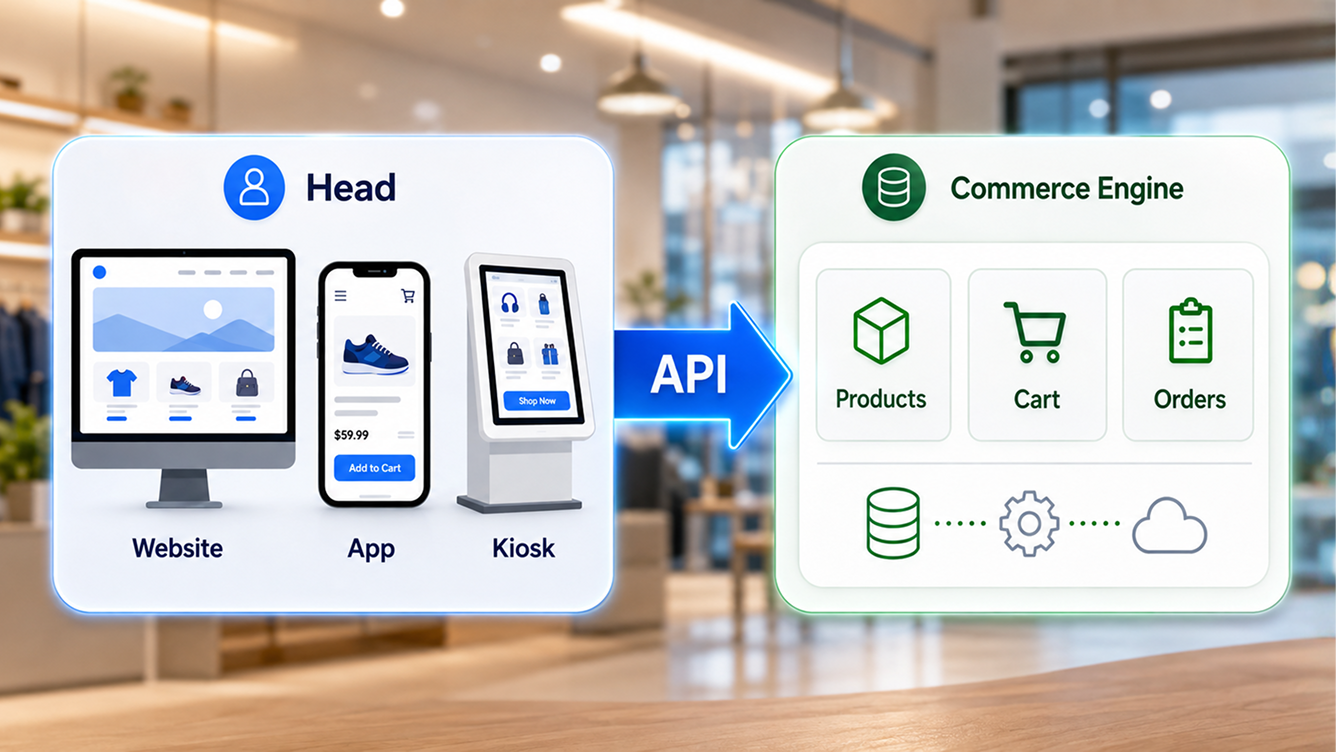
How does headless commerce actually work?
Skip the technical vocabulary for a second and walk through an ordinary purchase. A customer opens a product page and picks a size. Behind the scenes, a fairly plain sequence of requests plays out.
- The storefront asks for product data. It requests the title, images, price, and stock level from the commerce backend.
- The backend answers. It returns the current data, not a cached copy baked into a theme file.
- The customer clicks "Add to cart." The storefront sends that action to the cart API.
- The backend updates the cart. Quantity, pricing, and promotions all get recalculated centrally.
- Checkout runs on the backend. Payment, tax, and order creation happen in the commerce engine, not the frontend code.
- The storefront displays the result. Confirmation, order number, and next steps render back on whichever "head" the customer used.
Every one of those steps runs through an API, which is just a controlled way for two pieces of software to ask each other for information or request an action. "Show this product's price." "Is this size in stock?" "Add this item to the cart." "Create an order." Nothing mysterious, just a defined, repeatable question and answer.
Most modern platforms expose this through REST APIs, GraphQL, or both. REST typically hands back a fixed set of fields for a given resource, while GraphQL lets the frontend request only the specific data it needs for that page. Adobe Commerce exposes its headless capability through GraphQL, and BigCommerce offers storefront and management APIs covering products, carts, checkout, orders, and customer accounts. You don't need to pick a side here before deciding whether headless commerce fits your business at all.
That same API layer is what lets one backend serve several frontends at once, which is the real payoff most businesses are actually chasing. Connect your order and inventory operations once, and every storefront pulling from that API sees the same accurate stock and pricing, instead of five separate exports that quietly drift out of sync.
Traditional ecommerce vs headless commerce
Neither approach is automatically better. They trade different things for different priorities, so it helps to see them side by side before deciding which one your business actually needs.
| Area | Traditional ecommerce | Headless commerce |
|---|---|---|
| Architecture | Frontend and backend ship as one system | Frontend and backend run independently |
| Storefront design | Controlled by platform themes and templates | Fully custom frontend, built to spec |
| Development effort | Easier to launch and manage day to day | Needs stronger, ongoing technical resources |
| Release speed | Frontend changes often depend on platform structure | Frontend teams can ship changes independently |
| Channel support | Usually website-first | Built to serve several interfaces at once |
| Cost | Lower upfront complexity | Higher development and ongoing operating cost |
| Best fit | Standard stores with simpler requirements | Complex, multi-channel, or highly differentiated brands |
One clarification worth stating plainly: traditional ecommerce is not an outdated approach. A well-run Shopify, BigCommerce, Adobe Commerce, or WooCommerce store still suits plenty of businesses. BigCommerce itself notes that headless commerce isn't necessary, or even advisable, for every situation. Choose based on what your business actually needs, not on which architecture sounds more advanced in a sales deck. It's also worth checking whether a unified platform covering both ends of that table could close the gap without forcing you to pick a side at all.
A real-world example of headless commerce
Picture a mid-sized fashion brand expanding across channels. It keeps Shopify or BigCommerce running the products, checkout, and order management it already trusts. On top of that, it builds a custom storefront in a framework like Next.js, pulls editorial content from a separate headless CMS, and ships a mobile app for its most loyal customers. A product information system keeps details consistent everywhere, and an ERP handles inventory and fulfillment behind the scenes.
The website and the app can look and feel completely different from each other, yet both pull from the exact same backend product, inventory, and order data. That's the headless part in action: the brand can redesign or replace its website entirely without touching the checkout and order systems underneath it.
What wouldn't count as headless: swapping a Shopify theme while keeping Shopify's standard storefront architecture underneath it. That's still a valuable redesign, it just isn't a headless one. Worth noting too, some of what that brand built custom, editorial content that reads live catalog data without API plumbing, now comes built into platforms like the Redefine CMS platform as a standard capability rather than a bespoke integration project.
Curious what this would look like for your store?
We'll map your current stack against a headless setup and show you exactly what changes, and what doesn't.
The benefits of headless commerce, tied to real scenarios
Vague benefits don't help anyone make a decision, so here's what each advantage actually solves.
Control over the customer experience
A headless frontend doesn't have to follow your platform's standard theme structure, which opens the door to product configurators, immersive brand storytelling, custom B2B purchasing portals, and account-specific experiences that a stock theme simply can't render.
Faster frontend experimentation
Frontend teams can ship design and experience changes without touching the commerce backend at all, which speeds up landing page tests, navigation updates, and campaign launches considerably.
More control over performance, not automatic performance
Headless commerce doesn't make a site fast by itself. It does hand developers more direct control over server-side rendering, static generation, caching, and image delivery. Shopify lists performance, scalability, and workflow control among the main potential benefits of going headless, provided a team actually uses that control well.
Support for several sales channels from one backend
The same product, pricing, and order data can serve your main website, regional storefronts, a mobile app, an in-store kiosk, a marketplace, a B2B portal, and social commerce, all without duplicate catalogs to maintain.
Freedom to pick specialist tools
You can connect best-in-class systems for content, search, personalization, payments, subscriptions, and loyalty instead of settling for whatever your commerce platform bundles in. That said, a lot of teams reach for a separate specialist tool for personalization specifically because their current platform can't act on customer and catalog data together, which is exactly the gap an AI layer wired into live catalog and order data is built to close without adding another vendor to the stack.
Independent scaling under pressure
A traffic-heavy frontend can scale on its own during product launches, flash sales, or an influencer-driven spike, without dragging backend checkout performance down with it.
One clearly labeled case study helps ground this: fashion brand PAIGE reported a 22% revenue increase and a 76% conversion-rate increase after simplifying its stack with Shopify, Next.js, and Vercel. Treat that as one company's published result, not a guarantee, since your catalog, traffic, and starting point will differ.
"Headless commerce doesn't remove your storefront. It removes the requirement to use the one your platform shipped with."Redefine Platform Team
The trade-offs nobody should skip past
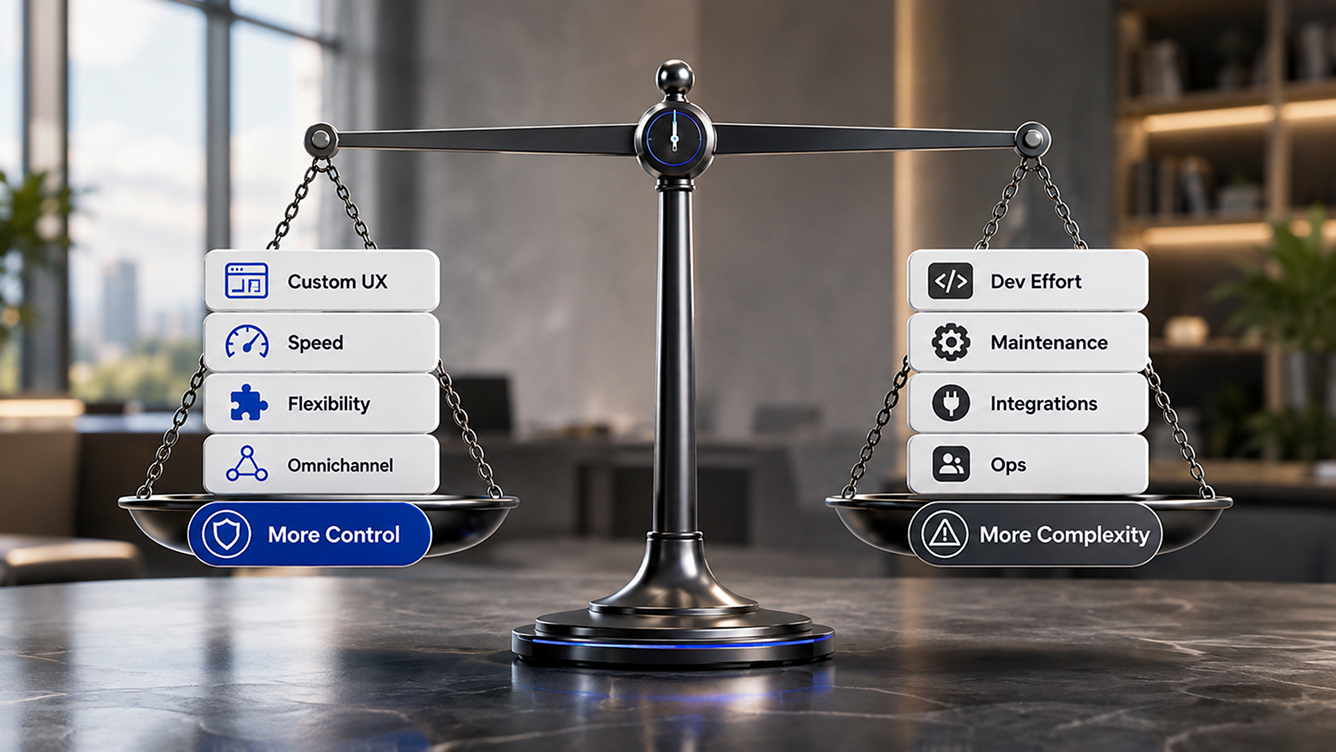
This is the section most vendor content quietly shortens, and it's exactly the part that determines whether headless commerce will actually work for you.
- Higher implementation cost. Frontend development, UX design, API integration, hosting, QA, and ongoing maintenance all add up in ways a themed store never asks you to budget for.
- More technical complexity. You're now managing a commerce platform, a frontend framework, a CMS, API connections, a deployment pipeline, and monitoring, instead of one system.
- Heavier dependence on developers. Marketing teams can lose self-service control unless you pair the frontend with a flexible content system and reusable page components from day one.
- More points where things can fail. Stale stock data, delayed pricing, cart errors, and broken checkout handoffs all become more likely with more systems talking to each other.
- App compatibility gets harder. Apps built for a platform's default storefront often don't work automatically inside a custom frontend.
- SEO needs deliberate work. A JavaScript-heavy frontend can create real crawling and indexing problems if a team implements it carelessly.
- Ownership gets blurrier. When several vendors manage different layers, someone still has to own site speed, uptime, and incident response end to end.
None of these are reasons to avoid headless commerce outright. They're reasons to go in with a realistic budget, a named owner for each system, and a plan for the parts a theme used to handle for you automatically. A good share of the "more points where things can fail" problem specifically comes down to quote approvals, return requests, and vendor onboarding running through disconnected webhooks. Handling that logic through built-in forms and workflow automation instead of custom middleware removes several of those failure points before they ever happen.
Is headless commerce good for SEO?
Headless commerce can support excellent SEO, but the architecture alone doesn't improve rankings. Search performance still depends on rendering strategy, URL structure, metadata, structured data, internal links, and page speed.
The upside is real: greater control over HTML output, flexible metadata at scale, and easier integration with a content-rich headless CMS. The risk is just as real: client-side content that search engines struggle to access reliably, missing metadata, broken pagination, duplicate product URLs, and lost redirects during a rushed migration.
Google processes JavaScript pages through crawling, rendering, and indexing, and pages can sit in a rendering queue before Google fully understands them. Google's own guidance recommends server-side rendering or static rendering over dynamic rendering as a long-term approach, precisely because client-side-only rendering makes indexing slower and less reliable.
A quick SEO-readiness checklist
- Important content appears in the rendered HTML, not just after a script runs.
- Every indexable page has a stable, crawlable URL.
- Metadata renders correctly for every template, not just the homepage.
- Internal links use real, crawlable anchor elements.
- Product and variant structured data validates against Google's guidelines.
- Sitemaps update automatically, and redirects survive every deployment.
Google states that ecommerce structured data, including Product, Offer, and Review markup, helps it understand commercial content more accurately, and can make pages eligible for richer product listings in search. Pairing a content system built for commerce pages with proper technical SEO from day one avoids the most common headless migration mistake: a beautiful new frontend that quietly loses six months of search visibility.
Headless vs composable commerce, and headless vs a headless CMS
These three terms get used almost interchangeably online, which causes more confusion than the underlying ideas deserve.
Headless commerce vs composable commerce
Headless commerce separates the frontend from the backend. Composable commerce goes a step further and breaks the backend itself into independent, replaceable services, such as search, checkout, promotions, and product information. A headless setup is not automatically composable. A business can run one monolithic commerce backend with a separate frontend and still call that headless.
| Concept | Main focus | What becomes independent |
|---|---|---|
| Traditional commerce | Simplicity | Little to nothing |
| Headless commerce | Frontend flexibility | Frontend and backend |
| Composable commerce | Full-stack modularity | Frontend and multiple backend services |
| MACH architecture | Technical principles behind it | Microservices, APIs, cloud, and headless together |
commercetools defines MACH as microservices-based, API-first, cloud-native, and headless, while composable commerce describes the broader strategy of assembling modular, best-fit capabilities rather than accepting one vendor's entire stack.
Headless commerce vs a headless CMS
A headless CMS stores and delivers content, pages, articles, banners, and campaign copy. A headless commerce platform manages transactional functions: products, prices, inventory, carts, checkout, and orders. In practice, a storefront often pulls storytelling content from the CMS and product data from the commerce platform, then blends both into one experience for the shopper. Some unified platforms sidestep this three-way split entirely by running commerce, content, and operations as purpose-built modules on one shared data layer, which is worth a look before you commit to assembling and maintaining a composable stack piece by piece.
Who actually needs headless commerce
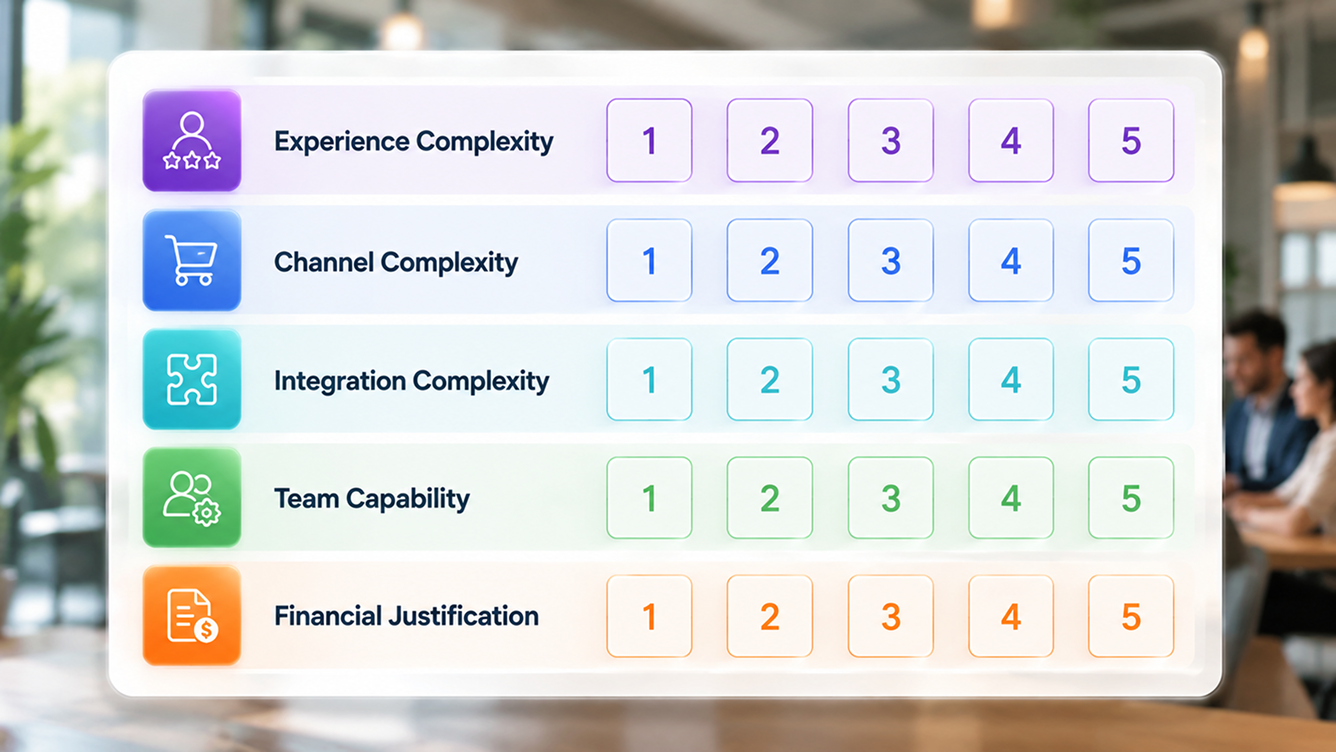
This is the question that matters more than any architecture diagram. Headless commerce earns its complexity when a specific requirement demands it, not because a competitor mentioned it in a press release.
- Consider it when: your platform is actively blocking a customer experience you need, you run several storefronts or channels, your brand depends on a highly custom design, you need complex B2B buying workflows, or you have a development team ready to own the added complexity.
- Hold off when: you run a straightforward catalog and checkout, your current theme already supports your roadmap, you don't have ongoing development resources, or your real problems are about marketing and demand rather than architecture.
A simple decision rule: choose headless commerce because a defined business requirement justifies the added complexity, not because the architecture happens to be fashionable this year.
B2B sellers are often the clearest fit, since account-specific pricing, custom catalogs, quote approvals, and ERP-connected stock rarely fit cleanly inside a direct-to-consumer theme. An omnichannel commerce platform that already supports B2B, direct-to-consumer, and account-based pricing on one backend can deliver a lot of what businesses want from headless, without the full rebuild, while listing consistently across marketplaces and channels from that same product record.
Cost, timeline, and getting started
Costs vary enormously with catalog size, number of storefronts, integration count, and custom checkout requirements, so treat any single flat number online with suspicion. Budget across discovery, UX and design, frontend development, API integration, content migration, SEO migration, testing, and ongoing hosting and support, then compare that total against your current platform's total cost of ownership, not just its monthly subscription fee.
Most successful headless projects roll out in phases rather than one high-risk cutover. commercetools recommends replacing legacy capabilities gradually instead of attempting a single all-at-once replatforming event, and that pattern holds up well in practice. A business might start with one regional storefront, one campaign microsite, or a new mobile app, prove the model works, and expand from there.
- Define the business problem first. Don't start by picking a frontend framework before you know what you're actually solving for.
- Audit what you already have. Your commerce platform, ERP, CRM, product data, and existing SEO equity all need a clear starting inventory.
- Set measurable success criteria. Page speed, conversion rate, release frequency, and search traffic all give you something concrete to check against later.
- Protect SEO through the migration. URL mapping, a redirect plan, and structured data need to be part of the launch checklist, not an afterthought.
- Launch in phases and monitor closely. Watch technical and commercial metrics together after every release, not just uptime.
Reliable reporting pulled from one data layer makes that monitoring far easier, since the same revenue and conversion figures feed both your board deck and your technical rollout review without separate reconciliation work. And because a headless setup exposes more of your commerce data through APIs by design, a governance and access-control layer built in from the start keeps that added surface area from becoming a security afterthought, and can also make your product, pricing, and inventory data usable by AI shopping tools down the road, provided the underlying data stays accurate and permissioned. Redefine Innovations also connects a shared product information layer across every storefront you add, so expansion becomes a configuration step instead of a rebuild each time.
Key takeaways
- Headless commerce separates your storefront from your commerce backend, connected through APIs, so the frontend can change without touching products, checkout, or orders.
- The benefit is control and flexibility. The cost is added complexity, more moving parts, and more direct responsibility for SEO and performance.
- Headless is not the same as composable, and it is not automatically better for SEO or speed. Implementation quality decides both outcomes.
- Choose it because a specific, measurable business need justifies it, not because it's trending.
Frequently asked questions
What is headless commerce in simple terms?
Headless commerce is an ecommerce setup where the customer-facing storefront runs separately from the backend system that manages products, inventory, carts, and orders. The two sides communicate through APIs, so a business can redesign or replace its website, app, or other buying experience without rebuilding the systems that manage products, payments, and orders.
Why is it called headless commerce?
The storefront that customers see is often called the head. Headless commerce removes that fixed, prebuilt storefront from the backend, so the business is not required to use the frontend that shipped with its commerce platform.
How does headless commerce work?
A frontend, such as a website or app, sends requests through an API to a commerce backend for product details, cart updates, and checkout actions. The backend processes the request, manages the transaction, and sends the result back to whichever frontend the customer is using.
Is Shopify a headless commerce platform?
Shopify supports both conventional storefronts and headless builds. It offers APIs and its Hydrogen storefront framework specifically for merchants building a custom, headless frontend on top of Shopify's backend.
Is BigCommerce headless?
BigCommerce can operate purely as a backend for an independent storefront through its APIs, which is the core pattern behind most BigCommerce headless implementations.
Is headless commerce good for SEO?
Headless commerce can support strong SEO, but the architecture alone does not improve rankings. Search performance still depends on rendering strategy, URL structure, metadata, structured data, internal links, and page speed, and a poorly built headless frontend can hurt SEO just as easily as help it.
What is the difference between headless and composable commerce?
Headless commerce separates the storefront from the backend. Composable commerce goes further and breaks the backend itself into independent, replaceable services, such as search, checkout, and promotions. A headless setup is not automatically composable.
Does a small business need headless commerce?
Usually not right away. A straightforward catalog and checkout typically runs well on a standard ecommerce theme. Headless commerce tends to make more sense once a business hits a specific limitation, such as multiple channels, complex B2B workflows, or a brand experience the default theme cannot support.
How much does headless commerce cost, and how long does it take?
Cost and timeline both depend heavily on catalog size, number of storefronts, integration count, and custom features. A focused, single-storefront build often takes a couple of months, while a multi-brand, multi-region rebuild can take considerably longer and cost proportionally more.
Still have a question this list didn't cover? A quick look at your current commerce platform setup usually answers it faster than another article.
Sources & citations
- Salesforce, "What Is Headless Commerce?": baseline definition of the frontend and backend separation that underpins headless architecture.
- Shopify, "The Top Benefits of Headless Commerce": performance, scalability, and workflow-control benefits, and Shopify's Hydrogen framework for headless builds.
- BigCommerce Developer Docs, "Introduction to Headless Commerce": storefront and management API structure, and guidance on when headless is not the recommended path.
- Adobe for Business, "A Complete Guide to Headless Ecommerce": GraphQL-based headless capability in Adobe Commerce.
- commercetools, "The Differences Between Composable, Headless and MACH": distinctions between headless, composable, and MACH architecture.
- Google Search Central, "Understand JavaScript SEO Basics", and "Structured Data for Ecommerce Sites": rendering recommendations and the value of ecommerce structured data.
- Vercel Customer Stories, PAIGE case study and Ruggable case study: vendor-published implementation results, cited here as individual examples rather than universal benchmarks.
Figures were current as of research in mid-2026. Vendor case studies reflect one company's results under specific conditions and should not be treated as guaranteed outcomes. Confirm current platform capabilities directly with each vendor before making a purchasing decision.

Umang Patel
Co-owner | Ecommerce Architecture, Systems & Integrations
Umang Patel has worked in ecommerce and technology since 2001. He specializes in backend systems, ecommerce architecture, ERP and platform integrations, automation, and reverse engineering complex business processes. At Redefine Innovations, he leads technolo
Areas of expertise: Ecommerce Architecture • Backend Systems • ERP Integration • Automation • Headless Commerce • Reverse Engineering