
Inventory visibility software

See every unit you can sell, in one place

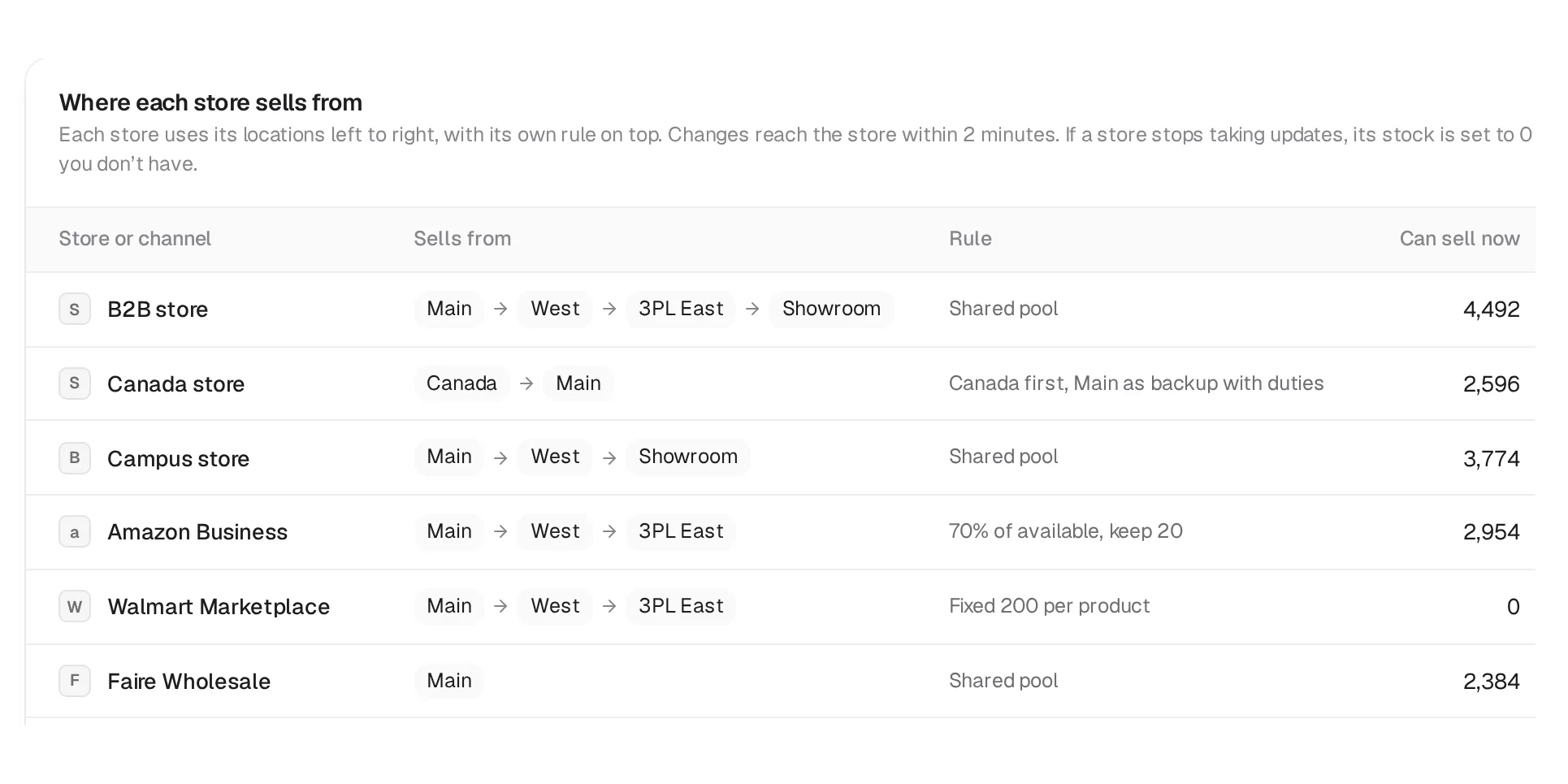
Redefine Suite shows your stock in every warehouse, 3PL and store. It also shows what each store and marketplace can sell right now. When stock moves, each store gets the new number within 2 minutes.

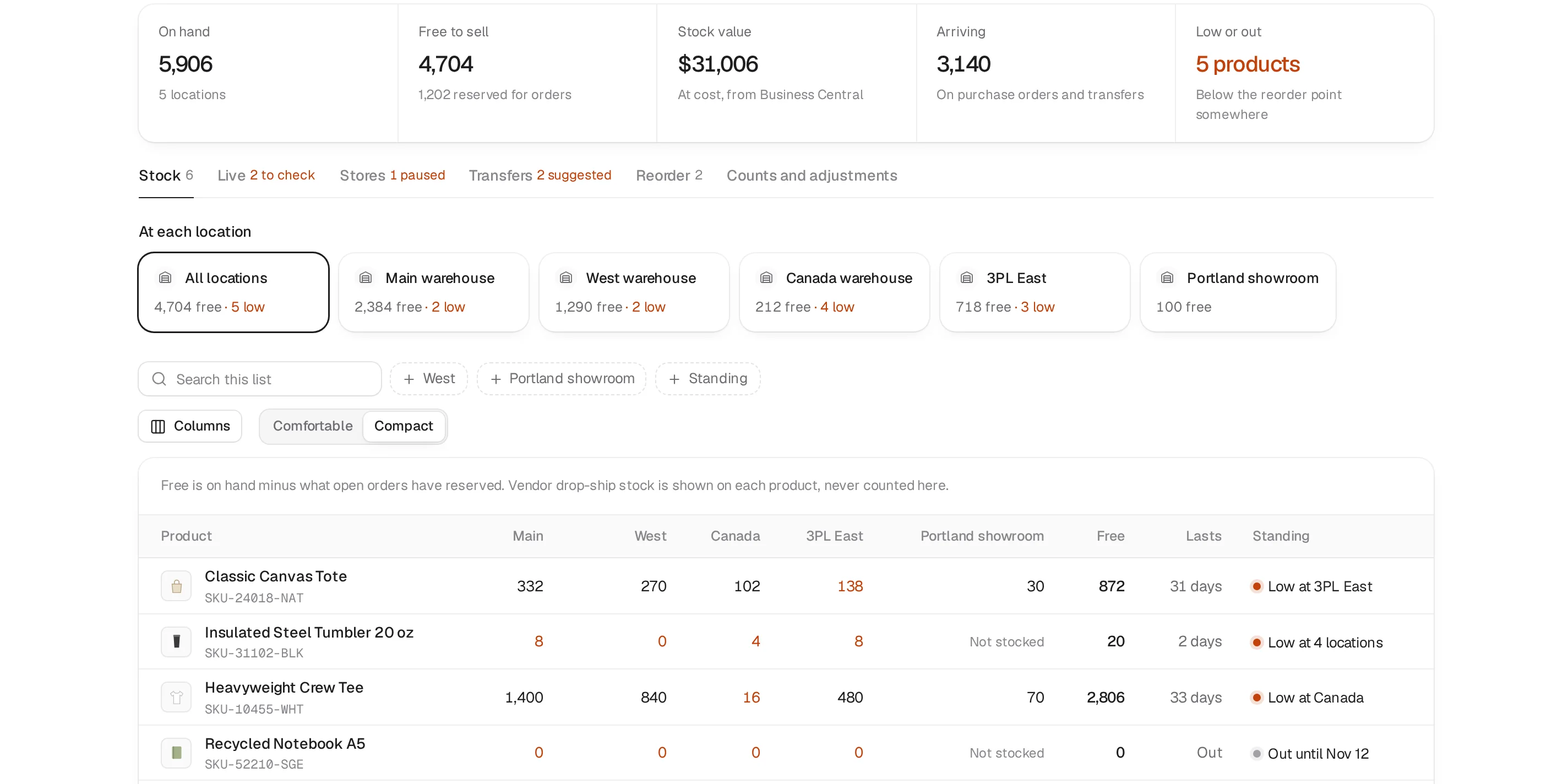
Redefine Suite inventory screen with stock on hand, free to sell, arriving and low stock, above a grid of each product
Free to sell is what you have, minus what open orders hold.
Projects delivered
550+
Years building commerce
25+
For a stock change to reach each store
2 min

See your own stock in one view.

A demo built on your own stock, locations and stores.

Book a personalized demo

Short answer

What is inventory visibility?

Updated

Inventory visibility means you can see how much stock you have, where it is, and how much each store can sell. Redefine Suite by Redefine Innovations brings stock from every warehouse, 3PL and store into one view, and sends each store its new number within 2 minutes.

Stock lives in many places. The ERP has one number. The 3PL has another. A marketplace shows a third. When they do not match, you sell what you do not have, or you hide stock you do have.

The number that matters is free to sell. That is what you have on the shelf, minus what open orders already hold.

How the options compare

Three ways to see your stock

OptionHow it worksWhat you getSee also
Redefine SuiteEvery location sends each change as it happensOne free to sell number for each storeMulti-location inventory control
A daily spreadsheetSomeone exports stock and pastes it inA number that is old by lunchOrder management system
Each tool on its ownThe ERP, 3PL and stores each keep a countThree numbers that do not agreeOrder routing engine

What one view shows

  • [1] Stock on hand at each location
  • [2] Stock held for open orders
  • [3] Stock on the way, from orders and moves
  • [4] Days of stock left at each location

See all of Redefine Suite.

Why stock numbers drift

Most oversells start with a number that was old.

Your stock is right somewhere. The trouble is that each system holds its own count, and they update at different times.

Before

Stock in many tools

  • Each system keeps its own count

    The ERP, the 3PL and each store show a different number. Nobody knows which one is right.

  • Stores sell stock you do not have

    A feed stops, and a marketplace keeps selling from an old number. You find out when the order comes in.

    [!] Found after the order

  • Counts that do not match go unseen

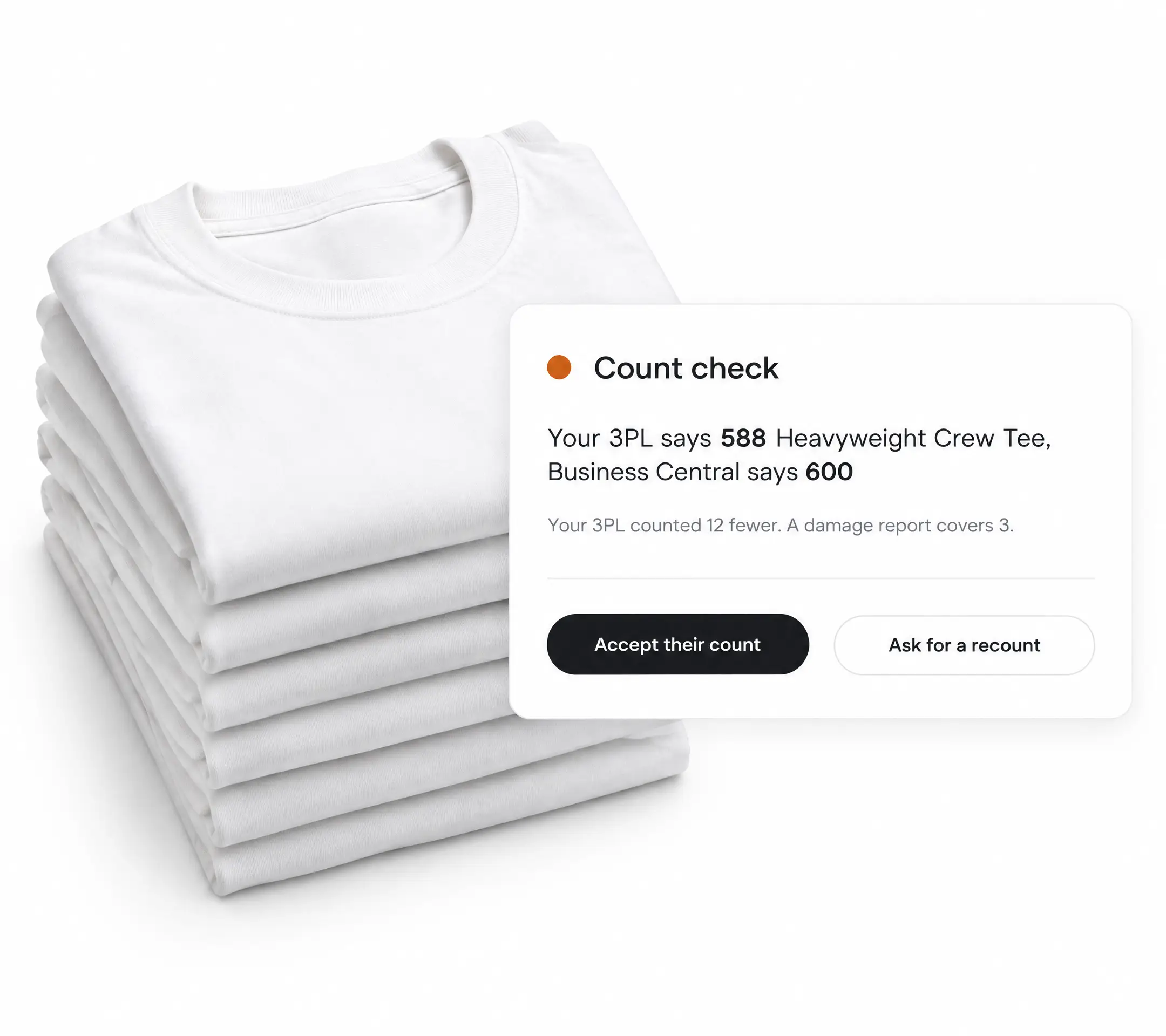
    The 3PL counts 12 fewer than your ERP. No one sees it until a buyer waits for an item that is not there.

With Redefine Suite

Stock in one view

  • One view of every location

    Each warehouse, 3PL and store sends its changes as they happen. You see on hand, held for orders and free to sell.

  • A store that stops syncing goes to 0

    If a store stops taking updates, its stock is set to 0 until it reconnects. It cannot sell what you do not have.

    Stopped before the order

  • Counts that do not match are flagged

    When a count and your ERP disagree, you see both numbers. Accept the count, or ask for a recount.

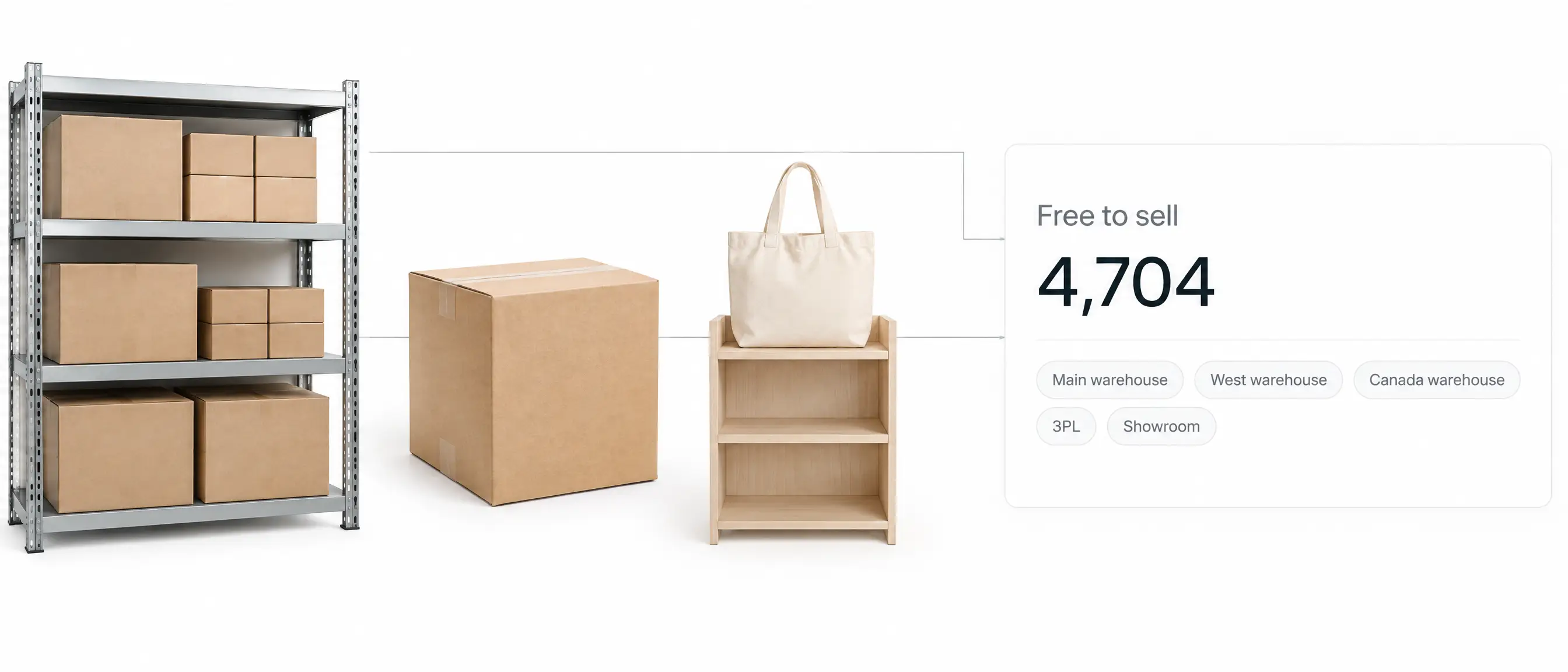
Stock from a warehouse shelf, a 3PL carton and a showroom shelf feeding one free to sell number for every store
Every location, one view, each store updated within 2 minutes.

How it works

Three views answer three stock questions.

Pick a view to see the screen. Each one comes from the same stock record, so the numbers always agree.

View 01

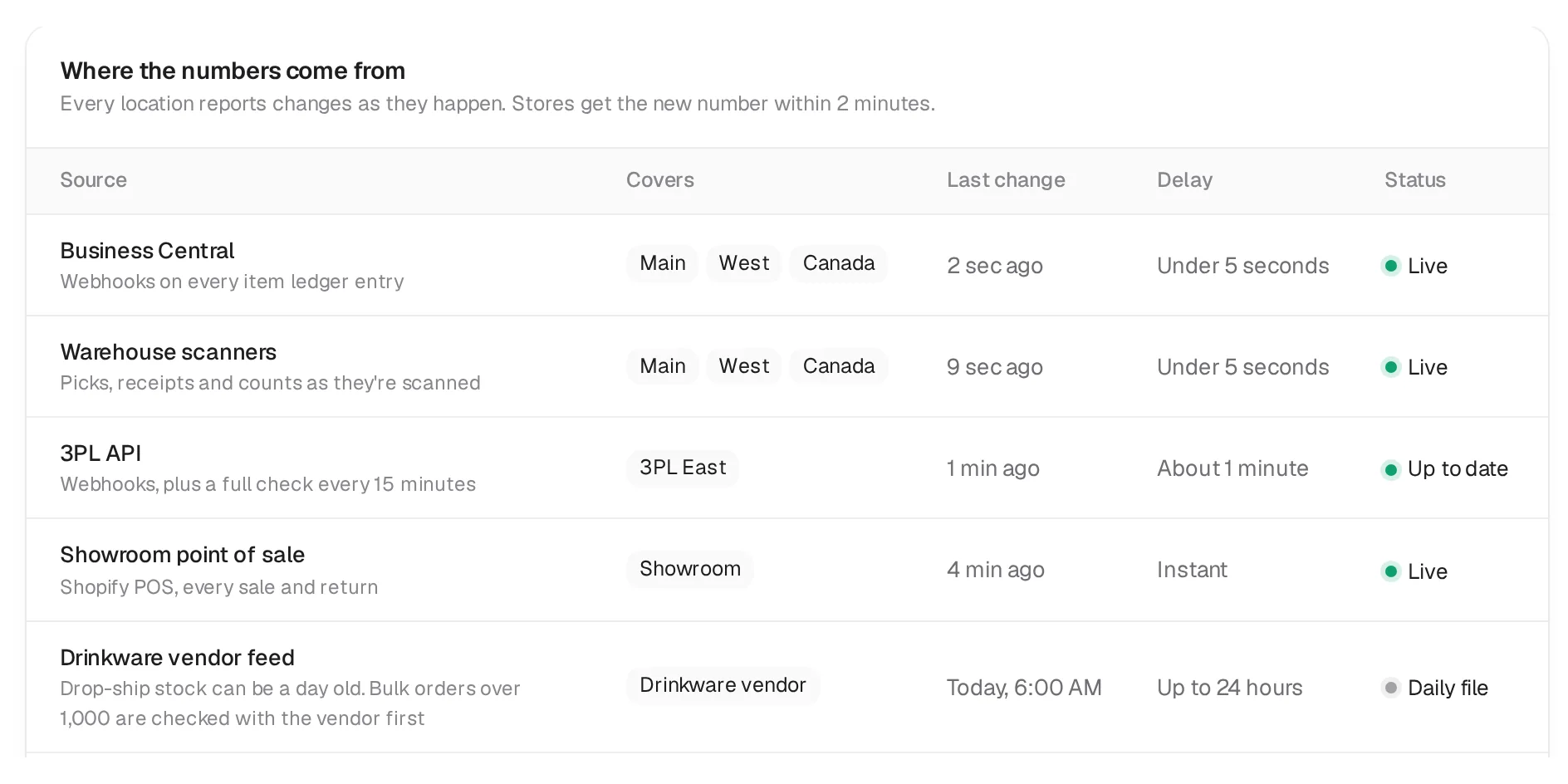
Where does each number come from?

Each source shows how fresh its number is. Your ERP and scanners update in seconds. A 3PL updates in about a minute.

  • Your ERP sends each stock entry as it is made.
  • Scanners send picks, receipts and counts as they are scanned.
  • A supplier file comes once a day, and the page says so.
Shows
Source and delay
Flags
Counts that differ
See channel sync
Redefine Suite list of stock sources, such as the ERP, warehouse scanners, a 3PL and the showroom point of sale, with

One product, every location.

Tap a point to see what each part means.

Redefine Suite stock page for one product: on hand, free to sell, arriving and days left, above a table of each
One product's stock page with four points explained.
  • Free to sell

    What stores can sell now. It is on hand, minus what open orders hold.

  • Reserved

    Units held for orders that are not shipped yet.

  • Arriving

    Stock on a purchase order or a move, with the date it lands.

  • Reorder point

    Set one for each location. Your ERP gets the change on the next sync.

Stock that stays true

Every unit that moves shows up, with the reason.

Here is what one view catches that separate tools miss. Scroll through four things it does for you every single day.

  1. 01 / Every change

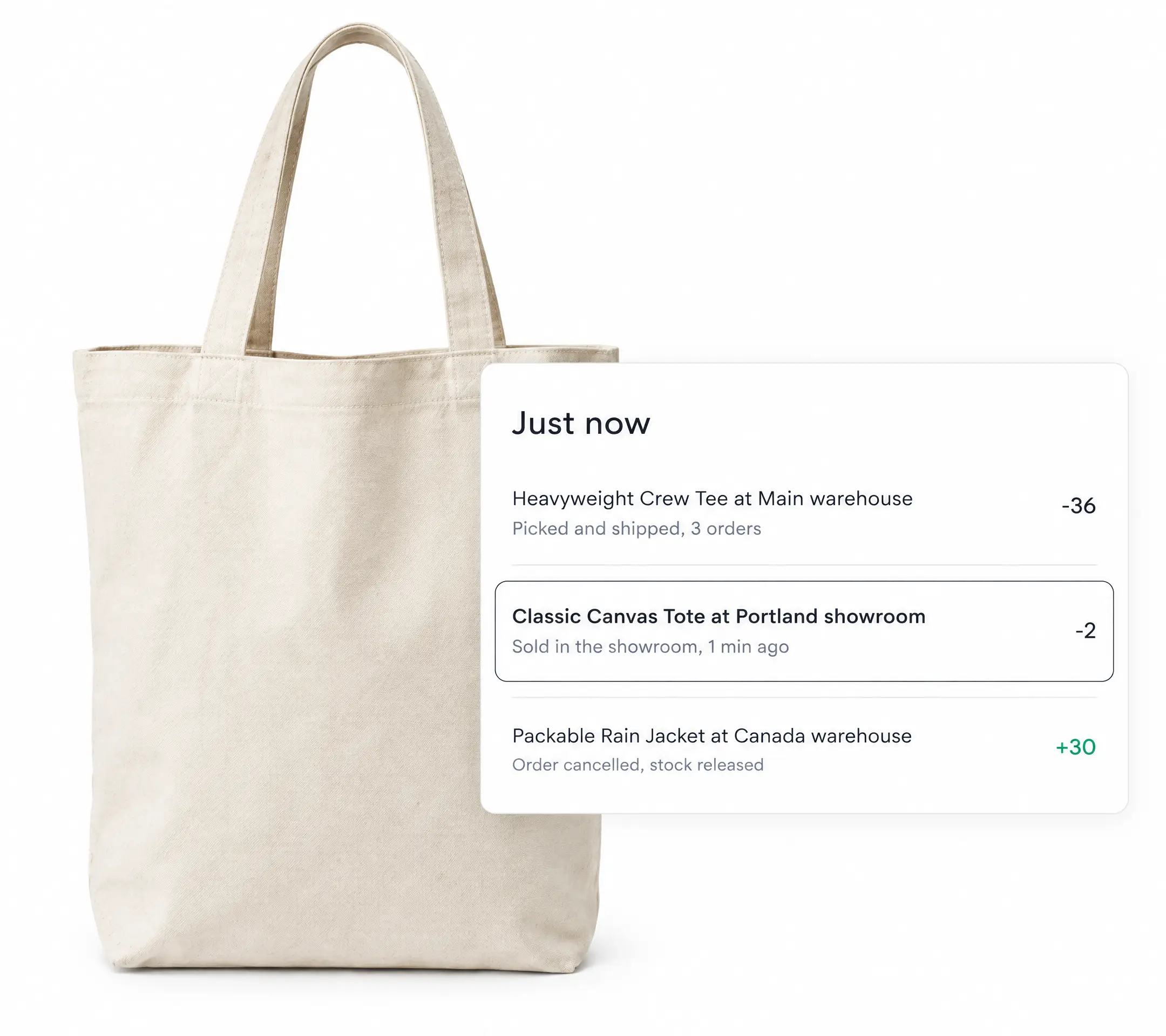
    See each change as it happens

    A sale, a pick, a cancel or a count. Each one moves the number and says why, newest first. You can see which store and which order made the change, and when.

    A canvas tote beside a live stock feed line showing two sold in the showroom, with a pick and a cancelled order above
  2. 02 / Count checks

    Catch counts that do not match

    Your 3PL counts 588 tees. Your ERP says 600. You see both and pick: accept the count, or ask for a recount. A note says why the two may differ, like a damage report from the 3PL.

    A stack of crew tees beside a count check where the 3PL counted 588 and the ERP shows 600, with buttons to accept or
  3. 03 / Paused at 0

    Stop a store from overselling

    If a marketplace stops taking updates, its stock goes to 0 until it reconnects. No buyer can order what you cannot ship. A banner at the top tells you which one is paused.

    A twill cap beside a marketplace row set to zero while its stock feed is down, so it cannot oversell
  4. 04 / Days left

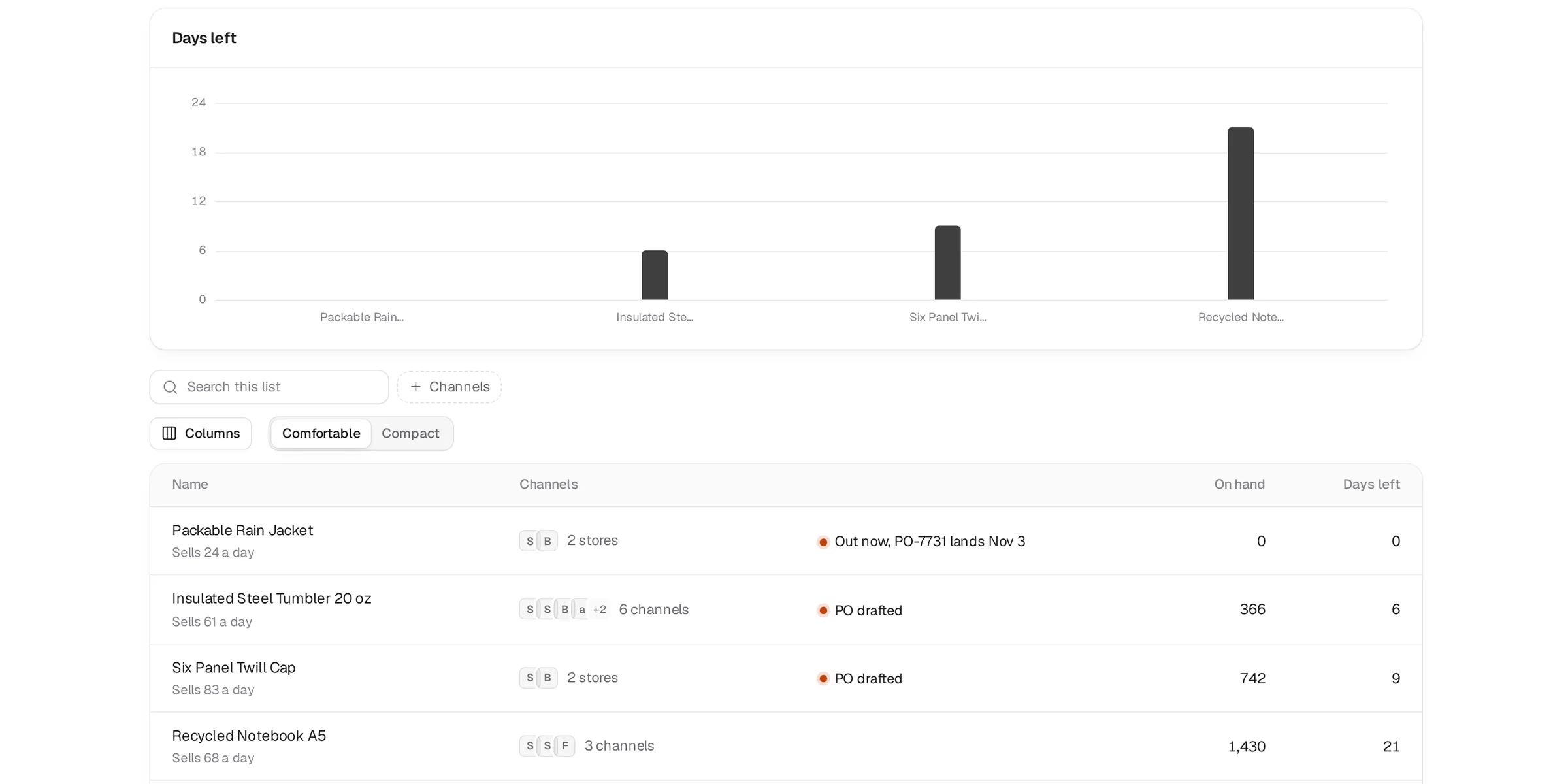
    Know how long stock will last

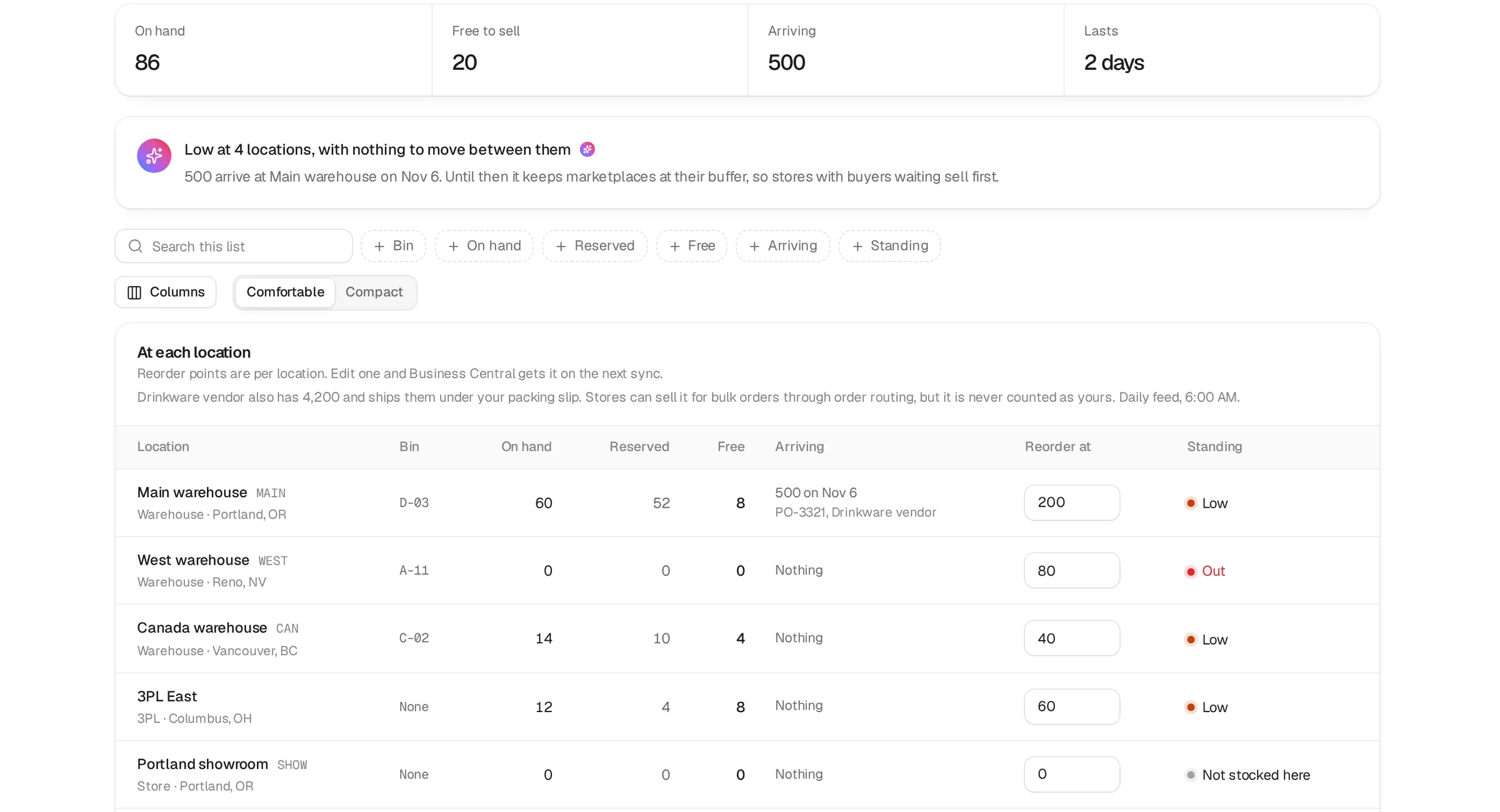
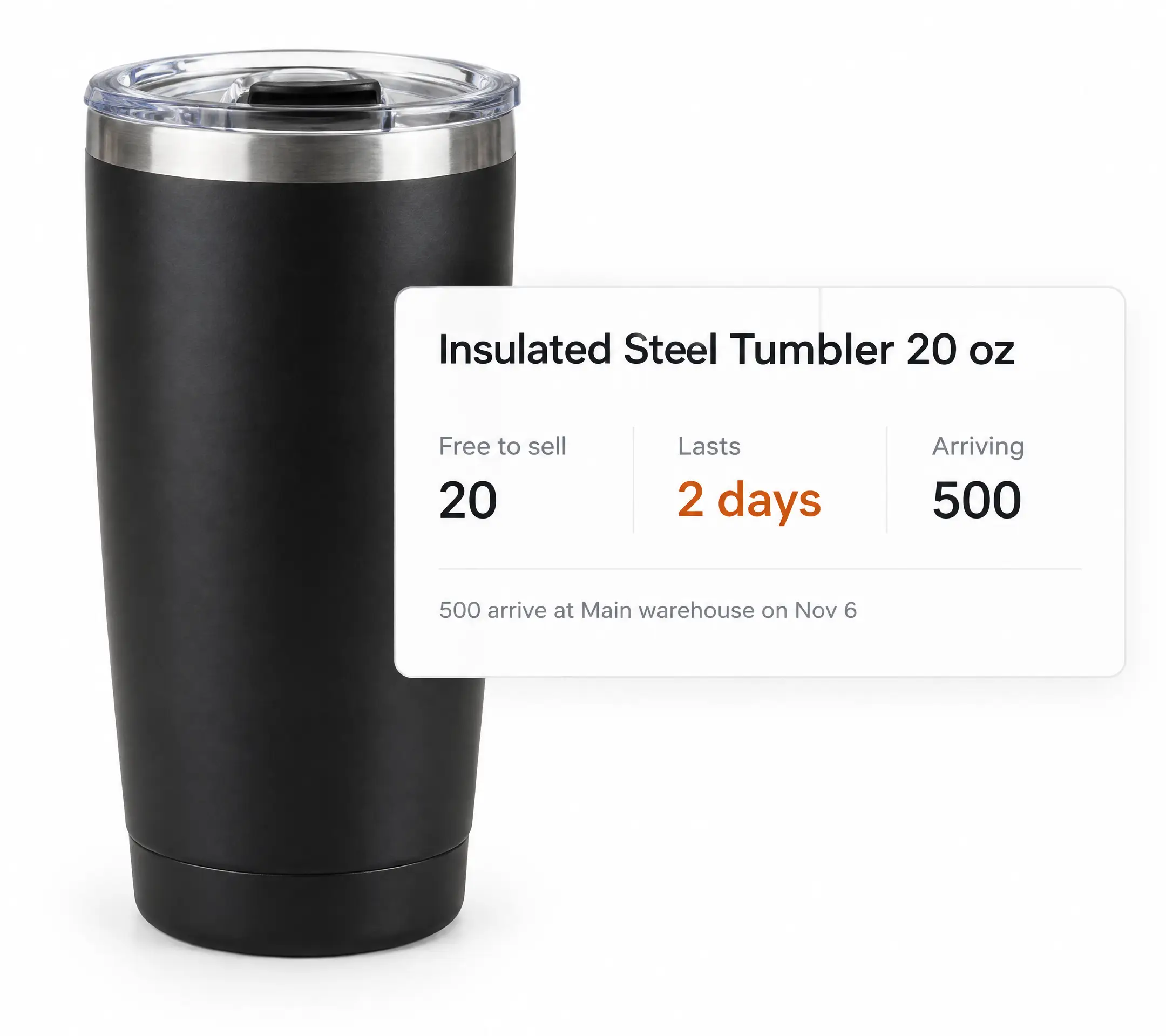
    Each product shows how many days it lasts and what is on the way. A tumbler with 2 days left shows 500 arriving on Nov 6. Until then, the stores with buyers waiting get to sell first.

    A steel tumbler beside its stock card: 20 free to sell, 2 days left, and 500 arriving on Nov 6

Client story

IMTRA went from 4 stock sources to 1. Every channel reads it.

IMTRA

Marine and industrial supply

IMTRA sells 13,000+ marine and industrial items from 24 brands. Redefine built the systems behind its catalog, linked to Business Central. Read the IMTRA story.

The challenge

Stock for each channel came from 4 sources, copied by hand.

The solution

One import now feeds every channel, and an automatic push to the ERP replaced most hand steps.

IMTRA / after go-live

Stock sources, down from 4
1
Hand ERP sync steps replaced
~85%
Before
4 stock sources, copied by hand
After
1 import that feeds every channel
Catalog
13,000+ items from 24 brands
From the IMTRA case study. Numbers as IMTRA reported them after go-live.

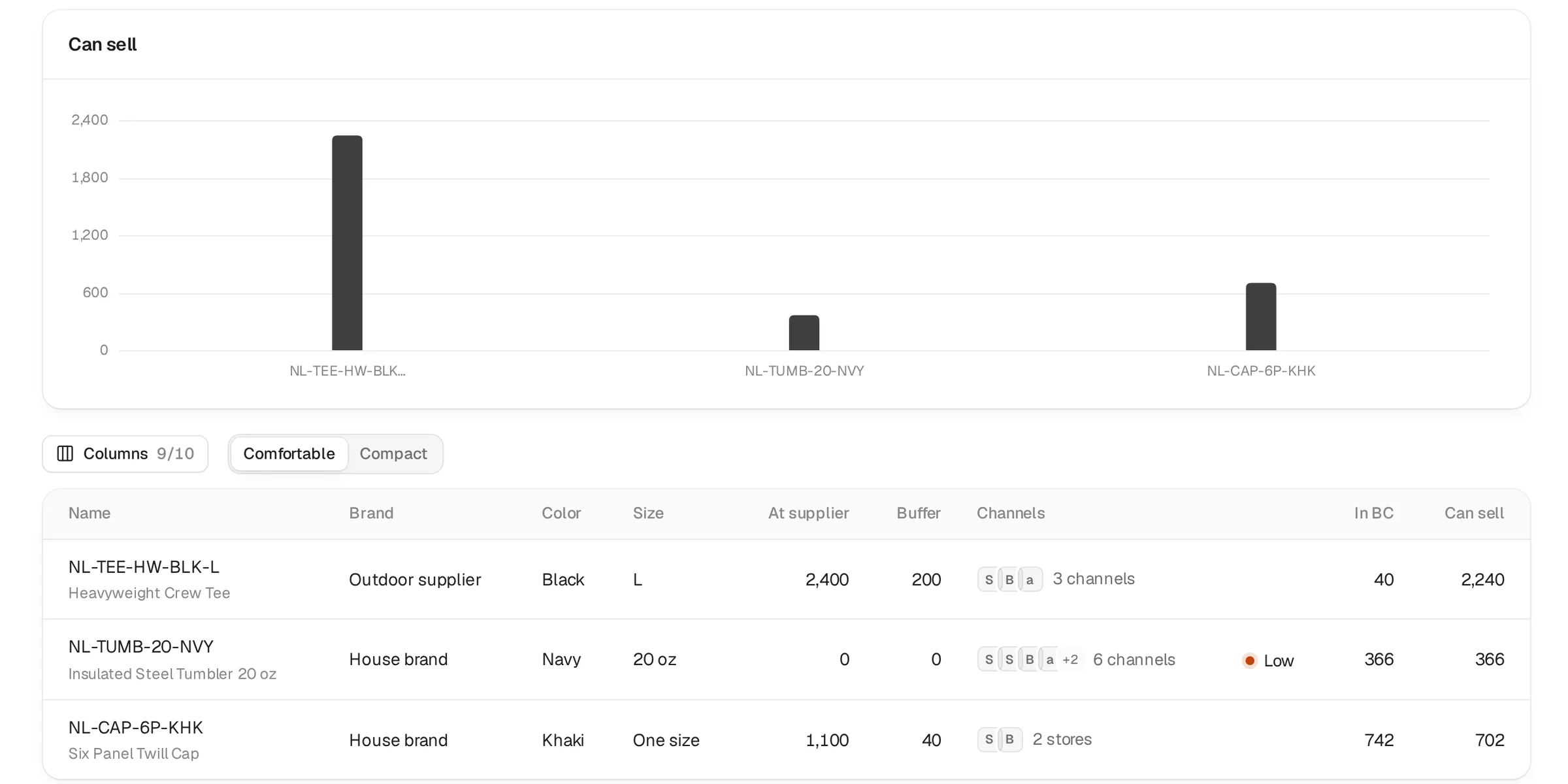
Supplier stock, shown but never counted as yours.

Some items ship from a supplier. You see what the supplier has, the buffer you hold back, what your ERP has and what stores can sell. Supplier stock stays apart, so your own count stays true.

See how orders use supplier stock
Redefine Suite stock by source report: for each item, what the supplier has, the buffer held back, what the ERP has and

How fast do stores get new stock numbers?

Each change reaches every store within 2 minutes. Your ERP and warehouse scanners send changes in seconds.

A 3PL also gets a full check every 15 minutes. See channel sync

Can I see stock at every location?

Yes. Warehouses, 3PLs and showrooms sit side by side, with on hand, reserved and free for each one.

Moves between them sit on the same page. See multi-location inventory control

What happens if a store stops syncing?

Its stock is set to 0 until it reconnects. A banner tells you which store is paused.

It cannot sell what you do not have. See marketplace channel management

What if a count does not match my ERP?

You see both numbers side by side. Accept the new count, ask for a recount, or keep the ERP number.

Nothing changes until you choose. See returns and exception management

Does supplier stock count as mine?

No. Supplier stock shows on each product, but it is never counted as yours.

Orders can still use it when you allow it. See the order routing engine

Which system keeps the stock record?

Your ERP does, like Business Central. Redefine Suite reads from it and sends back changes, like reorder points.

Your ERP stays the record. See Business Central implementation

Book a demo

See your own stock in one view.

Tell us where you keep stock and where you sell. In the demo, we show your locations and stores side by side, with what each one can sell. A demo built on your own stock, locations and stores. You can also use the demo booking page.

An operations lead in a warehouse checking stock at each location on a laptop
  • Built on your own stock
  • Your warehouses, 3PLs and stores
  • Your ERP stays the record
  • 550+ projects delivered

Book a personalized demo

Tell us which stock problem costs you the most. We set up the demo around it.

  1. 1We confirm your request
  2. 2A short call about your stock
  3. 3Your personalized demo
  4. 4You decide what comes next