Who uses supplier operations?
Teams that buy from many suppliers or ship drop-ship orders, like promo distributors, program stores and multi-brand stores.
Each store can use its own suppliers. See order and inventory operations
Redefine Suite / Supplier operations
Send POs, see supplier stock, ship drop-ship orders and check every bill in one place, next to the orders they fill.

A late supplier should show up on your screen before a customer asks. Each PO line sits beside the order it fills, so you see the gap first.
See supplier operations set up for your suppliers.
A demo set up with your own suppliers and POs.
Short answer
Updated
Supplier operations software runs the daily work between a seller and its suppliers: purchase orders, supplier stock, drop-ship orders, bills and supplier scores. Redefine Suite by Redefine Innovations keeps all of it next to your orders and stock.
Supplier catalog work brings products in. Supplier operations is what happens after a sale: the PO, the shipment, the bill and the score. Many teams still run it by email and sheets, so customers find a late order first.
In Redefine Suite, every PO line shows beside the order it fills. A bill that does not match the PO waits for you before it is paid.
Three ways to run supplier work
What it works from
See all of Redefine Suite.
Client result
What changed for Eyeglasses123, a dropshipping eyewear store.

Eyeglasses123
Better supplier oversight. Less work per order.
Stock accuracy
98.6%
On every channel, up from 86%.
Overhead per order
−26%
With better supplier oversight.
Oversells and stockouts
−71%
Fewer orders sold with no stock.
Yearly sales on the new systems
Source: Eyeglasses123 case study, redefineinnovations.com.
Tap a card to see what goes wrong, then what Redefine Suite does.
Purchase order management
The agent drafts the PO, you track each line, and the bill is checked before it is paid.
Step one: what to reorder
Your stock
8 / 30
Item and location pairs with 2 weeks of stock or less. Each one goes on a draft PO.
Jackets run out first
L1 to L6 are your six stock locations. Weeks of stock left, 1 to 5.
Step two: where each line is
This week
54%
Lines sent this week that the supplier has not confirmed yet.
Chase first: lines past their confirm date
Step three: check the bill
This week
2
Bills that do not match. They wait for you before payment.
4 of 23 bills shown

Stage 1 of 4
Order placed. The line goes to its supplier.
Mark an item drop ship only and the order line goes to the supplier that ships it. Their stock shows, but never counts as yours.
Stage 2 of 4
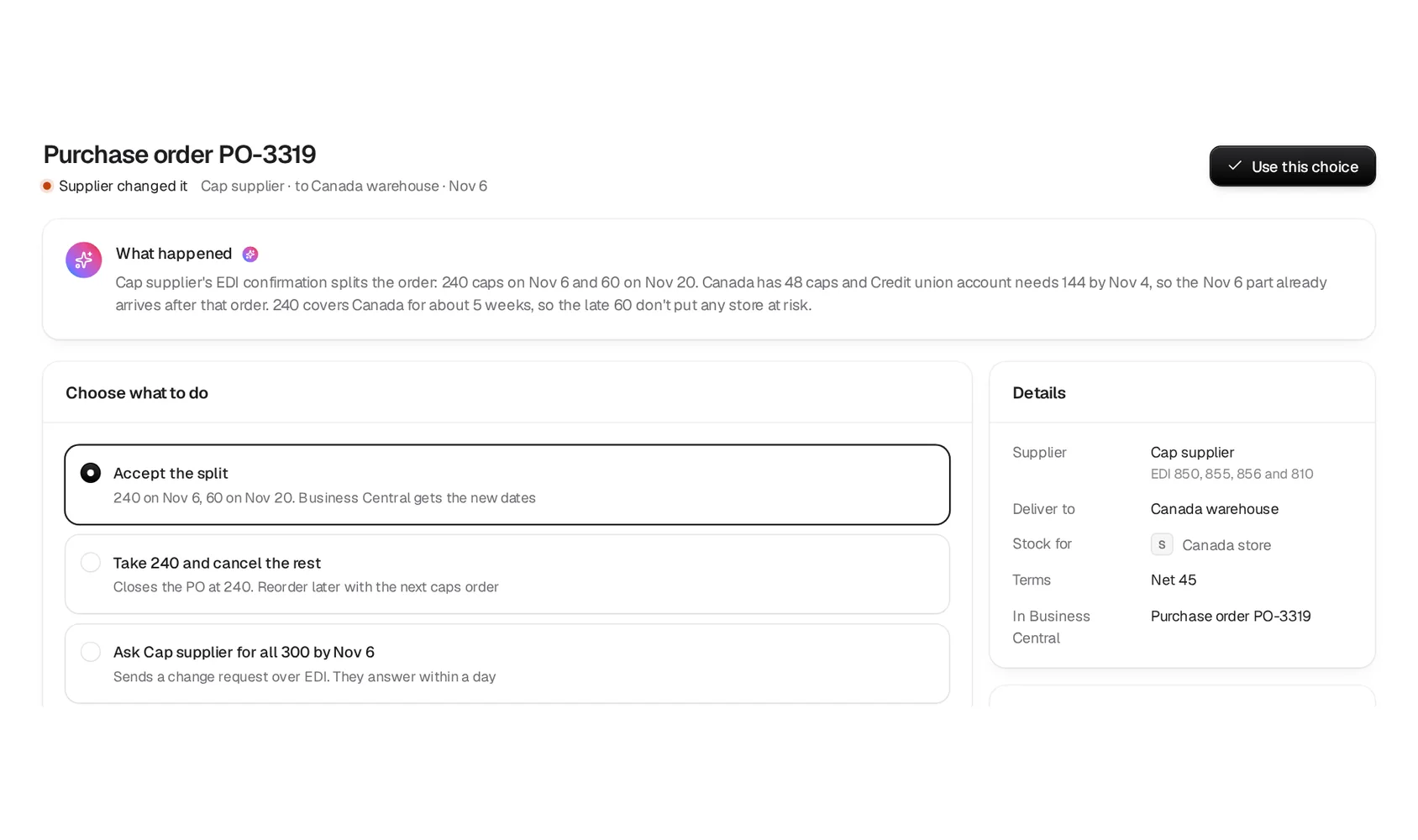
Drop-ship PO sent. Changes come back to you.
If the supplier changes a quantity or a date, the PO page shows it. You accept the change or push back.

Stage 3 of 4
Supplier ships. The PO shows it.
The PO page marks the lines confirmed and shipped. Until then, the order line shows the PO is still out.
Stage 4 of 4
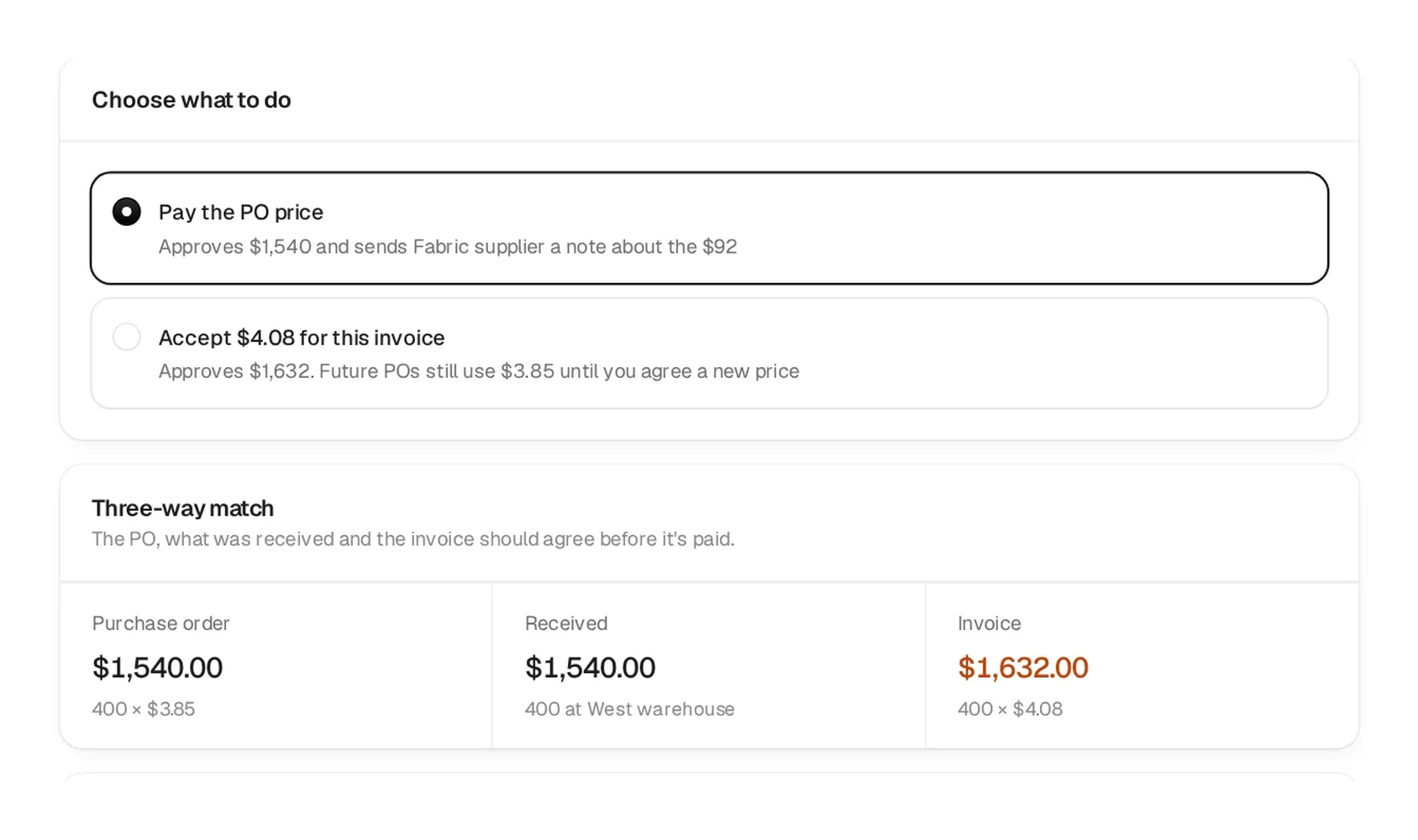
Bill checked. Score updated.
The bill is matched to the PO and what shipped. On-time, fill rate and lead time go on the supplier's scorecard.
Supplier scorecards
Each supplier page rates the supplier on on-time, fill rate and lead time, from your own PO dates and counts. You talk to the slow ones first.
Your suppliers / days late
This quarter
Questions
Teams that buy from many suppliers or ship drop-ship orders, like promo distributors, program stores and multi-brand stores.
Each store can use its own suppliers. See order and inventory operations
Set reorder points for each location. The agent drafts POs for you to approve, or you make one by hand.
Stock POs and drop-ship POs sit in one list. See inventory visibility software
Mark an item drop ship only. The order line goes to its supplier, and their stock shows without counting as yours.
Decorators and drop-ship vendors can be routing locations too. See the order routing engine
The PO page shows the change. You accept it or push back.
Backordered lines get their own tab on the orders page. See returns and exception management
Each PO is matched against what was received and what was billed. A bill that does not match waits for you.
Stock is received against the PO, into the right bin. See multi-location inventory control
Each supplier page shows on-time, fill rate and lead time.
An agent flags suppliers that run late or cost more. See the order management system
Suppliers and terms come from Business Central, and you can resync any supplier. EDI 850, 855, 856 and 810 documents sit in one log.
Each supplier page keeps a change log. See all of Redefine Suite
Supplier catalog management brings supplier products into your catalog. Supplier operations runs the POs, shipments and bills after that.
Most teams use both. See supplier catalog management
Book a demo
In the demo, we set up Redefine Suite with a few of your suppliers, POs and drop-ship items. A demo set up with your own suppliers and POs. You can also use the demo booking page.

Tell us how you work with suppliers. We set up the demo around it.