



Redefine Suite / Listing health and diagnostics

Find every listing problem on every channel

Listing diagnostics for Amazon, Walmart, Google and your own stores. Each problem says why, with a fix you can apply.

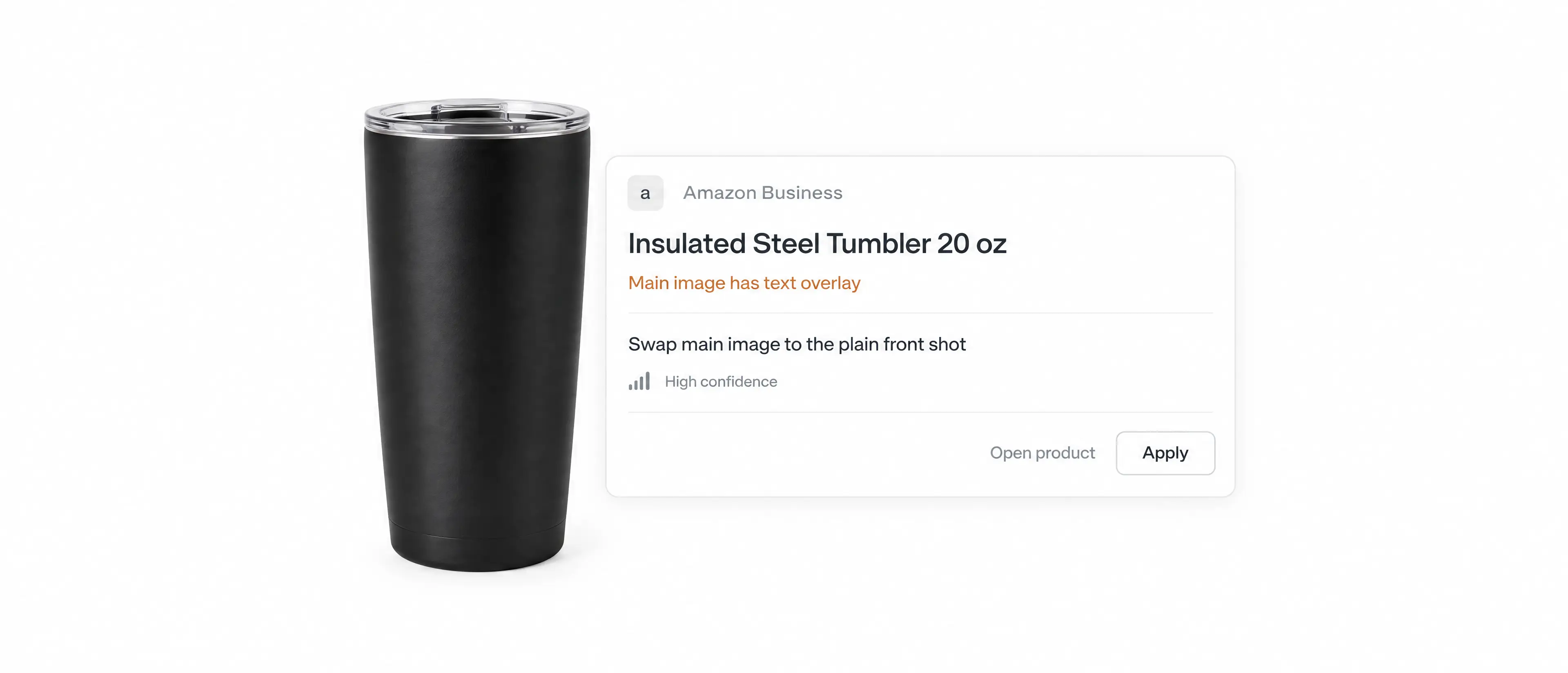
A steel tumbler beside a Redefine Suite listing issue: the main image has text on it, with a proposed fix to swap in
  1. 01

    Find

    Every channel in one list.

  2. 02

    Why

    The reason in plain words.

  3. 03

    Fix

    A fix, and how sure it is.

  4. 04

    Check

    What each channel took.

A listing a marketplace turns down shows up here with its fix, so you see it the day it fails.
Projects delivered
550+
Years building commerce
25+
List to check
1
See how a fix works

See every listing problem in one list.

A demo set up with your own channels and listing issues.

Book a personalized demo

Proof

One record on every channel

Redefine connected Forloh's Shopify store and Amazon to one product record. These numbers come from their case study.

  • Before
    3+
    Systems Forloh had to update by hand.
  • After
    2 → 1
    Sources of truth. The same record on Shopify and Amazon.
  • Result
    ~100%
    Of manual syncs now run on their own.

Read the Forloh story.

Short answer

What is listing health and diagnostics?

Updated

Listing health and diagnostics finds the product listings a marketplace or store has rejected, disapproved or left incomplete, and says why. Redefine Suite by Redefine Innovations puts every channel's listing issues in one list, with a proposed fix for each and a record of what each marketplace accepted.

Each marketplace checks listings its own way. Amazon may turn one down for a missing GTIN. Walmart may turn down a main image that is too small. A file can go up fine and still leave items out.

Listing diagnostics reads what each channel sent back. In Redefine Suite, a safe fix can be applied in one click. A fix that is not safe, like a price change, waits for you.

How the options compare

Three ways to find listing problems

OptionHow it worksWhat you getSee also
Redefine SuiteEvery channel's issues in one listA reason and a fix for each oneFeed management software
Each seller centralLog in to each one, one by oneEach names a problem its own wayCategory and attribute mapping
Error files and sheetsDownload each report and sort itFound after sales dropListing optimization

What lands in the list

  • [1] Items a marketplace rejected
  • [2] Products a feed disapproved
  • [3] Data a channel needs and lacks
  • [4] Channels that stopped syncing

Part of Marketplace and Channel Management in Redefine Suite.

Where listings go wrong

Same channels. One list.

By hand

Five channels. Five ways to say it.

  • Amazon

    Item rejected

  • Walmart

    Image too small

  • Google

    Product disapproved

  • TikTok Shop

    Needs 3:4 images

  • Your stores

    No size chart

No one list
Places to log in and check

5

In Redefine Suite

One list. One reason. One fix.

  • Amazon

    The reason, plainly

  • Walmart

    A proposed fix

  • Google

    How sure it is

  • TikTok Shop

    Crop and send

  • Your stores

    Open the product

  • Uploads

    What was accepted

Listing issues
Every channel, checked in one place

1

Listing issues

Every issue says why.

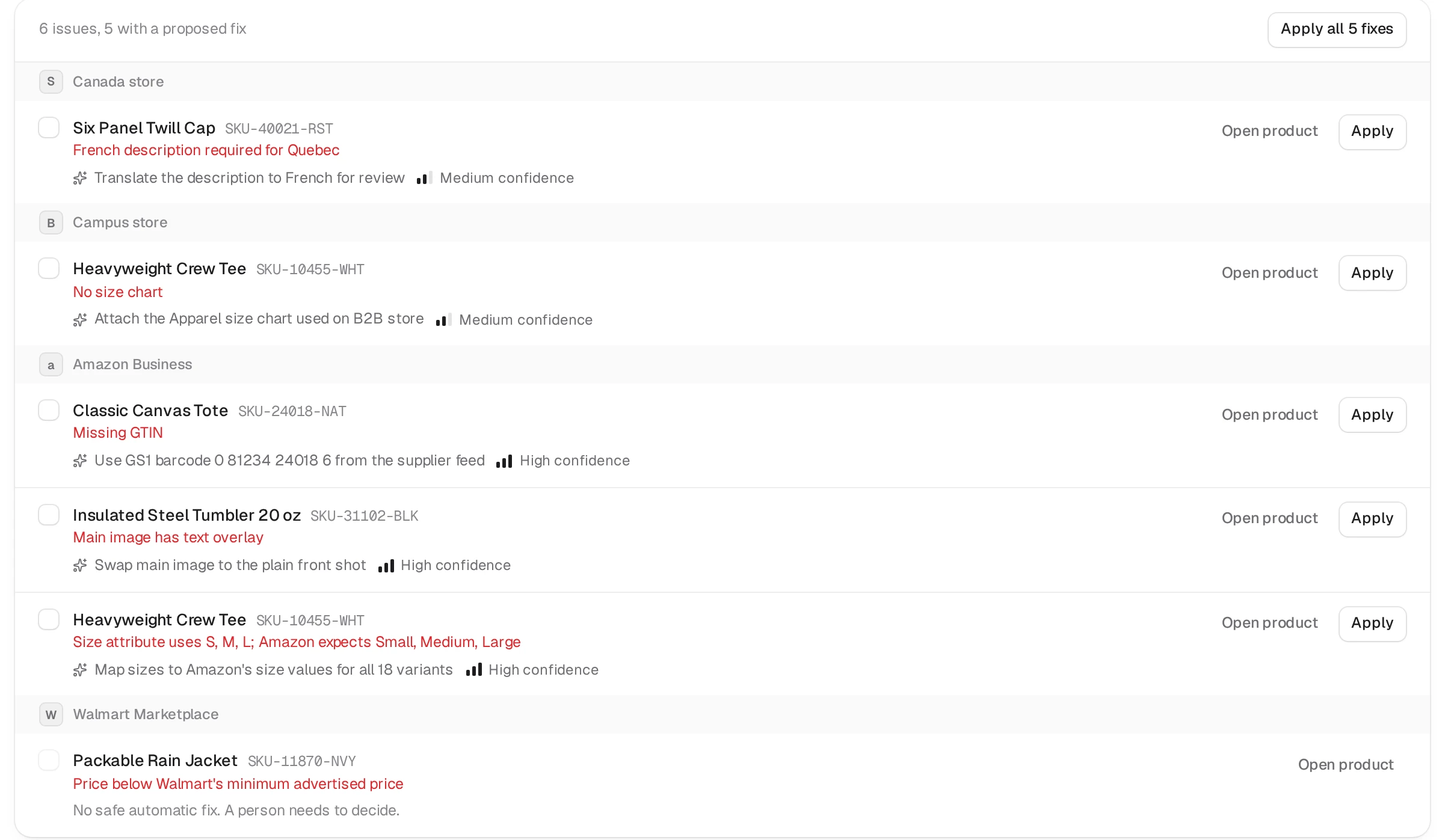
A marketplace rarely says it in plain words. Here each issue names the product, the problem and a fix. Some fixes are safe to apply now. Some wait for you.

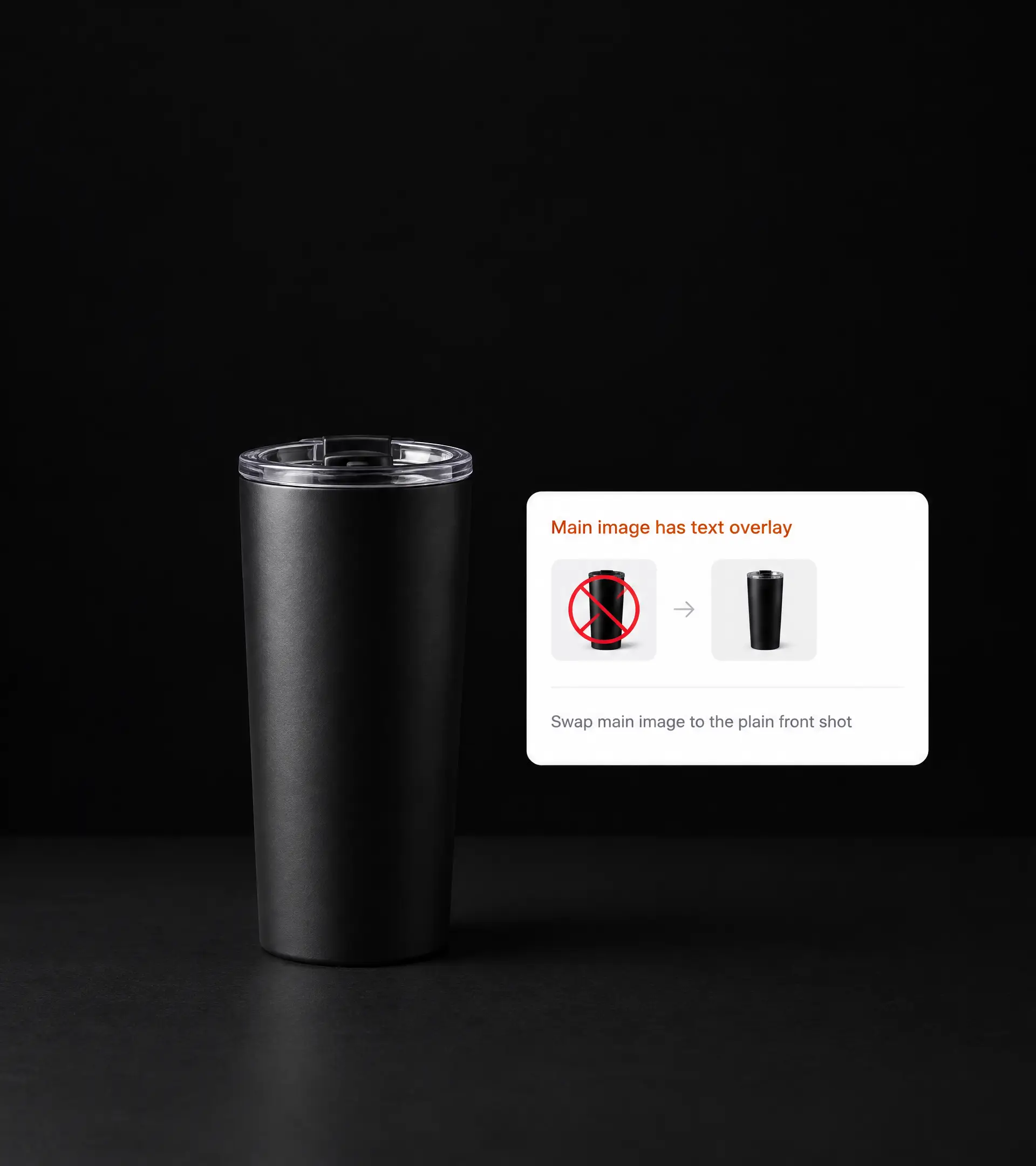
A steel tumbler with the listing issue for its main image and the plain front shot that fixes it

The issue

The main image has text on it.

Amazon, a steel tumbler, high confidence

What you see

The issue names the product, the channel and the problem: the main image has text on it. Marketplaces want a plain main image. A badge or a price on the photo is enough to turn it down.

If it waits

The product stays off that marketplace. It still looks fine on your own store, so nobody notices. You find out when sales on that channel go quiet.

The fix

Swap in the plain front shot from your product photos. The fix is marked high confidence, so you can apply it in one click. The next upload sends the new image to the marketplace.

From issue to live

Find it, fix it, check it.

One listing goes from turned down to live in four steps. The last step is the one most teams skip: checking the marketplace took it.

Your call

Fixes the agent makes on its own can be undone, one by one. See audit and traceability.

The Redefine Suite listing issues list with six issues from four channels and a button to apply all five proposed fixes

By hand or in one list

The same listings, before and after

Same products, same marketplaces, same team. What changes is how soon you see a listing fail, and why.

Listings / by hand

Your listings

  1. Find

    A login per channel

  2. Read

    Found late

    Problem

  3. Fix

    Fixed by hand

  4. Check

    Not checked

  • Seller centrals

    Each channel has its own error page

    Someone logs in to Amazon, Walmart and each store, one at a time. Each one names the same problem a new way.

    Result: you hear about it when sales drop.

  • Uploads

    Sent is not the same as live

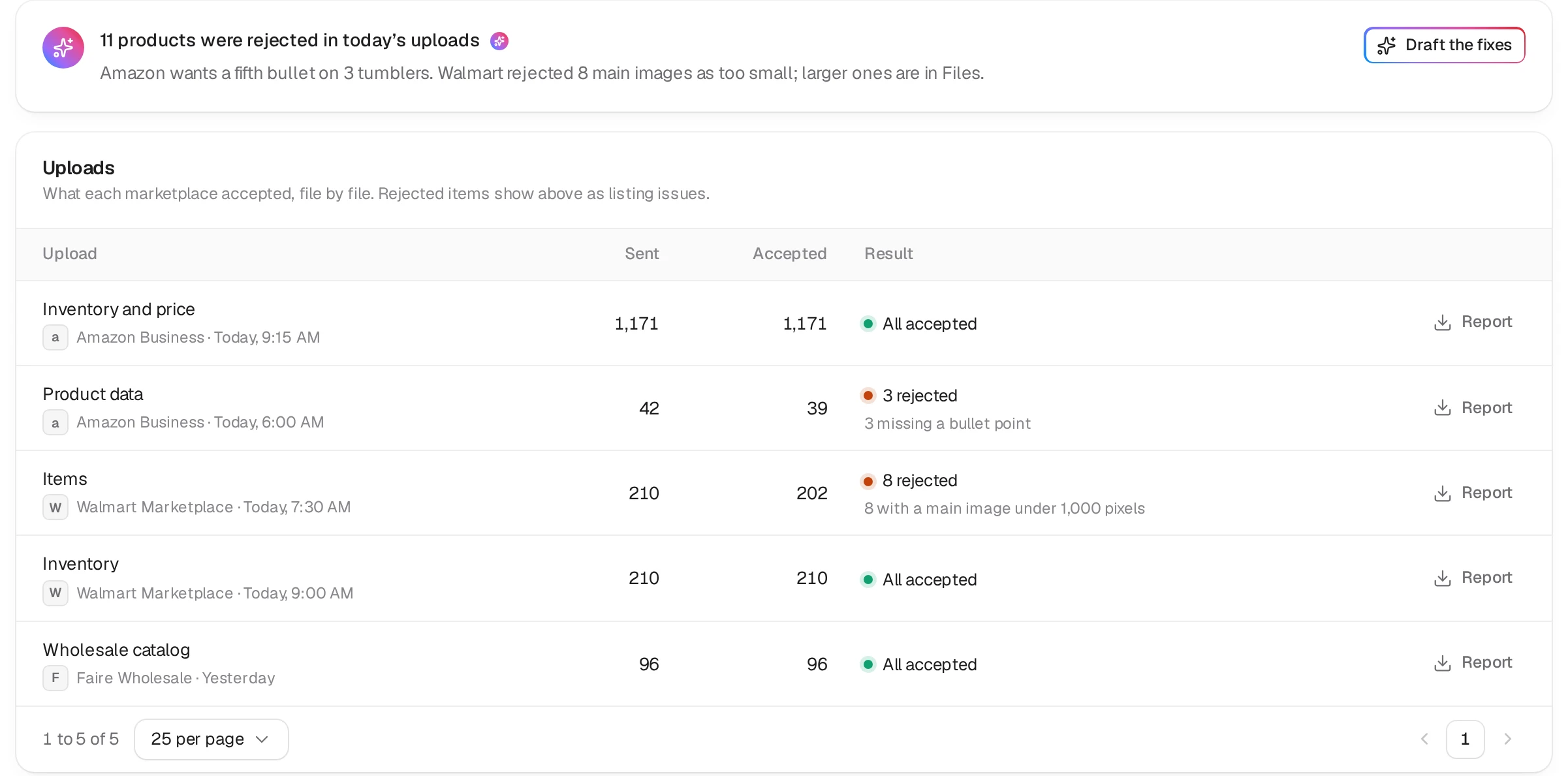
    A file goes up and looks fine. Three items were turned down, and nobody opens the report.

Listings someone checks

Some

Most listings get checked only when a buyer asks.

Read from what each channel sends back.

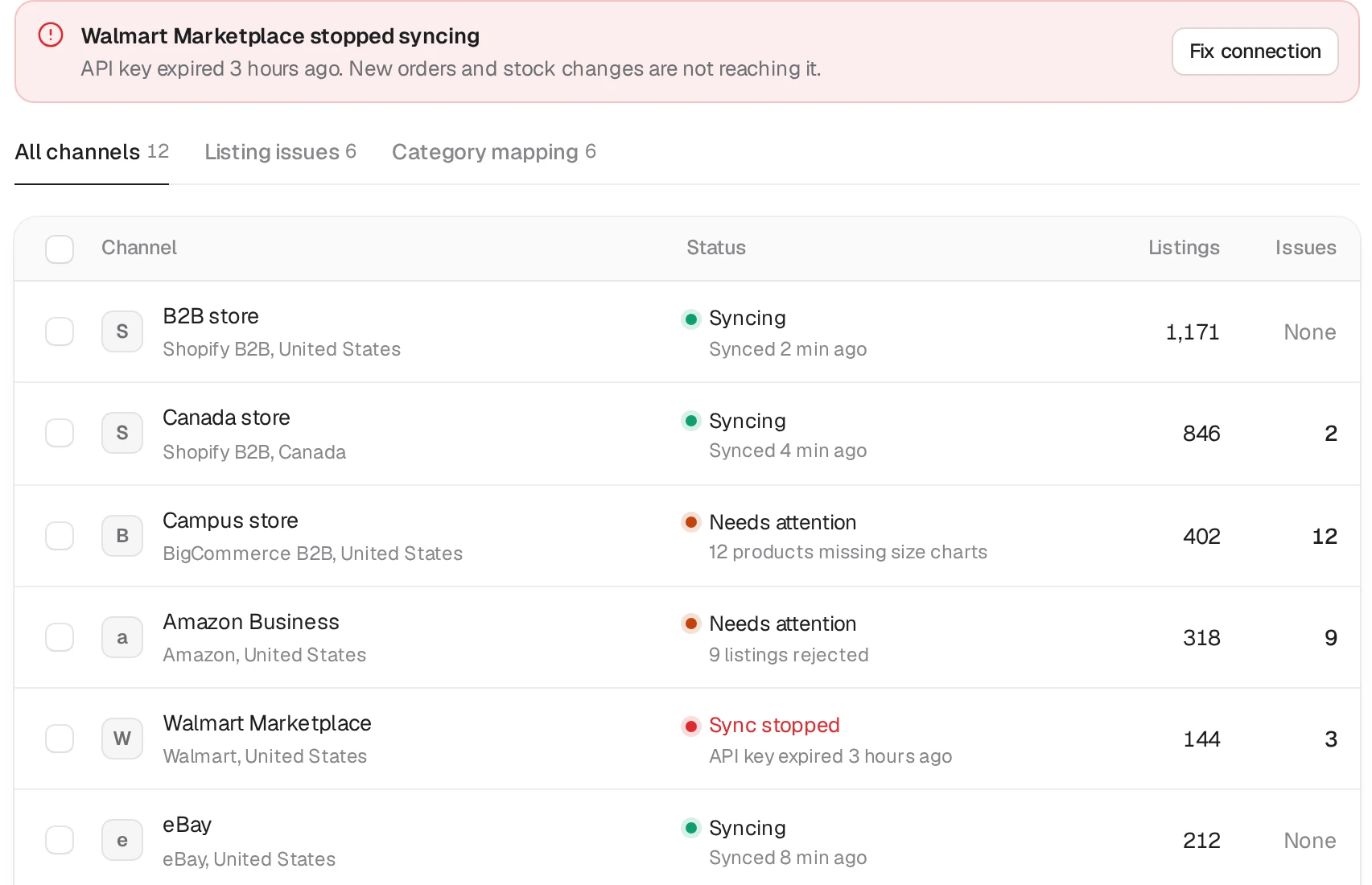
Every channel, one status.

See which channels sync, which need you and which stopped. A banner says why one stopped.

See channel sync
The Redefine Suite channels list showing which channels are syncing, which need attention and which stopped, with the

Which channels does listing diagnostics check?

Amazon, Walmart, eBay, Faire, Google Merchant Center, Facebook and Instagram, TikTok Shop, and your own Shopify and BigCommerce stores.

Each channel shows its status and its issue count. See supported marketplaces

Does it show Amazon listing errors and rejected items?

Yes. Items Amazon turned down show up as listing issues, with the reason, like a missing GTIN or a main image with text on it.

Each one comes with a proposed fix when there is a safe one. See feed management software

Can it fix listings on its own?

The channel agent fixes some on its own, like sizes, GTINs and main images, inside the limits you set. Each fix can be undone.

Some issues, like a price below the minimum advertised price, always wait for a person. See audit and traceability

What do High and Medium confidence mean?

It is how sure the agent is of a fix. A GTIN from your supplier feed is high. A French translation is medium, so a person checks it.

Apply one fix, or apply all of them at once. See product data validation

How do I know a marketplace accepted a change?

Uploads lists each file sent to each marketplace, how many items it took and why it turned any down.

Turned-down items come back as listing issues. See feed management software

What happens when a channel stops syncing?

A banner says which channel stopped and why, like an expired API key, with a button to fix the connection.

Until then, the agent asks before it changes anything on that channel. See channel sync

Is this the same as a listing quality score?

No. Listing health finds what is broken or turned down. Listing optimization makes listings that work sell better, with a Sales score for each.

Most teams fix health first, then optimize. See listing optimization

Book a demo

See your own listing issues.

In the demo, we set up a few of your channels in Redefine Suite and walk through their listing issues, each with its reason and fix. A demo set up with your own channels and listing issues. You can also use the demo booking page.

Two colleagues at a monitor reviewing listing issues in Redefine Suite and applying a proposed fix
  • Built on your own listings
  • Your marketplaces and stores
  • Fixes you can undo
  • 550+ projects delivered

Book a personalized demo

Tell us where your listings fail most. We set up the demo around it.

  1. 1We confirm your request
  2. 2A short call about your channels
  3. 3Your own demo
  4. 4You decide what comes next