Your proof approval software should release orders automatically.
Redefine is proof approval software that connects your artwork submission, digital proof review, and approval workflow directly to your order management system. When a buyer approves their proof, production releases. No email thread. No manual handoff.

Your approval workflow is delaying every order
When your creative approval workflow lives outside your order system, someone has to manually connect them. That gap causes delays, errors, and frustrated decorators.
Old Way: Manual Proofing
- Artwork submitted by email or external tools. No record in the order
- Proofs chased by hand through email chains or Slack messages
- Someone manually tells the decorator or order management system that approval happened
- Wrong artwork version decorated because no version control exists
- Decorator invoices reviewed separately from order status. Double the work
New Way: Redefine Proof Workflow
- Buyer submits artwork inside the store, attached to the order record
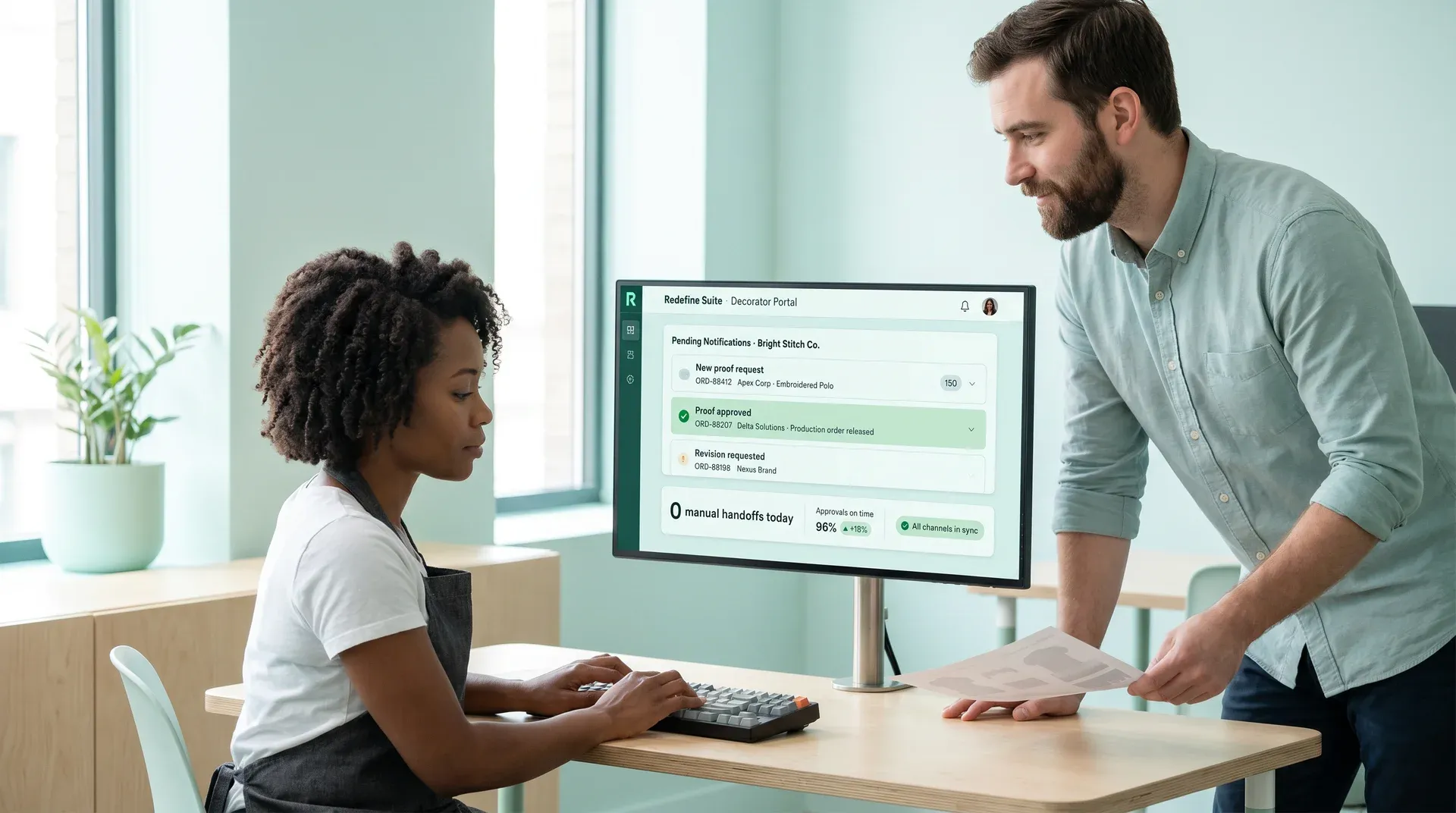
- Decorator receives automated notification with proof file and order context
- Buyer approves proof online: one click releases the production order
- Full version history per stock keeping unit: approved file is locked to the production run
- All proof status, approval gates, and order states visible in one dashboard
Platform unification advantage
Proof approval triggers order release in the same system: no integration, no manual step, no delay.
What our online proofing software does
This online proofing software handles every step between "artwork submitted" and "production released." It is built into your program store, connected to your order management system, and visible to every stakeholder in real time.
Online artwork and logo submission
Buyers upload files directly in the store portal, linked to their specific order and product.
Digital proof review and approval
Buyers review proofs on a branded portal and click to approve or request a revision.
Decorator and vendor proof notification
Automated notifications alert your decorator or vendor the moment a proof is ready to review or approved.
Artwork file management per order and product
Every artwork version is stored against the order line item. Revision history, file names, and approval timestamps all preserved.
Approval releases the production order
The platform unification difference: our proof approval software automatically triggers the production release in the order management system. Zero manual intervention.
Every step of the proof lifecycle, built in
Click any capability to see how it works inside Redefine's online proofing software.
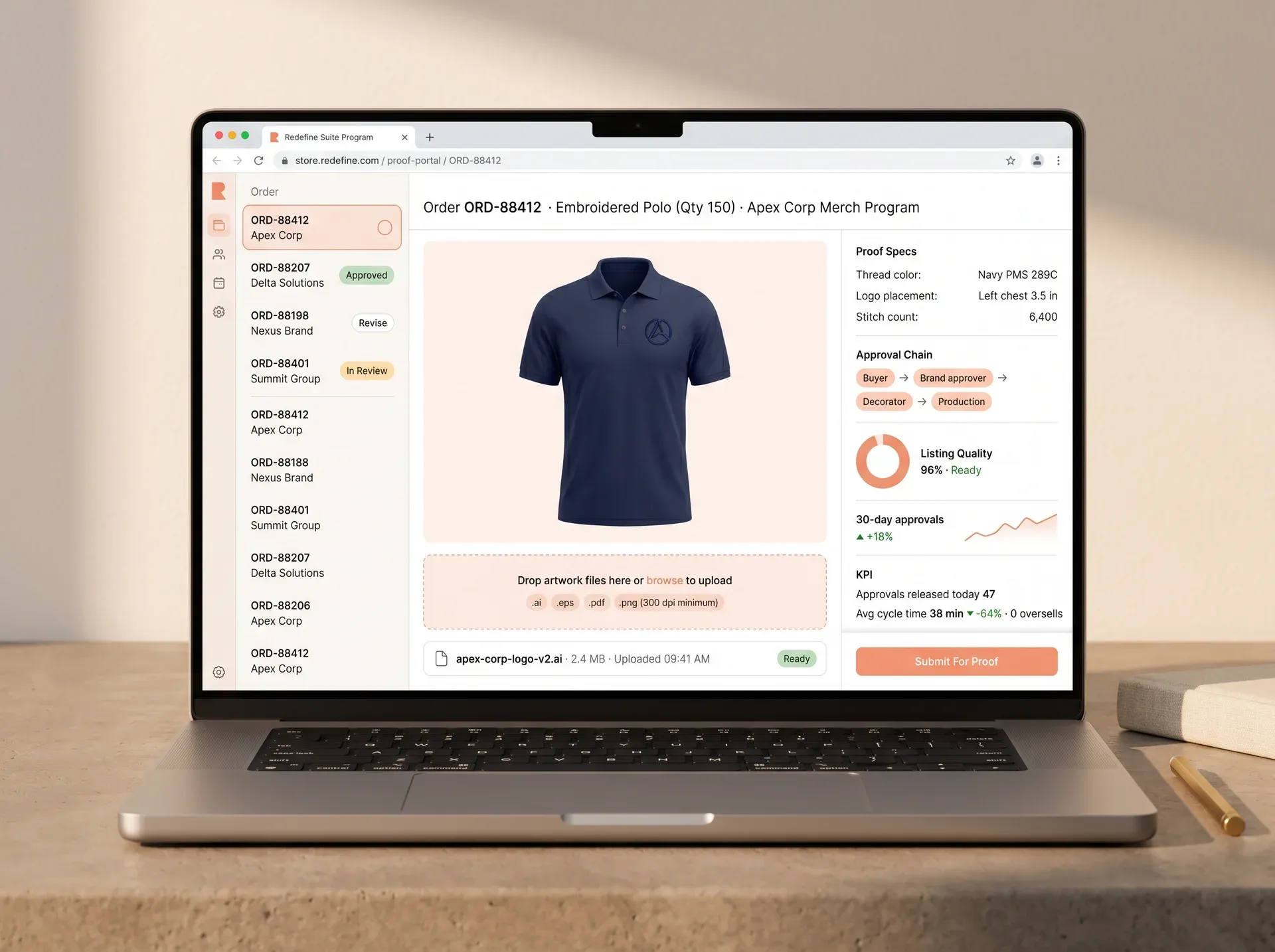
Order #ORD-88412: Apex Corp Merch Program
Submit your artwork for: Embroidered Polo (Qty 150)
Drop artwork files here or browse to upload
Accepted: .ai, .eps, .pdf, .png (300 dots per inch minimum)
apex-corp-logo-v2.ai
2.4 MB, Uploaded 09:41 AM
Proof #2: Embroidered Polo, Apex Corp
Awaiting Approval
Pending Notifications: Bright Stitch Co.
New proof request: ORD-88412
Embroidered Polo · Qty 150 · Apex Corp · Due: Jun 3
View artwork file
Proof approved: ORD-88207
Screen Print Tee · Qty 200 · Delta Solutions · Approved 10:12 AM
Production order released
Revision requested: ORD-88198
Hat Embroidery · Qty 75 · Nexus Brand · Notes: adjust logo size
Production Release Triggered
Order ORD-88207 released to production
Triggered automatically on proof approval at 10:12:04 AM
ORD-88412: Artwork Versions
apex-corp-logo-v2.ai
Uploaded May 19, 09:41 AM, version 2
apex-corp-logo-v1.ai
Uploaded May 18, 02:30 PM, version 1
Locked for production run
apex-corp-logo-v2.ai is the file attached to the released production order. Version history preserved.
From artwork upload to production release
Click any step to see what happens inside the creative approval workflow at that stage.
Buyer places order and submits artwork
Artwork file attached to the order in the store portal
Decorator receives automated notification
Email or portal alert with artwork file and order detail
Decorator prepares and uploads digital proof
Proof linked to the order record with placement specs
Buyer reviews proof online: approve or request a revision
One-click approval on the buyer portal, with revision notes if needed
Approval triggers order management system production release
No manual handoff. Production starts automatically
What happens at this step
The buyer uploads their logo or artwork file directly inside the program store order portal. The file is immediately associated with the order line item. No external email, no file transfer protocol folder, no separate upload tool.
Platform note
Accepted formats: .ai, .eps, .pdf, .png (300 dots per inch minimum). File stored in artwork manager against order ID.
What happens at this step
Your decorator or vendor receives an automated notification the moment artwork is submitted. The notification includes the artwork file, order quantity, decoration specs, and required in-hands date. Everything they need to start the proof without a phone call.
Notification channels
Email alerts and in-portal notifications. Configurable per vendor or decorator.
What happens at this step
The decorator uploads the digital proof through their portal. The proof is versioned (version 1, version 2, and so on) and linked to the original order. Placement specs, thread colors, and stitch counts are captured alongside the file.
Version control
Each proof version is stored. When approved, that version is locked to the production order. Superseded versions are archived, not deleted.
What happens at this step
The buyer receives an email with a direct link to the proof review page. They view the proof, see decoration specs, and click "Approve Proof" or "Request Revision." Revision notes are captured and sent back to the decorator immediately.
Approve
Triggers production release
Revise
Notes to decorator, new proof cycle starts
What happens at this step
The moment the buyer approves, the platform triggers a production order release in the order management system. The decorator is notified automatically. No one on your team has to check an inbox, update a spreadsheet, or send an email.
Manual steps eliminated at this stage: Zero
Promotional products at scale: from $14M to $120M
Client
Parsons Kellogg
Promotional products, corporate apparel, branded merchandise
Multi-store ecommerceProblem
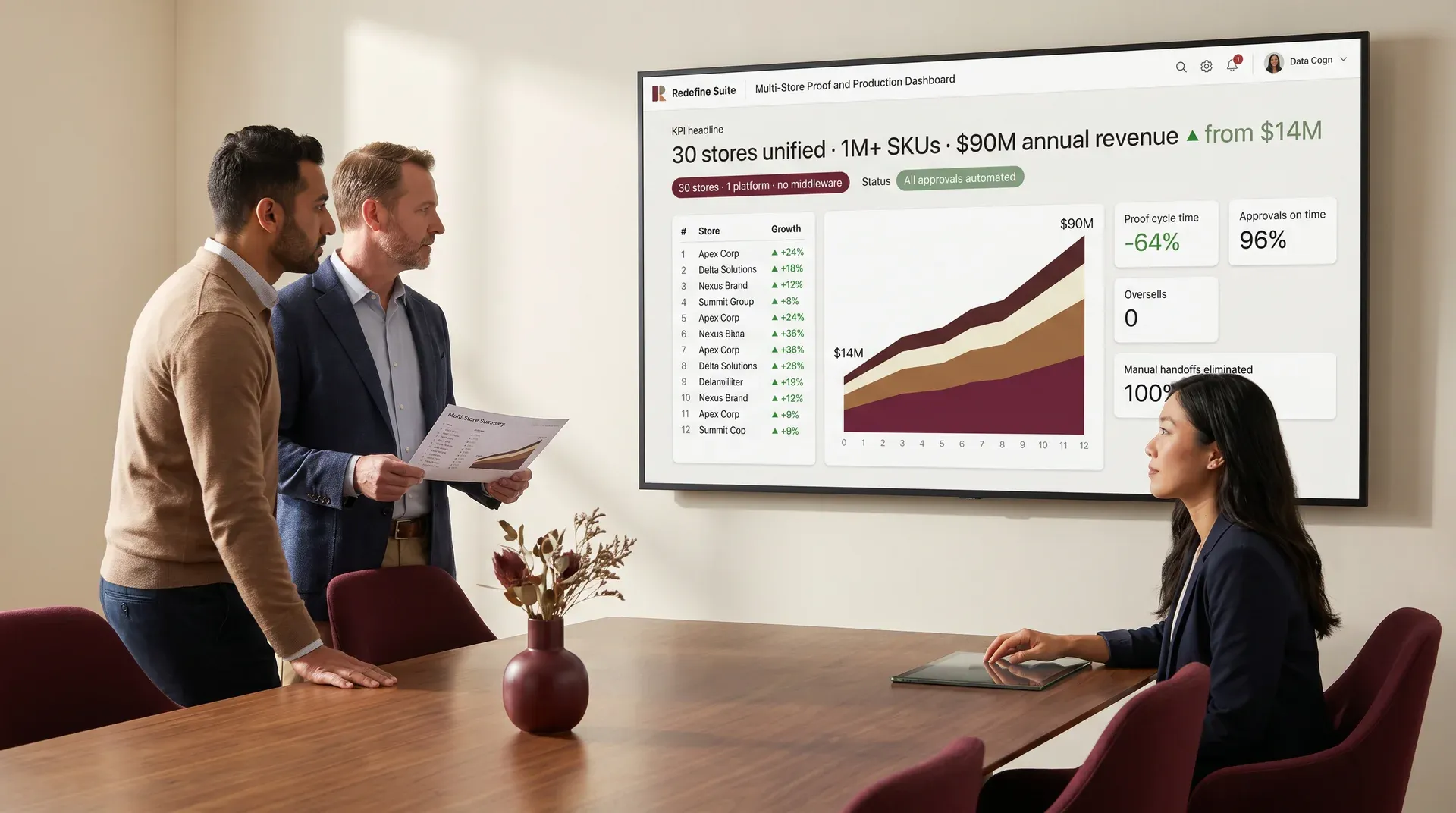
Existing systems lacked unified visibility across 30+ stores and over one million inventory items. Manual processes and fragmented integrations slowed order fulfillment and constrained scalability.
Solution
Custom ecommerce platform with enterprise resource planning integration, headless architecture, automated workflows, and real-time Power BI reporting across all 30+ stores and backend systems.
Result
Scaled from under $14M to over $120M annually. Automated workflows and unified operations eliminated manual overhead across 30+ stores.
Real-time analytics supported faster decisions across the full operation.
0+
Stores unified on one platform
0M+
Stock keeping units managed across stores
$0M
Revenue growth achieved
The only proof workflow connected to your order management system
Other program store platforms treat the design approval workflow as a separate module. Redefine connects the full lifecycle: store, artwork, proof, approval, and production release, in a single unified platform.
Program Store
Buyer artwork submission and order context captured in the storefront layer.
Artwork Manager
Files versioned, stored, and linked to order line items, not a shared folder.
Proof Workflow Engine
Proof review, approval gates, revision cycles, and decorator notifications managed in one engine.
Order Management System
Proof approval event triggers production order release. Zero manual step.
Live workflow state
Built for every stakeholder in the design approval workflow
Creative approval software your buyers will actually use
Our creative approval software sends buyers a branded portal link with their proof pre-loaded. They can review, comment, and approve or request a revision in under a minute. No account creation required.
- Mobile-optimized proof review page
- Inline revision request notes
- Approval timestamp and record preserved
Your Proof: Apex Corp Polo
Review Required
All Active Proof Workflows
Full visibility into every active proof
Your team sees every order's proof status in a single dashboard. No inbox digging, no spreadsheet. Color-coded status across the whole design approval workflow lets you spot bottlenecks before they cause delays.
- Real-time proof status per order
- Overdue proof alerts for your team
- Revision history and approval audit trail
Who gets the most from proof and approval automation
Promotional products distributors
Running high-volume decorated orders across multiple clients. Creative approval software lets every order get artwork submitted, proofed, approved, and released without manual overhead on your team.
Corporate merchandise program operators
Managing team, company, and redemption stores where every order line may require artwork review. Proof approval software connected to the order management system prevents production errors before they ship.
Decorator and fulfillment operations
Decorators and vendors who receive proof requests from multiple store operators. Online proofing software replaces scattered email threads and gives your team one place to track all active proofs.
Brand and marketing operations teams
Internal teams managing branded merchandise across dozens of programs. A design approval workflow with artwork version control and an audit trail keeps brand standards enforced at every order.
High-volume school and spirit wear programs
Spirit wear, school apparel, and team uniform programs where hundreds of orders each need individual artwork review. Automation removes the manual chase at every step.
Compliance-sensitive brand programs
Programs where brand guidelines must be enforced at every order. A creative approval workflow with approval gates and a locked artwork audit trail ensures only approved artwork reaches production.
Proof workflows connect across the full platform
Program Store Software
The parent platform. Proof and approval is one module inside a complete program store solution.
Explore Program Store →
Team Store Software
Proof workflows for spirit wear and team order programs. Every order runs through the same approval engine.
Explore Team Stores →
Company Store Software
Internal brand merchandise programs with proof approval gates built into every order.
Explore Company Stores →
Order Management System
The order management system layer that receives the production release trigger from proof approval. Same platform, no integration needed.
See Order Management System Connection →

Other program store platforms have a creative approval workflow user interface. They don't have order management system connection.
The most common failure in decorated order workflows is the gap between approval and production release. Most proof approval software leaves a proof approved, then someone has to manually trigger the next step. That gap costs time and causes errors.
Proofing connected to order management system, not bolted on
Most creative approval software stores proof files separately from the order system. In Redefine, proof approval is an event in the order lifecycle: it triggers a state change in the order management system directly. No application programming interface stitching, no manual step.
Full artwork version control per order line
Other tools rely on file naming conventions or shared folders. Redefine stores every version against the order ID with timestamps and approval records. When the production order releases, it references the approved file, not whatever was last uploaded to a folder.
Decorator notifications built into the workflow engine
Other platforms send a one-time email when a proof is uploaded. Redefine sends structured notifications at each state transition: artwork submitted, proof ready for review, approval received, revision requested, with order context included in each notification.
Questions about proof and approval workflows
When a buyer clicks "Approve Proof," the platform records the approval event and triggers a state transition on the associated order in the order management system. This is a platform-native connection, not a third-party automation or a webhook you configure. The order management system sees the approval event and automatically changes the order status to production-ready. Your team does not need to do anything.
The revision request triggers a notification back to the decorator with the buyer's notes. The order stays in a proof-pending state. Production does not release until a new proof is uploaded and approved. Each revision cycle is tracked in the order record. You can see the full revision history, including who requested what and when, at any time.
No. Buyers receive a direct link to their proof review page. The link is scoped to their specific order and does not require login. For store operators who prefer it, buyer account access is available, but it is not required for the proof and approval flow.
Yes. Proof gates are configurable per product type, per store, or per order category. Stock products that do not require decoration can bypass the proof workflow and release directly. Decorated products can be set to require proof approval before the production order is released. You define the rules; the platform enforces them.
Proof and approval is a module within Redefine's program store platform. The order management system connection that makes automated production release possible only works because both the proof layer and the order layer run on the same platform. A standalone proofing tool cannot achieve this without significant custom integration. If you're evaluating whether the full program store fits your operation, submit your brief and we'll walk you through what's relevant.
The portal accepts standard artwork formats including .ai, .eps, .pdf, and high-resolution .png (300 dots per inch minimum). File type and resolution requirements are configurable per store or product type. Buyers who upload a file that does not meet the spec see an inline error with guidance before submission completes.
See the proof workflow in your store context
Tell us about your decorated order volume and current proofing process. We'll show you exactly how our proof approval software connects approval to production release in a store built for your programs.
No commitment. No pitch.
Submit your brief
Tell us about your decorated order volume and current proofing process.
Call within 48 hours
A specialist reviews your submission and calls you to confirm fit before any demo.
Scoped proposal in 3 days
Tailored to your store setup, order volume, and decorator relationships, with line-by-line pricing, no commitment to receive it.
Sprint 1 begins within 1 week of sign-off
First deliverable visible at the end of Sprint 1.
Your team's time investment is typically 2 to 3 hours per week during setup. After go-live, the approval workflow runs without manual intervention. We handle configuration, testing, and decorator onboarding.
Submit your brief
Call within 48 hours → proposal in 3 days → Sprint 1 within 1 week of sign-off
Brief received
Brief received, we'll review your workflow and send a scoped proposal within 3 business days. Expect a call within 48 hours to confirm context before we scope.
Stop manually connecting proofs to production
Your decorated order volume shouldn't require a manual handoff at every approval. See how Redefine proof approval software closes that gap, for the full program store, not just the proof step.
No commitment. No pitch.
Submit your brief → call within 48 hours → scoped proposal in 3 days → Sprint 1 within 1 week of sign-off