




Marketplace launch management

Launch your next marketplace from the catalog you have.

See your next marketplace in Redefine Suite.

A demo set up with your own catalog and the marketplace you want next.

Book a personalized demo

Short answer

What is marketplace launch management?

Updated

Marketplace launch management is how a brand takes its catalog live on a new marketplace, like Amazon, Walmart or eBay. You connect the account, map categories and fields, set prices and stock, send the products and fix what gets rejected. Redefine Suite by Redefine Innovations runs each step from the catalog you already have.

A product that sells well on your store is often rejected on the next marketplace. Each one wants its own categories, barcodes, image sizes and size names.

In Redefine Suite, every channel sells from the same catalog, with its own prices, stock rules and categories. The agent maps what it can and asks you about the rest.

How the options compare

Three ways to launch a marketplace

OptionHow it worksWhat you getSee also
Redefine SuiteOne catalog, mapped and checked for each marketplaceRejections fixed in one listMarketplace and channel management
A connector appSends a feed to one marketplaceErrors read in each seller portalFeed management software
SpreadsheetsTemplates filled in and uploaded by handRejections found after uploadCategory and attribute mapping

What a launch works from

  • [1] Your catalog and its product fields
  • [2] The marketplace categories and rules
  • [3] Your costs, prices and the marketplace fee
  • [4] Stock and your Business Central orders

See all of Redefine Suite.

Case study / marketplaces

Half Price Drapes

One catalog behind 18+ marketplaces.

Half Price Drapes sells on its own store and 18+ marketplaces. Stock had to be right on all of them at once.

Velvet drapes hanging on tall sunlit windows, the kind of product Half Price Drapes sells on its own store and 18+

Result

Stock accuracy

Before

~82%

After

99.2%

Source: Half Price Drapes case study.

  1. 01 / Problem

    Each channel had its own copy.

    Stock and product data drifted from one marketplace to the next.

  2. 02 / Diagnosis

    The catalog was the constraint.

    Fixing one channel at a time did not stop the drift.

  3. 03 / Action

    One source for every channel.

    Products, stock and orders ran from one place, tied to Dynamics 365.

  4. 04 / Result

    ~82% to 99.2% accurate.

    The business grew past $70M a year.

Four steps from catalog to live.

  • Hands on a laptop connecting a new marketplace in Redefine Suite

    1 catalogStep 1: Connect

    Pick the marketplace and connect your account

    Every channel sells from the same catalog, with its own prices and stock rules.

  • A folded rain jacket beside a category match card that asks for gender and a size system before it can list

    90% matchStep 2: Map

    The agent maps categories and fields first

    A category applies on its own at a 90% match or higher. The rest wait for you.

  • A list of products not yet on the new marketplace, with two picked to send

    0 re-typedStep 3: Pick

    Choose which products go and send them

    Pick products on the Listings tab. Nothing is typed in again.

  • A packed shipping box beside a phone showing new marketplace orders coming in

    5 minutesStep 4: Sell

    Orders come in, stock and prices go out

    Orders arrive every 5 minutes and go to Business Central. Stock and prices go out when they change.

Launch check

Is your catalog ready for a new marketplace?

Select every problem you have today. Your score updates as you go.

Symptoms

Product data

Images

Categories

Selling setup

Launch ready score

Live

100%

No issues selected.

0 of 12 issues selected

  • Product data0 / 3
  • Images0 / 3
  • Categories0 / 3
  • Selling setup0 / 3

Seeing a few? We can show you how each one gets fixed.

Book a personalized demo

What is launch management? It is the work between deciding to sell on a marketplace and its first order: connect, map, price, send and fix. Each problem above shows up as one task, with a fix to approve.

Agent levels: Ask first, Low risk, Autopilot
3
Category match needed to apply one on its own
90%

Redefine Suite / Launch board

Every product on its way to a new marketplace, on one board

Products move from Needs you to Sent to Live. Select one to see its category match and what it still needs.

Launch pipeline

Your products

SKU-40021 · Google Shopping

Six Panel Twill Cap

Live

93%Category match

Price here
$11.90
Marketplace
Google Shopping
Category
Hats
Stage
Live

What was done

Category applied on its own93%

Live Selling on Google Shopping

Set up once. Reuse it next time.

  1. Saved setting 1 of 4

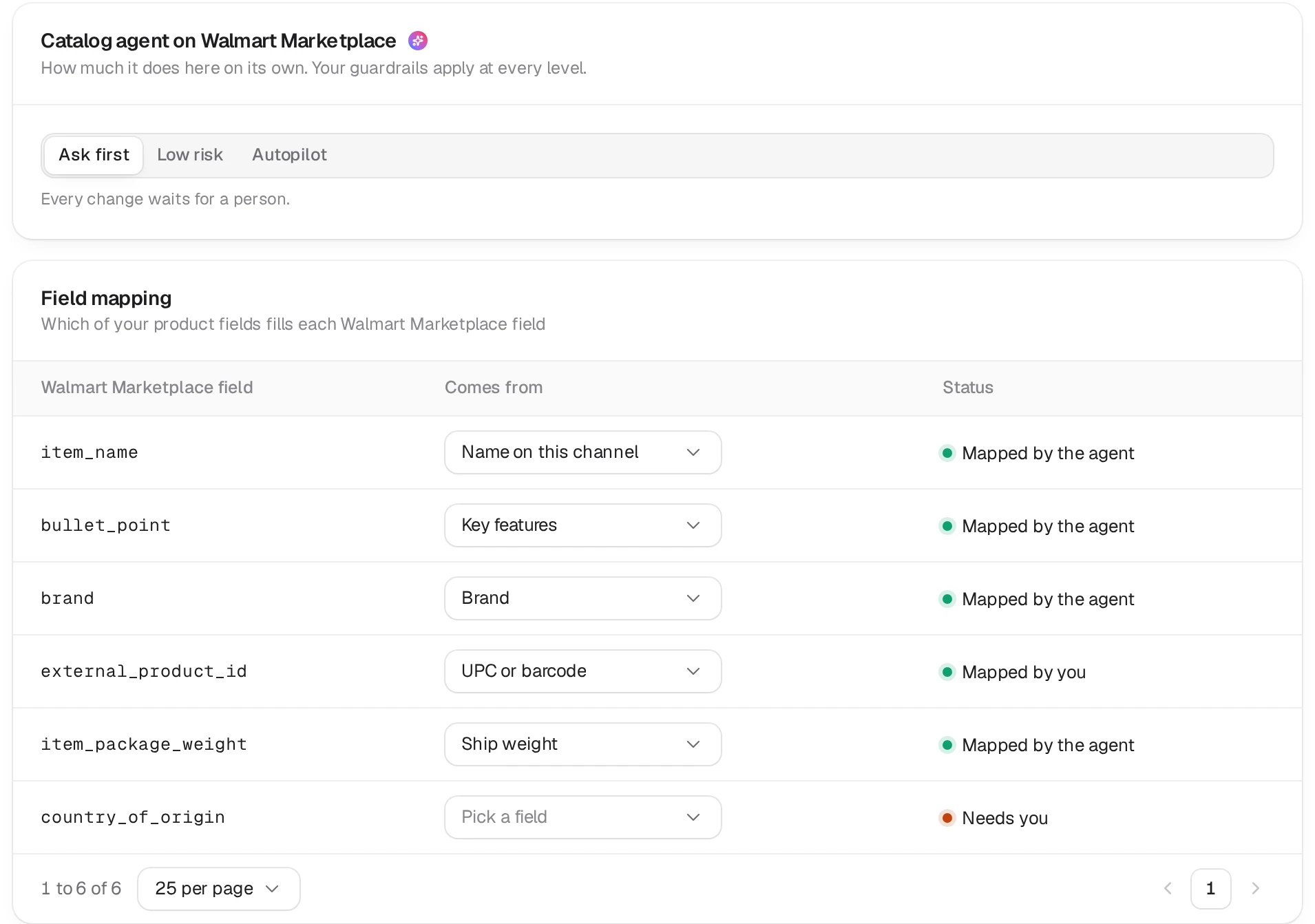
    Field mapping

    Mapped once, used again.

    It says which of your fields fills each marketplace field. The agent maps the rest from their names and your past listings.

    A field mapping card showing which product field fills each marketplace field and who mapped it
  2. Saved setting 2 of 4

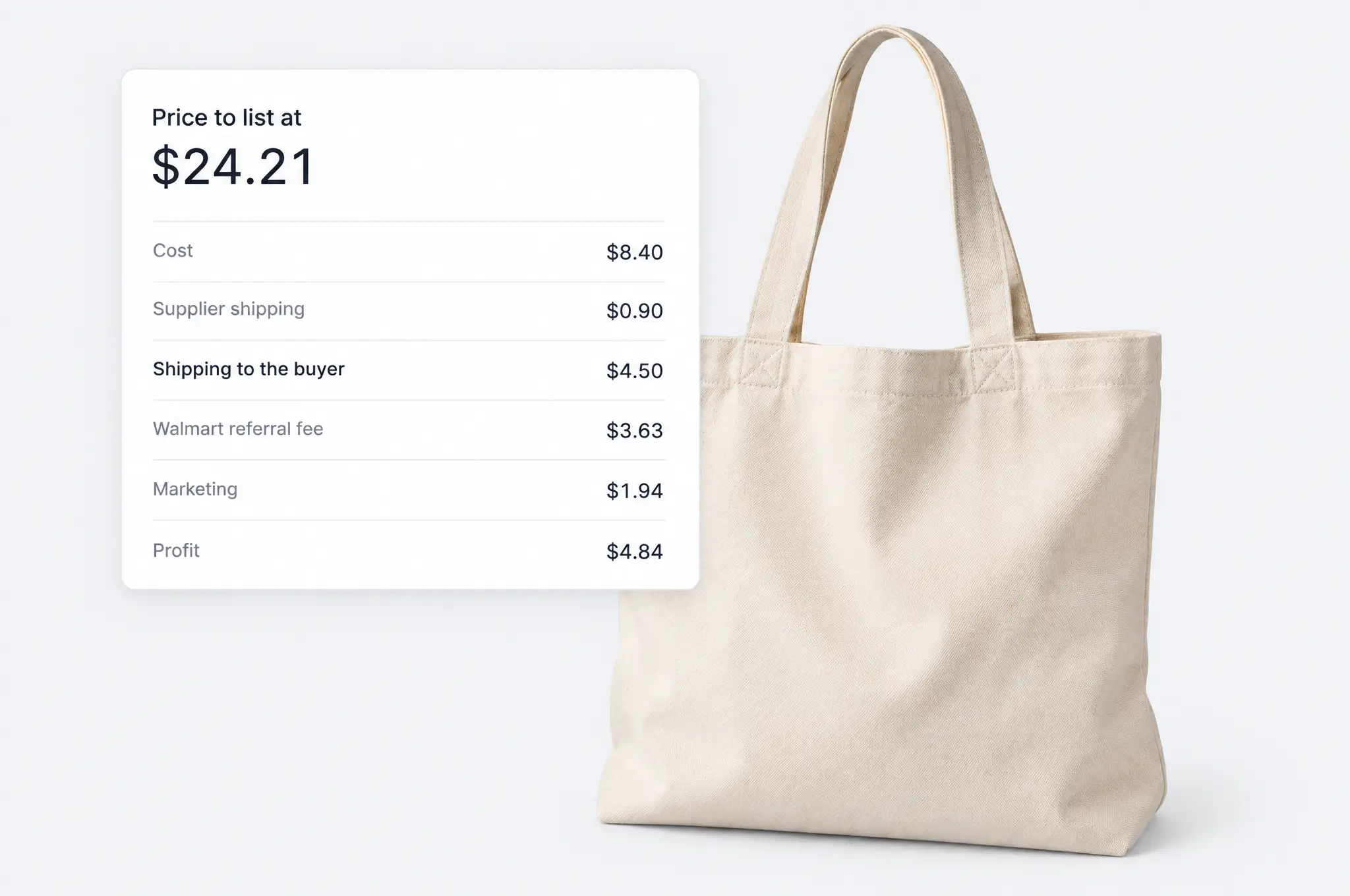
    Price rule

    The fee is in every price.

    Cost, shipping, profit and the marketplace fee add up to the price to list at.

    A canvas tote beside a price rule card that adds cost, shipping, the marketplace fee and profit into one listing price
  3. Saved setting 3 of 4

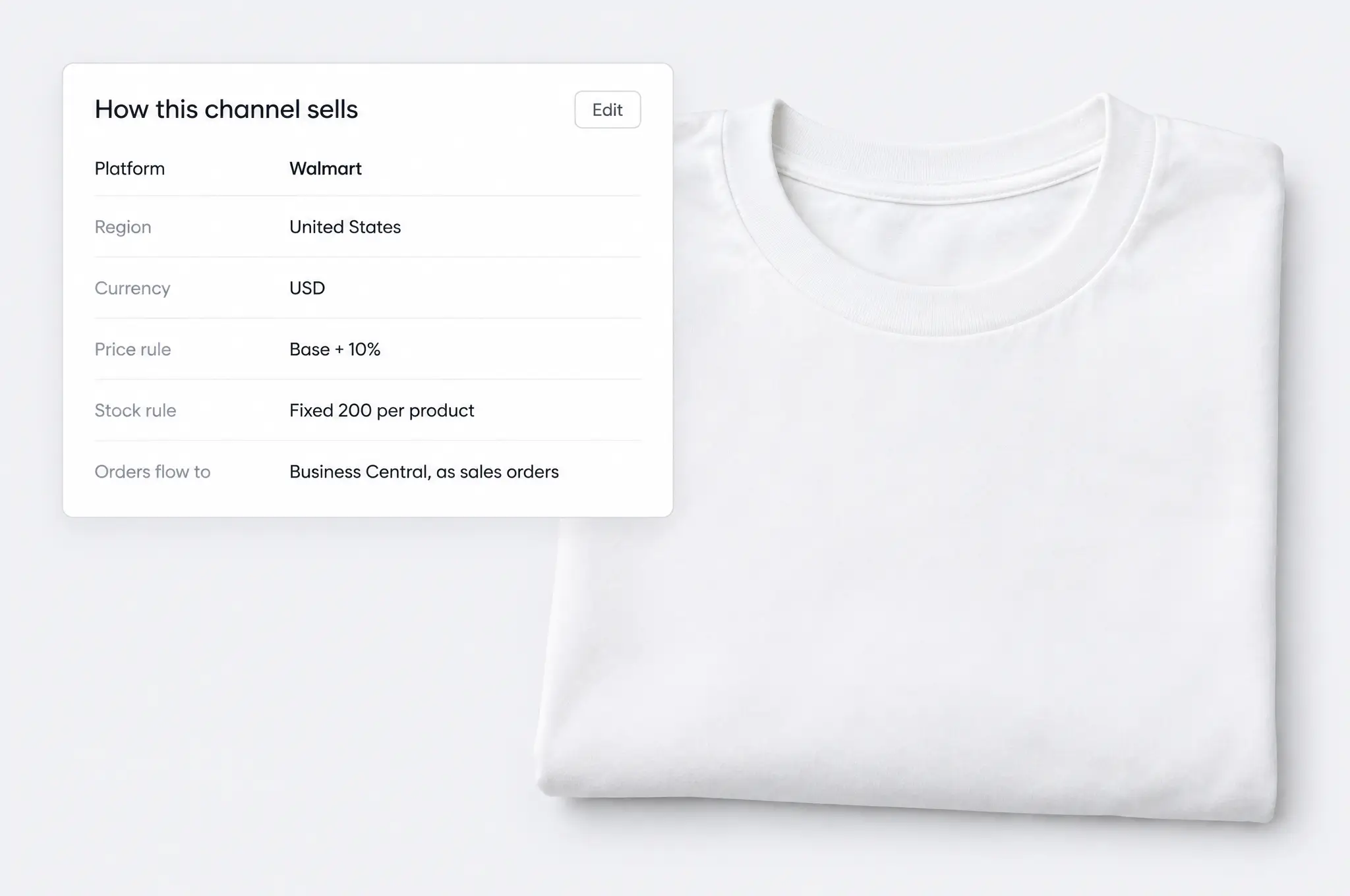
    Stock rule

    Each channel sells its share.

    Set a fixed amount or a share of stock. When free stock runs low, listings pause, then come back.

    A channel summary card with its price rule, its stock rule and where its orders go
  4. Saved setting 4 of 4

    Orders and tracking

    Orders land in Business Central.

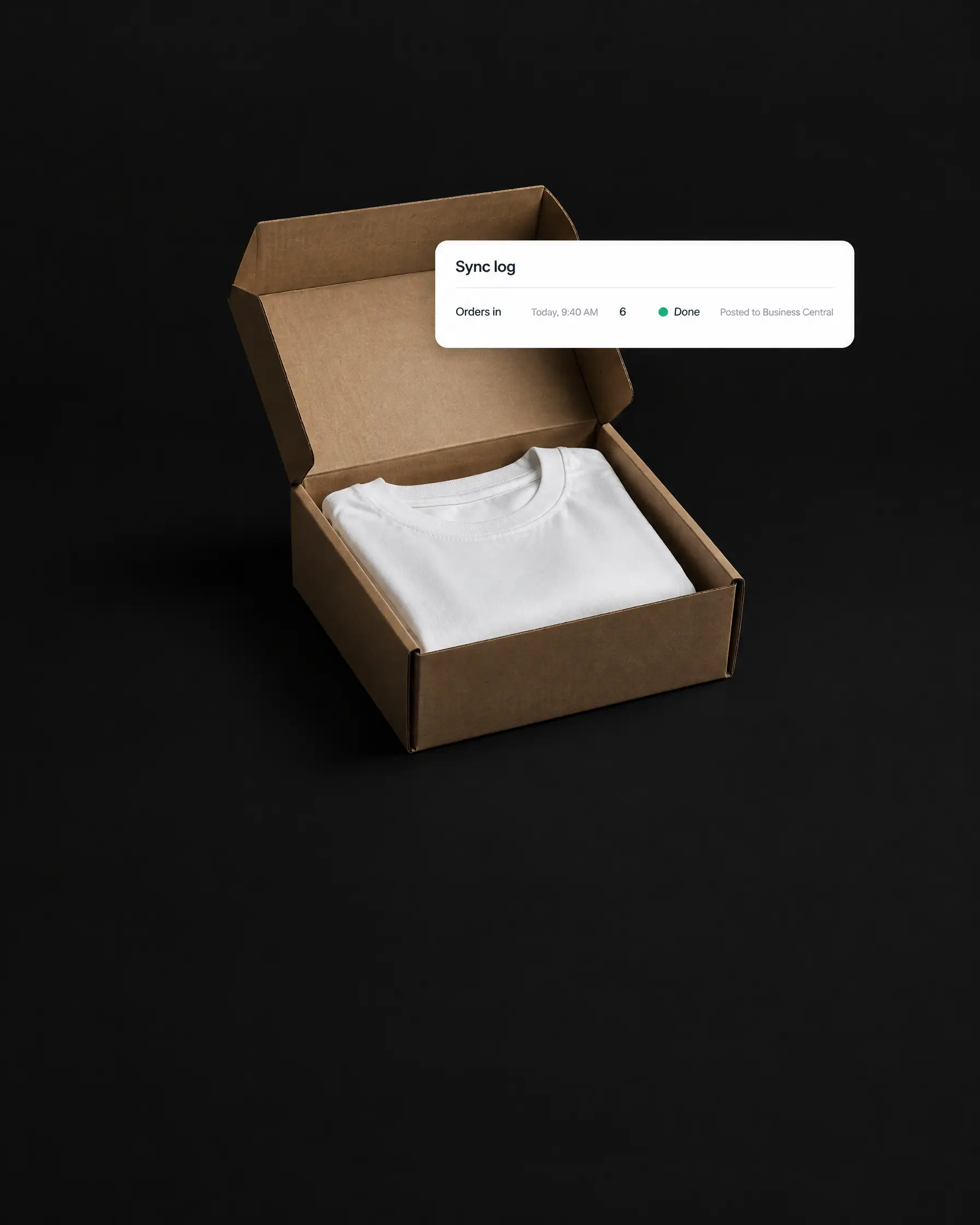
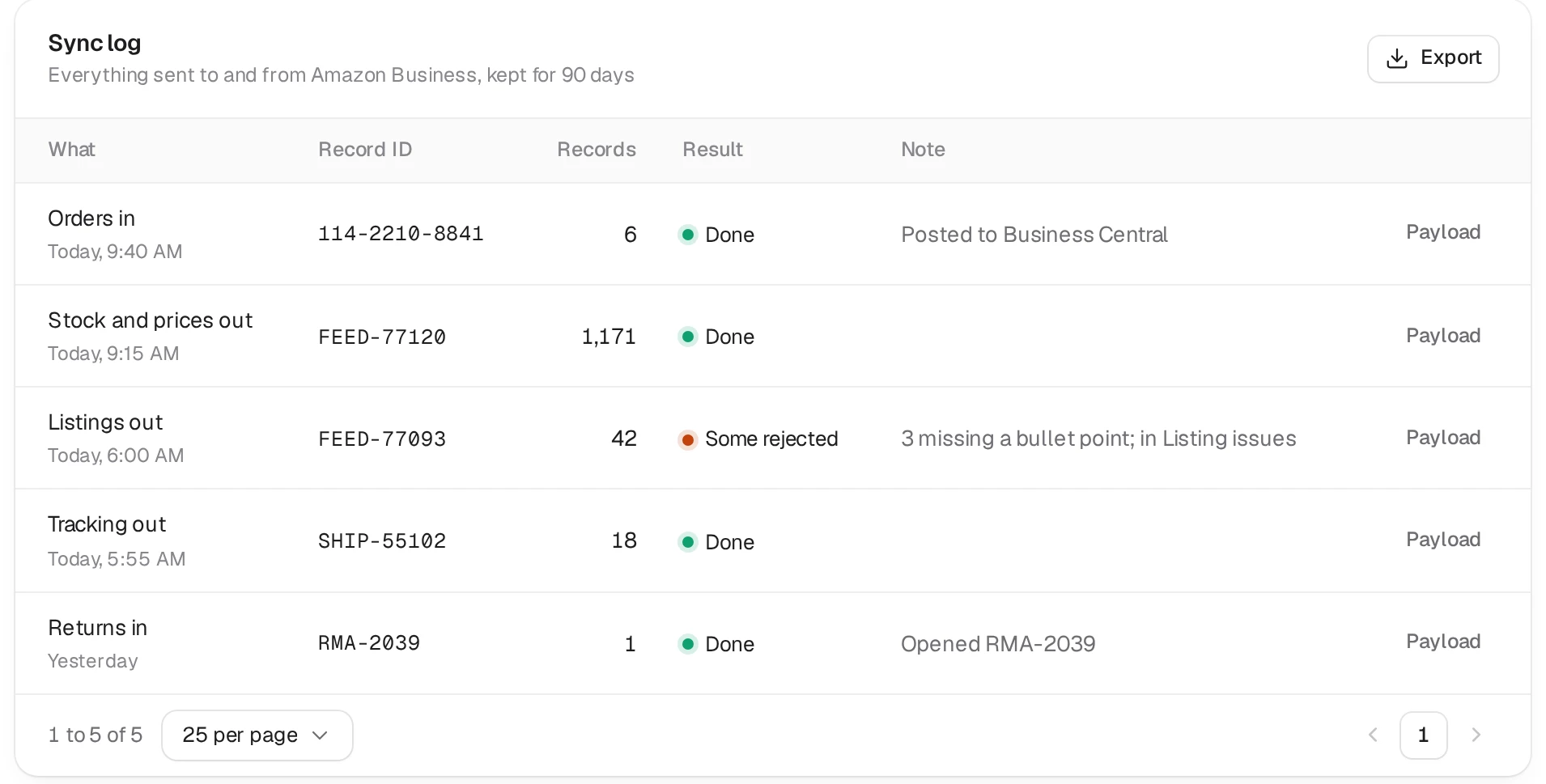
    Marketplace orders come in as sales orders. Tracking goes back with the carrier code each marketplace expects.

    A sync log showing orders coming in and stock, prices and tracking going out to the marketplace

Who is marketplace launch management for?

Brands and distributors that sell on one store or marketplace and want to add the next one, like Amazon, Walmart, eBay or Faire.

It works for Google Shopping and Meta too. See marketplace and channel management

Which marketplaces can I launch on?

Amazon, Walmart, eBay, Faire, Google Shopping and Meta, plus equipment and buying sites.

The full list is on one page. See supported marketplaces

Do I need to rebuild my catalog for each marketplace?

No. Every channel sells from the same catalog. Each one gets its own prices, stock rules and categories.

Your main product data stays as it is. See feed management software

How are categories and fields mapped?

The agent matches each product to a marketplace category and maps fields from their names and your past listings.

A category applies on its own at a 90% match or higher. The rest wait for you. See category and attribute mapping

Can I launch only some products?

Yes. You pick the products to send on the channel Listings tab. The rest show as Not listed.

You can send more at any time. See listing optimization

What happens when a marketplace rejects a listing?

It shows in Listing issues with the reason and, most of the time, a fix to approve. Some, like a price below a minimum price, wait for a person.

Each upload shows what was sent and what was accepted. See listing health and diagnostics

What happens once the marketplace is live?

Orders come in every 5 minutes and go to Business Central as sales orders. Stock and prices go out when they change.

Tracking goes back to the marketplace too. See channel sync

Book a demo

See your next marketplace go live.

In the demo, we load your own catalog into Redefine Suite and walk through a launch on the marketplace you want next. You can also use the demo booking page.

A marketplace manager checking every channel and its status in Redefine Suite
  • Built on your own catalog
  • The marketplace you want next
  • Your categories and fields
  • 550+ projects delivered

Book a personalized demo

Tell us which marketplace is next. We set up the demo around it.

  1. 1We confirm your request
  2. 2A short call about your catalog
  3. 3Your own demo
  4. 4You decide what comes next