
AI automation is the use of artificial intelligence to run business tasks that normally need human judgment. For example, AI reads a customer email, understands the request, drafts a reply, updates the CRM, and alerts a salesperson. Traditional automation follows fixed rules. AI automation handles messy inputs like emails, PDFs, and chats, with a person approving the higher-risk steps.
Find out where AI automation would pay off first
- Your top three automation candidates
- Which systems can connect to AI today
- What needs modernizing first
- An honest read on whether AI is the right tool at all
A short readiness review looks at your processes, your data, and your systems, then tells you which workflow to automate first and what has to change before you do.
Your team is not short on work. It is short on hours.
If you run a business, you have probably asked the question this guide answers: what is AI automation, and is it worth it for a company like mine? As of 2026, nearly nine in ten companies use AI in at least one business function, yet only 37% say it has added anything to their bottom line.1
A quick disclosure. Redefine Innovations provides AI automation and legacy modernization services through our AI services practice. So we will be honest about both halves: what AI can take off your plate, and what has to be true about your systems before it can.
What Is AI Automation?
AI automation, also called artificial intelligence automation or intelligent automation, is software that does work which normally needs a person to read, think, and decide.
Classic automation is a recipe. If an order comes in, send a confirmation email. It works until something unexpected shows up. A customer replies with a question. A supplier sends a scanned invoice instead of a CSV. The rule breaks, and a person steps in.
AI automation handles that messy middle. It reads the email, understands the question, pulls the right answer from your systems, and replies or routes it. Most business AI solutions combine three parts:
The Three Parts of AI Automation
- Understanding: natural language processing and computer vision read text, documents, and images. Intelligent document processing (IDP) applies both to invoices, forms, and contracts.
- Deciding: machine learning models and large language models classify, predict, and choose the next step.
- Acting: workflow tools and APIs update your ERP, CRM, store, or inbox.
AI Automation vs Traditional Automation vs RPA
The difference is how each handles the unexpected: traditional automation follows fixed rules, RPA copies human clicks, and AI automation reads the input and decides what to do.
| Traditional automation | RPA | AI automation | |
|---|---|---|---|
| How it works | Fixed if-then rules | Software bots copy human clicks | Models read, decide, and act |
| Best input | Clean, structured data | Stable screens and forms | Emails, PDFs, chats, images |
| Handles exceptions | No, it stops | No, it breaks | Yes, or flags them for review |
| Setup effort | Low | Medium | Medium to high |
| Good example | Order confirmation email | Copying data between two old apps | Reading and coding supplier invoices |
Which One Should Your Business Use?
You do not have to pick one. Most good setups use all three: rules for predictable steps, AI for judgment, and RPA where an old app has no other way in.
The glue is integration. AI that cannot write back to your systems still leaves someone copying and pasting, so projects often start with application integration work, not the AI itself.
How AI Workflow Automation Works, Step by Step
Every AI workflow automation follows the same basic loop.
- Trigger. Something happens. An email lands, a form is submitted, an order fails, or a daily schedule fires.
- Gather. The system pulls the context it needs: the customer record, the order history, the product data, the policy document.
- Understand and decide. The AI reads the input, classifies it, and chooses what to do next, with a confidence score.
- Act. It updates a record, drafts a reply, routes a ticket, or creates a task.
- Review. Low-risk actions run on their own. High-risk or low-confidence ones go to a person to approve.
- Learn. Your team's corrections improve accuracy over time.
Why Step Two Decides Success
Step two is where most projects stall. If your customer data lives in the CRM, orders live in the ERP, and product details live in spreadsheets, the AI cannot see the full picture. Clean, connected data integration is what makes steps three through five reliable.

Why Business Owners Are Paying Attention Now
Business owners are adopting AI automation in 2026 because the tools got cheaper, the potential savings are large, and competitors already use it.
- The tools got cheaper. Large language models now read documents and write replies well enough for real business use, at a fraction of the cost of custom machine learning.
- The ceiling is high. McKinsey estimates current technology could, in theory, automate activities that account for about 57% of US work hours.2
- Your competitors are already testing it. AI use is now close to universal, so the edge comes from doing it well.
Returns come from measuring a process, automating it, and tracking the difference. Our guide on how to calculate AI automation ROI shows the math, including the review time most vendors leave out.
AI Automation Examples by Department
The most common AI automation examples for small and mid-market businesses sit in five departments: customer service, sales, finance, operations, and ecommerce.
Customer service
AI reads incoming emails and chats, tags the intent, answers common questions from your help content, and hands complex cases to a person with a summary. A well-built AI chatbot can also check order status or start a return without a human touching it.
Sales and marketing
AI scores leads, drafts first-touch emails, summarizes calls, and updates the CRM, so reps stop doing data entry after every meeting.
Finance and accounting
AI reads supplier invoices in any format, matches them to purchase orders, codes them to the right account, and flags mismatches. The value depends on ERP integration, because the matched invoice has to land in your ERP, not in another inbox.
Operations
AI routes approvals, flags late shipments, and turns free-text requests into structured tasks. Tools like forms and workflow software give those decisions an audit trail.
Ecommerce and product data
AI writes and tags product descriptions, fills missing attributes, and fixes marketplace listings that get rejected. AI product data enrichment is one of the fastest paybacks for catalogs with thousands of SKUs.
Where AI Agents Fit In
An AI agent is a form of AI automation that plans and completes several steps on its own toward a goal, instead of following one fixed path.
A Simple AI Agent Example
An agent handling a delayed order might check the carrier, check stock at another warehouse, draft a customer message, and offer a reship, then ask a person to approve the plan.
Why Many Agent Projects Fail
Agents are also overhyped. Gartner predicts over 40% of agentic AI projects will be canceled by the end of 2027 because of rising costs, unclear value, or weak risk controls. It also found that only about 130 of the thousands of vendors claiming agentic AI actually offer it.3
Prove a simpler automation first, then explore agentic AI solutions where the process truly needs them.
The Modernization Problem: Why Old Systems Stall AI
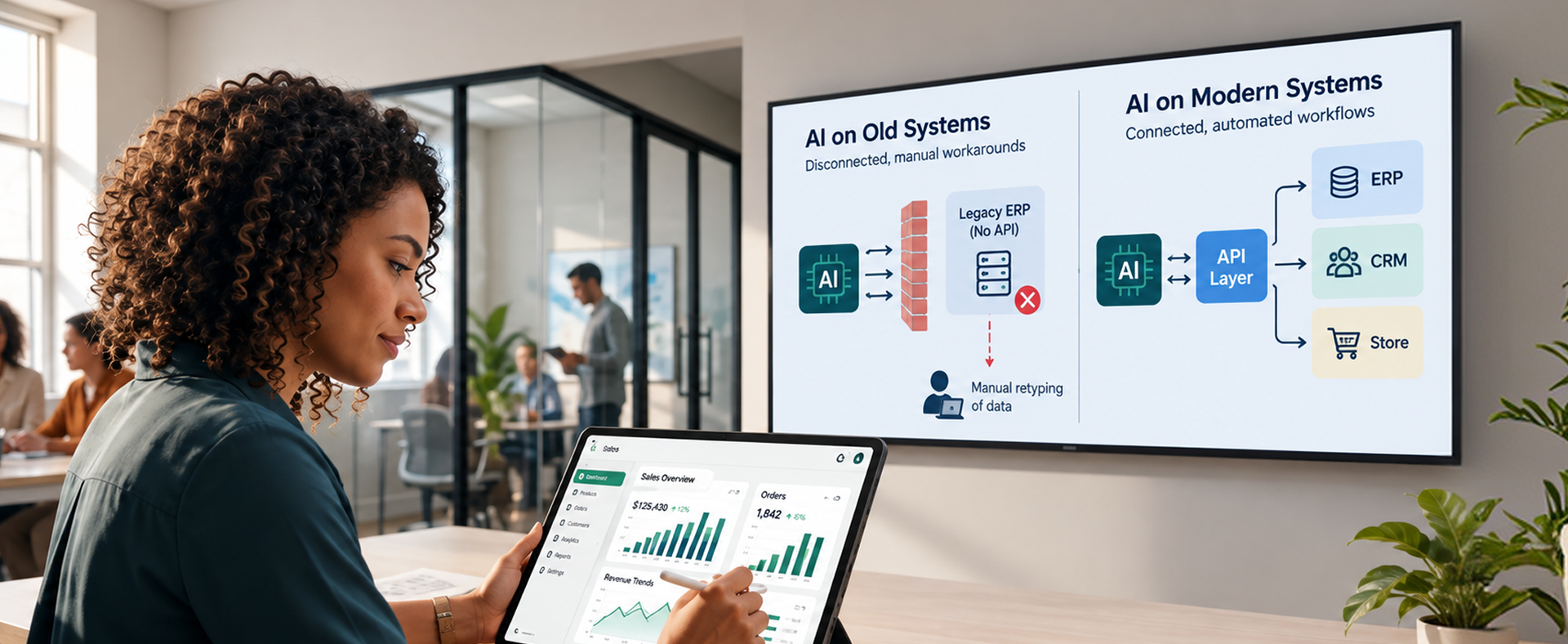
Old systems stall AI automation because AI can only automate what it can reach through an API or shared data.
In MuleSoft's 2025 benchmark, 95% of organizations reported challenges integrating AI into existing processes, and 80% named data integration as their biggest obstacle. The average enterprise runs 897 applications, and only 29% of them are connected.4
Picture a distributor with a 15-year-old ERP that has no API. The AI reads every invoice perfectly, but a person still types the result in. The automation saves minutes, not hours.
Signs Your Systems Will Stall AI Automation
- Your core system has no API, or only exports files overnight
- The same customer or product lives in three places with three different values
- Reports need someone to merge spreadsheets by hand
- Only one person knows how the old system really works
Two Ways to Modernize for AI
If that sounds familiar, modernization is step one, not a side project. You have two main options.
Option 1: Wrap the Old System with APIs
Keep the old system and add custom APIs around it, so AI can read and write to it safely. This is faster and cheaper, and suits systems that still work well.
Option 2: Modernize Piece by Piece
Replace the old system one module at a time while the business keeps running. Legacy application modernization suits systems that are hard to maintain, costly to host, or known by only one person.
The real bottleneck: Most businesses do not have an AI problem. They have a connected-systems problem that shows up the moment they try AI.
What AI Business Automation Can and Cannot Do
AI business automation does well on high-volume, repeatable work with reachable data, and struggles with rare decisions, high-risk final calls, and data it cannot access.
| AI business automation does well | AI business automation struggles with |
|---|---|
| High-volume, repetitive tasks | Rare, one-off decisions |
| Reading emails, PDFs, and forms | Data it cannot access |
| First drafts and summaries | Final calls with legal or financial risk |
| Spotting patterns in large data sets | Messy data with no single source of truth |
| Working 24/7 at a steady pace | Explaining its reasoning without guardrails |
AI also makes confident mistakes, so keep a person in the loop for anything that moves money, changes a contract, or reaches an upset customer.
Cloud platforms also connect to AI far more easily than back-office servers, so an on-premise to cloud migration often turns a pilot into a daily tool.
Is Your Business Ready for AI Automation?
Your business is ready for AI automation, and business AI pays off, when four things are true:
- You have a clear, repeated process. If your team does it the same way 100 times a week, it is a candidate.
- You can measure it. You know its time, error rate, and cost.
- Your data is reachable and mostly clean. The AI can read the records it needs through an API or a shared data layer.
- Someone owns it. One person decides what "good" looks like and reviews the output.
If you are unsure about the third point, start there. An AI data readiness assessment shows which data sets are ready for AI today and which need cleanup first.
A Five-Step Roadmap to Your First AI Automation
The safest way to start AI automation is one workflow at a time, in three phases and five steps.
Phase 1: Prepare
Step 1: Pick One Workflow
Choose a high-volume, low-risk process, such as invoice intake or ticket tagging. A focused AI discovery workshop can shortcut this step and the next one.
Step 2: Measure the Baseline
Record how the process performs today, before you change anything.
What to Measure
Hours per Week the Process Takes
Total staff time the process takes, including rework.
Error Rate of the Current Output
How often the output is wrong, late, or needs a second look.
Cycle Time for One Item
How long one item takes from start to finish.
Phase 2: Build
Step 3: Fix the Plumbing
Connect the systems the workflow touches. Modernize or add APIs where you have to.
Step 4: Pilot with a Human in the Loop
Run the AI on real work for four to eight weeks, with a person approving each output.
Phase 3: Grow
Step 5: Scale What Works
Loosen review on high-confidence cases, then move to the next workflow.
Common Mistakes to Avoid
- Buying an AI tool before choosing the process it should fix
- Skipping the baseline, so nobody can prove the savings
- Ignoring old systems until the pilot hits a wall
- Launching without rules on data privacy and review. Clear AI governance protects you from costly errors and keeps your team trusting the output.
"The AI is rarely the hard part. The data and the systems behind it are."A common lesson from AI automation projects
AI Automation Readiness Checklist
Use this checklist to confirm you are ready before you automate your first workflow.
If you cannot tick the second and last boxes yet, an AI ROI assessment will put real numbers on both before you spend on software.
Frequently Asked Questions
The Basics
What is AI automation in simple terms?
It is software that uses AI to do tasks that need reading, thinking, and deciding, then takes action in your systems.
What is AI automation with an example?
A supplier emails a scanned invoice. AI reads it, matches it to the purchase order, codes it to the right account, and posts it to the ERP. A person only reviews mismatches.
Is AI automation the same as RPA?
No. RPA copies human clicks and follows fixed steps. AI automation understands inputs and handles exceptions. Many setups use both.
What is AI automation for business?
It is the use of AI to run repeatable business work, such as invoices, support tickets, and product data. Small businesses often see faster payback because one workflow is a bigger share of their workload.
Cost, Timing, and Your Team
How much does AI automation cost?
It depends on the process and your systems. A single workflow on modern, connected systems costs far less than one that needs legacy modernization first.
How long does it take to see results?
A focused pilot usually shows measurable results within one to three months.
Will AI automation replace my staff?
It usually replaces tasks, not roles. Most teams move people from data entry to review, exceptions, and customer work.
Systems, Data, and Safety
Can AI work with my old ERP?
Often, yes, if you add an API layer or modernize the parts the workflow touches. Without that, results stay limited.
Is AI automation safe?
It is safe when you control what data it sees, log every action, and keep a person approving high-risk steps.
Should I build AI automation in-house or hire help?
If you have developers with AI and integration experience, in-house can work. If not, you can hire AI developers for the build and keep ownership of the process.
The Bottom Line
AI automation is the next step past rules-based automation: software that reads, decides, and acts on work that used to need a person.
The businesses that win pick one process, measure it, connect the systems behind it, and keep a person in the loop until the numbers hold.
If your stack is modern and connected, you can start tomorrow. If it is not, modernization is the first AI project. Either way, the goal is the same as Redefine's own AI and automation platform: AI that does real work on your real data, with humans in control.
"Automate one process well before you try to automate the business."The bottom line
Not sure where AI automation fits in your business?
Bring us one process that eats your team's time. We will map the workflow, check whether your systems can support AI today, and tell you honestly what to automate, what to modernize first, and what to leave alone.
Talk to our AI consulting team
Sources & Citations
Primary research used for the statistics in this guide:
- McKinsey & Company, "The state of AI in 2026: On the road to ROI (August 2026)": nearly nine in ten respondents use AI in at least one business function; 37% report a positive EBIT contribution.
- McKinsey Global Institute, "Agents, robots, and us: Skill partnerships in the age of AI (November 2025)": current technology could, in theory, automate activities accounting for about 57% of US work hours.
- Gartner, "Gartner Predicts Over 40% of Agentic AI Projects Will Be Canceled by End of 2027 (June 2025)": cancellation forecast, causes, and the estimate of about 130 genuine agentic AI vendors.
- Salesforce and MuleSoft, "2025 Connectivity Benchmark Report Insights": 95% face challenges integrating AI into existing processes, 80% cite data integration as the top obstacle, and only 29% of 897 average applications are integrated.