Workato integration services that production-ready recipes.
We design, build, and deploy Workato recipes for your cloud apps and enterprise systems. Every recipe ships with runbook documentation, error handling, and monitoring from day one.
integration projects delivered across ERP, ecommerce, and cloud platforms
Hero · Workato integration recipe builder in active use

Buying the platform is easy. Building recipes that run in production is the real work.
Teams that build Workato recipes in-house spend weeks learning the platform. Then months debugging edge cases. They still end up with recipes that fail silently when a source system changes its API. The platform can do almost anything. Knowing which recipes to build, and in which order, is the work.
What goes wrong with self-implementation
Recipes fail silently when a connected app changes its API
One person owns every Workato recipe and the rest of the team cannot touch them
One person owns every Workato recipe and the rest of the team cannot touch them
When that person leaves, the Workato integration becomes a mystery nobody wants to touch.
Hard-coded data mappings break on the first schema change
Recipes built without flexibility assumptions require rebuilding whenever a field is renamed.
Inside a Production Workato Recipe
Workato integration consulting compresses that learning curve to a handoff your team can own immediately.
Salesforce to Slack opportunity alert
Trigger: deal stage changed · Last run: 4 min ago
Shopify order to enterprise resource planning sales order
Trigger: order created · 1,284 runs today
Customer relationship management to marketing platform sync
Trigger: contact updated · 318 synced today
Support ticket to customer relationship management case creation
Trigger: ticket opened · 0 errors in 7 days
1,602 total recipe runs today · 0 failed · error rate 0.00%
Click any node to see what happens inside a production Workato integration
Every Workato integration solution we build follows this architecture. Trigger fires, data is validated and transformed, actions execute in sequence, errors are caught and logged, and your team gets an alert before any downstream system is affected.
Select a node on the left to see its configuration and logic.
What separates a production Workato integration from one that only works in a demo
Workato integration consulting is not about clicking through the recipe builder. It is about understanding your data models, edge cases, and operational dependencies. Then designing recipes that survive real-world conditions.
Recipe architecture built around your actual business logic
We map your workflows before writing a single Workato recipe, so the automation matches how your business actually operates, not how a template assumes it does.
Error handling and retry logic built into every recipe
Every recipe we write includes a structured error handler. Failed steps retry with backoff, errors are logged with context, and your team gets an alert before data loss occurs.
Custom connectors for systems Workato does not support natively
When your system is not in the Workato connector library, we build a custom connector using its API. It integrates with the same reliability as a native connection.
Documented runbooks your team inherits at handoff
Every Workato integration solution we deliver ships with structured runbooks covering each recipe's trigger, action sequence, error thresholds, and monitoring configuration.
Bidirectional data flows across all connected systems
Data moves in both directions, not just from system A to system B. Updates in your ERP write back to your storefront. Status changes push to your marketing platform.
Full recipe and connector ownership at handoff
Every recipe and custom connector we build lives in your Workato workspace and is yours to extend. No ongoing service dependency, no vendor-locked configuration.
From fragmented ERP, CRM, and ecommerce systems to one connected automation layer
A B2B promotional products company ran ERP, CRM, BI, and marketing tools with no automated connection between them. Inventory syncs failed regularly. Catalogs loaded slowly. Customer approvals required manual steps. System data sat fragmented across every platform.
Operational pain before integration
- System data fragmented across enterprise resource planning, customer relationship management, and marketing tools with no automated sync
- Inventory syncing was unreliable and customer approvals required manual intervention for every order
- All integrations required manual effort and created operational bottlenecks across every team
Enterprise systems unified through a single integration layer
Manual system handoffs remaining post go-live
Automation of cross-system approval and order workflows
Case Study · Workato integration recipe monitor, live system overview
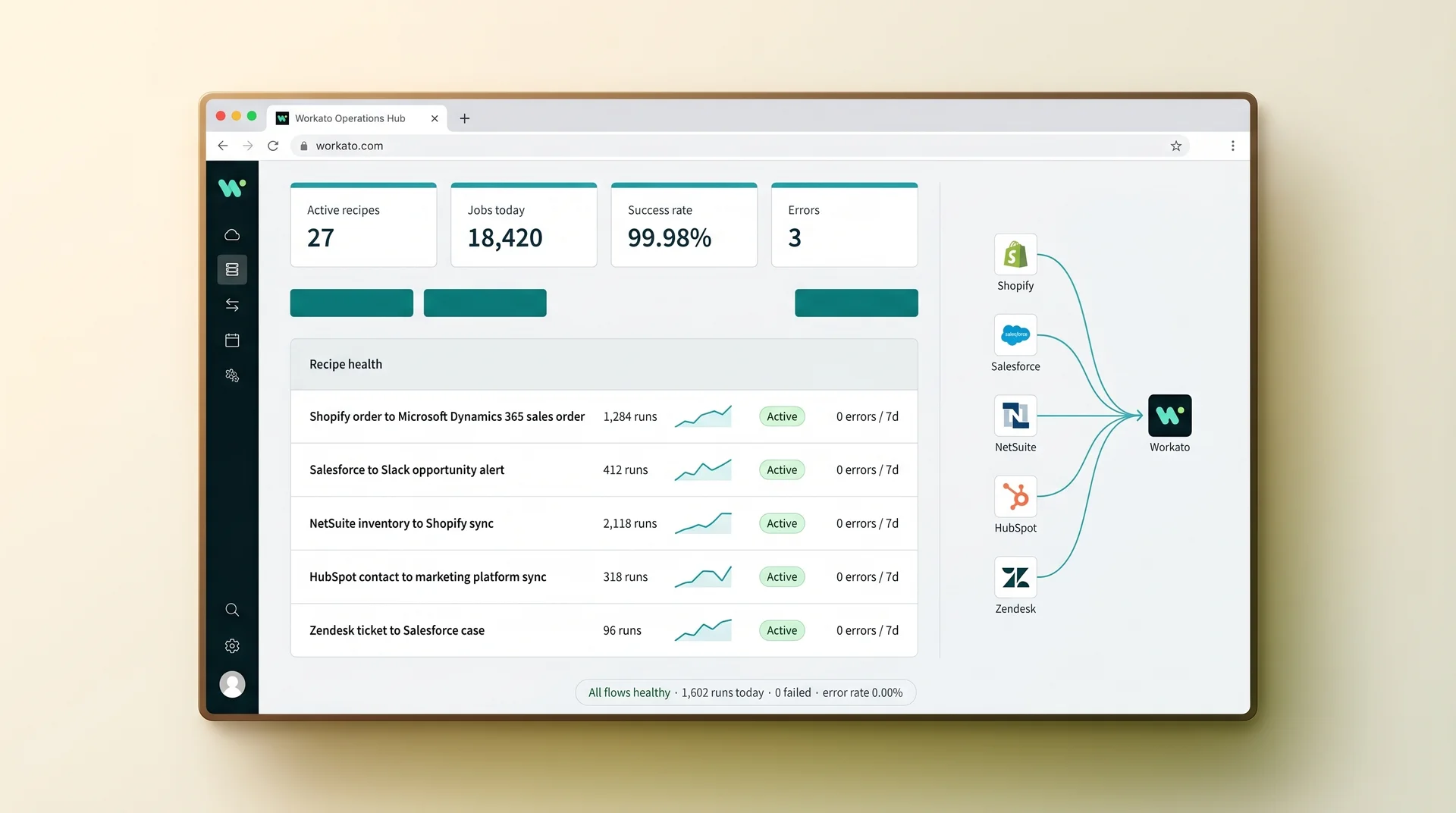
Every integration runs with minimal manual intervention. Real-time inventory and pricing sync directly from the ERP. The CRM centralizes account and customer data. BI tools give the team visibility into performance. Email marketing and newsletter systems drive ongoing customer communication automatically.
Most Workato implementation engagements follow a template. Ours follow your data model. The difference shows up three months after go-live. Edge cases appear and your recipes handle them instead of breaking.
Most Workato implementation engagements follow a template. Ours follow your data model. The difference shows up three months after go-live when edge cases appear and your recipes handle them instead of breaking.
Differentiation · Workato integration consulting session, recipe review

Runbooks for every recipe your team inherits, with monitoring thresholds and escalation paths built in
- Template-based recipes that match common use cases but drop your specific business rules
- No error handling, so failed recipes stop silently and nobody knows until data is missing
- Recipes only they can maintain, creating a permanent dependency after go-live
- No monitoring configuration, so capacity and failure rates are invisible after handoff
What Redefine delivers on every Workato integration
- Custom Workato integration logic designed around your specific data models and business rules
- Structured error handling, retry logic, and alerting built into every recipe before it goes live
- Full recipe and connector ownership in your Workato workspace with no ongoing service dependency
- Runbooks for every recipe your team inherits, with monitoring thresholds and escalation paths built in
Common questions about Workato integration projects
Workato integration connects your cloud apps, enterprise systems, and databases through automated recipes. A recipe defines a trigger (an event in one system) and a set of actions in other systems. For example, when Shopify creates a new order, a recipe can create a matching record in your ERP, update inventory, notify your fulfillment team, and log the event in your data warehouse. No human intervention required.
Workato connects hundreds of cloud apps and enterprise platforms. The list includes Salesforce, Slack, Dynamics 365, SAP, NetSuite, Shopify, HubSpot, Workday, ServiceNow, Zendesk, and custom systems via REST and SOAP APIs. Workato also reaches on-premise systems through its on-premise agent. That means hybrid integration works even when some data cannot leave your internal network.
A Workato license gives you access to the platform. A Workato integration engagement gives you recipes that are designed around your exact business logic, tested against your real data, and documented so your team can maintain them. Our Workato integration consulting team handles recipe architecture, error handling, retry logic, monitoring configuration, and handoff so you do not spend months learning the platform before your first integration goes live.
A focused Workato integration covering two to four systems and five to ten recipes typically goes live in four to seven weeks. More complex Workato integration solutions with custom connectors, multi-step approval logic, or real-time event processing run eight to fourteen weeks. We publish a line-by-line delivery timeline before work begins so your teams can plan around each recipe milestone.
Yes. Every recipe, custom connector, and configuration we create is documented and transferred to your Workato workspace at handoff. We also deliver runbooks covering each recipe's trigger logic, action sequence, error handling, and monitoring thresholds so your team can maintain and extend the Workato integration without coming back to us for every change.
Tell us which systems your team needs to connect. We will map the recipe plan.
Scoped before work starts, line-by-line pricing, no commitment to receive a proposal.
Response in 48 hours
A Workato integration specialist reviews every brief
Proposal in 3 business days
Line-by-line scope with recipe plan and timeline
200+ integrations delivered
Across cloud, enterprise resource planning, and ecommerce platforms
You own every recipe we build
Your Workato workspace, your recipes, no dependency
Brief received
We'll review your Workato setup and send a scoped integration proposal within 3 business days.