AI task automation uses artificial intelligence to read information, classify it, summarize it, generate outputs, and trigger actions across your business systems, with less manual work at every step. The strongest early candidates are tasks you already do at least once a week, that follow a repeatable pattern, and that end in a clearly measurable output, such as email triage, meeting follow-ups, customer support routing, invoice processing, and weekly reporting.
Think about a normal Monday at your company. Your sales team researches leads before every call. Someone in operations copies numbers between two spreadsheets that refuse to talk to each other. Finance keys in invoices by hand. A manager turns yesterday's meeting notes into a task list. Customer support answers the same twenty questions it answered last week.
None of that work disappears as your company grows. It multiplies.
For years, AI mostly helped with the thinking part of these tasks: draft this email, summarize this document, answer this question. That is changing fast. Instead of only answering a prompt, well-built AI agents can now gather information, make bounded decisions, update your systems, and carry a task through to completion on your behalf, with a person approving the parts that matter most.
So the question worth asking is not "can AI do this?" Almost everything below, AI can touch in some way. The better question is what part of the task to hand over, what should trigger it, where a human still needs to sign off, and how you will know it is actually working. That is what this guide walks through, task by task.
What does it mean to automate business tasks with AI?
AI task automation uses artificial intelligence to perform repeatable business work with less manual intervention. AI can read information, classify it, summarize it, generate outputs, make bounded decisions, and trigger actions across the systems you already run.
There are three levels worth knowing before you automate anything, and mixing them up is the most common planning mistake teams make.
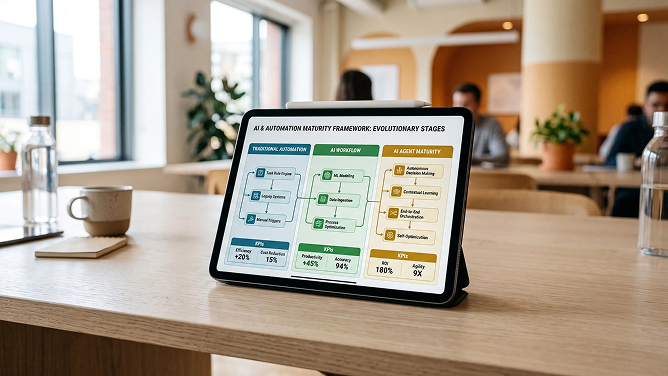
1. Traditional workflow automation
Fixed rules, no interpretation. Example: a form gets submitted, a CRM record gets created, a confirmation email goes out. Works well when every case follows the same path.
2. AI-powered workflow
Fixed steps, but AI adds understanding inside one or more of them. Example: a form gets submitted, AI reads the request, identifies the intent, pulls out the relevant details, and the workflow routes it to the right department.
3. AI agent
A goal, not a script. Example: a new sales lead arrives, AI researches the company, evaluates the fit, updates the CRM, prepares an account summary, drafts a personalized outreach message, and sends it to the rep for approval.
OpenAI's own guidance draws this same line: conventional automation streamlines a workflow, while an agent performs that workflow on your behalf, gathering context, choosing tools, and operating inside guardrails you set.1 Agents earn their keep on the workflows where a fixed rule set breaks down, not on the ones a simple trigger already handles.
Which business tasks are best suited for AI automation?
Slack's own workforce research found that desk workers spend an average of 41 percent of their time on low-value, repetitive tasks,5 which is a big enough number to explain why this topic keeps showing up on every leadership team's agenda. Before you look at the ten examples, it helps to know what makes a task a good candidate in the first place. The strongest early candidates share these traits:
- You do it at least weekly
- It eats a meaningful chunk of someone's time
- The inputs repeat in a predictable shape
- The output is fairly predictable too
- The source data already lives somewhere digital
- Exceptions are the minority, not the norm
- You can define what success looks like
- The downside of a mistake is manageable
- A human can review the output quickly
AWS gives SMB teams almost the same advice: prioritize the tasks with clear inputs and outputs, low integration risk, and a metric you can track from week one, rather than trying to fix everything at once.2
AI automation opportunity score. Automation opportunity = Frequency × Time consumed × Repeatability × Data availability ÷ Risk and exceptions. This is an editorial framework, not an industry standard. If you are not sure whether your data is actually clean and available enough to support this, an AI data readiness assessment answers that question before you build anything, so you are not guessing at the denominator in that formula.
10 business tasks you can automate with AI today
Here is the quick-scan version. Each row expands into a full section below, with the workflow spelled out and the human checkpoints marked.
| Task | AI automation potential | Human review | Primary KPI |
|---|---|---|---|
| Email management | High | Medium | Inbox processing time |
| Meeting follow-up | High | Low to medium | Follow-up completion rate |
| Customer support | High | Medium | Resolution time |
| Lead qualification | High | Medium | Time to first touch |
| Invoice and document processing | High | Medium | Processing time |
| Data entry and cleanup | High | Low to medium | Error rate |
| Business reporting | High | Medium | Reporting hours |
| Content workflows | High | Medium to high | Production time |
| Employee onboarding | Medium to high | Medium | Time to productivity |
| Orders and inventory monitoring | High | Medium | Exception resolution time |
1. Automate email triage, drafting, and follow-ups
AI can categorize incoming messages, flag urgency, summarize long threads, pull out action items, draft routine replies, create CRM tasks, and schedule follow-ups.
Here is what the workflow looks like in practice: an email lands, AI reads it, checks your CRM for context, drafts a reply, and creates a task, then waits for your rep to approve anything that needs a human voice before it goes out.
Say a prospect emails asking for pricing on 150 units and whether you offer Net 30 terms. Instead of your rep hunting down the account and the pricing rules, AI finds the account, pulls the relevant pricing context, drafts the response, creates the opportunity, and asks the rep to approve it before it sends.
Keep a human involved when:
- A contractual commitment is on the table
- The complaint is sensitive
- Pricing needs a judgment call
- Legal language shows up in the thread
Measure: minutes spent per inbox, response time, missed follow-ups, emails processed per employee.
2. Automate meeting notes and action items
This is one of the easiest, lowest-risk places to start. AI can transcribe the meeting, summarize the discussion, identify decisions, extract action items, assign owners, create project tasks, update your CRM, and draft the follow-up email.
Before AI, someone writes notes, emails a summary, creates tasks by hand, and your CRM gets updated eventually, if at all. With AI, the meeting ends, the transcript gets processed, decisions get pulled out, tasks get created, and your CRM updates itself.
The real value here is not "AI summarizes meetings." It is that AI turns the meeting into completed system updates and assigned work, which is a very different thing.
Measure: admin minutes per meeting, percentage of action items captured, task completion rate, CRM documentation completeness.
3. Automate customer support triage and routine requests
McKinsey's newest global survey finds that respondents most often report cost benefits from AI in supply chain management, service operations, and manufacturing,3 which puts support squarely among the highest-value places for most teams to start.
AI can classify tickets, detect priority, answer FAQs, look up order status, explain policy, route the ticket, summarize the conversation, and suggest a resolution.
A customer asks, "Where is order 8472?" AI identifies the request, retrieves the order, checks the carrier, and answers the customer, without anyone opening three separate systems to find one tracking number.
For a task this repetitive, a purpose-built AI chatbot handles the first response while your team focuses on the conversations that genuinely need a person.
Automatically escalate:
- Angry or high-risk customers
- Large refund requests
- Exceptions to stated policy
- Safety issues or legal threats
- Any answer the model is not confident about
Measure: first-response time, resolution time, cost per ticket, escalation rate, percentage resolved automatically.
4. Automate lead research, qualification, and CRM updates
This is one of the highest-value use cases in sales. AI can research the company, build an account summary, classify the industry, enrich the lead record, score it against your ideal customer profile, complete CRM fields, and draft the first outreach message.
A new lead fills out a form. AI enriches the record, researches the company, scores it against your ICP, updates the CRM, assigns the right rep, and drafts a personalized first touch, then waits for the rep to approve it before anything sends.
That kind of research-then-judgment chain is exactly where a purpose-built AI agent earns its keep, since it has to gather context, weigh it, and decide what happens next rather than follow one fixed rule.
Measure: time to first touch, research minutes per account, CRM completeness, lead-to-meeting conversion, rep selling time.
5. Automate invoice, receipt, and document processing
AI can read invoices, capture the supplier and invoice number, identify the PO number, extract line items, detect due dates, classify the expense, compare documents, flag missing information, route approvals, and enter approved data into your ERP.
An invoice arrives. AI extracts the fields, matches it against the purchase order, checks for discrepancies, routes any exception for review, and posts the approved invoice straight into your accounting system.
The highest value shows up when the document AI connects to the next operational step, not when it simply turns a PDF into text.
Human review required for:
- Large payments
- Vendor or banking detail changes
- Unusual discrepancies
- Tax exceptions
Measure: cost per invoice, processing time, data-entry error rate, exception percentage, late-payment rate.
6. Automate data entry, classification, and cleanup
AI can extract information from PDFs, standardize customer names, categorize requests, tag products, clean spreadsheet columns, merge duplicate records, classify documents, and turn unstructured notes into structured fields.
Instead of an employee manually cleaning a supplier spreadsheet, copying specifications, and creating SKUs by hand, AI maps the fields, flags what is missing, standardizes the attributes, and hands your team a review queue instead of a blank spreadsheet.
Measure: records processed per hour, rework rate, duplicate rate, data completeness, manual processing hours.
7. Automate weekly reports and business summaries
AI can gather KPIs from multiple systems, compare performance periods, flag anomalies, identify trends, generate an executive summary, explain likely causes, and deliver the whole thing on a schedule.
Instead of a flat "revenue fell 12 percent," a well-built reporting workflow tells you revenue fell 12 percent because three high-volume SKUs sat out of stock in the Northeast for four days, so you actually know what to fix.
This is exactly the model behind good AI-powered reporting and analytics: connect your commerce, order, and inventory data once, then let the system explain what changed instead of asking someone to rebuild the same spreadsheet every single week.
Measure: hours spent preparing reports, time from data availability to insight, number of anomalies caught before they became a problem.
8. Automate content production and repurposing
AI can generate briefs, first drafts, product descriptions, social variations, email adaptations, metadata, SEO titles, image alt text, and localized or reformatted versions of existing content.
You add a new product. AI reads the approved product data, writes an ecommerce description, a marketplace version, metadata, and social copy, then sends everything to your team's approval queue instead of straight to your inbox.
A generative AI consulting engagement is usually the right place to start here, since content workflows need the model tuned to your brand voice and reviewed carefully before anything ships to a customer.
Keep human review for:
- Brand claims
- Medical or legal claims
- Pricing
- Original thought leadership
- Anything sensitive
Measure: content production time, output per marketer, approval rate, revision rate, time to publish.
9. Automate employee onboarding and internal knowledge requests
AI can answer policy questions, build onboarding checklists, recommend training, handle system-access requests, retrieve documents, answer new-hire FAQs, and send task reminders.
A new hire asks how to request access to the reporting system instead of pinging their manager. AI searches your approved internal knowledge, answers the question, identifies the correct request form, and submits it, then tells the employee what happens next.
The important distinction here: the AI should automate the administration around a decision, never the decision itself. Keep hiring calls, terminations, performance judgments, and compensation decisions fully human, with proper governance around them.
Measure: HR ticket volume, onboarding admin hours, time to system access, time to productivity.
10. Automate inventory, order, and operational exception monitoring
AI can watch for low inventory, stockout risk, delayed orders, failed integrations, order-routing exceptions, marketplace listing issues, supplier delays, and unusual demand, then diagnose the issue and recommend an action.
Inventory velocity crosses a threshold. AI detects the stockout risk, estimates the exposure, identifies an alternative warehouse, and prepares a transfer or reorder recommendation for your operations team to approve, instead of waiting for someone to notice a dashboard.
Measure: stockout incidents, order exceptions, time to detect, time to resolution, SLA compliance, manual monitoring hours saved.
AI assistant vs workflow automation vs AI agent: which do you need?
This distinction matters more than picking a specific tool, because it decides your build time, your budget, and how much oversight the system needs.
| Capability | AI assistant | AI workflow | AI agent |
|---|---|---|---|
| Needs a prompt to start | Usually | No | No, or only occasionally |
| Follows a fixed process | No | Usually | Can adapt as it goes |
| Understands context | Yes | Yes | Yes |
| Takes action on its own | Limited | Predefined actions | Multiple, chosen actions |
| Touches multiple systems | Sometimes | Yes | Yes |
| Makes bounded decisions | Limited | Sometimes | Yes |
| Best for | Individual productivity | Repeatable processes | Complex, multi-step work |
This lines up with what OpenAI has found building agents for real customers: agents earn their place on workflows with complex decisions, rule sets that get unwieldy to maintain, or unstructured information that makes a deterministic script brittle.1 If a simple trigger already does the job, an agent is over-engineering. If judgment is genuinely required at more than one step, an agent is often the only thing that will hold up.
Picking the right one of these three, before your team builds anything, is exactly what a short AI strategy consulting engagement is for.
What AI productivity tools do you actually need?
Organize your thinking by category rather than chasing another top-27-tools list. Most businesses end up using a mix of all four.
AI assistants
ChatGPT, Microsoft Copilot, Gemini. Best for research, analysis, drafting, and individual productivity, one person at a time.
Workflow automation platforms
Zapier, Make, Power Automate, n8n. Best for connecting applications and triggering repeatable processes without writing custom code.
CRM and service AI
Salesforce Agentforce, HubSpot's built-in AI, and similar service-platform agents. Best for sales, service, and customer workflows already living inside that platform.
Custom AI agents
Best for processes that depend on proprietary data, several connected systems, custom rules, complex approvals, or logic specific to how your business actually runs.
When your process depends on proprietary data, several connected systems, or approvals a generic tool cannot enforce, custom AI product development built around your actual workflow beats stitching together a stack of point solutions.
Skip the tool sprawl. The best AI productivity tool is usually the one already connected to the systems where the work happens. Tool sprawl is itself an operational problem, not a productivity win.
Which AI automation should you start with?
A practical five-step way to pick your first project.
Step 1: Find the repetitive work
Ask your team a simple question: "What do you do every week that feels like copy-paste?" You will get a longer list than you expect.
Step 2: Measure the current baseline
Capture frequency, minutes per task, how many employees are involved, the error rate, typical delay, and the cost. You cannot prove ROI later without this number now.
Step 3: Map the workflow
Trigger, information required, decision, action, approval, output. Write it out in that order before anyone writes a line of code or configures a tool.
Step 4: Automate one workflow
Resist the urge to "AI-transform" an entire department at once. One workflow, done well, builds the trust you need for the next one.
Step 5: Measure and expand
AWS recommends the same discipline for SMB teams: start with a measurable pilot, track efficiency, quality, revenue, and risk, and only scale once the workflow has proven itself.2
If you would rather have someone map that first workflow with you instead of guessing, a scoped AI consulting engagement is built to do exactly that.
How to calculate ROI from AI task automation
Start with a simple formula for monthly labor savings:
Monthly labor savings. Tasks per month × minutes saved per task ÷ 60 × loaded hourly cost. Then subtract your real costs: AI or API fees, the automation platform, implementation time, ongoing human monitoring, and maintenance.
Example: say your team handles 800 of these tasks a month and AI saves 8 minutes on each one. That works out to 6,400 minutes, or roughly 107 hours of capacity freed up every month.
Do not automatically present those hours as a layoff or as cash in the bank. Split the value into three honest buckets:
- Capacity created. Time your team now has available for higher-value work.
- Hard-dollar savings. Spend you actually eliminated, not just time you freed up.
- Revenue impact. Faster response times, higher conversion, or sales you would otherwise have lost.
Keeping these three separate is what makes your ROI story credible instead of another inflated AI claim nobody trusts.
Run this calculation before you commit budget, or have it built for you inside a formal AI ROI assessment so your board sees real numbers instead of estimates on a whiteboard.
What business tasks should you not fully automate with AI?
This section matters as much as the ten tasks above. Use AI cautiously, and always with a human in the loop, for:
- Final hiring decisions
- Employee termination
- Legal commitments
- Major financial transfers
- High-risk compliance decisions
- Safety decisions
- Sensitive customer disputes
- Strategic decisions with no clear success criteria
"Automate preparation aggressively. Automate irreversible decisions carefully."The one rule that keeps a rollout safe
Microsoft's latest Work Trend Index makes a related point: as agents take on more execution, the job of every leader becomes redesigning workflows, roles, and approval points around what humans and agents should each own, not simply installing more AI.4 Removing every human from a process is rarely the goal. Finding the right balance is.
A formal AI governance and risk assessment gives you a defensible way to draw that line for regulators, auditors, and your own team, instead of deciding it ad hoc after something goes wrong.
AI automation checklist: is this task ready to automate?
Run any candidate task against this list before you build anything.
- The task happens at least weekly
- The process is documented somewhere
- The inputs are already available digitally
- The desired output is clearly defined
- Historical examples exist to test against
- Success can be measured with a real number
- Exceptions can be identified and flagged
- Human approval points are already defined
- AI can securely access the systems it needs
- A failed automation can be reversed
- 8 to 10 yes: a strong AI automation candidate.
- 5 to 7 yes: automate the cleanest steps first, not the whole task.
- 0 to 4 yes: fix the process or the data before you add AI to it.
This scoring is our own editorial framework, not an industry standard.
If you would rather have someone run this checklist against your actual systems than guess at the answers, an AI readiness assessment does exactly that in a matter of days, not months.
From one automated task to AI business operations
Automating one task is the beginning, not the destination. Here is the maturity path most organizations actually follow.
Stage 1: AI assistance
An employee asks AI to draft an email. One person, one prompt, one output.
Stage 2: Repeatable AI task
AI drafts every qualified follow-up, the same way, every time, without someone re-explaining the request.
Stage 3: Workflow automation
A new lead automatically triggers research, scoring, and CRM enrichment, with no one having to remember to kick it off.
Stage 4: AI agent
An agent manages the workflow across multiple tools on its own, escalating to a person only when it needs to.
Stage 5: Connected AI operations
Multiple agents and workflows share context across your CRM, ERP, ecommerce, and reporting systems, instead of each one working from its own island of data. This is usually the point where teams bring in enterprise AI consulting to keep governance and architecture consistent as more of the business runs through AI.
McKinsey's 2026 survey shows this shift is already well underway. Forty-four percent of organizations now report AI scaling across the enterprise, up from thirty-eight percent a year earlier, and the organizations using AI in three or more business functions grew from fifty-one percent to fifty-six percent over the same period.3 Individual productivity gains are common; the businesses seeing real financial impact are the ones that keep pushing past stage two.

Frequently asked questions
What business tasks can AI automate?
AI can automate large parts of email management, meeting follow-ups, customer support, lead qualification, invoice processing, data entry, business reporting, content production, onboarding, and inventory monitoring. In most of these, AI takes over the research, drafting, or routing step while a person still approves the outcome.
How can I automate business tasks with AI?
Start by finding the task your team repeats most often, measure how long it currently takes, map the workflow from trigger to output, automate one workflow at a time, and track a real KPI before you expand to the next one.
What is AI task automation?
AI task automation uses artificial intelligence to read, classify, summarize, generate, and act on business information with less manual effort, then trigger the next step in one of your existing systems.
What is the difference between AI and workflow automation?
Traditional workflow automation follows fixed rules with no interpretation. AI-powered workflow automation adds understanding to individual steps inside that same fixed structure. An AI agent goes further and can plan, adapt, and choose actions across several steps toward a goal.
What are the best AI productivity tools for businesses?
It depends on the job. AI assistants like ChatGPT or Copilot suit individual productivity. Workflow platforms like Zapier or Power Automate suit connecting apps. CRM-native AI suits sales and service. Custom AI agents suit processes with proprietary data or complex, multi-system approvals.
Can AI automate an entire business process?
Rarely end to end, and that is usually fine. Most valuable automations hand AI the research, drafting, classification, or routing, while keeping a human checkpoint at the step with real financial, legal, or reputational risk.
What tasks should not be automated with AI?
Keep a human fully in charge of final hiring decisions, terminations, legal commitments, major financial transfers, high-risk compliance calls, safety decisions, sensitive customer disputes, and strategic decisions without clear success criteria.
How do I calculate the ROI of AI automation?
Multiply tasks per month by minutes saved per task, divide by 60, then multiply by your loaded hourly cost. Subtract your AI, platform, implementation, and monitoring costs. Then separate the result into capacity created, hard-dollar savings, and revenue impact, since they are not the same thing.
Start with the task your team repeats every week
You probably do not need to automate your entire company this quarter. You need to find the process your team repeats every single week, the one where someone is copying data, chasing an approval, or preparing the same report, and figure out exactly what part of it AI can safely take off their plate.
Use the trigger-to-KPI shape from this guide on whichever task you pick first: trigger, AI understands, AI acts, system updates, human approves, KPI tracked. Get that one workflow right, measure it honestly, and the next nine tasks on this list get considerably easier.
Key takeaways
- The goal is not to automate the most tasks. It is to automate the tasks that free up the time your team actually needs back.
- Hand AI the research, drafting, classifying, or routing. Keep a person on irreversible decisions.
- Pick assistant, workflow, or agent before you pick a tool. That choice sets build time, budget, and oversight.
- Start with one weekly, measurable workflow. Prove it, then expand.
Not sure which of these ten tasks would move the needle fastest?
Walk through your repetitive workflows, your systems, and your risk tolerance with a working session built for exactly this decision.
Sources & citations
Primary research and documentation used for the statistics, definitions, and framework claims in this guide:
- OpenAI, "A Practical Guide to Building Agents" (2026): distinction between conventional automation and agents, and the workflow characteristics where agents outperform fixed rules.
- AWS Smart Business, "Unlock Growth With AI for Business Operations: Practical Strategies for SMBs" (2026): guidance on prioritizing pilots with clear inputs and outputs, low integration risk, and measurable, trackable results.
- McKinsey & Company, "The State of AI in 2026: On the Road to ROI": current enterprise AI scaling rates, function-level adoption, and where organizations report measurable cost and revenue impact.
- Microsoft WorkLab, "2026 Work Trend Index: Agents, Human Agency, and the Opportunity for Every Organization": findings on agent adoption, workflow redesign, and the leadership role in balancing automation with human oversight.
- Slack, "What Is AI for Work? Essential Benefits and Applications": Slack Workforce Lab research on the share of desk-worker time spent on low-value, repetitive tasks.

Umang Patel
Co-owner | Ecommerce Architecture, Systems & Integrations
Umang Patel has worked in ecommerce and technology since 2001. He specializes in backend systems, ecommerce architecture, ERP and platform integrations, automation, and reverse engineering complex business processes. At Redefine Innovations, he leads technolo
Areas of expertise: Ecommerce Architecture • Backend Systems • ERP Integration • Automation • Headless Commerce • Reverse Engineering
AI automation, no fluff
One short email a month on workflows, agents, and what to automate first.
You're in, check your inbox to confirm.