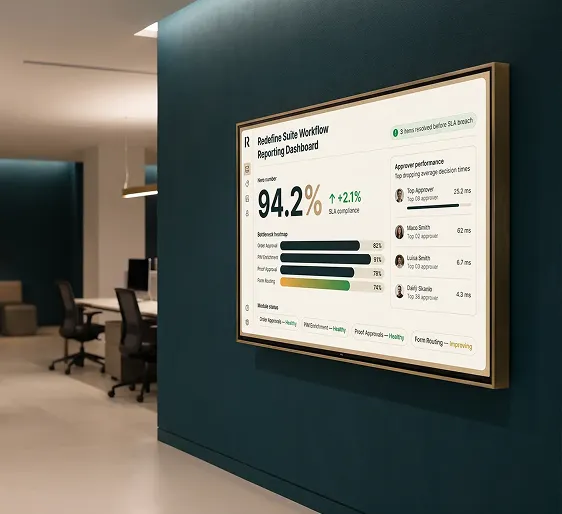
See where workflow analytics show every process stalls, slips, or succeeds
Form submissions, approval queues, SLA timers, and bottleneck alerts. One reporting layer spans every workflow type in your platform. No spreadsheet chasing. No siloed dashboards.

Your workflows run. Your reporting does not.
- Approval queues invisible to managers until an order is already late
- Form completion rates buried in three separate tools, none of them talking to each other
- SLA breaches discovered in end-of-month reviews, not in real time
- No cross-module view: order approvals, product information management tasks, and form submissions each live in their own silo
- Bottleneck attribution impossible without exporting CSV files and doing it manually
- Live approval queue depth visible by role, stage, and elapsed time
- Form submission volume and completion rates in one unified workflow dashboard
- SLA breach alerts trigger before a deadline passes, not after
- Cross-module view spans order approvals, product information management enrichment tasks, form routing, and proof workflows
- Bottleneck identification pinpoints which approver, stage, or rule is holding up volume

Every role gets the workflow view they actually need
Operations leaders see queue depth and SLA compliance. Finance sees approval cycle times. Information technology sees system health. Pick a role below to see what process analytics software looks like for your team.
| Requestor | Amount | Stage | Wait |
|---|---|---|---|
| Acme Corp | $48,200 | Approved | 2h |
| Global Merch | $12,750 | Pending Level 2 | 31h |
| Brand Co. | $7,400 | Processing | 6h |
| TechBuild | $94,000 | SLA Breach | 52h |
Process analytics software reports everything your workflows generate in one place
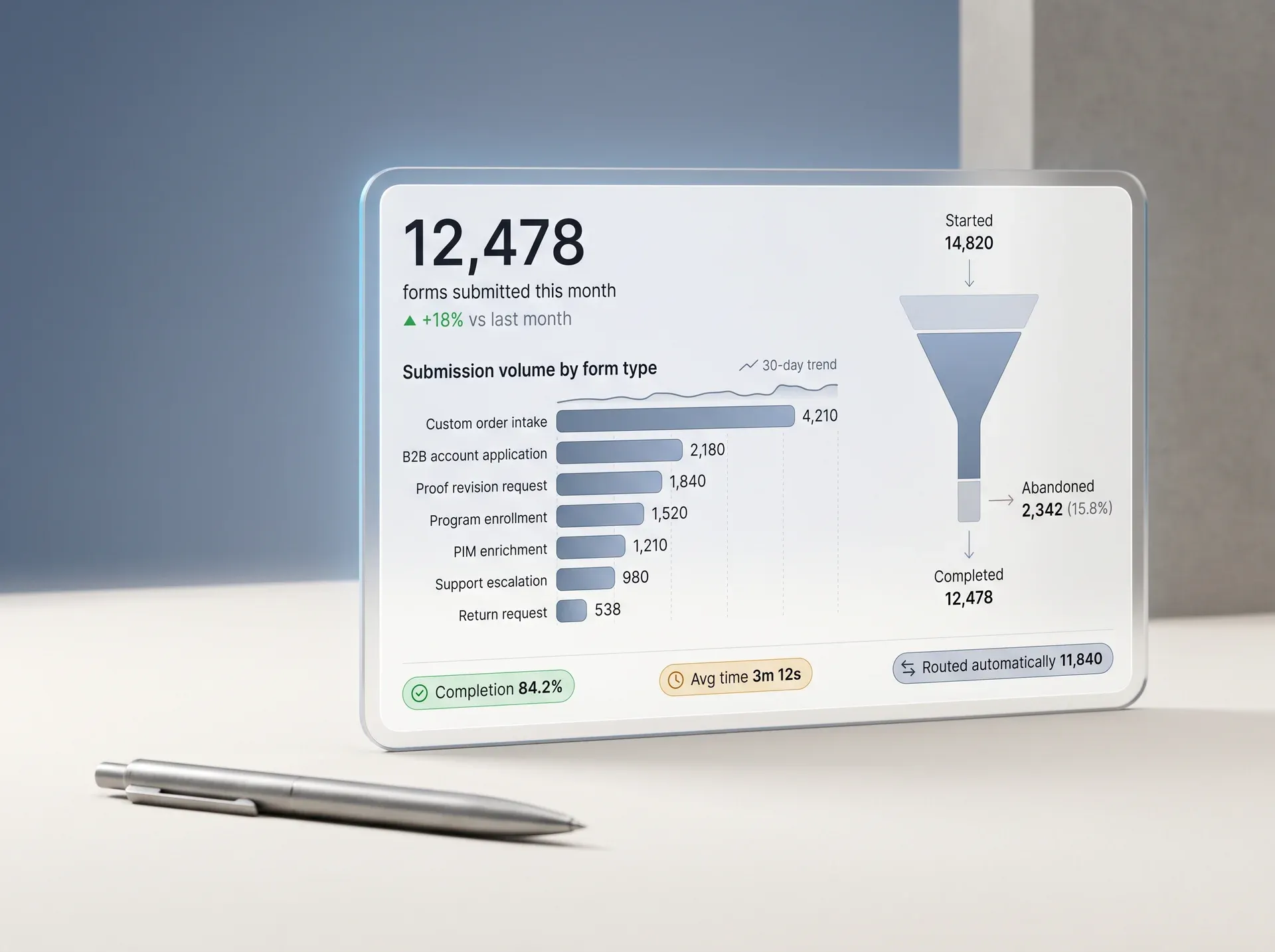
Form Submission Volume and Completion Rates
Track how many forms are submitted, completed, abandoned, and routed per day, week, or month. Compare across form types and identify which intake flows need redesign.
Workflow Performance Metrics and Bottleneck Identification
See average approval times per stage, identify which approvers or steps consistently delay completion, and trace every bottleneck to its root cause without leaving the platform.
Workflow SLA Compliance Reporting
Set SLA targets per workflow type. Track compliance rates and workflow performance metrics in real time. Receive automated alerts when items approach or breach their SLA windows before operations are impacted.
Cross-Module Workflow View
Order approvals, product information management enrichment tasks, content publishing workflows, proof approvals, and form routing all surface in one reporting layer. No module silos.
Scheduled Reports and Alerts
Deliver workflow summary reports to your inbox on any cadence. Set threshold alerts for queue depth, SLA breach risk, and completion rate drops.
Exportable and Business Intelligence-Ready Data
Export workflow data to CSV, Excel, or PDF. Push directly to Tableau, Power BI, or Looker with native connectors. Your data, your tools.
Proof that cross-module workflow visibility actually works

From workflow event to actionable report in minutes, not days
Every form submission, approval decision, and SLA timer creates a data event. Redefine captures, routes, and surfaces it as workflow analytics across every reporting view without manual export or third-party connectors.
Which operations teams see the most impact

Business-to-Business Order Approval Teams
Multi-level purchase approval workflows with budget authorizations, purchase order routing, and real-time SLA visibility per account and buyer role.
Operations and Fulfillment Managers
Track pick-pack-ship workflow completion rates, supplier purchase order approval times, and return merchandise authorization queue depth in one view.
Program Store Administrators
Monitor enrollment form completion rates, budget redemption approval workflows, and proof review cycle times per program store.
Content and Product Information Management Teams
Visibility into enrichment task completion, publish workflow status, and translation workflow delays. Know which product data is holding up a marketplace listing.
Information Technology and Platform Administrators
Monitor workflow rule engine health, track automation trigger success rates, and diagnose routing failures before they impact operations.
Executive Leadership
High-level process health summaries that show SLA compliance trends, workflow volume by module, and emerging bottlenecks before they become incidents.
Other reporting tools see one workflow type. Redefine sees all of them.
Most process reporting software is siloed by product area. A form tool reports on forms. An order management system reports on orders. Neither connects to the other. Redefine unifies workflow analytics across every module in one reporting layer.

| Capability | Typical Workflow Tool | Standalone Form Platform | Redefine |
|---|---|---|---|
| Form submission reporting | |||
| Order approval SLA tracking | |||
| Product information management enrichment task reporting | |||
| Cross-module bottleneck identification | |||
| Role-based workflow dashboards | Partial | ||
| Real-time SLA breach alerts | Partial | ||
| Business intelligence tool export (Power BI, Tableau, Looker) | Partial | Partial |
Process reporting software connects to every part of the platform
Questions we hear before every workflow reporting demo
Workflow reporting in Redefine spans every module in the platform. That means order approvals, product information management enrichment task queues, content publishing workflows, form routing, proof approval cycles, and program store enrollment workflows all surface in one reporting layer. You do not need to pull separate reports from each module.
SLA targets are configured per workflow type inside the platform admin. Your operations or information technology team sets the target hours or days per stage. Once configured, the reporting layer tracks compliance automatically and fires alerts when items approach the threshold. You can have different SLA windows for different workflow types, business units, or approval tiers.
Yes. Workflow data can be exported to CSV, Excel, and PDF directly from the dashboard. Native connectors for Power BI, Tableau, and Looker allow live data feeds without manual export. Your existing business intelligence infrastructure continues to work; Redefine adds workflow data to the feeds your team already uses.
Dashboards refresh automatically and reflect live workflow status. Event data is captured as it happens. SLA alerts fire in real time when a threshold is approached. Scheduled reports for email delivery run on a cadence you define, separate from the live dashboard refresh. Both modes are available without additional configuration.
Role-based views are configurable. An operations manager sees queue depth and bottleneck detail. A finance user sees approval cycle times and budget authorization status. An executive sees a high-level SLA compliance summary. Each view is built from the same underlying data, filtered and presented for that role without giving them access to data they do not need.
Workflow reporting is the right fit if...
- You run multi-step approval workflows for orders, budgets, or content and currently have no SLA visibility
- Your operations team discovers approval bottlenecks in end-of-month reviews rather than in real time
- You need workflow data in Power BI or Tableau but currently export manually from multiple tools
- Different teams (operations, finance, content) need role-specific workflow views without shared access to sensitive data
- You need only basic form analytics with no approval or SLA tracking requirements
- Your operation runs fewer than 10 workflows per week and a simple spreadsheet review is sufficient
- You are only looking for a standalone form reporting tool not connected to commerce or product information management workflows
Not sure? Tell us your situation and we will be direct with you.
Describe Your Workflow Setup →See your workflows in a live workflow dashboard
Tell us about your current workflow setup. We will show you how approval queues, SLA compliance, and cross-module bottlenecks look in live workflow analytics scoped to your operation.

We will review your workflow setup and send a scoped proposal within 3 business days. Expect a call within 48 hours to confirm the brief.
Stop discovering workflow problems after they cost you
Workflow analytics show exactly which workflows stall, which approvers delay, and which SLAs your team is at risk of missing. No commitment. No pitch.