


Program store reporting

Every store and what it sold, in one list.

  1. A coach hands out matching navy hoodies to players at the side of a field at dusk

    Every store and what it sold, in one list. 01Team stores: a size run the decorator can use

  2. An office manager sorts company-paid tees and canvas totes into bundles on a meeting table

    02Company stores: company paid, by program

  3. An employee picks a reward on a phone at a lamp-lit desk, a gift box with a pullover beside it

    03Redemption stores: codes and orders together

  4. A volunteer hands a tote bag to a walker at a charity walk merch table at dusk

    04Event stores: what each one raised

See every program store on one page.

A demo built on your own program stores and the reports your clients ask for.

Book a personalized demo

Short answer

What is program store reporting?

Updated

Program store reporting shows the sales of every short team, school, company and event store in one place. In Redefine Suite by Redefine Innovations, each store's orders, units, revenue and money raised sit in one list, and the organizer gets a sales and size report every Monday.

Most program stores are run from spreadsheets. Someone exports each store, adds it all up and emails the coach or the HR lead. By then, the store has often closed, and the numbers come too late to help.

Here, the store, its orders and its production run share one record, so the numbers match what was made and shipped.

How the options compare

Three ways to report on program stores

OptionHow it worksWhat you getSee also
Redefine SuiteEvery store in one list, from draft to deliveredEach organizer gets a sales and size reportProgram store administration
Store builder exportsOne export per store, added up by handThe numbers come after the store closesCommerce reporting
BI dashboardsBuilt by an analyst from those exportsGood charts, but slow to changeExecutive dashboards

What it reads

  • [1] Every program store and its dates
  • [2] Orders, units and revenue per store
  • [3] Size runs and production status
  • [4] Fundraiser add-ons and goals

Part of Analytics and reporting in Redefine Suite.

One store

One store, from open to delivered.

Each store reports on itself while it runs. When it closes, its orders turn into one production run, and the numbers stay with it.

Needs you

Closing early, extending or ordering extra sizes changes the store, so those wait for you. Reminders go out on their own.

Open, closes in 11 days

Your store

Today

1 needs you
Orders per day
12
Raised of goal
81%

Units ordered

Units ordered by product and decoration
ProductDecorationUnits
Crew teeBack: 1-color print102
Canvas toteFront: 1-color print96
Steel tumblerLaser engraved141

Proof from a reporting project

30+ program stores, one view of the numbers.

Promotional products

Parsons Kellogg

Branded apparel and promotional products, sold through 30+ program stores.

Manual reporting time
-58%
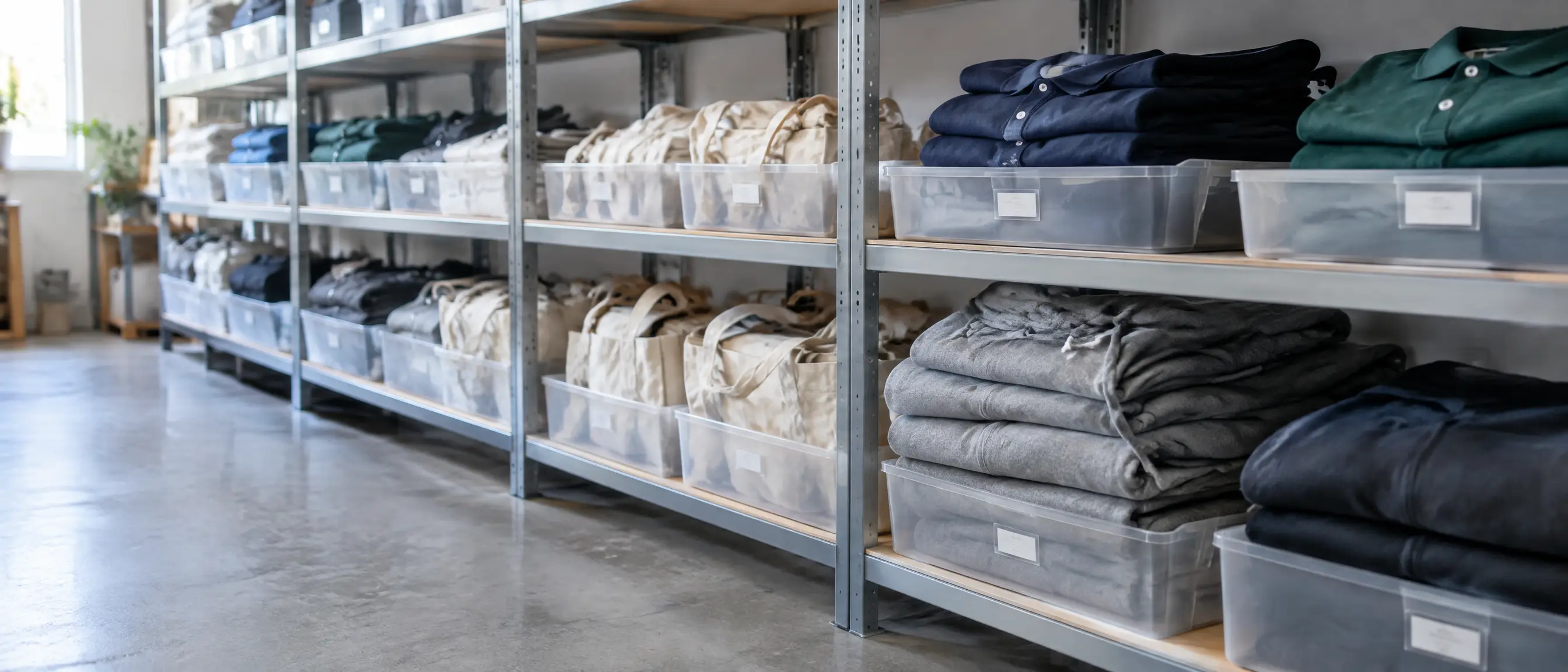
Folded branded apparel and promo items sorted into bins for each program store
This was Power BI and Dynamics 365 reporting work for Parsons Kellogg, not Redefine Suite.

The problem

Store, stock and order numbers sat in separate systems, across 30+ stores and more than a million items. Admins pulled numbers by hand to compare stores.

What we did

Built Power BI reports on Dynamics 365, with one view across every store. The manual pulls were automated, so the numbers came on their own.

  • Power BI
  • Dynamics 365
  • 30+ program stores
  • 1M+ items

The result

  • One view across every store
  • Manual reporting time down 58%
  • Inventory accuracy reached 99.0%

Reporting and ERP work. Read the Parsons Kellogg case study.

Reports

The reports program teams open most.

Pick one to see what it shows. Each one can be exported, saved, or sent to people on a schedule, with a short note on top.

Pop-up stores

Every program store, in one list

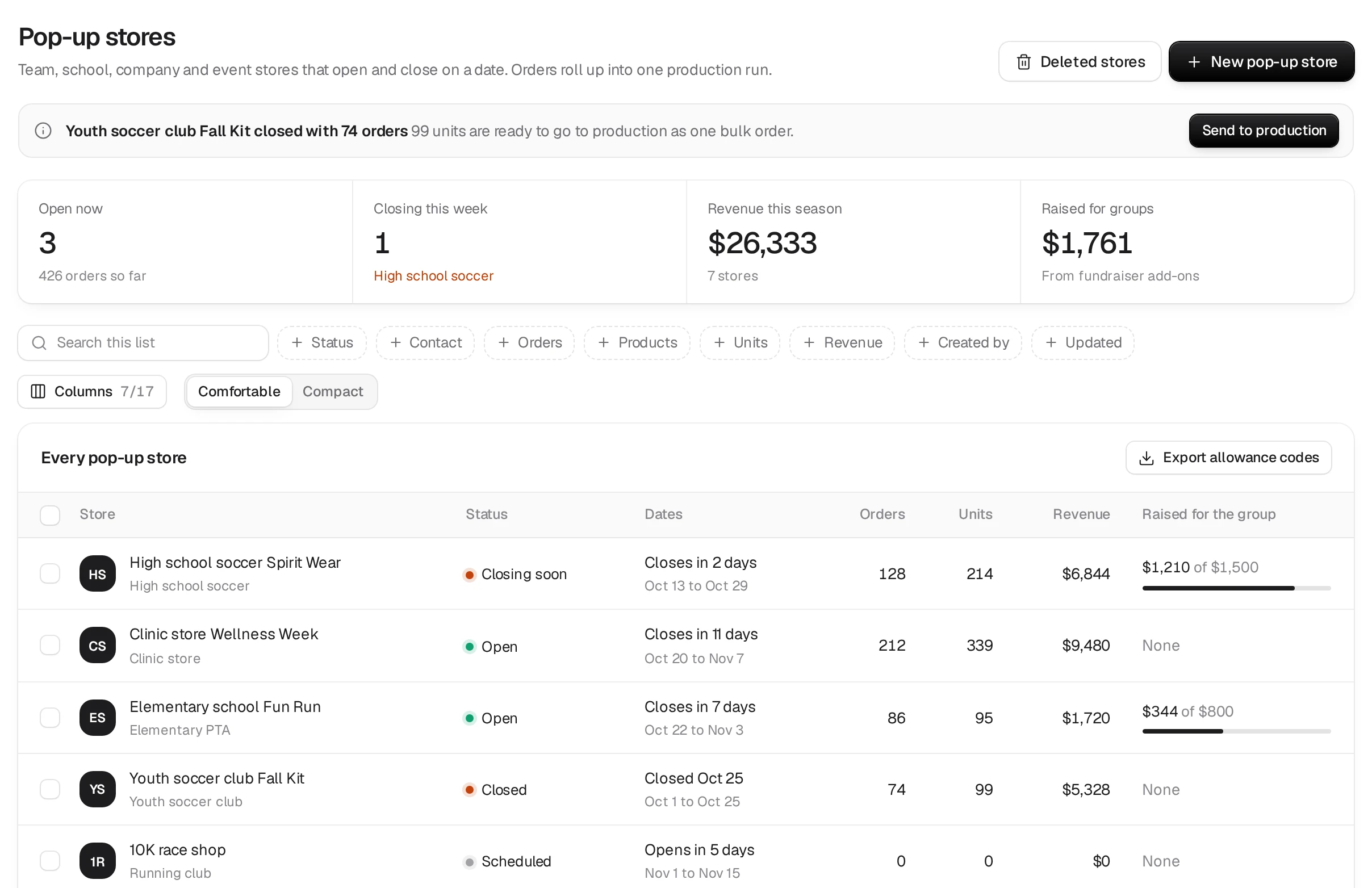
Status, dates, orders, units, revenue and what each group raised, for every store this season. Open now and closing this week sit on top.

Covers
Draft to delivered
Export
Allowance codes too
See program store administration
The Redefine Suite list of every pop-up store with status, dates, orders, units, revenue and money raised for each group
Read it at a glanceStores closing this week sit at the top, so you can remind the organizer in time. Stores in production show when they ship, and delivered stores keep their totals for next season.

Monday reports

Every organizer gets the numbers, without asking.

Open each one to see what it covers.

The sales and size report

Sent every Monday while the store is open.

Coaches, schools and HR leads ask how their store is doing. Add them under Report sharing, and the report goes to them on its own.

3 things it holds

  • Sales so far

    Orders, units and revenue for their store.

  • Size run

    Units by product and size, ready for the decorator.

  • Raised for the group

    What the fundraiser add-on raised, next to the goal.

Before it closes

A reminder with sales so far.

Pick how many days before closing the organizer hears from you, so they can nudge the last buyers.

2 settings

  • Remind the organizer

    Days before closing, with sales so far.

  • Program ID

    Which program the store reports under in Business Central.

A school coach reads the Monday sales and size report on a phone in a gym

Report sharing

Every Monday

Who gets the sales and size report

Send to
The organizer, plus anyone you add.
How often
Every Monday, while the store is open.
What they see
Their own store, not your other stores.
For your team
Schedule any report as a CSV with a short note on top.
Set for each storeSet in Redefine Suite

Why one list

Spreadsheets against one list of stores

Program store reporting in Redefine Suite compared with exports and spreadsheets
TaskSpreadsheetsRedefine Suite
Sales across the seasonBy handOne export per storeOne listEvery store and status
Fundraiser totalsAdded up for each groupRaised, next to the goal
Organizer updatesEmails when they askEvery Mondayon its own

Spreadsheets: each store exported, added up and emailed by hand, often after the store has closed.

Can I see every program store in one place?

Yes. One list shows each store's status, dates, orders, units, revenue and what its group raised. Open now and closing this week sit at the top.

Stores are set up and run from program store administration. See program store administration

Can coaches and HR leads get reports without asking?

Yes. Add them under Report sharing. They get the sales and size report every Monday while the store is open.

Any report can also be sent on a schedule as a CSV. See scheduled reports and alerts

How do I track a team store fundraiser?

Turn on the fundraiser add-on for each item. The list shows what each group raised next to its goal, and Raised for groups adds up the season.

Budgets and allowance codes have their own page. See budget and redemption controls

Can I compare stores and seasons?

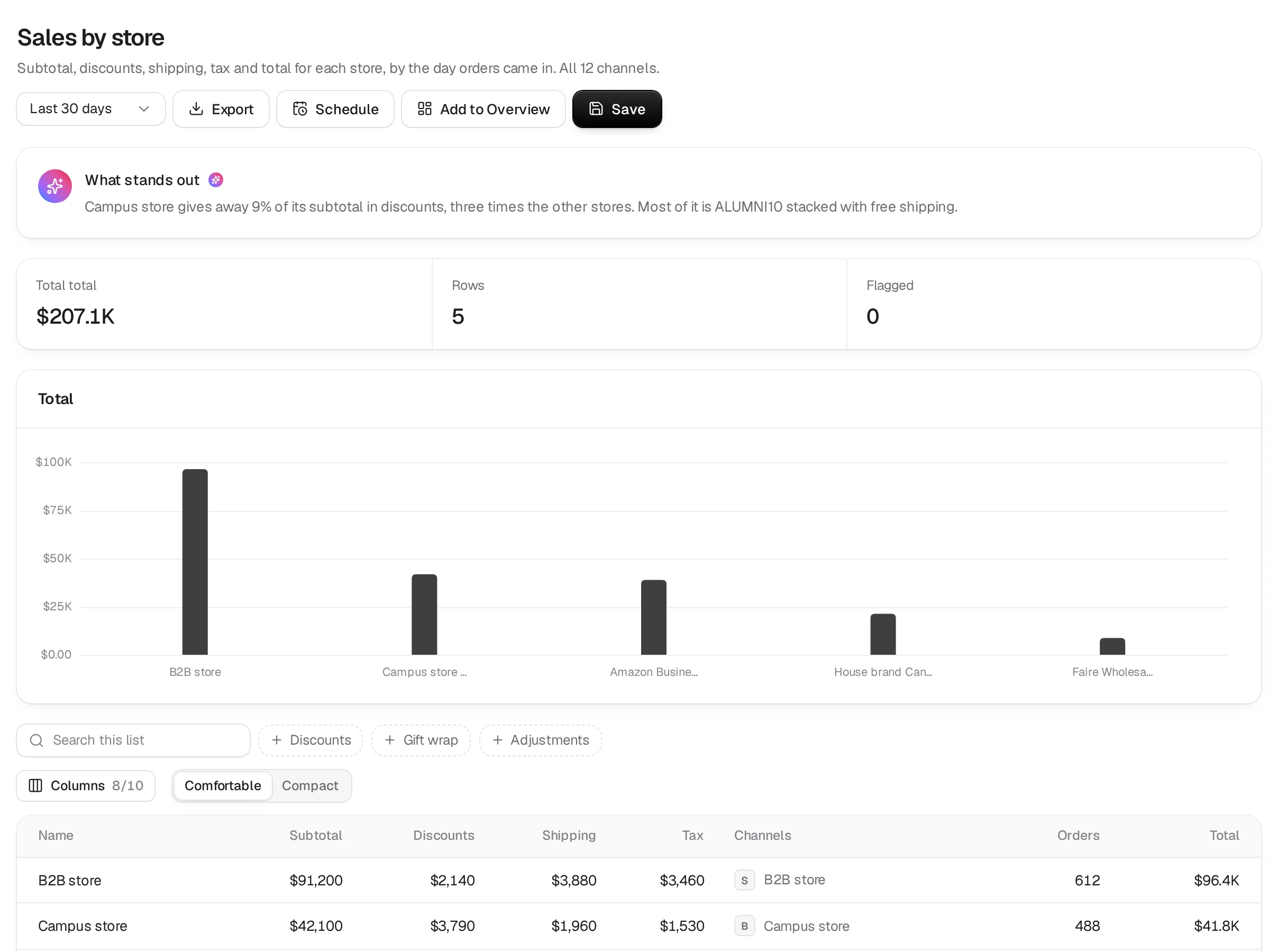
Yes. Sales by store shows each store's subtotal, discounts, shipping, tax and total. Compare two periods sets each store against the period before.

Leaders can also get one view of all sales. See executive dashboards

Does it help with royalty reporting?

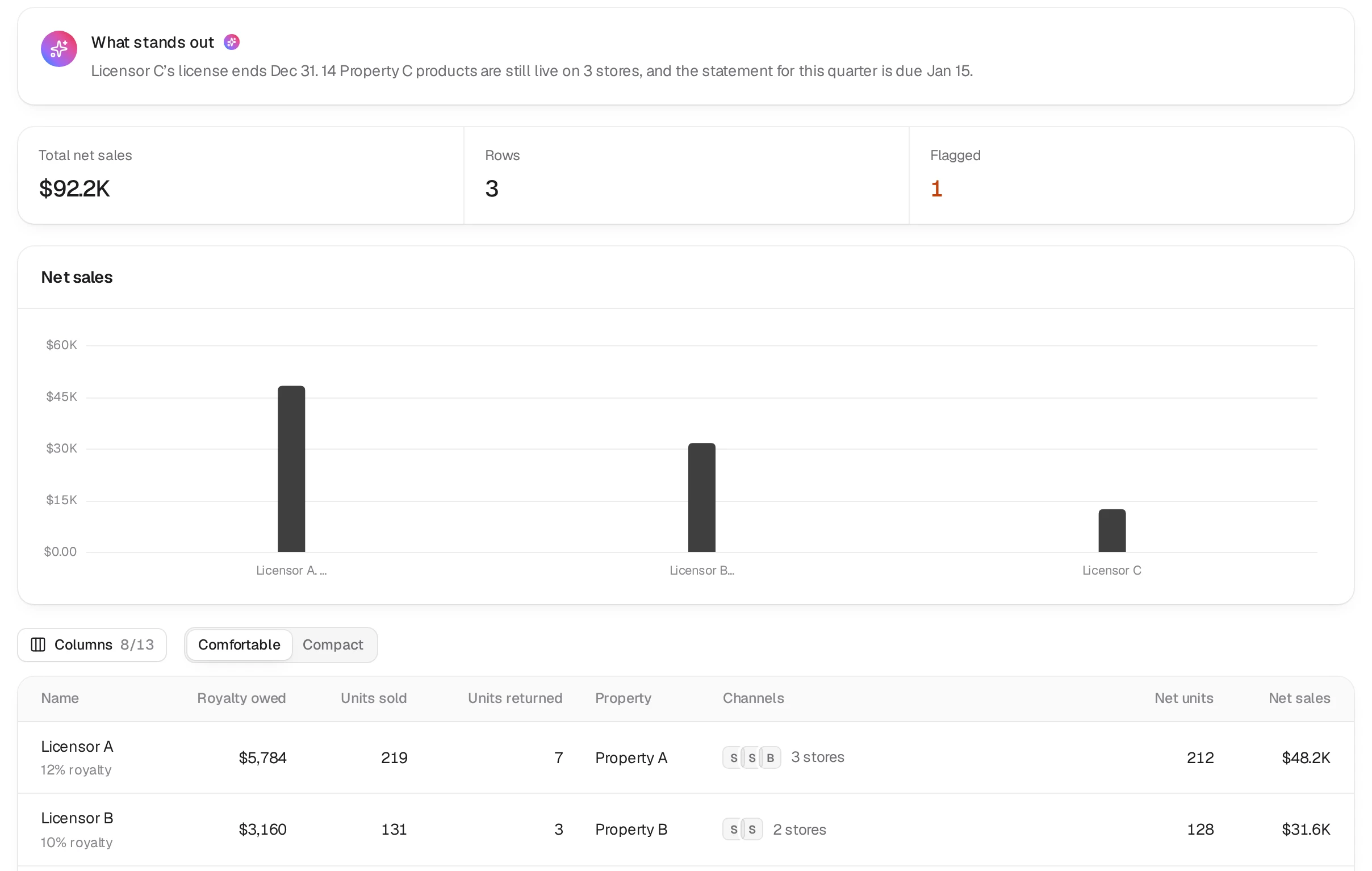
Yes. Licensed sales for royalties shows units and net sales by license and property, in the layout licensors ask for.

It counts by ship date, like the statements do. See commerce reporting

When is it not worth it?

If you run one or two stores a year and no one asks you for numbers, a spreadsheet may do. It pays off when you run many stores each season.

In the demo, we load your own stores. See program store software

Book a demo

See every program store on one page.

Tell us how many stores you run each season and who asks you for numbers. In the demo, we load your stores and show the list, the size run and the Monday report. A demo built on your own program stores and the reports your clients ask for. You can also use the demo booking page.

A program manager and a decorator check a size run beside a stack of printed tees
  • Built on your own stores
  • The reports your clients ask for
  • Your own questions
  • 550+ projects delivered

Book a personalized demo

Tell us which problem costs you the most. We set up the demo around it.

  1. 1We confirm your request
  2. 2A short call about your questions
  3. 3Your personalized demo
  4. 4You decide what comes next