

Planning an ERP implementation or headless deployment?
- ERP implementation for D365, SAP, NetSuite & BC
- API-first, headless ERP architecture
- 20+ years delivering ERP projects
No obligation, just a clear answer on what your implementation would take.
Running a growing business on spreadsheets and disconnected software slows everyone down. ERP implementation replaces that patchwork with one connected system, and a headless ERP deployment approach lets you modernize the interface without touching the financial core underneath it. This guide walks through the steps, the components, and the deployment decision in plain terms.
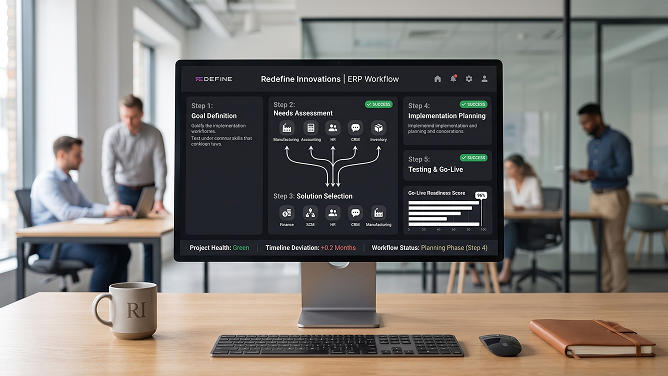
What Is ERP Implementation?
ERP implementation is the process of installing, configuring, and rolling out an enterprise resource planning system so it runs your core business functions from one connected platform. Instead of finance, inventory, HR, and sales data living in separate tools, an ERP brings them together into a single system of record.
A typical implementation covers production, finance, supply chain, inventory, and reporting, and automates the manual handoffs between them. That automation is what reduces overhead and increases efficiency across the business, not just within one department.
Done well, an ERP implementation gives every team the same real-time data, so decisions get made from one accurate picture instead of five conflicting spreadsheets. That is the difference between an ERP rollout that pays for itself and one that just adds another system to manage.
Why this matters in 2026: A mid-size ERP implementation now averages around $7.1 million and 17.4 months, according to Panorama Consulting Group's benchmark research, and Gartner's latest research projects that roughly 70% of implementations over the next three years will fall short of their original objectives. Cloud ERP adoption data shows adoption has climbed to 64% of organizations, up from 44% in 2020, which is exactly why the deployment approach you choose matters as much as the platform itself.
6 Steps to a Successful ERP Implementation
A successful ERP implementation follows six steps: define objectives, pick the right system, redesign workflows, document a plan, test thoroughly, and train every user before go-live. Skipping any one of them is where most timelines and budgets start to slip.
- Clarify your objectives. Define what the system needs to fix or improve, and tie every requirement back to a business goal your leadership team can measure.
- Choose the right system. Compare vendors on features, pricing, and scalability so the platform can grow with you instead of forcing a second migration in three years. An independent technology stack audit keeps the shortlist unbiased.
- Set up process management workflows. Rebuild your data, access, security, and approval workflows before go-live, not after, so nobody is improvising on day one.
- Create a detailed implementation plan. Document every phase, owner, and deadline so responsibilities are clear at each stage of the rollout.
- Test the system thoroughly. Run unit, integration, and user-acceptance testing before production data ever touches the new environment.
- Train users effectively. Give every role hands-on training before day one, since adoption is what decides whether the system earns its return.
Step 6 is the one Redefine's ERP delivery team sees shortchanged most often. On a recent NetSuite rollout, two departments that skipped hands-on training re-entered the same data by hand for months, not because the system couldn't handle it, but because nobody had shown them the screen that did.
Planning an ERP implementation?
Redefine Innovations scopes ERP rollouts line by line before Sprint 1, with fixed pricing and a named delivery team.
Core Components of an ERP System
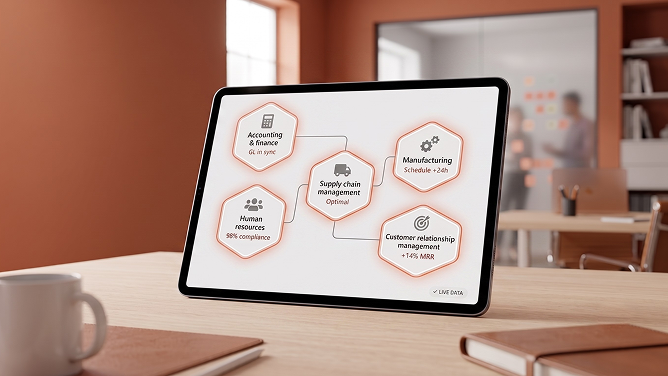
Most ERP systems bundle five core modules: accounting, manufacturing, supply chain, human resources, and customer relationship management. Together they cover the day-to-day functions that keep a business running.
Accounting & finance
Manages invoicing, accounts payable and receivable, the general ledger, and budgeting in one place.
Manufacturing
Streamlines production scheduling and helps optimize materials and capacity planning.
Supply chain management
Improves stock control and keeps order fulfillment on time while holding costs down.
Human resources
Handles payroll, leave tracking, training records, performance reviews, and hiring workflows.
Customer relationship management
Tracks sales activity, order history, and marketing campaigns to support a better customer experience.
Many platforms now treat these modules as connected but independently upgradable services rather than one fixed suite. Microsoft's own Finance and Supply Chain modules are a good example, and pairing them with Power BI reporting turns raw ERP data into decisions your team can act on the same day.
What Is Headless ERP Deployment?
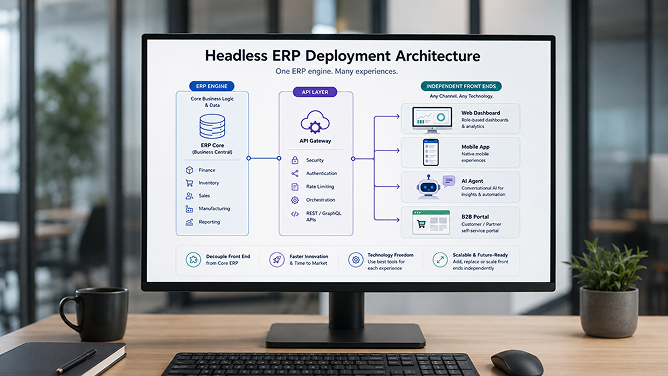
Headless ERP deployment separates the user interface from the ERP engine, so the system's finance, inventory, and workflow logic keeps running underneath while the front end is built independently through APIs. The ERP does not go away. Only the presentation layer changes.
It is the same decoupling that reshaped ecommerce through headless commerce, applied to the ERP core instead of the storefront. In both cases, the backend keeps its logic and data intact while a custom interface talks to it over an API.
A 2026 Censuswide survey of more than 4,000 finance and technology executives, commissioned by Rimini Street, found that seven in ten no longer see traditional, monolithic ERP as the future, and roughly a third already favor a composable, API-driven model over a single vendor's fixed interface. Even SAP, historically committed to a cloud-only roadmap, agreed in mid-2026 to extend AI access to hybrid landscapes still running on-premises ECC and S/4HANA, a sign that decoupled architecture is becoming a mainstream option rather than a fringe idea.
From the field
One of our distribution clients was running a 12-year-old on-premises ERP that nobody wanted to touch, let alone replace. Instead of a 14-month replatform, our integration team built an API layer over their existing system and shipped a role-based warehouse dashboard and an AI reorder agent in six weeks. The ERP itself never moved. Only the interface did.
Redefine Innovations' ERP delivery team, on a recent headless ERP deployment engagement (client name withheld per NDA)How Headless ERP Deployment Differs From a Traditional Rollout
A traditional ERP implementation ties the interface directly to the vendor's own screens, so any redesign means touching the core system. Headless ERP deployment exposes the same business logic through an API integration layer instead, so the interface, dashboard, or AI layer can change on its own schedule.
In practice, that means a warehouse team can get a purpose-built mobile screen, a finance team can keep the standard dashboard, and an AI agent can read and write order data, all from the same underlying ERP, without three separate implementation projects.
Worth remembering: Headless does not replace your ERP. It decouples the interface from it. Your finance, inventory, and workflow logic stay exactly where they are; only the presentation layer moves.
6 Benefits of ERP Implementation
Implementing ERP pays off in six consistent ways: efficiency, accuracy, cost, service, inventory control, and scalability. Here is what each one looks like in practice.
01 Increased efficiency
An ERP system streamlines and automates processes like order handling and inventory management, and keeps accurate records of every sale, purchase, and transaction along the way.
Because every team pulls from the same real-time metrics, decisions move faster, and the time saved from automation compounds across the whole organization.
For you Fewer manual handoffs, faster decisions, more done with the same team.
02 Improved data accuracy
Centralizing data into one repository keeps every department working from the same numbers, and changes reflect everywhere immediately instead of days later.
That accuracy carries into marketing, inventory planning, and customer relations, and pairs well with business intelligence tools that turn the same data into deeper analysis.
For you One accurate number, not five conflicting versions of it.
03 Reduced costs
Automating paperwork, record keeping, and task management cuts the manual labor an organization needs to keep operations running, and reduces the errors that come with outdated data.
Centralized data also improves transparency, which makes it easier to spot where costs are creeping up before they become a bigger problem.
For you Lower overhead, and a clearer view of where the savings come from.
04 Improved customer service
Customers benefit directly, since staff can track an order and resolve a question quickly instead of chasing information across three systems.
The automation behind an ERP system also lets teams respond faster and more accurately to inquiries, cutting the back-and-forth that frustrates customers.
For you Faster answers, fewer dropped tickets, better retention.
05 Optimized inventory management
Real-time inventory data lets teams manage stock levels and fulfillment times more precisely, so they can act on demand shifts as they happen instead of after the fact.
It also surfaces stock or order problems early enough to fix them before they hit the customer, protecting both margin and service levels.
For you Fewer stockouts, less dead inventory, better fill rates.
06 Enhanced scalability
An ERP system helps a growing business manage more customers and more complexity without a proportional increase in administrative overhead.
A headless ERP deployment strategy takes this further: as the business adds channels, regions, or AI-driven workflows, teams can extend the front end without re-implementing the core system underneath.
For you Room to grow, without a second implementation project in three years.
"The best ERP systems disappear into the background of daily work, and the best deployments make it easy to keep them there."A principle driving the shift toward headless ERP deployment
Considering a headless deployment?
Our integration architects map the API layer between your ERP and any front end you want to build.
Traditional vs. Headless ERP Deployment: Which Fits Your Business?
The choice comes down to how much control you need over the interface versus how quickly you need to go live. A traditional implementation is faster to stand up with a vendor's default screens; a headless ERP deployment takes more upfront integration work but pays off as soon as you need more than one interface.
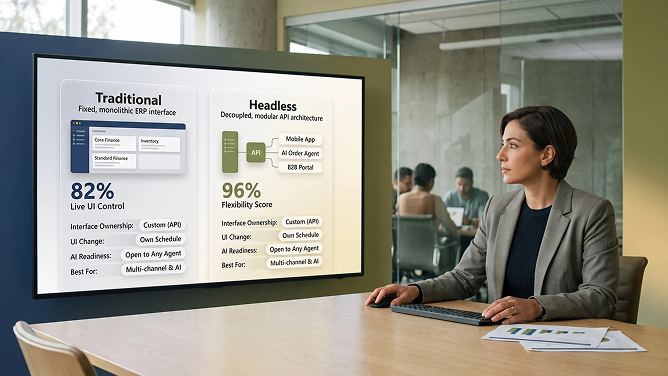
| Dimension | Traditional ERP Deployment | Headless ERP Deployment |
|---|---|---|
| Interface ownership | Tied to the vendor's built-in screens | Custom-built, connected through APIs |
| Time to change the UI | Slower; often requires a vendor update cycle | Faster; the front end ships on its own schedule |
| AI agent readiness | Limited to native vendor tools | Open to any agent that can call the API |
| Upfront complexity | Lower; fewer moving parts to configure | Higher; requires an API and integration layer |
| Best for | Single-interface teams that need to go live fast | Multi-channel operations and AI-driven workflows |
| 2026 direction | SAP's core ECC and S/4HANA customers | SAP's own Joule now bridges into hybrid, on-prem landscapes |
This split shows up in the market data too. SAPinsider benchmark research found that 55% of organizations have deployed SAP S/4HANA, but only 34% have fully completed the transition, which is exactly the gap a headless ERP deployment layer is built to bridge: it lets teams modernize the interface and extend AI access now, while the underlying migration finishes on its own timeline.
Key Takeaways
- ERP implementation succeeds or fails on planning: clear objectives, the right system, and real user training matter more than the software brand.
- Five modules (finance, manufacturing, supply chain, HR, and CRM) cover most of what a growing business needs from day one.
- Headless ERP deployment separates the interface from the ERP engine, so you can build custom dashboards, mobile apps, and AI agents without replacing the core.
- Headless deployment adds upfront integration work in exchange for speed and flexibility later, especially for multi-channel or AI-driven operations.
- Most organizations do not have to choose once and for all. Many run a traditional core alongside a headless layer for the interfaces that change most often.
Frequently Asked Questions
What is ERP implementation?
ERP implementation is the process of installing, configuring, and rolling out an enterprise resource planning system so it runs an organization's core functions, including finance, supply chain, inventory, HR, and customer relationships, from one connected platform instead of separate spreadsheets and disconnected tools.
What are the main steps in an ERP implementation?
A successful ERP implementation generally follows six steps: clarify the business objectives, choose the right system for your needs and scale, redesign process and data workflows, document a detailed implementation plan, test the system thoroughly before go-live, and train every user on the new platform.
What are the core components of an ERP system?
Most ERP systems include five core modules: an accounting and finance module for transactions and reporting, a manufacturing module for production planning, a supply chain management module for procurement and logistics, a human resources module for payroll and workforce data, and a customer relationship management module for sales and service history.
What is headless ERP deployment?
Headless ERP deployment separates the user interface from the ERP engine so the system's finance, inventory, and workflow logic keeps running in the background while a custom front end, mobile app, or AI agent is built independently on top through APIs. The ERP stays in place; only the presentation layer changes.
How is headless ERP deployment different from a traditional ERP implementation?
A traditional ERP implementation ties the interface directly to the vendor's own screens, so any redesign requires touching the core system. Headless ERP deployment exposes the same business logic through REST or GraphQL APIs, letting teams build or swap the interface, dashboard, or AI layer on its own schedule without re-implementing the underlying ERP.
Why do ERP implementations fail?
Most ERP implementation failures trace back to unclear objectives, poor data migration, insufficient user training, and weak change management rather than the software itself. Industry research commonly cites failure or shortfall rates between 55% and 75%, most often driven by rushed planning and underestimated staffing rather than a defective platform.
How long does an ERP implementation take?
A mid-size ERP implementation currently averages around 17.4 months and commonly runs a few months past its original schedule, according to Panorama Consulting's benchmark research. Timelines vary by company size, number of modules, and how much data migration and customization the project requires.
What are the benefits of ERP implementation?
The core benefits include increased operational efficiency, improved data accuracy through a single source of truth, reduced costs from less manual work, faster and more informed customer service, optimized inventory management, and easier scalability as the business grows.
Sources & further reading
- Panorama Consulting Group, The ERP ReportBenchmark data on implementation cost, duration, and budget/schedule overruns
- Rand Group, "What Percentage of ERP Implementations Fail?"Summarizes Gartner's implementation shortfall research
- ERP Software Blog, "Why ERP Implementations Fail and How to Prevent It"Industry data on the 55% to 75% implementation shortfall range
- The Register, "ERP users may soon get ahead by going headless"Censuswide survey of 4,295 finance and technology executives, commissioned by Rimini Street
- ERP Today, "Headless ERP Migration: Can a New Architecture Change the Math?"SAP's Joule/hybrid landscape shift and SAPinsider S/4HANA adoption data
- Global ERP Statistics 2026 roundupCloud ERP adoption trend data (2020 to 2024)

Umang Patel
Co-owner | Ecommerce Architecture, Systems & Integrations
Umang Patel has worked in ecommerce and technology since 2001. He specializes in backend systems, ecommerce architecture, ERP and platform integrations, automation, and reverse engineering complex business processes. At Redefine Innovations, he leads technology and project teams building scalable systems across both B2B and DTC ecommerce environments.
Areas of expertise: Ecommerce Architecture • Backend Systems • ERP Integration • Automation • Headless Commerce • Reverse Engineering


