

Thinking about Business Central?
- D365 Business Central implementation & support
- ERP integration with ecommerce, CRM, and EDI
- 20+ years delivering Dynamics & ERP projects
No obligation, just a clear answer on what a Business Central rollout would take.
Running a business means coordinating finance, inventory, projects, and customer service without losing time to disconnected spreadsheets. D365 Business Central was built to solve exactly that, and the 2026 release wave pushes it further with general-availability AI agents and reporting that used to require a separate Power BI license.

In client scoping calls, the same two questions come up almost every time a growing business evaluates Business Central: how fast can we actually go live, and will it talk to the ecommerce store or CRM we already run. The honest answer to both is usually yes, provided the implementation is scoped around real processes rather than a generic demo. This article covers the eight features behind that answer, plus what genuinely changed in the 2026 release wave.
What Is D365 Business Central?
Dynamics 365 Business Central is Microsoft's cloud ERP built specifically for small and midsize organizations, unifying finance, sales, inventory, projects, and supply chain in one connected system. It replaced Dynamics NAV as Microsoft's core SMB business platform and now ships as a cloud-first product with two scheduled release waves a year, so the feature set keeps moving rather than sitting still between major upgrades.
Business Central gives every department a shared, real-time view of the same data, accessible from any device. Instead of finance working from one export and operations from another, both teams look at the same numbers, updated as transactions happen, which is what makes cross-department decisions faster and less argumentative.
What's New in the 2026 Release Wave
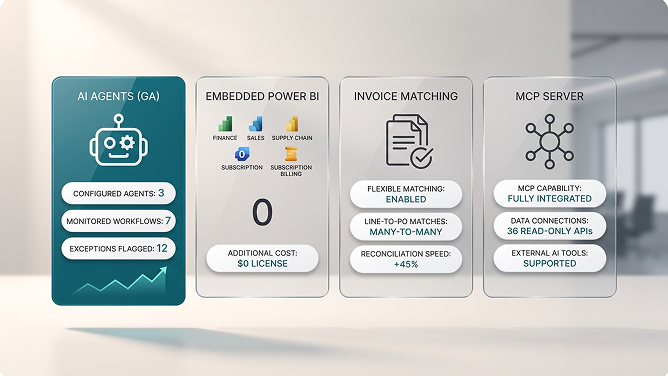
2026 release wave 1 (version 28) is the most AI-forward Business Central update to date. Microsoft shipped general-availability AI agents built through a new Agent Designer, four embedded Power BI apps at no extra license cost, and a rebuilt financial reporting engine, alongside dozens of smaller fixes to invoice matching, expense reporting, and inventory tracking. Full details are documented in Microsoft's official 2026 release wave 1 plan.
Why this matters: Agent Designer reached general availability in May 2026, letting any team, not just developers, configure an AI agent to monitor overdue invoices or flag purchasing exceptions using plain language and your own Business Central data. That's a meaningful shift from earlier Copilot features that only assisted inside a single screen. (Source: ERP Software Blog's 2026 wave 1 breakdown.)
1. Business Insights & AI Agents
Business Central turns everyday transactions into decision-ready insight, and as of 2026 it can also act on that insight through configurable AI agents. Beyond dashboards, the platform now supports agents built in Agent Designer that watch for specific conditions, like an invoice sitting unpaid past terms, and trigger a defined next step automatically.
01Real-Time Business Insights
Business Central surfaces current performance across sales, finance, and operations so leadership can plan growth from what's actually happening, not last quarter's export. It integrates with other Microsoft and third-party applications to extend those insights into customer activity and buying trends.
For you Decisions backed by live data instead of a monthly snapshot
02Configurable AI Agents
With Agent Designer now generally available, teams can define what data an agent watches and what action it takes without a development cycle. A common first use case is an agent that monitors overdue invoices and automatically sends a follow-up, or one that flags exceptions in purchasing before they become a bigger problem. Extending this further into your own workflows is exactly the kind of work an AI development engagement is built to scope and ship.
For you Automation you configure yourself, not a feature you wait on a developer for
2. Robust Security & Compliance
Business Central takes a security-first approach, encrypting data at rest and in transit and meeting standards including HIPAA and EU GDPR. Audit logging tracks user and system activity throughout the application, which is what regulators and auditors actually ask to see when they review a compliance claim.
Role-based permissions keep sensitive financial and customer data visible only to the people who need it, and that access model scales cleanly as a company adds users, departments, or entire subsidiaries. For businesses juggling multiple regulatory frameworks across regions, this built-in compliance layer removes a significant amount of custom security work a homegrown system would otherwise require.
3. Comprehensive Financial Management
Financial management in Business Central covers the full cycle: setting up accounts, tracking transactions, managing cash flow and budgets, and reporting on performance by department. The 2026 release wave rebuilt the financial reporting engine and added a global withholding tax framework, closing gaps that previously required a third-party add-on for multi-jurisdiction businesses (details in Rand Group's release wave 1 review).
- Faster financial close. Automated reconciliation and a rebuilt reporting engine cut the manual steps between period-end and a finished statement.
- Grouped expense reporting. Employees can now bundle multiple expenses into a single report, and finance can approve or reject the whole submission directly in Business Central.
- Flexible invoice matching. A single invoice line can match to multiple purchase order lines and posted receipts, replacing the old rigid one-to-one matching rule.
- Automated risk prevention. Built-in controls flag unusual transactions before they become unexpected costs.
Not sure Business Central fits your finance stack?
We scope Dynamics 365 implementations against your actual chart of accounts and reporting needs, not a generic demo.
4. Inventory Management
Inventory management in Business Central keeps stocking levels accurate and gives visibility into quantity, location, and cost for every item. It supports cycle counting, batch and serial tracking, warehouse management, and stock transfer requests, forming a complete system rather than a bolt-on module.
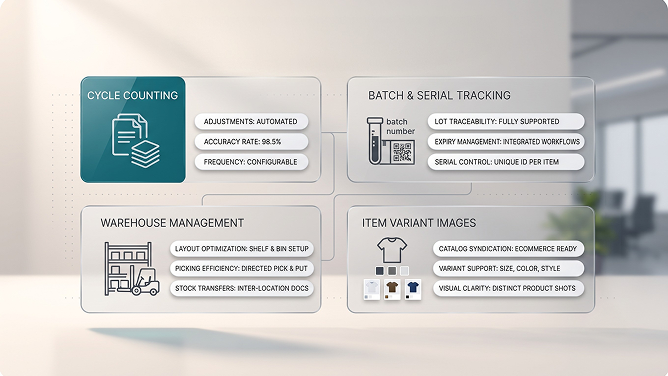
Recent releases also added a native Quality Management extension, with QA workflows, lot tracking, and inspection routing built directly into inventory, and images on item variants, which matter for any brand syndicating a catalog to an ecommerce storefront where shoppers need to see the actual variant they're buying, not a single generic product photo (see Stoneridge Software's wave 1 walkthrough).
5. Project Management
Project management in Business Central tracks progress, budget, timeline, and resource allocation so projects finish on time and within scope. It handles task assignments, team and stakeholder collaboration, issue resolution, and change requests inside the same system that holds your financial data, so project costs roll up into real numbers instead of a separate spreadsheet someone reconciles manually at month-end.
Status reporting keeps every stakeholder, internal and client-facing, aware of where a project stands without a manual update meeting. For services businesses billing by project, that direct link between project hours and financial reporting is often the single biggest reason to move off a standalone project tool.
6. Supply Chain Management
Supply chain management in Business Central helps optimize manufacturing and distribution by tracking resources, planning production, and managing customer orders and shipments. Demand forecasting supports better prediction of customer needs, while item tracking, bills of materials, shipment management, and warehouse management round out a genuinely complete module.
Recent releases improved drop shipment posting and purchase order matching specifically, reducing the manual reconciliation that used to eat up an accounts payable team's week. For businesses running Business Central alongside other platforms, whether that's a separate ecommerce store, an EDI-connected supplier network, or a CRM, keeping that data flowing without manual re-entry is exactly what a dedicated ERP integration layer is built to solve.
7. Customized Reporting & Dashboards
Business Central now ships four embedded Power BI apps, covering Finance, Sales, Supply Chain, and Subscription Billing, at no extra license cost. Analysis Mode v2 is AL-deployable for developers who want custom pivot-style analysis, and 36 new read-only APIs give external BI tools direct access to Business Central data without a custom integration layer (per ERP Software Blog's release wave 1 summary).
Practical note: Embedded Power BI covers most standard reporting needs out of the box, but businesses with cross-system reporting, blending Business Central with ecommerce, marketing, or a separate CRM, still get more value from a purpose-built Power BI dashboard that unifies every data source in one model rather than four separate embedded apps.
8. Automated Data Entry & Invoice Processing
Automated data entry pulls information straight from incoming documents, like invoices and purchase orders, without a person retyping it into the system. Document recognition parses the relevant fields, reduces manual-entry errors, and only posts validated data, and 2026 release wave 1 extended this with AI agents that can flag exceptions rather than simply queue everything for manual review.
Combined with the flexible invoice matching covered under financial management, this is where AI-driven automation shows up most concretely on a P&L: fewer hours spent on data entry, fewer reconciliation errors, and faster time from invoice receipt to payment approval.
"An ERP earns its keep the day finance, inventory, and operations finally stop arguing about whose number is right."The practical case for Business Central
Business Central vs. Dynamics 365 Finance & Supply Chain Management
Business Central and Dynamics 365 Finance and Supply Chain Management (F&SCM) both run on the Dynamics 365 platform, but they target very different company sizes. Choosing between them comes down to scale, complexity, and how much of your process is genuinely unique.
| Dimension | Business Central | Finance & Supply Chain Management |
|---|---|---|
| Target company size | Small to midsize businesses | Large, complex enterprises |
| Implementation time | Weeks to a few months | Several months to over a year |
| Licensing cost | Lower, tiered by user type | Higher, enterprise-scale pricing |
| Customization depth | Extensions and Power Platform | Deep multi-entity, multi-currency configuration |
| Best for | Single or few-entity businesses wanting fast time to value | Global manufacturers and enterprises with complex consolidation needs |
Most growing businesses start on Business Central and only evaluate Finance and Operations once they've genuinely outgrown it, typically when multi-entity consolidation or manufacturing complexity exceeds what Business Central's extension model can comfortably handle. A short digital transformation assessment is usually enough to tell you which side of that line your business actually sits on.
Want a straight answer on whether BC fits?
We scope Dynamics 365 Business Central implementations against your real processes, not a canned demo.
Key Takeaways
- D365 Business Central unifies finance, inventory, projects, and supply chain in one cloud ERP built for small and midsize businesses.
- 2026 release wave 1 adds general-availability AI agents, four embedded Power BI apps, and a rebuilt financial reporting engine, all at no extra license cost.
- Eight features carry most of the platform's value: AI-driven insights, security and compliance, financial management, inventory, projects, supply chain, reporting, and automated data entry.
- Business Central and Finance & Supply Chain Management solve different problems; most growing businesses start on Business Central.
- Integration with ecommerce, CRM, and EDI systems is where a lot of the platform's real-world value gets unlocked or lost.
Frequently Asked Questions
What is Dynamics 365 Business Central?
Dynamics 365 Business Central is Microsoft's cloud ERP for small and midsize businesses, covering finance, sales, inventory, projects, and supply chain in one connected system. D365 Business Central replaced Dynamics NAV as Microsoft's core SMB business management platform and now ships as a cloud-first product with regular twice-yearly release waves.
What are the main features of D365 Business Central?
The core features include AI-powered business insights and Copilot agents, robust security and compliance, comprehensive financial management, inventory management, project management, supply chain management, customizable reporting with embedded Power BI, and automated data entry and invoice processing. Together these cover most of what a growing business needs from a single ERP platform.
Is Business Central the same as Dynamics 365 Finance and Operations?
No. Business Central is built for small and midsize companies and is faster to deploy with lower licensing and implementation costs. Dynamics 365 Finance and Supply Chain Management targets large, complex enterprises with deeper multi-entity, multi-currency, and manufacturing requirements. Many growing businesses start on Business Central and evaluate Finance and Operations only once they outgrow it.
What's new in Business Central 2026 release wave 1?
2026 release wave 1 (version 28) adds general-availability AI agents built with the new Agent Designer, four embedded Power BI apps for finance, sales, supply chain, and subscription billing at no extra license cost, a rebuilt financial reporting engine, expanded invoice matching, and a more capable Model Context Protocol server for connecting external AI tools to Business Central data.
Does Business Central use AI?
Yes. Business Central includes Copilot-assisted features across sales, finance, and inventory, and as of 2026 release wave 1 it supports custom AI agents built with Agent Designer that can be configured to monitor overdue invoices, flag purchasing exceptions, or automate repetitive approval steps without custom development.
Is D365 Business Central suitable for small businesses?
Yes. Business Central was purpose-built for small and midsize organizations, with tiered licensing, a faster implementation timeline than full-scale ERP suites, and modules a smaller team can adopt incrementally rather than deploying everything at once.
Can Business Central integrate with ecommerce platforms like Shopify?
Yes. Business Central connects to ecommerce platforms such as Shopify and BigCommerce through APIs and pre-built connectors, syncing inventory, orders, and customer data in both directions. Recent release waves also added item variant images, which are particularly useful for ecommerce catalogs that need to display each product variant distinctly.
How do I get started with D365 Business Central?
Start with a scoped assessment of your current finance, inventory, and reporting processes to identify which Business Central modules you need first. Most implementation partners can go live with a core finance and inventory setup within a matter of weeks, then layer in supply chain, projects, and custom AI agents once the fundamentals are running.

Umang Patel
Co-owner | Ecommerce Architecture, Systems & Integrations
Umang Patel has worked in ecommerce and technology since 2001. He specializes in backend systems, ecommerce architecture, ERP and platform integrations, automation, and reverse engineering complex business processes. At Redefine Innovations, he leads technology and project teams building scalable systems across both B2B and DTC ecommerce environments.
Areas of expertise: Ecommerce Architecture • Backend Systems • ERP Integration • Automation • Headless Commerce • Reverse Engineering


