To update PHP on a WooCommerce store, check your version in WooCommerce > Status, take a full backup, and update WordPress, WooCommerce, and extensions. Then test checkout, payments, shipping, tax, and scheduled jobs on a staging copy running the new PHP. Switch production in a low-traffic window with a rollback ready. Aim for PHP 8.3 or newer.
To update PHP on a WooCommerce store without breaking it, check your version, back up, update your extensions, test checkout on a staging copy running the new PHP, and switch with a rollback ready. Aim for PHP 8.3 or newer, which WooCommerce recommends.1 PHP 7.4, 8.0, and 8.1 are already end of life.2
The worry is fair. PHP runs your checkout, payment calls, order emails, and every extension. One incompatible plugin can turn a routine update into a broken cart. So the goal is to safely upgrade PHP, not to rush it.
Waiting carries risk too. On Oct 21, 2026, PHP shipped emergency fixes for two critical flaws, and it issued no official release for 7.4, 8.0, or 8.1.34 A quick disclosure: Redefine's PHP development team moves PHP stacks to supported versions for clients, so we have seen what breaks.
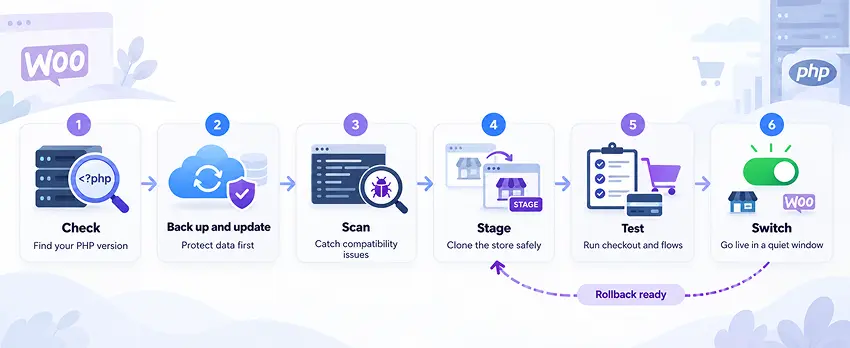
- Check. Find your PHP version and list what runs your store.
- Update. Back up, then update WordPress, WooCommerce, and extensions.
- Scan. Check code and extensions for PHP compatibility problems.
- Stage. Copy the store to a staging site on the new PHP version.
- Test. Run checkout, payments, shipping, and scheduled jobs.
- Switch. Change production in a quiet window with a rollback ready.
Why Should You Update PHP on WooCommerce Now?
Three things changed in the last year, and each one pushes a store off old PHP. Here are the dates as of Oct 26, 2026.25
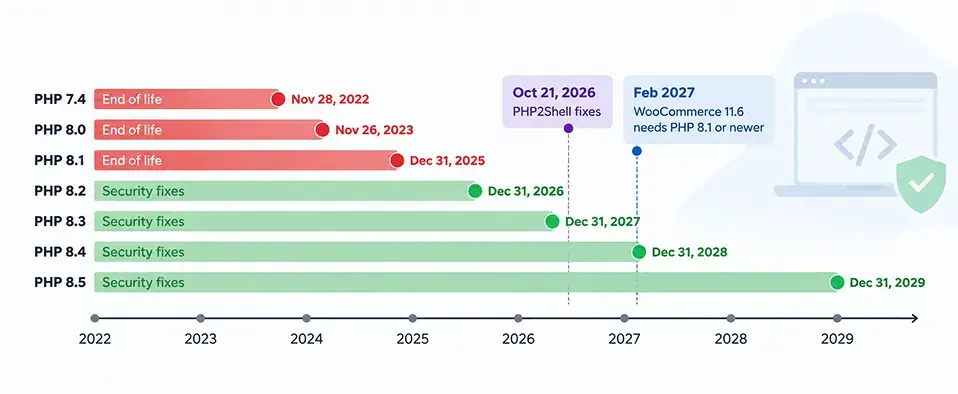
| PHP version | Security support ends | Status |
|---|---|---|
| 7.4 | Nov 28, 2022 | End of life |
| 8.0 | Nov 26, 2023 | End of life |
| 8.1 | Dec 31, 2025 | End of life (last release 8.1.34) |
| 8.2 | Dec 31, 2026 | Security fixes only |
| 8.3 | Dec 31, 2027 | Security fixes only |
| 8.4 | Dec 31, 2028 | Active support until Dec 31, 2026 |
| 8.5 | Dec 31, 2029 | Active support |
WooCommerce is raising its floor
WooCommerce 11.6, planned for February 2027, requires PHP 8.1 or newer. WooCommerce 11.5 is the last planned release that runs on PHP 7.4 and 8.0, and WooCommerce recommends PHP 8.3 or newer.1 Its opt-in sample shows about 7% of tracked stores on 7.4 and 2% on 8.0. WordPress core set 7.4 as the minimum for WordPress 7.0 and kept 8.3 as its recommended version.6
PHP2Shell turned a chore into a deadline
On Oct 21, 2026, PHP released fixes for two critical flaws, CVE-2026-109618 and CVE-2026-109619, together called PHP2Shell. Each scores 9.2 on the CVSS 4.0 scale. The fixes ship in PHP 8.5.12, 8.4.27, 8.3.36, and 8.2.35.3 Updating WooCommerce or your plugins does not apply the fix, because the flaw sits in PHP on the server. PHP 7.4, 8.0, and 8.1 got no official release, only source patches that a hosting account cannot apply. Some hosts and Linux vendors may ship their own backport, so ask yours.4
Which version should you pick?
Aim for PHP 8.3 or newer. Moving to 8.2 only buys about ten weeks, since its security support ends Dec 31, 2026. PHP 8.4 and 8.5 last longer, but confirm your extensions support them first.
Step 1: How Do You Check Your PHP Version in WooCommerce?
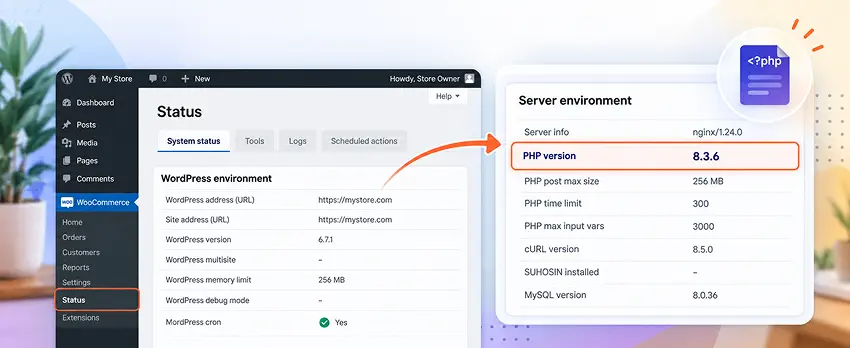
Open WooCommerce > Status and read the Server environment section. You can also open Tools > Site Health > Info > Server.7 Then list everything that touches PHP:
- WordPress and WooCommerce versions
- Your theme and any child theme
- Extensions for payments, shipping, tax, subscriptions, and search
- Custom code, snippets, and must-use plugins
- Integrations to your ERP, CRM, warehouse, and email platform
That list becomes your test plan. If nobody has mapped your stack, a technology stack assessment does it in a structured way.
What should you ask your host?
Most shared hosting plans stop you from changing PHP yourself, so ask your host, who can usually do it at no charge.7 Ask three things: which PHP versions do you offer, can you set my staging copy to the new one, and how do I roll back?
Step 2: What Should You Update Before Changing PHP?
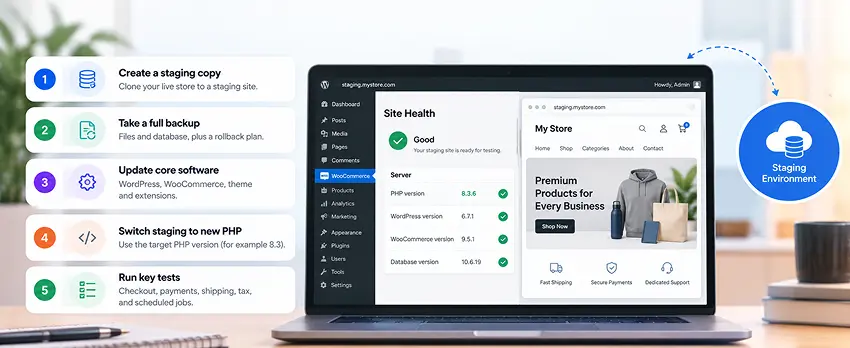
Take a full backup of your files and database first, and store a copy off the server.7 Then update the software before you touch PHP. Work in this order: WordPress, WooCommerce, your theme, then extensions. Read each changelog for PHP support.
WooCommerce screened 1,357 extensions sold on its marketplace and flagged potential PHP 8.1 issues in 0.22% of them.1 That points to abandoned plugins and custom code as the likelier risk, though your own extensions may differ. Flag any extension with no update in the last year, then replace it, retire it, or have a developer review it. A team without developers can hand this to an application maintenance partner.
Step 3: How Do You Scan for PHP Compatibility Problems?
Newer PHP versions change or remove features that older code relies on. PHP's own migration guide says these incompatibilities "should be tested for before switching PHP versions in production environments."8
Use a scanner for a first pass. The PHP Compatibility Checker plugin from WP Engine lints theme and plugin code and sorts results into errors and warnings. It no longer gets maintenance, and it cannot catch runtime problems because it never runs the code.9 Treat a clean scan as a good sign, not a pass. Custom code needs a human review, and a code audit covers it.
Step 4: How Do You Build a Staging Copy on the New PHP Version?
Clone the live store to a staging site, ideally on the same host, and set the copy to the new PHP version. Teams that ship often can automate this with a DevOps and CI/CD pipeline. Before you test anything, set three safeguards:
- Put payment gateways in test or sandbox mode. A staging copy that charges real cards creates a new problem.
- Stop live emails. Route order emails to a test inbox.
- Pause outbound integrations. Disconnect ERP, warehouse, and email syncs.
Step 5: What Should You Test Before Switching PHP?
Baymard's review of 50 studies puts average cart abandonment at 70.22%, and 17% of surveyed shoppers named site errors or crashes as a reason.10 Staging tests keep a PHP change out of that number. Run every test as a guest and as a logged-in customer, on desktop and mobile.
Customer-facing flows
Checkout and payments
Place a full order with each shipping method and each coupon type. Confirm that tax and shipping totals match the live store.
Payment gateways
Test every enabled gateway in sandbox mode, including cards, wallets, and bank options. Confirm that a declined card shows a clear message. Stripe integration specialists can confirm your sandbox setup.
Refunds and webhooks
Issue a full and a partial refund. Confirm that gateway webhooks update the order status.
Back-office flows
| Area | What to confirm |
|---|---|
| Admin orders | You can create, edit, and refund an order |
| Order emails | Every template sends correctly |
| Scheduled actions | The Scheduled Actions screen shows no failed or stuck jobs |
| Subscriptions | A test renewal completes and charges correctly |
| Order and stock sync | Orders reach your ERP or warehouse once, with correct stock counts |
| Error logs | No new fatal errors; review deprecation notices |
Fix what fails, then retest until the logs run clean. A QA and test automation service can turn this list into a suite you rerun after every update, and an order synchronization integration check protects the handoff to your back-office systems.
| Test | Desktop | Mobile | Result |
|---|---|---|---|
| Guest checkout | ☐ | ☐ | Pass / Fail |
| Logged-in checkout | ☐ | ☐ | Pass / Fail |
| Each payment gateway | ☐ | ☐ | Pass / Fail |
| Refunds and webhooks | ☐ | ☐ | Pass / Fail |
| Order emails | ☐ | ☐ | Pass / Fail |
| Scheduled actions | ☐ | — | Pass / Fail |
| Order and stock sync | ☐ | — | Pass / Fail |
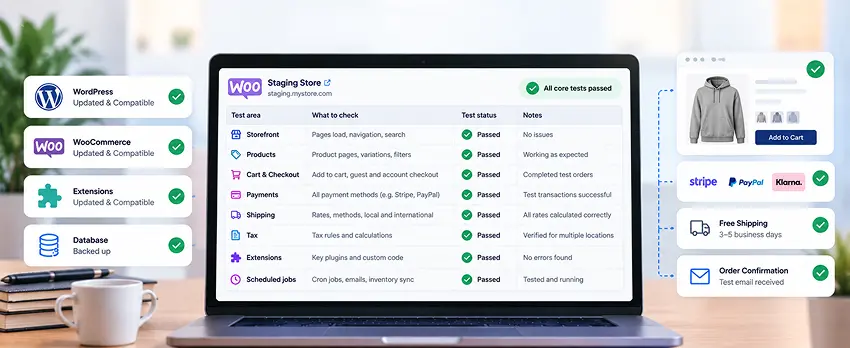
Step 6: How Do You Switch Production With a Rollback Ready?
Pick a low-traffic window and avoid sales events. Take a fresh backup, change the PHP version in your host's panel (or ask your host), and clear caches. Then repeat the critical flows live: one real checkout, one refund, one admin order, and one order email.
Confirm the version your site serves
Check Site Health or WooCommerce > Status while the site serves a page. Do not rely on the command line version, since the two often differ.4 Ask your host to restart PHP workers if the new version does not appear.
Keep a rollback ready
If checkout fails, switch back to the old PHP version first, then debug on staging. Ask your host before launch how a rollback works.
Watch the store for 48 hours
Track error logs, order counts, payment success rates, and Search Console crawl errors. Routine monitoring is standard work for a post-launch support team.
If you were exposed to PHP2Shell, patching is not the last step
Patching does not remove an intruder. Check for web shells, changed files, new admin users, and unusual outbound connections.34
What Mistakes Break WooCommerce During a PHP Update?
- Changing PHP before updating WooCommerce and extensions
- Testing the home page but not checkout
- Leaving payment gateways in live mode on staging
- Skipping scheduled jobs and every ecommerce integration that runs in the background
- Changing PHP and other things on the same day
A clean home page proves nothing. Checkout is the page that pays you.
"A clean home page proves nothing. Checkout is the page that pays you."A rule for every WooCommerce PHP update
When Is a PHP Update Really a Platform Decision?
Sometimes the scan shows more than a PHP problem. A store that leans on abandoned extensions, heavy custom code, or a theme nobody can update may cost more to keep than to move. Price both paths. Updating keeps what you have. On a hosted platform the vendor runs the servers, so you no longer maintain PHP; confirm the details with the vendor. Our WooCommerce to Shopify migration and WooCommerce to BigCommerce migration teams can scope either route, and our guide to the seven signs your platform is holding you back helps you decide.
If the store works and the audit looks clean, stay on WooCommerce and finish the update.
Safe PHP Upgrade Checklist
Use this checklist before you change production PHP:
Frequently Asked Questions
How do I update PHP on my WooCommerce store?
Check your version in WooCommerce > Status, back up, and update your software. Test on a staging copy running the new PHP, then change the version in your host's panel or ask your host to.
Which PHP version is best for WooCommerce?
WooCommerce recommends PHP 8.3 or newer, and WooCommerce 11.6 will require 8.1 or newer.1 Pick the newest branch all your extensions support.
Is PHP 8.1 still supported?
No. PHP 8.1 reached end of life on Dec 31, 2025, and its last release was 8.1.34.2 Plan an upgrade now.
Is PHP 8.2 still supported?
Only for security fixes, and only until Dec 31, 2026.5 Version 8.2.35 fixes PHP2Shell, but the move buys only about ten weeks, so aim higher.
What changed between PHP 7 and PHP 8?
PHP 8 changed or removed features that older code relied on, which is why old plugins and custom code need testing. PHP publishes a migration guide for each version.8
Will updating PHP break my WooCommerce store?
It can, when an extension or custom code does not support the new version. A staging test finds those problems before customers do.
Does updating WooCommerce fix PHP2Shell?
No. The fix is in PHP on the server, and CMS or plugin updates do not apply it.4
Can I update PHP myself?
Often no. Most shared hosting plans control PHP, so you change it in the host's panel or ask the host.7
How long does a PHP update take?
It depends on your extensions and custom code. Stores with few extensions need mostly testing time; heavy custom code needs a review first. A staging test shows the real scope.
How do I roll back a PHP update?
Switch back to the previous PHP version in your host's panel, clear caches, and retest checkout. Fix the cause on staging, and keep your backup until the new version has run cleanly for a few days.
The Short Answer
Change one thing at a time, and test the parts that make money. The risk lives in skipped steps, not in PHP.
"The safest PHP update is the one your customers never notice."The goal of every upgrade
Not sure what your store runs on?
Send us your PHP version, hosting setup, and extension list. We will review them and send a written upgrade outline, even if the answer is that you can finish the update yourself.
Sources & Citations
Primary documentation and vendor pages behind the dates, versions, and statistics. Facts checked Oct 26, 2026.
- WooCommerce Developer Blog, "New requirement for WooCommerce 11.6: PHP 8.1+": WooCommerce 11.6 (planned February 2027) requires PHP 8.1 or newer; PHP 8.3 or newer recommended; about 7% of tracked stores on PHP 7.4 and 2% on 8.0; 0.22% of 1,357 screened extensions with potential PHP 8.1 issues.
- PHP Group, "Unsupported Branches": End-of-life dates and last releases: PHP 7.4 on Nov 28, 2022 (7.4.33), PHP 8.0 on Nov 26, 2023 (8.0.30), PHP 8.1 on Dec 31, 2025 (8.1.34).
- ThreatLocker, "PHP2Shell: Why Organizations Must Patch": CVE-2026-109618 and CVE-2026-109619 (CVSS 4.0 score 9.2 each); fixed releases of Oct 21, 2026; temporary steps are not a fix; post-patch compromise checks.
- CybelAngel, "What We Know About PHP2Shell": No official release for PHP 7.4, 8.0 and 8.1; CMS and plugin updates do not apply the fix; check the version served to web requests, not the command line version; web shell and new admin user checks.
- PHP Group, "Supported Versions": Security support end dates for PHP 8.2 (Dec 31, 2026), 8.3 (Dec 31, 2027), 8.4 (Dec 31, 2028), and 8.5 (Dec 31, 2029). Page checked Oct 26, 2026.
- Make WordPress Core, "Dropping support for PHP 7.2 and 7.3": PHP 7.4 becomes the WordPress 7.0 minimum; PHP 8.3 stays the recommended version; PHP version usage shares as of Jan 9, 2026.
- WooCommerce, "How to update your PHP version": Where to find the PHP version (WooCommerce > Status, Tools > Site Health), the full backup advice, and the note that you usually ask your host to change PHP.
- PHP Group, "Migrating from PHP 8.3.x to PHP 8.4.x": PHP's own migration guide: incompatibilities should be tested for before switching PHP versions in production.
- WordPress.org, "PHP Compatibility Checker (WP Engine)": The plugin lints theme and plugin code, cannot detect runtime issues, and is no longer actively maintained.
- Baymard Institute, "Cart Abandonment Rate Statistics": Average documented cart abandonment rate of 70.22% across 50 studies; 17% of surveyed shoppers cited site errors or crashes.
Review every 6 months, after each PHP security release, and on Jan 1, 2027 when PHP 8.2 reaches end of life. Confirm current dates on php.net before you act.

Umang Patel
Co-owner | Ecommerce Architecture, Systems & Integrations
Umang Patel has worked in ecommerce and technology since 2001. He specializes in backend systems, ecommerce architecture, ERP and platform integrations, automation, and reverse engineering complex business processes. At Redefine Innovations, he leads technolo
Areas of expertise: Ecommerce Architecture • Backend Systems • ERP Integration • Automation • Headless Commerce • Reverse Engineering