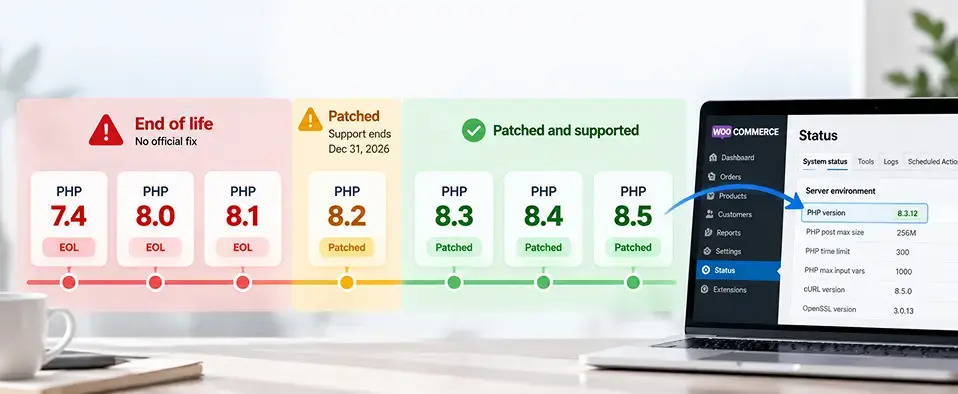
The WooCommerce PHP vulnerability called PHP2Shell affects any store whose server runs PHP 8.1 or older, or a PHP 8.2 to 8.5 release from before Oct 21, 2026. PHP2Shell is two critical flaws in PHP, CVE-2026-109618 and CVE-2026-109619, both rated 9.2 on the CVSS 4.0 scale. WooCommerce itself is not the flawed part. Check your version under WooCommerce > Status > Server environment. Then ask your host to update PHP to 8.3 or newer and restart it. WooCommerce and plugin updates do not apply the fix.
Yes, your store may be affected. This WooCommerce PHP vulnerability is not a WooCommerce bug. It lives in the PHP version your server runs.
On Oct 21, 2026, PHP fixed two critical flaws, known together as PHP2Shell. The fixes cover PHP 8.2 to 8.5 only. PHP 7.4, 8.0 and 8.1 are end of life, so PHP shipped no official release for them.1
That matters for a store. The same server runs your checkout, your admin and your customer records. And a WooCommerce security update alone will not close the gap.
This guide shows how to check your PHP version, what to do this week, and how to upgrade without breaking checkout. Every date is current as of Oct 26, 2026. Redefine's ecommerce team supports stores on several platforms, so the advice here is not tied to one of them.
What Is the PHP2Shell Vulnerability, and Does It Affect WooCommerce?
PHP2Shell is two flaws in PHP itself: CVE-2026-109618 and CVE-2026-109619. PHP rates both 9.2 under CVSS 4.0, which is critical.1 An attacker who exploits either one can run code on your server without logging in.
Attacks were reported before the fix
CERT-EU warned on Oct 21 that proofs of concept had begun to circulate.2 Cloudflare and Aikido reported early attacks, though PHP and CERT-EU have not confirmed them.3 Treat the risk as live.
Is this a WooCommerce vulnerability?
No. WooCommerce is not the flawed part. PHP is, and PHP says every setup that serves web pages is affected, so any WooCommerce store on unpatched PHP is exposed.3 Your server does more than show pages. It runs checkout, the admin and your customer records. Code running on that server could reach all three.
PHP End of Life Dates: Which Versions Have a PHP2Shell Fix?
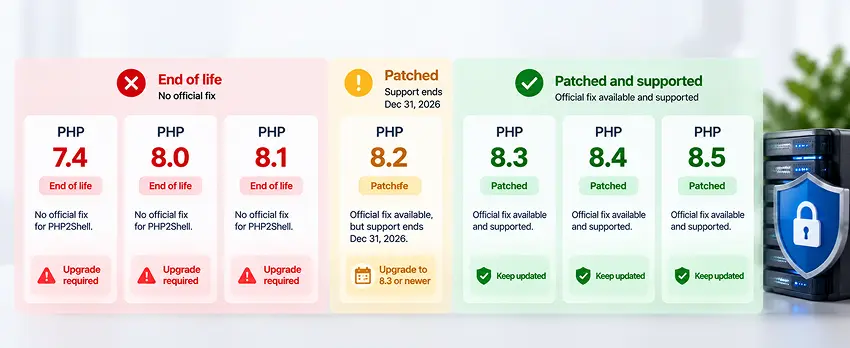
PHP 8.1 ended on Dec 31, 2025, PHP 8.0 on Nov 26, 2023, and PHP 7.4 on Nov 28, 2022.4 PHP gives each version two years of active support, then two years of security fixes only.5 The table shows where each version stands as of Oct 26, 2026. Recheck php.net before you act, because it changes with each release.
| PHP version | Security support ends | Status as of Oct 26, 2026 | PHP2Shell fix |
|---|---|---|---|
| 7.4 | Ended Nov 28, 2022 | End of life | No official release; source patches and vendor backports only |
| 8.0 | Ended Nov 26, 2023 | End of life | No official release; source patches and vendor backports only |
| 8.1 | Ended Dec 31, 2025 | End of life | No official release; source patches and vendor backports only |
| 8.2 | Dec 31, 2026 | Security fixes only | 8.2.35 |
| 8.3 | Dec 31, 2027 | Security fixes only | 8.3.36 |
| 8.4 | Dec 31, 2028 | Active support until Dec 31, 2026 | 8.4.27 |
| 8.5 | Dec 31, 2029 | Active support until Dec 31, 2027 | 8.5.12 |
You are in a big group. Mallory's Shodan counts, published Oct 20, 2026, found about 2.24 million internet-facing hosts running PHP. Of the 1.5 million that show a version, 59% run a branch with no official fix. These count hosts, not websites.3
How Do You Check Whether Your WooCommerce Store Is Affected?
Find your PHP version
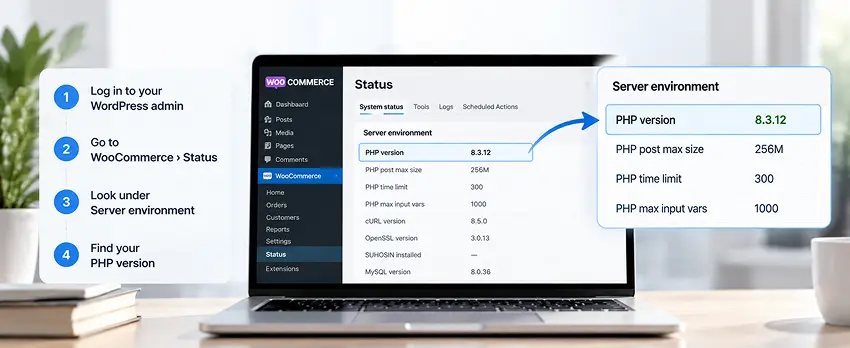
In your WordPress admin, go to WooCommerce > Status and open the Server environment section. WooCommerce lists your PHP version there.6 Your hosting panel or your host can confirm it too.
A WooCommerce security update does not fix PHP2Shell
The fix lives on the server. WordPress, WooCommerce, theme and plugin updates will not apply it.3 Only an update to PHP itself closes this gap.
Check the version your site serves
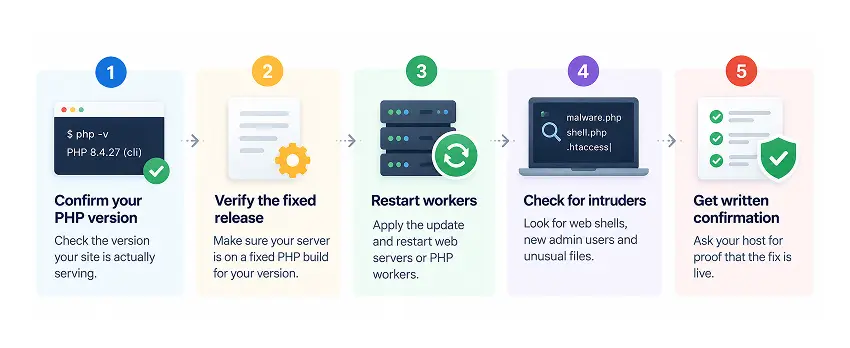
After any PHP update, check the version your WooCommerce site reports while it serves a page. Do not trust the command line version. The two often differ.3
What Should You Do This Week, by PHP Version?
If your store runs PHP 7.4, 8.0 or 8.1
PHP released no official fix for these versions. You have three routes, in this order.
- Ask your host for a vendor backport. cPanel shipped fixed PHP packages with backports for 7.4, 8.0 and 8.1, and Plesk shipped fixed builds. Debian, Red Hat and Ubuntu published fixed packages too.7 A backport can keep the old version number, so ask your host to confirm the fix is in.
- Skip PHP's source patches. They are for teams that build PHP themselves. A hosting account cannot apply them.3
- If neither works, limit access. CERT-EU advises isolating internet-facing applications until the fix is applied and verified.2
If your store runs PHP 8.2 to 8.5
- Update PHP to the fixed release. On PHP 8.2 to 8.5, move to 8.5.12, 8.4.27, 8.3.36 or 8.2.35. These are the releases that fix PHP2Shell.1
- Restart every PHP worker. A worker is a background process that runs PHP. After you update PHP, the new version loads only once every worker restarts.3
- Get your host to confirm the patch in writing. On managed hosting, ask the host to confirm in writing that the PHP2Shell patch is live. Then recheck the version your site serves.3
Temporary steps are not a fix
Lower memory and upload limits, turning off session.upload_progress (a PHP setting that tracks file uploads), restarting workers and firewall rules all reduce exposure. PHP says only updating is a complete fix.1
Running Adobe Commerce instead of WooCommerce? Redefine's Adobe Commerce emergency support covers outages, checkout failures and security incidents, with a senior engineer responding within 15 minutes on critical issues.
Not sure which branch you are on?
Send us your hosting details. Redefine Innovations reviews your PHP setup for free and sends a written upgrade outline.
Patched Already? How to Check Whether Someone Got In First
Patching does not remove an intruder.1 Attacks were reported before the fix shipped, so look back as well as forward. Check as far back as June 2026 for these signs:3
- Web shells, which are hidden scripts that give an attacker remote control
- Unexpected or changed PHP files
- New admin users
- Odd outbound connections from the server
- Unexpected child processes of the web server
If you find a break-in, isolate the site, save the evidence and change every exposed password and key. Rebuild from a trusted backup if needed.1
"Patching closes the door. Checking the house tells you whether someone already walked in."Why a PHP2Shell response never stops at the update
Backport or Upgrade: Which Fixes the Problem for Good?
A backport closes PHP2Shell and nothing else. WooCommerce notes that PHP 7.4 and 8.0 no longer receive upstream security support.6
Platforms are moving on
- WooCommerce: recommends PHP 8.3 or newer. WooCommerce 11.6, planned for February 2027, requires PHP 8.1 or newer. If you need time, you can stay on WooCommerce 11.5 for now, but that is not a long-term option.6
- WordPress: requires PHP 7.4 or newer from WordPress 7.0 and recommends 8.3. In Jan 2026, 22.2% of WordPress sites ran PHP 7.4 and 15.4% ran 8.1.8
- Adobe Commerce: 2.4.8 supports PHP 8.3 and 8.4, keeps 8.2 for upgrades only, and drops 8.1.9
If old custom code cannot run on a supported PHP, Redefine's legacy application modernization service replaces it piece by piece instead of in one risky rewrite.
Is PHP 8.2 Still Supported?
Yes, for security fixes only. PHP 8.2.35 fixes PHP2Shell, but PHP 8.2 security support ends Dec 31, 2026.5 As of Oct 26, 2026, a move from 8.1 to 8.2 buys about 10 weeks. Aim for 8.3 or newer, which WooCommerce and WordPress both recommend.68
How Do You Upgrade PHP on WooCommerce Without Breaking the Store?
A safe upgrade follows nine steps. WooCommerce gives the same advice: test on a staging copy, then recheck after you go live.6
- List what runs on the site. Note your WooCommerce version, theme, plugins, custom code, and payment, shipping, tax and ERP connections.
- Pick the target PHP. Choose the newest version your WooCommerce, theme and plugins support. Aim for 8.3 or newer.
- Back up files and database. Take a fresh backup before you change anything.
- Update WooCommerce, theme and plugins. Move each to a release that supports the target PHP.
- Copy the site to staging. Run the copy on the target PHP version.
- Scan custom code. A PHP compatibility checker is a tool that flags code that breaks on a newer PHP. PHP 8 changed or removed older features, so old code needs this check. For custom code, Redefine's code audit reports security, performance and code quality findings down to the file and line.
- Test the money paths. Run checkout, every payment method, shipping and tax, order emails, order management, scheduled jobs, the theme and each extension. Redefine's QA and test automation runs checkout, login and account flows automatically in Playwright and Cypress, so you can repeat this step after every change.
- Fix and retest. Repeat step 7 until every flow passes.
- Switch production in a quiet window. Keep a rollback ready. Then recheck WooCommerce > Status and repeat the critical flows on the live site.
How to update PHP on WordPress
Your host sets the PHP version. Change it in the hosting panel or ask the host to do it. A WordPress PHP update therefore starts at the hosting level, not in the WordPress admin.6
When Does a PHP Upgrade Become a Platform Decision?
Some stores cannot reach a supported PHP without bigger changes. Abandoned plugins and heavy custom code push the same way. You then have two routes.
Route 1: upgrade the platform version
A Magento store on an older release may need a version upgrade before it can run PHP 8.3. Our Magento upgrade work covers that path, since Adobe Commerce 2.4.8 supports PHP 8.3 and 8.4 only.9
Route 2: move to a hosted platform
Shopify and BigCommerce run their own servers, so their merchants do not manage PHP. Check each vendor's security notice to confirm. Redefine handles both moves: WooCommerce to Shopify and WooCommerce to BigCommerce.
Moving platforms is a big step. Make it only when plugins or code block a PHP upgrade, or when the platform already holds you back. Our guide to the 7 signs your ecommerce platform limits growth helps you judge.
How Redefine Can Help
Redefine Innovations reviews your PHP setup for free and sends a written upgrade outline. We check your version, your PHP2Shell patch status and your plugins, then tell you plainly what to fix first.
Our approach to ecommerce growth is engineering first: a stable, supported stack comes before new features. Redefine has delivered 550+ projects in 25+ years. After the upgrade, ongoing development support and maintenance from Redefine covers security patching and dependency updates.
Frequently Asked Questions About the WooCommerce PHP Vulnerability
Is WooCommerce vulnerable to PHP2Shell?
WooCommerce itself is not the flawed part. PHP is, and PHP says every setup that serves web pages is affected. A WooCommerce store is exposed if its server runs PHP 8.1 or older, or a PHP 8.2 to 8.5 release from before Oct 21, 2026.3
How do I check my PHP version in WooCommerce?
Go to WooCommerce > Status and open the Server environment section. The PHP version is listed there. Your host can also confirm it.6
Does updating WooCommerce fix the PHP vulnerability?
No. The fix is in the server's PHP. WooCommerce, WordPress, plugin and theme updates do not apply it.3
Which PHP version should a WooCommerce store use?
WooCommerce recommends PHP 8.3 or newer. WooCommerce 11.6, planned for February 2027, requires PHP 8.1 or newer.6
Is PHP 8.1 still supported?
No. It reached end of life on Dec 31, 2025, and its last release was 8.1.34. For PHP2Shell, PHP posted only source patches for people who build PHP themselves.34
Is PHP 8.1 outdated?
Yes. PHP 8.1 no longer gets security fixes from PHP, so it is outdated for security. A store on it needs a vendor backport now and an upgrade soon.47
Is PHP 8.2 still supported?
Yes, for security fixes only, until Dec 31, 2026. PHP 8.2.35 fixes PHP2Shell.5
Can a firewall stop PHP2Shell?
A firewall lowers exposure to known attack patterns, but it is not a complete fix. PHP says only updating is.1
What is the difference between PHP 7 and PHP 8?
Every PHP 7 version is end of life. PHP 8 changed or removed older features, which is why old plugins and custom code need testing. PHP publishes a migration guide for the details.10
What is the most recent stable version of PHP?
The newest branch is PHP 8.5. Version 8.5.12, released Oct 21, 2026, includes the PHP2Shell fix. Recheck php.net for newer releases.1
Not sure where your store stands?
Send us your hosting details and your plugin list. Redefine Innovations reviews your PHP setup for free and sends a written upgrade outline.
Sources & Citations
Primary sources and official vendor pages used for the dates, versions and figures in this guide. All pages were opened Oct 26, 2026.
- ThreatLocker, "PHP2Shell: Why Organizations Must Patch Critical PHP Vulnerabilities Now": CVE IDs, CVSS 9.2 rating, fixed releases of Oct 21, 2026, temporary mitigations, and post-patch compromise checks.
- CERT-EU, "Security Advisory 2026-018": Fix timing, affected versions, proofs of concept in circulation, and the advice to isolate internet-facing applications.
- CybelAngel, "What We Know About PHP2Shell (CVE-2026-109618 and CVE-2026-109619)": Source patches only for 7.4, 8.0 and 8.1, CMS updates do not apply the fix, served-version check, reported attacks, and Shodan host counts of Oct 20, 2026.
- PHP.net, "Unsupported Branches": End-of-life dates and last releases for PHP 7.4, 8.0 and 8.1.
- PHP.net, "Supported Versions": Security support end dates for PHP 8.2 to 8.5.
- WooCommerce Developer Blog, "New Requirement for WooCommerce 11.6: PHP 8.1+": WooCommerce PHP requirements, recommended version, store usage figures, and merchant testing guidance.
- Greenbone, "PHP2Shell Remote Code Execution": Fixed PHP packages and backports from cPanel, Plesk, Debian, Red Hat and Ubuntu.
- Make WordPress Core, "Dropping Support for PHP 7.2 and 7.3": WordPress minimum and recommended PHP versions and the Jan 2026 usage split.
- Adobe, "Adobe Commerce 2.4.8 Release Notes": PHP versions Adobe Commerce 2.4.8 supports and drops, and its support end date.
- PHP.net, "Migrating from PHP 7.4.x to PHP 8.0.x": Official guide to backward incompatible changes between PHP 7 and PHP 8.
Dates and version numbers were verified against the linked sources on Oct 26, 2026. Recheck php.net and your host after every PHP security release.

Umang Patel
Co-owner | Ecommerce Architecture, Systems & Integrations
Umang Patel has worked in ecommerce and technology since 2001. He specializes in backend systems, ecommerce architecture, ERP and platform integrations, automation, and reverse engineering complex business processes. At Redefine Innovations, he leads technolo
Areas of expertise: Ecommerce Architecture • Backend Systems • ERP Integration • Automation • Headless Commerce • Reverse Engineering