










Linkedin integration services

Connect LinkedIn Data to Your Whole System

Redefine Innovations fixes LinkedIn data for your business. Our developers fix the data flow and tracking, not just the ad account.

Get My LinkedIn Integration Map

Get a written map of LinkedIn data flows, gaps, and ranked fixes.

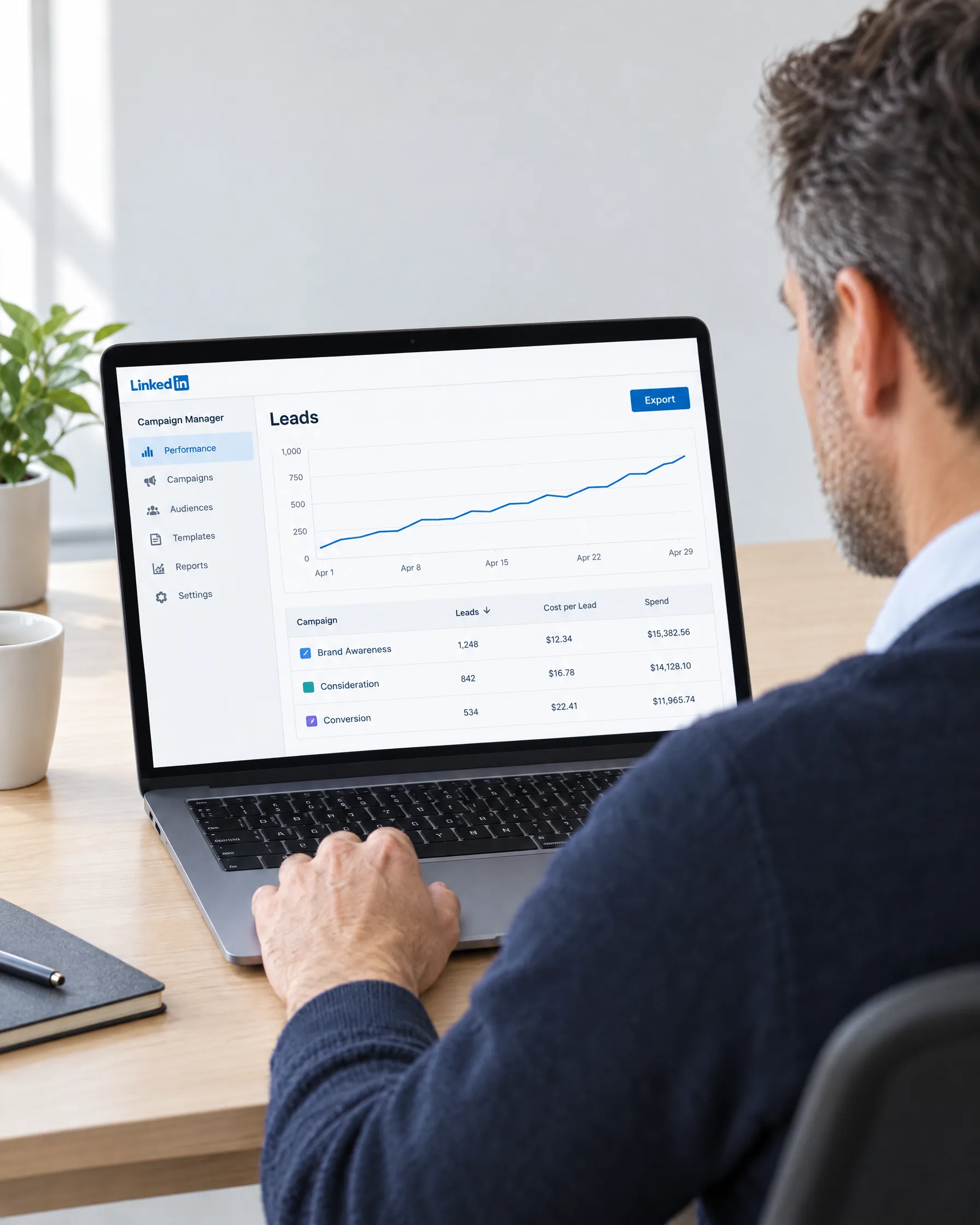
  1. A marketing lead reviews LinkedIn Campaign Manager results

    01Lead forms reach your CRM.

  2. A developer opens the Lead Gen Forms page in LinkedIn Campaign Manager

    02Conversions reach analytics.

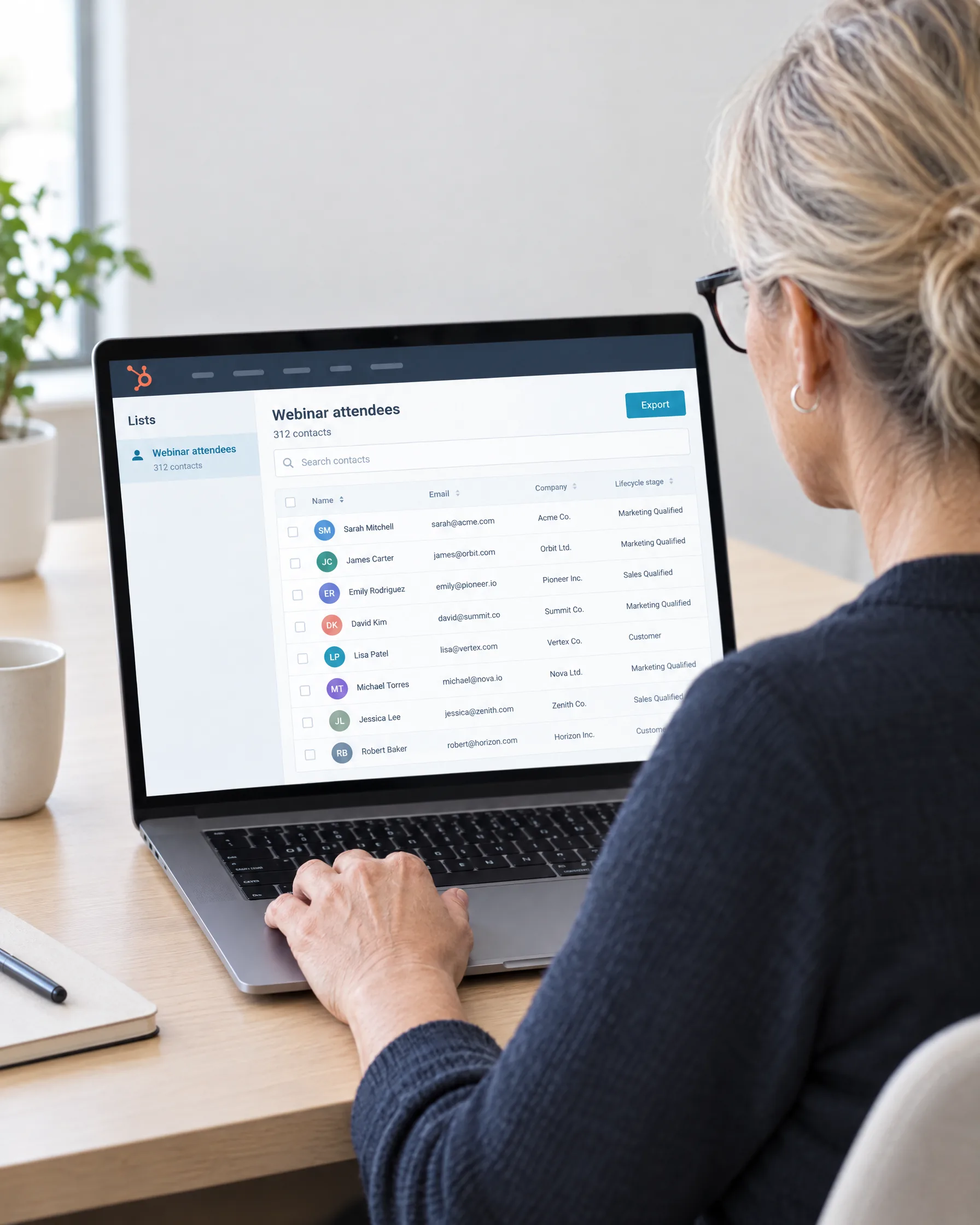
  3. A sales lead sees LinkedIn Lead Gen contacts in the HubSpot Contacts page

    03Audiences sync from your CRM.

  4. A growth manager checks Matched Audiences in LinkedIn Campaign Manager

    04Ads tie to orders.

Proof

LinkedIn Integration Made Simple

Real results from our data sync work. They come from store, stock and system links like the ones in your LinkedIn map.

  • Forloh
    ~100%
    Of manual syncs automated between Shopify and Amazon.
  • JWE Inc
    11/11
    Manual touchpoints found in discovery, all automated at go-live.
  • Half Price Drapes
    99.2%
    Inventory accuracy, up from about 82%, after our stock sync work.

Sources: our case studies for Forloh, JWE Inc and Half Price Drapes.

The LinkedIn Integration Map shows data paths, gaps, and fixes for LinkedIn in your stack.

A person reads your setup and writes your map.

Get My LinkedIn Integration Map

Short answer

What are LinkedIn integration services?

Updated

LinkedIn integration services by Redefine Innovations link LinkedIn with your website, CRM, email, and analytics. Lead Gen Forms, Campaign Manager, Matched Audiences, Insight Tag, and Conversions API all move into your stack. LinkedIn leads, ad data, and customer lists flow into your CRM and analytics. Data links throughout your tools.

Many teams start with a connector tool. That works until the LinkedIn API changes and the connector stops. So we look at your whole setup first, then plan the fixes in order.

A written LinkedIn Integration Map comes first. It shows each data flow, each gap, and the fix that matters most.

Three kinds of LinkedIn work

Pick by what hurts most

Work What hurts What we build You check it with
Lead forms Lead Gen Forms export as CSV by hand. We send each form to your CRM with a webhook. A test of each data flow
Campaign data Campaign Manager data stays in LinkedIn. We move it into your analytics through the API. Counts side by side
Audiences CRM segments need a manual re-upload. We sync Matched Audiences on their own. An alert when a number drifts

What your LinkedIn Integration Map covers

  • [1] Lead Gen Form data flow to your CRM
  • [2] Campaign Manager data flow to your analytics
  • [3] LinkedIn Insight Tag and Conversions API check
  • [4] Lead Gen Form to CRM sync check

See all our integration services, or read about Pinterest integration services.

Make your CRM see LinkedIn leads

Redefine Innovations connects LinkedIn to your stack, so each lead lands in your CRM with its source.

A sales lead and an engineer review the lead flow from LinkedIn on a printed list

One connected system

Separate tools and vendors become one connected system and one team

Connect LinkedIn with your website and CRM. See leads, conversions and orders in one place.

Get My LinkedIn Integration Map

Before

Each tool has its own owner. Nobody owns the data between them.

  • LinkedIn Lead Gen Forms

    Leads need download and upload by hand.

  • LinkedIn Campaign Manager

    Conversion data stays inside LinkedIn.

  • Your CRM

    Audience segments must be exported and re-uploaded.

  • Analytics

    LinkedIn ad orders lack an ROI trail.

After

Redefine connects LinkedIn and your stack so you see every data flow.

Redefine Innovations

One team

  • LinkedIn Lead Gen Forms
  • LinkedIn Campaign Manager
  • CRM
  • Analytics

Time calculator

Find Lost Hours and Costs

Do you spend time on manual exports from LinkedIn? Fixes take time and money that could be saved.

Your numbers

Your team

6
$45
300

Manual work

Your estimate

Hours a month
26
Minutes per lead
5.2

Cost of manual work

$14Ka year

312 hours lost a year.

Get My LinkedIn Integration Map

Your map shows where the time goes.

Estimate: hours a week x 52 x your hourly cost. Not a promise.

LinkedIn Integration Gaps

  • Lead Gen Forms leads exported by hand as a CSV file

    Lead forms

    Lead Gen Forms export as CSV by hand.

    We send each form to your CRM with a webhook.

  • Campaign Manager data that stays inside LinkedIn

    Campaign data

    Campaign Manager data stays in LinkedIn.

    We move it into your analytics through the API.

  • A HubSpot list that needs a manual re-upload to LinkedIn Matched Audiences

    Audiences

    CRM segments need a manual re-upload.

    We sync Matched Audiences on their own.

  • Google Analytics shows LinkedIn sessions with no key events

    ROI

    LinkedIn deals have no ROI trail.

    We track conversions with the Insight Tag.

  • A terminal shows an OAuth token that expired and stopped a sync

    Tokens

    OAuth tokens expire and lose access.

    We refresh tokens before they run out.

An engineering mindset for LinkedIn integration

We run growth the way engineers run software.

  • An integration engineer writes the LinkedIn sync in a code editor

    Old way: Fixes stop at the ad account.

    Developers fix the store, tracking and data.

    A fix reaches the code, not just the LinkedIn ad account.

  • A growth manager reads an alert on the Google Analytics app the week a LinkedIn number drifts

    Old way: Problems wait for the monthly report.

    Alerts fire the week a number drifts.

    Each alert has one owner and a planned response.

  • An operations director reviews a plan where every LinkedIn task has a done-when line

    Old way: A task is done when it is sent.

    Every task has a done-when line.

    You know when each LinkedIn fix is finished.

How Redefine works

TheREDEFINEMethod

LinkedIn Integration Made Clear

LinkedIn integrations connect LinkedIn to your stack. Without them, data stays hidden in LinkedIn. We start with your LinkedIn setup, not a guess.

Get My LinkedIn Integration Map

A person reads your setup and writes the map.

Why this approach matters

  • You see where linkedin data goes.
  • You find what slows your stack down.
  • You decide the next steps confidently.
  1. Start here

    Step 1: Diagnose

    We check how LinkedIn Lead Gen Forms and Campaign Manager data reach your stack.

    You receive data flow report.

  2. Choose what matters

    Step 2: Prioritize

    We focus on fixing CRM integration first, not social media syncs.

    You receive ranked fixes list.

  3. Do the work

    Step 3: Deliver

    We create LinkedIn integrations for data push to your CRM and analytics.

    You receive completed integrations.

  4. Check the result

    Step 4: Prove

    We test each LinkedIn integration to confirm it moves data correctly.

    You receive confirmation report.

  5. Keep improving

    Step 5: Improve

    We review LinkedIn data flow and advise on the next fixes to try.

    You receive improvement guide.

What you receive

A clear LinkedIn Integration Map with action steps.

Case study / Data sync

JWE Inc

A multi-channel distributor with an ecommerce arm.

A stockroom worker scans a box so stock stays right across the store and its sales channels
  1. 01

    Problem

    Every system held its own data, and staff re-keyed it by hand.

  2. 02

    Diagnosis

    There were 3 sources of truth and 11 manual touchpoints.

  3. 03

    Solution and result

    We built one source of truth and automated every touchpoint found in discovery.

Manual touchpoints automated
11/11
Sources of truth from 3
1
Touchpoints left at go-live of 11
0

From chaos to clarity. The same team will map your LinkedIn data flows.

Your LinkedIn Integration Map

LinkedIn Integration Map

The LinkedIn Integration Map shows your data path. Send your website and tools. We send the map before any sales call. Ask for a review call if you want.

Sections
5
Biggest gap
1
Order of work
Ranked
Get My LinkedIn Integration Map

Redefine

Confidential

Prepared for: your store

LinkedIn Integration Map

Contents

  1. 01Campaign Manager data flow to your analytics3
  2. 02LinkedIn Insight Tag and Conversions API check7
  3. 03Lead Gen Form to CRM sync check12
  4. 04CRM attribution gap check18
  5. 05List of fixes with timeline estimate22

LinkedIn Integration Map

Your store

01 / 05

Biggest gap found

Leads

Your LinkedIn data stops short of your store. Hand work fills the gap.

Where LinkedIn data stops

Fix first

Sync

Priority

High

Build in this order

Tracking Data sync Alerts

How your LinkedIn Integration Map is laid out: the cover and the first finding.

What are LinkedIn integration services?

These services connect LinkedIn to your systems. They help your CRM, website, and more talk to LinkedIn. This means lead data moves without stopping.


What does the LinkedIn Integration Map include?

The map shows data flow between LinkedIn and your tools. It pinpoints where data stops and suggests fixes. You get it before a sales call.


What systems does it connect?

It links your CRM, website, email, and analytics. Lead Gen Form leads go to the CRM. Spend and conversion data go to analytics and customer lists go back to Matched Audiences.


What happens if LinkedIn changes its API or a token expires?

Redefine builds for change. The app has automatic token refresh. It adjusts when LinkedIn updates things.


How long does a LinkedIn integration build take?

Time depends on your needs. The Integration Map helps set the timeline. Planning comes first.


Can you connect LinkedIn to HubSpot or Salesforce?

Yes, LinkedIn can link to HubSpot or Salesforce. A Lead Gen Forms webhook sends them each form as it arrives. The Insight Tag and Conversions API tie a LinkedIn ad to a deal.


How much does it cost?

Cost depends on what you need. The map gives a scoped estimate. Clear planning keeps costs clear.


What is the REDEFINE Method?

The REDEFINE Method is Redefine Innovations' business-first framework for identifying business constraints, prioritizing improvements, delivering appropriate solutions, verifying outcomes, and sustaining improvements.

It has five stages: Diagnose, Prioritize, Deliver, Prove and Improve. It includes LinkedIn integration steps. Read the REDEFINE Method

Your LinkedIn Integration Map

LinkedIn Integration Map

The LinkedIn Integration Map shows you how leads and data move through your stack. Redefine finds gaps and ranks the fixes for you.

A product manager and an integration engineer mark up the LinkedIn integration map
  • A written map you keep
  • Discover how LinkedIn links with your website and CRM
  • 25+ years in ecommerce
  • 550+ projects delivered

Request your LinkedIn Integration Map

Tell us what feels stuck with LinkedIn. A person reads every request.

  1. 1Fill out the form with your details
  2. 2Redefine reviews your LinkedIn setup
  3. 3Receive your LinkedIn Integration Map