






Business process consulting

Fix the process, then automate it.

Fix the process, then automate it. Redefine Innovations fixes slow handoffs and builds the automation in your ERP and CRM.

IMTRA: about 85% of manual ERP sync steps now automatic.

Results from named clients

Less manual work, from real projects

Each number comes from a Redefine case study and links to its source.

IMTRA stock sources
From 4 sources to 1
Read the IMTRA story
IMTRA ERP sync steps
Manual steps now automatic: ~85%
Read the IMTRA story
USA School System admin work
Manual admin effort cut by about 70%
Read the case study
Parsons Kellogg reporting
Manual reporting time cut by 58%
Read the case study

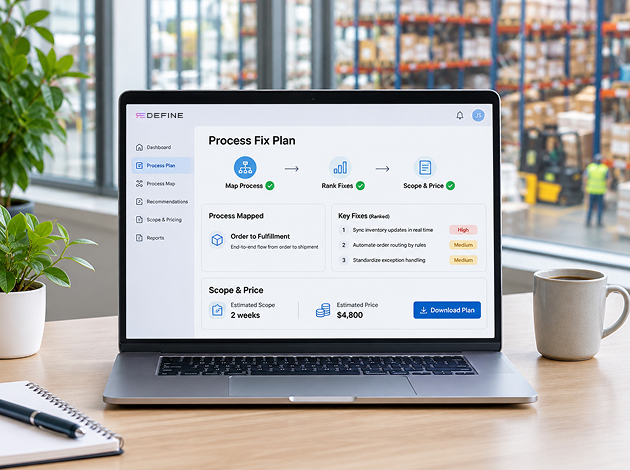
Get a process fix plan for your company.

Written for your team, no obligation.

Get my process fix plan

Short answer

What is business process consulting?

Updated

Business process consulting from Redefine Innovations maps how work moves through your company, finds the steps that waste time, and fixes them. The team writes down each process with the people who run it, ranks the fixes, and then builds the automation in your ERP, CRM, store or reports. You get one team from the map to the working fix.

Most slow work hides in the gaps between teams and tools. An order is typed twice. A bill waits in one inbox. A report is rebuilt by hand each month.

So we time each step first. Then we fix the steps that cost the most, and build the tools that keep them fixed.

How it compares to other consulting

Pick the help that fits the problem

ServiceWhat it looks atWhat you getLearn more
Process auditWhere time and money leak todayA ranked list of leaksProcess audit
Operations consultingHow the whole operation runs each dayA plan for teams, tools and targetsOperations consulting
ERP consultingYour ERP setup and its dataAn ERP your teams can trustERP consulting services

What we look at first

  • [1] Order, bill and ticket exports
  • [2] How each team does the work today
  • [3] Your ERP, CRM and store setup
  • [4] The reports your leaders read

Need help with the bigger plan? See management consulting, or all consulting services.

One order. One record. No retyping.

When the store, ERP and CRM share one record, nobody types an order twice or chases it by email.

See ERP consulting services
Order desk clerk viewing a web order that arrived in Business Central as a released sales order

Watch one approval run the new way.

Press the button to see one purchase request move through a fixed process. Every step is logged.

Purchase approval, after the fix

  1. 1Request sent
  2. 2Routed by rule
  3. 3Manager approves
  4. 4ERP updated

Press Run the workflow to start.

Processes we fix first

Where the hours go in most companies

  • Warehouse packer scanning a shipping box at a packing station with a handheld barcode reader

    Fewer handoffs

    Order to cash

    Orders move from the store to the ERP, the warehouse and the invoice with no retyping.

    See operations consulting
  • Accounts payable clerk checking purchase invoices in Microsoft Dynamics 365 Business Central on a laptop

    Matched in one place

    Procure to pay

    Purchase orders, receipts and vendor bills are matched in the ERP, not in email.

    See CRM consulting services
  • Finance lead reviewing a Month-end close report with revenue and open invoice cards in Microsoft Power BI

    One set of numbers

    Month-end reporting

    Reports refresh on their own, so nobody rebuilds the same sheet each month.

    See Power BI consulting

What we look for on your process map.

Tap a point to see what each one costs you.

Analyst and operations manager mapping an order to cash process on a glass wall, with red dots on the slow steps
Process map on a glass wall with four common delays explained.
  • Retyped data

    The same order is typed into two systems. Each retype adds time and mistakes.

  • Waiting on approval

    Work sits in one inbox until a single person signs off. We add rules and a backup.

  • Side spreadsheet

    A sheet only one person understands. When they are out, the process stops.

  • No clear owner

    Nobody owns the step, so problems bounce between teams. Each step gets one owner.

Red dots mark the steps where work waits.

Why Redefine

A process fix that lands in your systems

A typical process consultant compared with Redefine Innovations
What to expectTypical consultantRedefine
Who fixes the systemSlidesYou build it laterCodeOur developers fix your ERP and CRM
Your process afterLeft to habitWritten down, with one owner per step
When work is doneWhen the report is sentWhen the number movesand stays moved

Typical consultant: maps the process and hands over a report. Redefine maps it, fixes it in your systems and checks the number.

How Redefine works

The REDEFINE Method

How Redefine fixes a business process.

Every engagement follows five stages, and each one ends with something your team can review. Redefine times each step with the people who do the work before anything is automated, because automating a broken step only makes the mistake faster.

Get my process fix plan

A written process fix plan for your company.

Why this approach matters

  • Fixes follow your own data, not a template.
  • Small fixes ship first, so time saved shows early.
  • You approve each stage before the next one starts.
  1. Start here

    Step 1: Diagnose

    We map one key process with the people who run it, time each step, and find where work waits or is typed twice.

    You receive Process map with times

  2. Choose what matters

    Step 2: Prioritize

    We rank the fixes by hours saved and effort. A clear rule or a missing owner often comes before new software.

    You receive Ranked fix list with scope

  3. Do the work

    Step 3: Deliver

    We change the steps, then build the automation in your ERP, CRM, store or reports, and train the team.

    You receive Working fixes in your tools

  4. Check the result

    Step 4: Prove

    We time the same steps again and compare them with the first map. Each fix has a "done when" line.

    You receive Before and after times

  5. Keep improving

    Step 5: Improve

    We watch the numbers each month and send a short list of the next fixes to make.

    You receive Short next-fixes list

What you receive

A process map, a ranked fix list, working automation, before and after times and a next-fixes list.

What you get

Your Process Fix Plan, part by part.

Open any item to see what is inside.

Process map

How the work runs today, step by step.

We map one key process with the people who do it, so the plan starts from how work really runs.

3 parts

  • Current process map

    Every step, handoff and tool on one page.

  • Time per step

    Where the hours go, from your own data.

  • Leak list

    Retyping, waiting and side sheets, each one named.

Fix plan

What to fix first, and what it takes.

Each fix is ranked by the time it saves and the work it needs, so you can start small.

2 parts

  • Ranked fixes

    A rule, an automation or a new tool, each with one owner.

  • Scope and price

    A written scope for the first fixes, before any work starts.

Consultant and operations manager reviewing a printed swimlane process map with two delays marked in red

Fix 01

Status: Ranked first

Stop retyping web orders into the ERP

Today
Staff copy each web order into the ERP by hand.
Fix
Push each order to the ERP the moment it is placed.
Other options
A nightly batch import. More staff at busy times.
What changes
Orders reach the ERP on their own, with no retyping.
Other options on recordHow each fix reads in your plan.

Client results

Four stock sources. One import.

IMTRA

Business Central admin portal

A 70-year-old marine and industrial products company with 13,000+ items across 24 brands and 4 store types.

The challenge

Stock lived in four places, and orders waited for someone to import them into Business Central by hand.

The fix

One admin portal on top of Business Central: one stock view, orders pushed straight to the ERP, and roles for every team.

Stock and orders / after go-live

IMTRA case study

Manual ERP sync steps now automatic
~85%
Stock source, down from 4
1

Places stock was updated by hand

Four stock feeds by hand

One import, Business Central as the record
Source: IMTRA case study. Four stock sources were joined into one import. Read the IMTRA story

What is the REDEFINE Method?

The REDEFINE Method is Redefine Innovations' business-first framework for identifying business constraints, prioritizing improvements, delivering appropriate solutions, verifying outcomes, and sustaining improvements.

It has five stages: Diagnose, Prioritize, Deliver, Prove and Improve. For a business process, it means Redefine times each step first and ranks the fixes by hours saved before anything is built. Read the REDEFINE Method

What does a business process consultant do?

A business process consultant maps how work gets done, finds the steps that waste time, and plans a better way.

At Redefine, the same team then builds the fix in your ERP, CRM, store or reports. See operations consulting

Which processes do you fix first?

Most teams start with order to cash, procure to pay, stock updates or month-end reporting.

We pick the one that costs you the most hours each week. See the process audit

How much does business process consulting cost?

It depends on how many processes and tools are in scope.

Your process fix plan gives the scope and price before any work begins, so there are no surprises.

How long does it take?

It depends on the process and the tools it touches. We set the timeline in your plan.

Small fixes often ship first, so your team sees time saved early.

Do you build the automation too?

Yes. Redefine builds ERP, CRM and store integrations, Power BI reports and custom apps.

At IMTRA, about 85% of manual ERP sync steps were replaced by an automated push. Read the IMTRA story

What happens after I ask for a plan?

We talk with your team, map one key process and send a written process fix plan with the scope and price.

Then you decide. There is no obligation. See all consulting services

Start here

Know what to fix first before you buy new software

Get a written process fix plan: one key process mapped, the fixes ranked, and the scope and price. No obligation.

Operations manager sketching her order process as boxes and arrows in a notebook at a warehouse office table
  • A written plan you keep
  • Map, fixes, scope and price
  • 25+ years in business
  • 550+ projects delivered

Request your process fix plan

Tell us about your company and what feels stuck.

  1. 1Send your company details
  2. 2A short call with your team
  3. 3You get your process fix plan
  4. 4You decide what comes next