


Redefine Suite / Multistore rollout

Launch your next store by copying one you run.

Redefine Innovations helps B2B and DTC teams add a brand, a country or a dealer store on Redefine Suite. Copy a store, change what is different, and launch. Products, prices and stock stay shared.

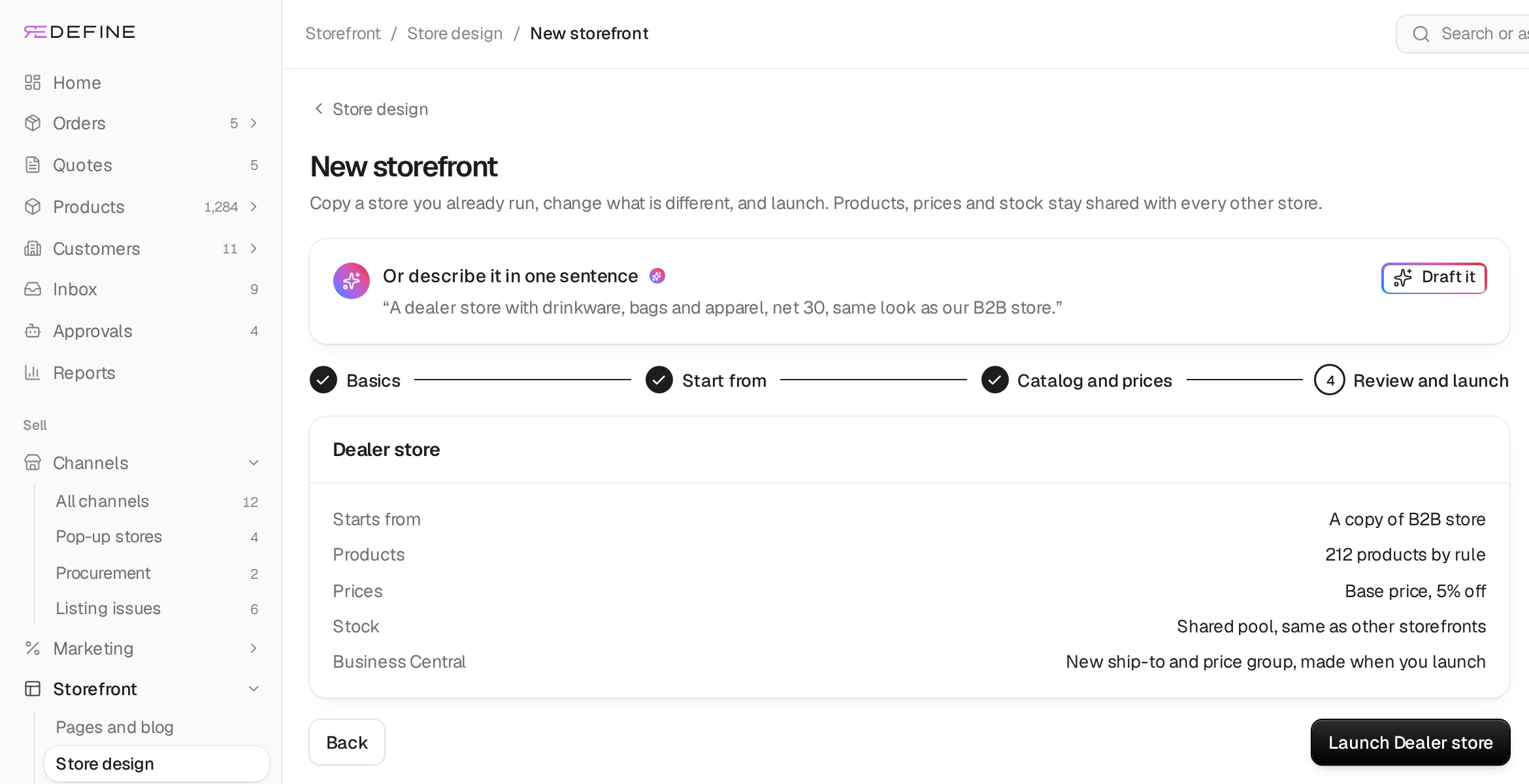
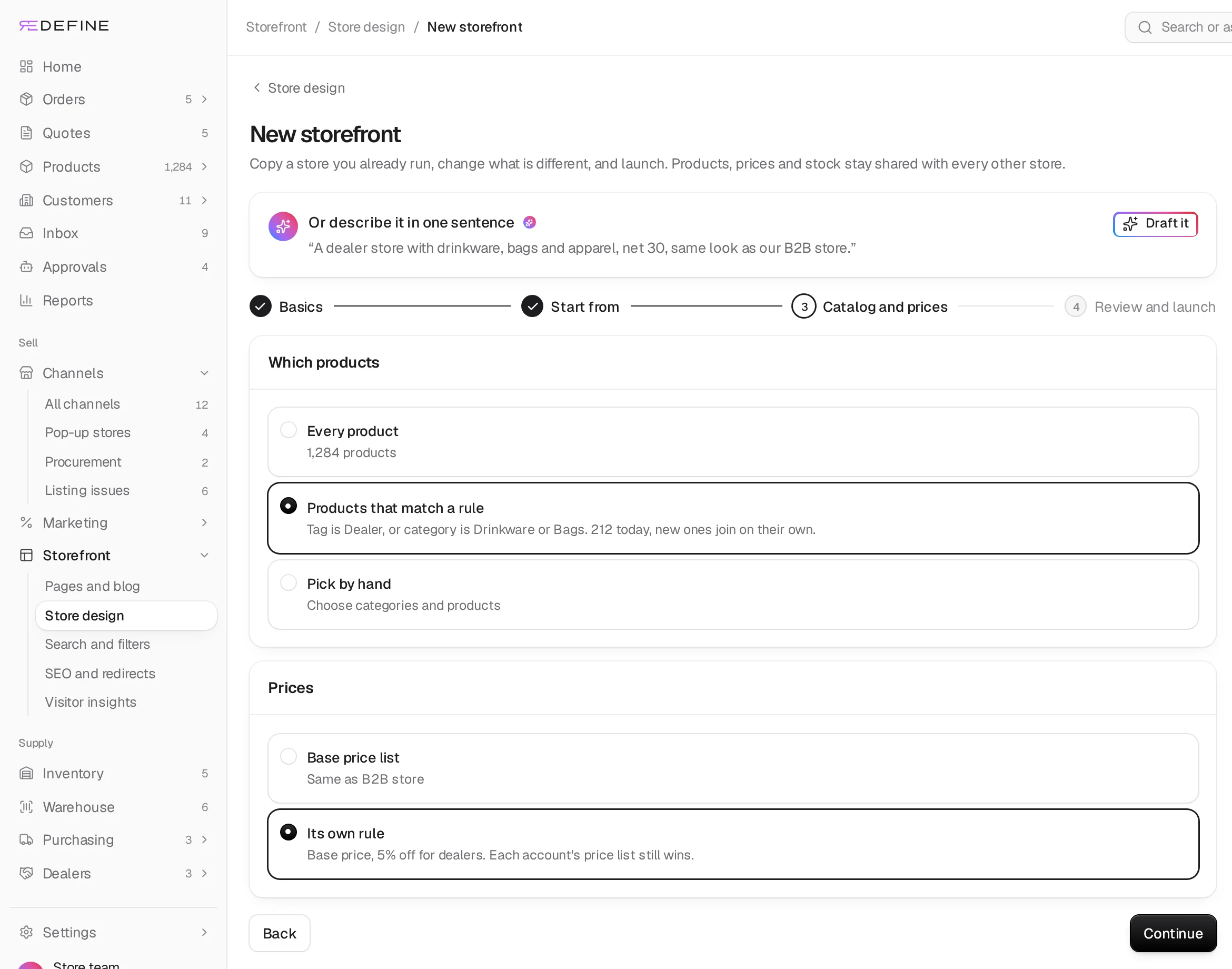
Redefine Suite New storefront screen, step 4 Review and launch: a Dealer store copied from the B2B store, 212 products

See your next store planned in a personalized demo.

No commitment. You get a short written summary.

Book a personalized demo

Short answer

What is a multistore ecommerce rollout?

Updated

A multistore ecommerce rollout is how you add a new store, like a new brand, country or dealer site, to the stores you already run. With Redefine Suite from Redefine Innovations, you copy a store you run, change what is different, and launch. Products, prices and stock stay shared, so the new store does not start from zero.

Many teams build each new store from scratch. They export the products to a file, load them again, and set up prices, menus and emails by hand. Then the stores slowly drift apart.

Run many brands and regions each day? See Multi-Brand and Multi-Region Commerce. Planning how brands share one setup? See Multi-Brand Commerce Architecture.

Three ways to add a store

Pick the one that fits your next launch

WayWhat you doWhat comes alongPick it when
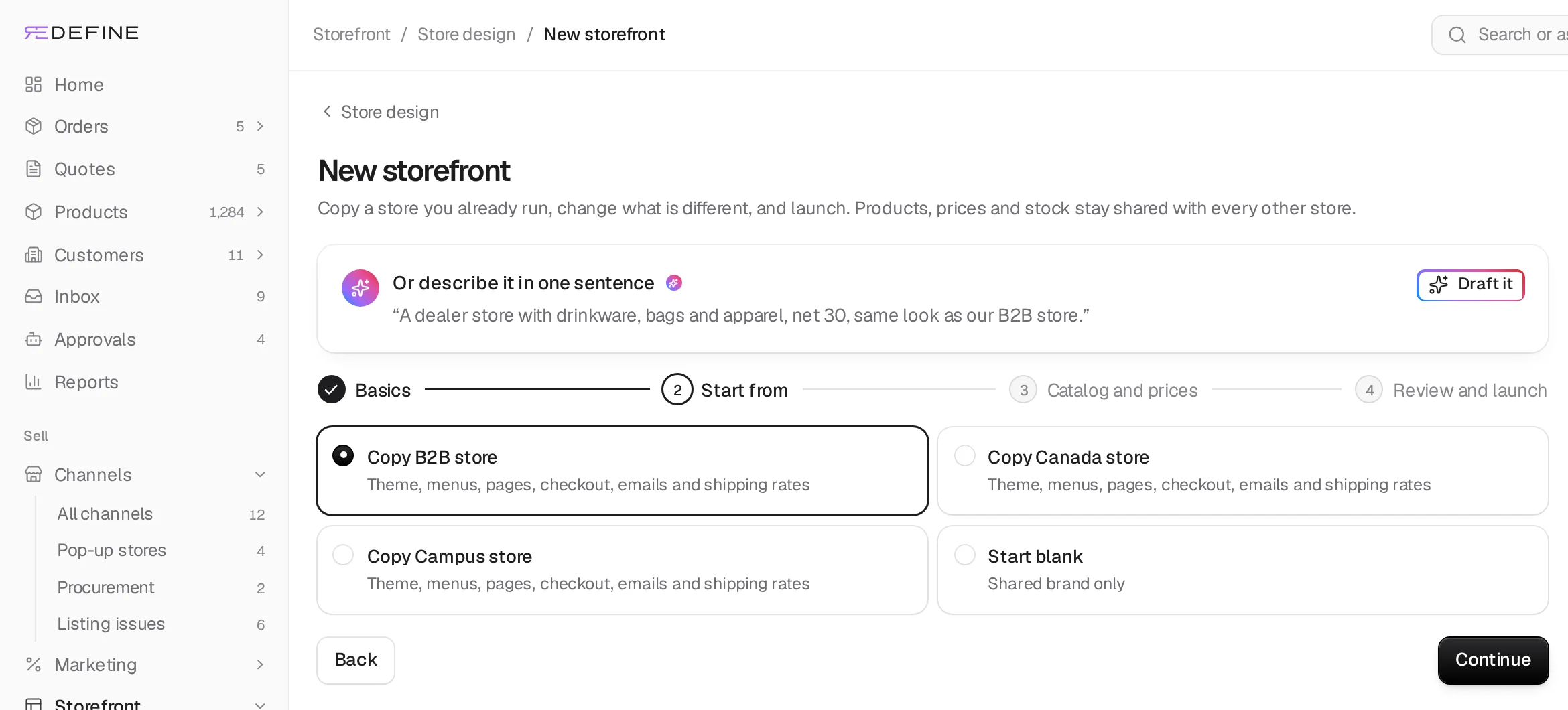
Copy a store you runPick a store, then change what is differentTheme, menus, pages, checkout, emails and shipping ratesThe new store should look and sell like one you have
Start blankSet up the look and pages yourselfYour shared brand onlyThe new store looks like none of the others
A store on its own systemExport a file of products, then load it againNothing, so stock and prices are kept twiceThe store will never share stock

Helpful to bring to the demo (not needed)

  • [1] The store you want to add next
  • [2] The store it is most like today
  • [3] Its prices, like a dealer discount
  • [4] Where it will sell and ship

Taken from the real New storefront screen in Redefine Suite.

The rollout gap

Why the next store takes so long

The hard part is not the new site. It is setting everything up again, then keeping each store in step after launch.

From scratch

Each store built on its own

  • Products copied by file

    Your team exports the catalog, loads it again, and fixes what broke on the way.

  • Prices set by hand

    Each store needs its own price list, typed in one row at a time.

    [!] Where mistakes hide

  • Stores drift apart

    A logo or a menu changes on one store and not on the others.

Copied

Each store copied from one you run

  • Start from a store you trust

    Theme, menus, pages, checkout, emails and shipping rates come along with the copy.

  • Shared stock and products

    New products join the store on their own when they match its rule.

    One place to change

  • Drift shows up as an alert

    Store design flags stores that drifted from your brand, with one button to fix them.

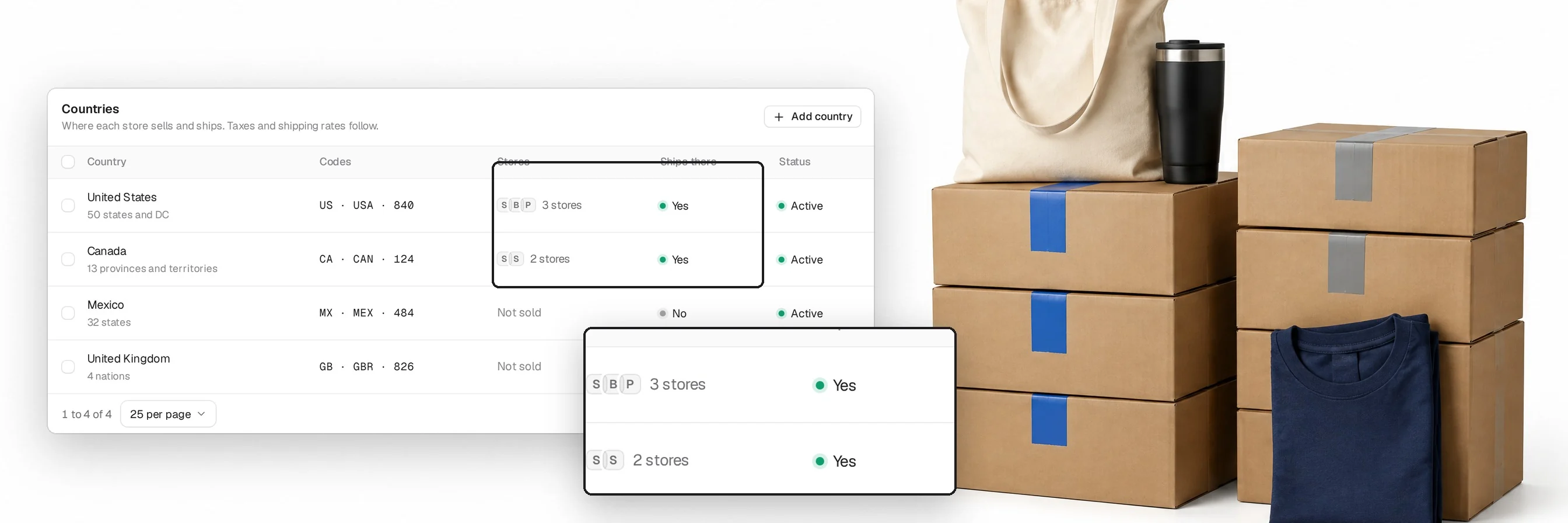
The Redefine Suite Countries and regions screen beside boxed totes, tumblers and shirts, with the United States sold by
Countries and regions: each store shows where it sells and ships. Taxes and shipping rates follow.

The New storefront screen

Three steps, then you press launch

These are the real steps in Redefine Suite. Step four, Review and launch, is the screen at the top of this page.

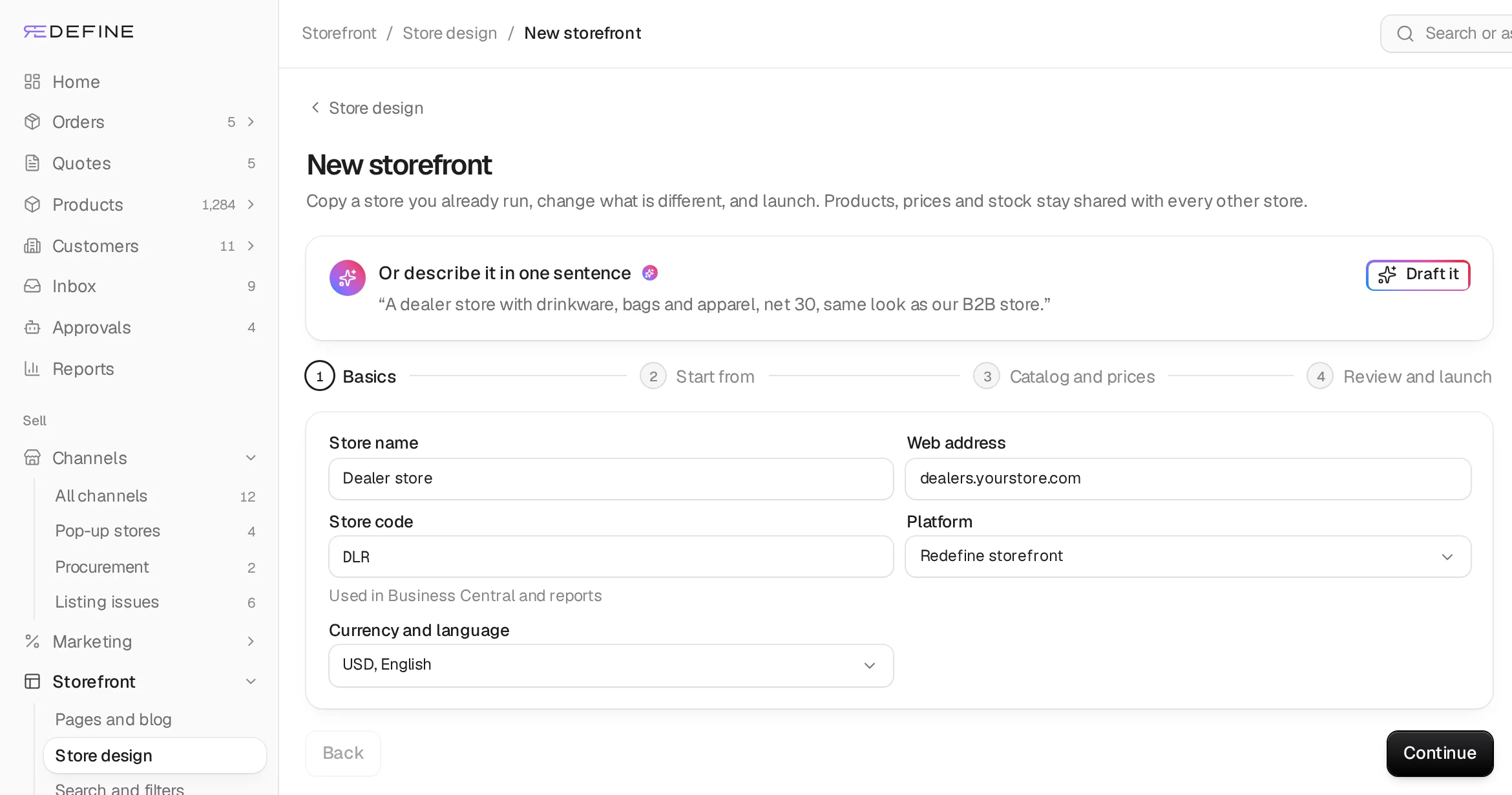
Redefine Suite New storefront screen, step 1 Basics: store name Dealer store, web address dealers.yourstore.com, store
The store code is used in Business Central and in your reports.

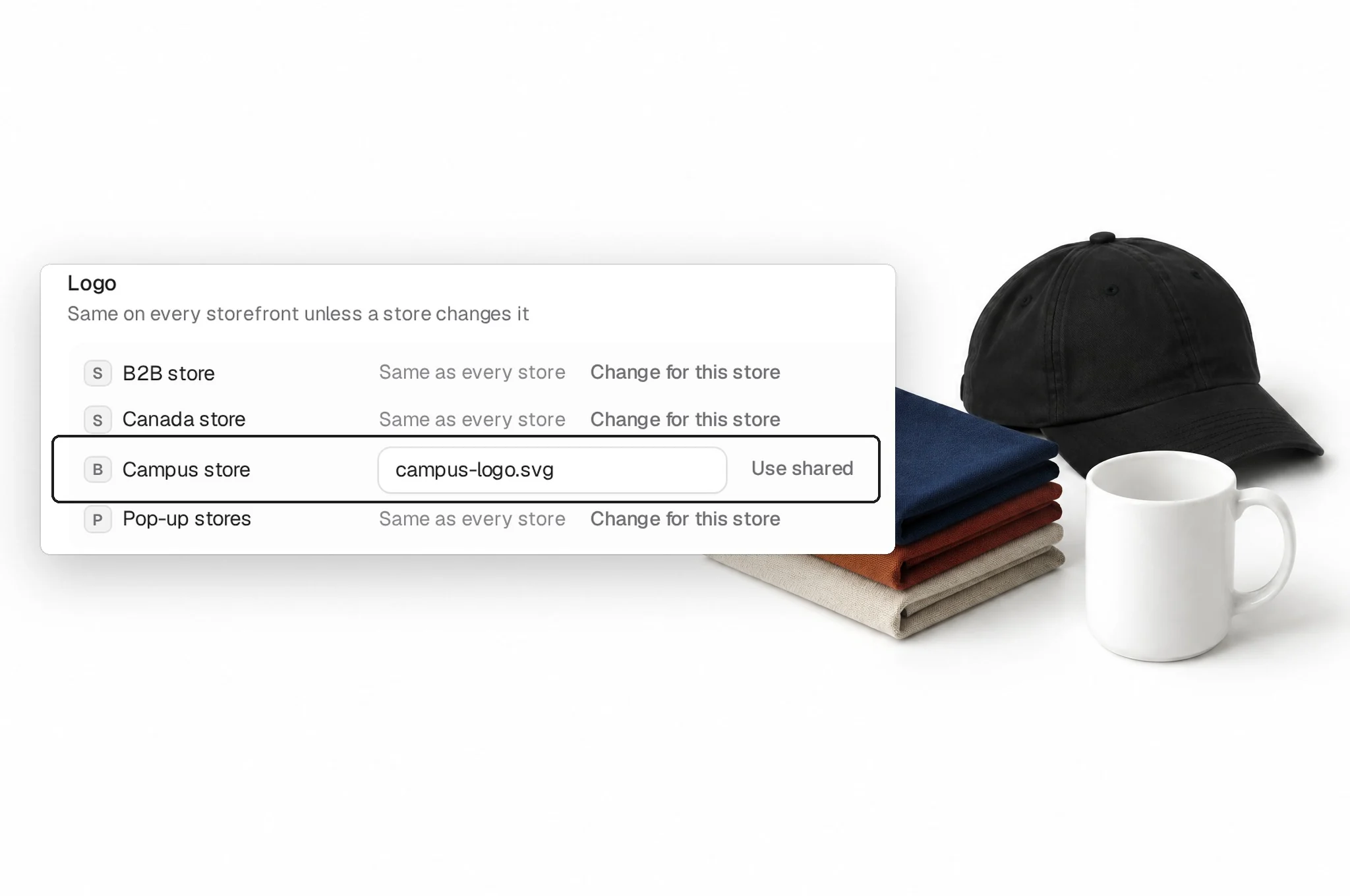
Change once. Every store follows.

Store design shows each setting for every store. Keep it shared, or give one store its own, like a campus logo.

See Multi-Site CMS
The Redefine Suite Store design logo setting beside a cap, mug and folded shirts, with the Campus store using its own

After launch

What the new store shares on day one

  • A packer at a warehouse bench putting a canvas tote into a box, with shelves of boxed stock behind her

    One stock pool

    Shared stock

    The new store sells from the same stock pool as your other stores.

    See Channel Sync
  • A finance lead at an office desk reading a printed sales chart next to a closed laptop

    Made at launch

    Business Central ready

    A new ship-to and price group is made in Business Central when you launch.

    See the Omnichannel Commerce Platform
  • A shop owner opening a delivery of tumblers and shirts on the counter of her store

    Its own price rule

    Dealer prices

    Base price with 5% off for dealers. Each account price list still wins.

    See B2B Commerce

Who builds it / Custom client build

SwagHQ

SwagHQ sells branded merch to businesses. We built this for SwagHQ. The same team built Redefine Suite.
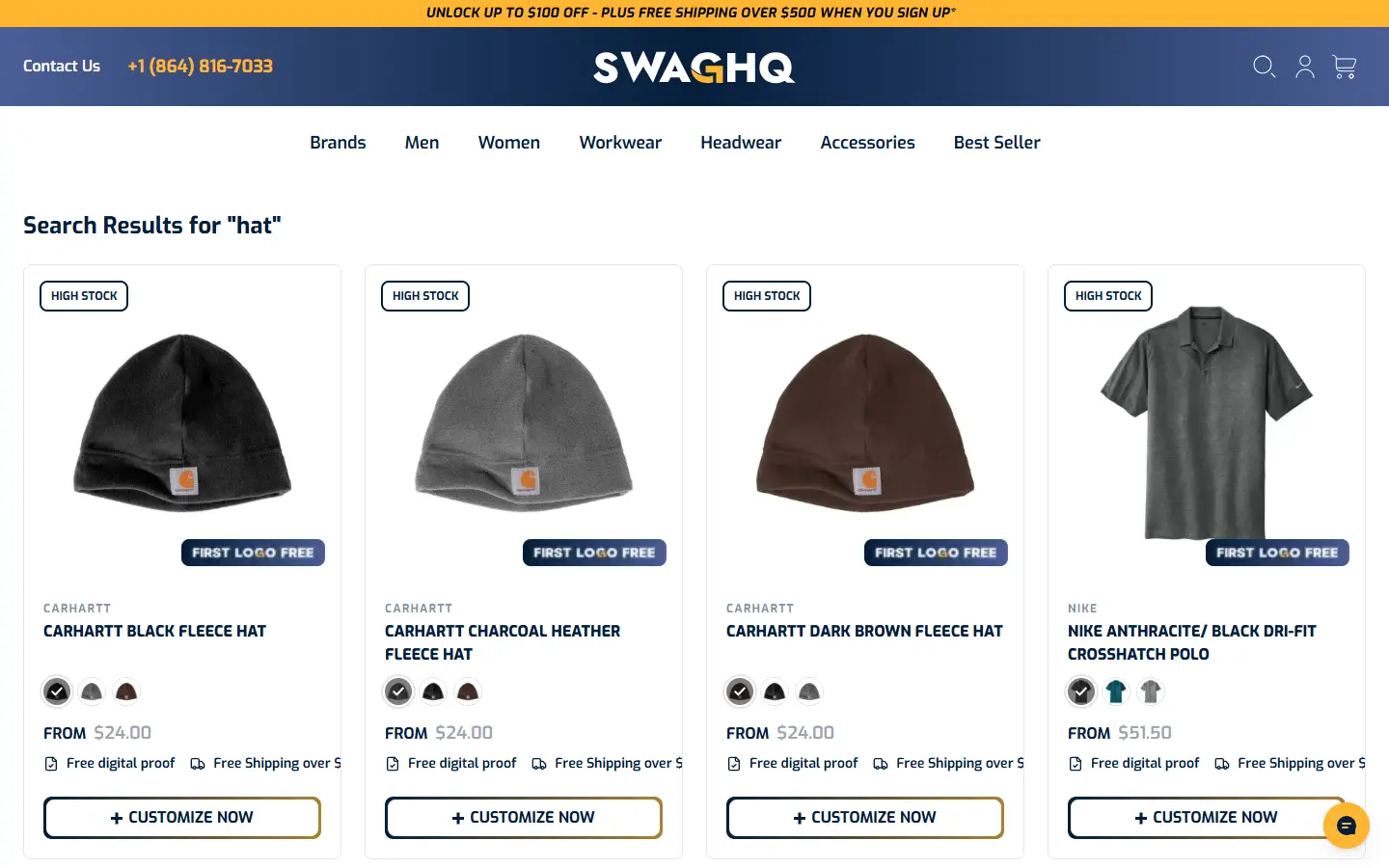
SwagHQ search results Redefine built, with hats and polos, product options and a Customize now button
  1. 01

    Problem

    A big catalog that keeps changing, with custom options on every item.

  2. 02

    Diagnosis

    Business buyers wanted speed, and several business systems had to stay in step.

  3. 03

    Solution and result

    A headless Next.js store, a custom admin, and APIs that sync catalog and stock with the ERP.

Checkout conversion
+29%
Pages load in
0.9s
Services, one team
8

A custom client build, not a Redefine Suite setup. Past results, not a promise. Read the SwagHQ story


How long does a new store take to launch?

It depends on how much is different from the store you copy.

A copy brings the look, pages, checkout, emails and shipping rates, so most of the work is the part that is new. See the three steps

Does the new store share stock with my other stores?

Yes. The new store sells from the same shared stock pool as your other storefronts.

Products, prices and stock stay shared with every other store. See Channel Sync

Can the new store have its own prices?

Yes. Use the base price list, or give the store its own rule, like 5% off for dealers.

Each account price list still wins over the store rule. See B2B Commerce

Do I pick every product by hand?

No. Pick every product, products that match a rule, or pick by hand.

With a rule, new products that match it join the store on their own. See the catalog step

What if one store needs its own logo or menu?

Change it for that one store in Store design. The rest stay shared.

If a store drifts from your brand, Store design shows an alert with a fix. See Multi-Site CMS

Does it work with Business Central?

Yes. A new ship-to and price group is made in Business Central when you launch.

The store code you set in step one is used in Business Central and in reports. See the Omnichannel Commerce Platform

What happens in the demo?

We walk through the store you want to add next on Redefine Suite.

You leave with a short written summary. No commitment. See how demos work

Plan your next store

Book a personalized demo of your next store

Tell us the store you want to add and the store it is most like. We walk through it on Redefine Suite and send a short written summary. No commitment.

Two team leads at a table pointing at printed charts while they plan the next store
  • Reply in one business day
  • Your next store, walked through
  • 25+ years building
  • 550+ projects delivered

Tell us about your next store

Pick the kind of store you want to add next. We plan the demo around it.

  1. 1Send your details
  2. 2We reply in one business day
  3. 3We walk through your next store
  4. 4You get a short written summary