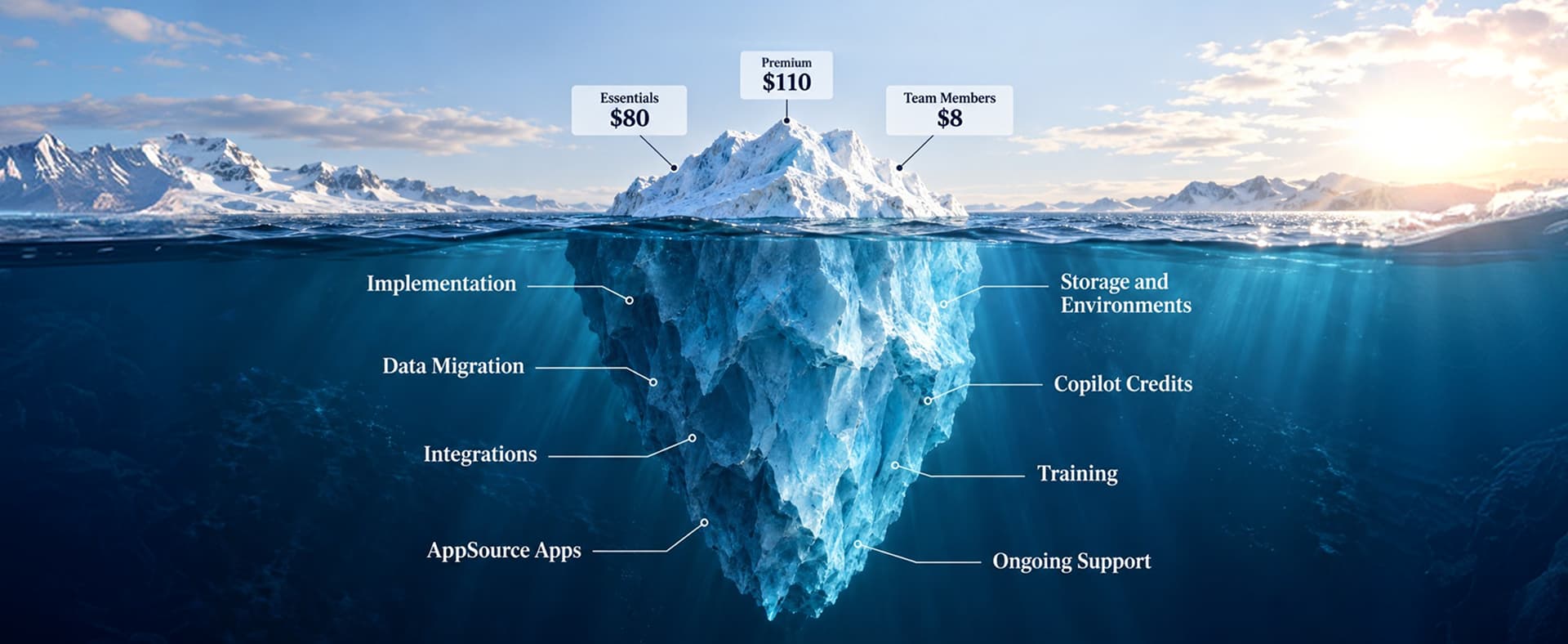
A Dynamics 365 migration assessment is a structured review of your current ERP or CRM system that tells you how to move to Microsoft Dynamics 365 and what it will take. It evaluates your business processes, customizations, integrations, data quality, reporting, and licensing, then recommends a migration approach (upgrade, reimplementation, or hybrid), a timeline, a budget range, and the main risks to manage. It happens before any migration work starts.
Find out what your migration really involves
- Your support deadline and real time to act
- Which customizations to keep, replace, or retire
- A timeline range based on 240 completed migrations
- An honest read on whether to move now
Book a free Dynamics 365 migration assessment call. We review what you run today and tell you honestly which path fits, with no obligation to move forward.
You already know you need to move to Dynamics 365. The hard part is knowing how.
Maybe GP support is ending, or every NAV upgrade quote looks like a new implementation. That uncertainty is expensive. Gartner predicts that by 2027, more than 70% of recently implemented ERP initiatives will fail to fully meet their original business goals.1
A Dynamics 365 migration assessment removes that uncertainty before it becomes a budget overrun. At Redefine, we run one before every Dynamics 365 data migration project, because the assessment decides whether the migration goes smoothly or turns into a rescue.
What Is a Dynamics 365 Migration Assessment?
A Dynamics 365 migration assessment is the blueprint for your move. It reviews your current system from two angles. The functional review covers how your teams work: order to cash, procure to pay, month-end close, sales pipeline, and service. The technical review covers custom code, integrations, database size, reports, and licenses. Microsoft's own AIM assessment for on-premises customers uses the same split: a functional evaluation, a technical evaluation, and a recommended upgrade approach.2
The output is a decision, not a shelf report. You learn which Dynamics 365 apps fit, which customizations you can retire, and which path carries the least risk. For advice beyond the migration, our Microsoft Dynamics 365 consulting team covers the wider Microsoft stack.
When Does Support End for Dynamics GP, NAV, AX, and CRM?
Microsoft support for the main legacy Dynamics products ends between 2023 and 2031, depending on the product and version. These are the dates most mid-market teams face:
| System | Key date | What it means |
|---|---|---|
| Dynamics GP (current, 18.x) | December 31, 2029 | End of product support, enhancements, and regulatory updates |
| Dynamics GP (current, 18.x) | April 30, 2031 | End of security patches |
| Dynamics GP 2016 / 2016 R2 | July 14, 2026 | Extended support ended |
| Dynamics GP 2018 / 2018 R2 | January 11, 2028 | Extended support ends |
| Dynamics AX 2012 R3 | January 2023 | Extended support ended |
| Dynamics NAV 2018 | January 2028 | Extended support ends |
| Dynamics 365 Customer Engagement v9 (on-premises) | January 9, 2029 | Extended support ends (mainstream ends January 12, 2027) |
Sources: Microsoft's GP end of support announcement,3 the GP lifecycle policy,4 the Customer Engagement v9 extension,5 and the Microsoft lifecycle pages for AX 2012 R36 and NAV 2018.7
2029 sounds far away. It is not. A GP migration typically takes 12 to 20 weeks, and you also need time for the assessment, partner selection, data cleanup, and a year-end close you do not want to disrupt. Our Dynamics GP to Business Central migration page lays out that route.
The real deadline: Your deadline is not the end-of-support date. It is the date you need to start so you finish before it.
How Is a Migration Assessment Different From an ERP Assessment or Health Check?
A migration assessment plans a move to Dynamics 365. An ERP assessment asks whether your current ERP still fits at all. A health check reviews a Dynamics 365 system you already run. Full discovery designs the build after you choose a path.
| Type | Question it answers | Best for |
|---|---|---|
| Migration assessment | How should we move to Dynamics 365, and what will it take? | Teams on GP, NAV, AX, CRM on-premises, or another ERP |
| ERP assessment | Is our current ERP still the right fit? | Teams unsure whether to stay, upgrade, or replatform |
| Health check | Is our live Dynamics 365 system set up and used well? | Teams already on Dynamics 365 |
| Full discovery | What exactly will we build? | Teams that already chose a path and a partner |
If you already run Dynamics 365 and something feels off, book a Dynamics 365 health check instead. If you are still on a legacy system, start with the migration assessment.
What Does a Dynamics 365 Migration Assessment Cover?
A Dynamics 365 migration assessment covers six areas in three groups. Skip any of them and the migration estimate will be wrong.
Functional review of how your teams work
Business processes
The assessment maps how teams actually work today. Many legacy processes exist only because of an old workaround.
Technical review of your current system
Customizations and add-ons
Each custom code block and ISV add-on gets one of three verdicts: keep it, replace it with standard Dynamics 365 features, or retire it.
Integrations
Every connection to ecommerce, EDI, payroll, banking, or a warehouse system needs a plan. Our integrations team flags which connectors exist and which need a rebuild.
Data volume and quality
The assessment measures how much history to move, how clean it is, and where duplicates sit.
Reporting
Legacy reports often break in the cloud, so the assessment lists the ones your team relies on and how to rebuild them.
Commercial review of cost and licensing
Licensing
Dynamics 365 subscription licensing works differently from perpetual on-premises licenses, so the assessment estimates the license each role needs. For a deeper review, see our Dynamics 365 licensing advisory.

Dynamics Upgrade, Reimplementation, or Hybrid: Which Path Fits?
A Dynamics 365 migration assessment compares three approaches:
| Approach | What it means | Fits when |
|---|---|---|
| Upgrade (technical move) | Move your existing setup and data to the cloud version | Processes still work and customizations are light |
| Reimplementation | Rebuild processes on standard Dynamics 365 and bring over clean data | Heavy custom code, messy data, or big process changes |
| Hybrid | Upgrade core areas and redesign the ones that hurt most | Some areas work well and others need a reset |
A straight Dynamics upgrade is often cheaper, and our Dynamics 365 upgrade services team runs plenty of them. But years of workarounds do not disappear in an upgrade. They move with you.
Common Dynamics 365 migration routes we assess
ERP migration routes
Dynamics GP to Business Central
The most common route for small and mid-size finance teams.
GP route question: which add-ons run your month-end close?
Dynamics NAV to Business Central
A natural next step, since Business Central grew out of NAV. See our NAV to Business Central migration approach.
NAV route question: how much custom code can standard Business Central replace?
Dynamics AX to Finance and Supply Chain Management
Larger, multi-entity projects where the assessment matters most.
AX route question: upgrade the AX code base or rebuild on standard processes?
CRM migration routes
Legacy CRM to Dynamics 365 Sales
Including older on-premises Dynamics CRM. Our legacy CRM to Dynamics 365 Sales migration page covers it.
CRM route question: which pipeline and customer records are clean enough to move?
What Does a Cloud Migration Assessment Check?
A cloud migration assessment checks what changes when Dynamics leaves your own servers. Four changes catch on-premises teams out:
- Updates arrive on Microsoft's schedule. You test release waves instead of choosing when to upgrade.
- Direct database access goes away. Tools that query SQL directly need a new approach.
- Security moves to identity. Access runs through Microsoft Entra ID, so roles need a clean setup.
- Costs shift from capital to subscription. Finance plans and budgets differently.
If other workloads share those servers, plan the wider Azure move at the same time with our Azure consulting team.
How Do You Prepare Data for a Dynamics 365 Migration?
You prepare data for a Dynamics 365 migration by deciding what history to keep, removing duplicates, mapping fields, and naming an owner to sign off each data set. It matters because Gartner estimates poor data quality costs organizations at least $12.9 million a year on average.8 Move bad data and you pay that cost again on a new platform.
- How many years of history do you really need in Dynamics 365?
- Which customer, vendor, and item records are duplicates or inactive?
- Which fields map cleanly, and which need transformation rules?
- Who signs off each data set before cutover?
For Business Central moves on a tight deadline, our Business Central data migration fast track turns the assessment findings into a clean load plan.
"Migrate clean data or plan to clean it twice."A rule every migration assessment should enforce
How Does ERP Modernization Fit Into a Dynamics 365 Migration?
ERP modernization is what you change once you land on Dynamics 365, and the migration assessment is the best place to plan it. A Forrester Total Economic Impact study commissioned by Microsoft projected more than 200% ROI over three years and a potential six-month payback for a composite organization with $50M in revenue and 300 employees using Business Central.9 Those gains come from new ways of working, not from the move itself.
So the assessment should also flag quick wins: approvals to automate, spreadsheets to retire, and dashboards to build. Our ERP consulting services team shapes the longer roadmap, and the Dynamics 365 reporting accelerator gets key reports live fast.
How Much Does a Dynamics 365 Migration Assessment Cost?
The first Dynamics 365 migration assessment call with Redefine is free, with no obligation. If you need a full, fixed-scope assessment, Redefine's published pricing is:
| Offer | Price | Best for |
|---|---|---|
| Free migration assessment call | Free | Any team exploring a Dynamics 365 migration |
| 30-day assessment, Starter | $6,500 | Single-entity small businesses |
| 30-day assessment, Growth | $12,500 | Mid-size operations with ecommerce and supply chain needs |
| 30-day assessment, Enterprise | $19,500 | Multi-entity or omnichannel companies |
The 30-day Dynamics 365 assessment delivers a process fit scorecard, a risk register, a data quality and migration readiness audit, a three-scenario investment model, and an executive readout. Redefine credits 100% of the fee toward implementation when you sign a statement of work within 90 days.
How Long Does a Dynamics 365 Migration Take?
A Dynamics 365 migration typically takes 6 to 36 weeks, depending on the source system and complexity. These ranges come from Redefine's 240 completed migration projects:
| Migration route | Typical duration |
|---|---|
| Legacy CRM to Dynamics 365 Sales | 6 to 12 weeks |
| NAV to Business Central | 8 to 16 weeks |
| GP to Business Central | 12 to 20 weeks |
| Custom or third-party ERP to Business Central | 16 to 28 weeks |
| Finance and Operations platform upgrade | 20 to 36 weeks |
The assessment narrows that range for your business, and it shapes the plan for the Dynamics 365 implementation that follows.
How the Dynamics 365 Migration Assessment Works, Step by Step
The five assessment steps
- Book a call. Tell us what you run today, how many users you have, and your biggest pain points.
- Share a snapshot. Your version, key add-ons, integrations, and rough data volume.
- Walk through processes. We talk with finance, operations, and IT about how work gets done.
- Review findings. We score fit, flag risks, and compare migration paths.
- Get a recommendation. Move now, move later, or stay put, with the reasons behind it.

What a Dynamics 365 migration assessment delivers
- A recommended migration path with the reasons behind it
- Customizations to keep, replace, or retire
- An integration and data readiness summary
- A timeline range, a budget range, and the top risks
Want a rough number first? Try our Dynamics 365 implementation cost calculator and bring the result to your call.
Common Dynamics 365 Migration Mistakes
- Picking a path before the assessment. Custom code surfaces halfway through.
- Moving all the history. Old closed transactions slow the project.
- Treating integrations as an afterthought. A broken ecommerce or EDI feed on go-live day costs real orders.
- Leaving finance out of the room. The people who close the books need to shape the design.
- Underinvesting in training. A clean system still fails if people work around it. Plan Dynamics 365 training from the start.
"The most expensive migration is the one you scope after you start."A common lesson from ERP rescue projects
Dynamics 365 Migration Assessment Readiness Checklist
Have these ready before your Dynamics 365 migration assessment:
If CRM data worries you more than ERP, bring that too. Our CRM consulting services team reviews pipeline and customer data alongside the ERP.
Frequently Asked Questions
Questions about the free Dynamics 365 migration assessment
Is the Dynamics 365 migration assessment really free?
Yes. The first Dynamics 365 migration assessment call with Redefine is free and carries no obligation. A full 30-day assessment starts at $6,500, with the fee credited toward implementation if you proceed within 90 days.
Can a Dynamics 365 migration assessment recommend not moving yet?
Yes. A Dynamics 365 migration assessment can recommend waiting when your support date is far off, your current system still works, or a Microsoft release you need is still coming.
Do we have to use Redefine for the migration after the assessment?
No. The findings from a Redefine Dynamics 365 migration assessment are yours to use with any Microsoft partner.
Questions about the Dynamics 365 migration itself
Which systems can a Dynamics 365 migration assessment cover?
A Dynamics 365 migration assessment can cover Dynamics GP, NAV, AX, older Dynamics CRM, on-premises Dynamics 365, and non-Microsoft ERPs.
Can you assess a migration from NetSuite to Dynamics 365?
Yes. A NetSuite move starts with the same assessment. See our NetSuite to Business Central migration route.
Should we choose Business Central or Finance and Supply Chain Management?
Business Central usually fits small and mid-size companies with simpler operations. Dynamics 365 Finance and Supply Chain Management usually fits larger, multi-entity, or manufacturing-heavy companies. The assessment confirms which one fits your business.
Will we lose historical data when we migrate to Dynamics 365?
No. In a Dynamics 365 migration you choose which history moves into the new system and which stays archived and searchable.
Book Your Free Dynamics 365 Migration Assessment
One Redefine client, Half Price Drapes, a multi-channel window treatment retailer, moved to Dynamics 365 with Power BI, gained unified inventory visibility across sales channels, and reports $70M in annual revenue after the migration. A clear plan came first.
As a Microsoft Dynamics 365 partner, Redefine gives you an honest recommendation, even if the answer is to wait.
"Know your path before you move. Everything else gets easier after that."The case for a migration assessment
Running GP, NAV, AX, or an older CRM?
Book a free Dynamics 365 migration assessment call. Bring your version, your add-ons, and your biggest headaches. We will show you your best path, a realistic timeline, and the risks to plan for, with no obligation to move forward.
Talk to Redefine's Dynamics 365 consultants
Sources & Citations
Primary research and official Microsoft pages used for the statistics and lifecycle dates in this guide. Redefine pricing, migration durations, the 240-project figure, and the Half Price Drapes result come from Redefine's own service pages linked above.
- Gartner, "What IT Leaders Must Do to Avoid Disappointing ERP Initiatives": by 2027, more than 70% of recently implemented ERP initiatives will fail to fully meet their original business goals.
- Microsoft Learn, "AIM Assessment, Dynamics 365": functional evaluation, technical evaluation, and recommended upgrade approach in Microsoft's migration assessment.
- Microsoft Dynamics 365 Blog, "Announcing End of Support for Dynamics GP": GP product support ends December 31, 2029, with security patches until April 30, 2031.
- Microsoft Learn, "Understand the Lifecycle Policies, Dynamics GP": GP 2016 extended support ended July 14, 2026; GP 2018 extended support ends January 11, 2028.
- Microsoft Learn, "Support Extended for Dynamics 365 for Customer Engagement Apps, v9 (on-premises)": mainstream support to January 12, 2027 and extended support to January 9, 2029.
- Microsoft Learn, "Dynamics AX 2012 R3, Microsoft Lifecycle": AX 2012 R3 extended support ended in January 2023.
- Microsoft Learn, "Dynamics NAV 2018, Microsoft Lifecycle": NAV 2018 extended support ends in January 2028.
- Gartner, "Data Quality: Why It Matters and How to Achieve It": poor data quality costs organizations at least $12.9 million a year on average.
- Microsoft Dynamics 365 Blog, "Forrester TEI Study of Dynamics 365 Business Central (March 2026)": more than 200% ROI over three years and potential six-month payback for a $50M, 300-employee composite organization.