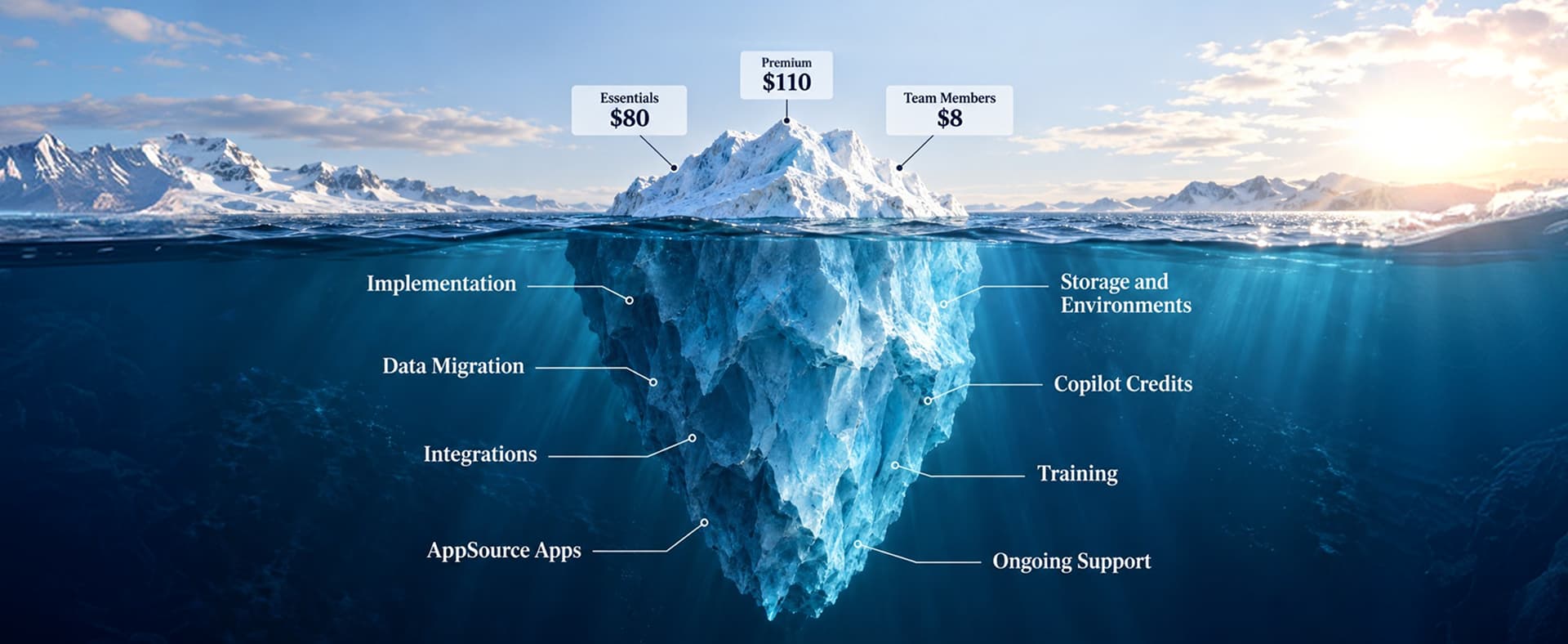
A Business Central migration checklist is a phased plan for moving data, processes, and integrations from a legacy ERP, such as Dynamics GP, Dynamics NAV, QuickBooks, or Business Central on-premises, into Microsoft Dynamics 365 Business Central online. It covers six phases: (1) discovery and scoping, (2) data cleanup and mapping, (3) customizations and extensions, (4) integrations and CRM connections, (5) test migrations and user acceptance testing, and (6) cutover and stabilization. Each phase has a named owner and a sign-off. A typical Dynamics GP to Business Central migration takes about 22 weeks, based on Redefine project data.
Know your migration scope before you sign a statement of work
- Which data to move and which to archive
- Which customizations to keep, replace, or retire
- Every integration and CRM connection that needs rework
- A realistic timeline and budget range
A short discovery sprint maps your data, customizations, and integrations so your Business Central plan starts from facts, not guesses.
Moving to Microsoft Dynamics 365 Business Central is not the hard part. Moving everything that depends on your old ERP is.
Microsoft has set end dates for Dynamics GP and Dynamics NAV, and the data transfer is rarely what goes wrong. Undocumented customizations, finance reports, and CRM connections are. Gartner predicts that by 2027, more than 70% of recently implemented ERP initiatives will fail to fully meet their original business goals.1
This business central migration checklist covers six phases, with owners, timelines, and costs, the same structure Redefine's Business Central implementation team uses on every project.
What Is a Business Central Migration Checklist?
A Business Central migration checklist is a phase-by-phase list of tasks, owners, and sign-offs for moving from your current ERP into Dynamics 365 Business Central online. It covers data, licensing, users, customizations, integrations, testing, and the first 30 days live.
The six phases of a Business Central migration at a glance
| Phase | Main output | Owner | Sign-off |
|---|---|---|---|
| 1. Discovery and scoping | Scope, license count, budget, go-live date | Executive sponsor | Approved scope and budget |
| 2. Data cleanup and mapping | Clean master data and a field map | Finance and data owners | Field map approved |
| 3. Customizations and extensions | Keep, replace, or retire list | IT lead and partner | Extensions built and tested |
| 4. Integrations and CRM | Connection inventory and rebuilt syncs | Integration owner | End-to-end sync tests pass |
| 5. Test migrations and UAT | Two sandbox dry runs | Finance and process owners | Trial balance tie-out signed |
| 6. Cutover and stabilization | Live system and 30-day support plan | Project manager | Go-live checklist closed |
Redefine's Dynamics 365 migration services page compares every path.
Why Is Cloud ERP Migration to Business Central Happening in 2026?
Cloud ERP migration to Business Central is speeding up in 2026 because Microsoft is retiring Dynamics GP and NAV, Business Central keeps growing, and the cloud removes server work.
Dynamics GP and Dynamics NAV support end dates
Dynamics GP
Microsoft ends product support and updates for Dynamics GP on December 31, 2029, and security patches stop on April 30, 2031.2
Dynamics NAV
Dynamics NAV 2018, the last NAV release, leaves extended support in January 2028.3 After these dates, GP and NAV receive no tax updates, fixes, or security patches.
Business Central keeps growing
Business Central passed 55,000 customers in April 2026, with more than 2,000 partners serving it.4
Business Central online removes server work
Microsoft runs servers, backups, and updates, and ships two major releases a year, including AI agents for payables and sales orders.
GP teams short on time can use Redefine's Dynamics GP Rescue Program. NAV teams can start with the NAV to Business Central migration path.
Which Business Central Migration Path Are You On?
Your starting system decides the tools, timeline, and cost of a Business Central migration:
| Starting point | Typical approach | What to watch |
|---|---|---|
| Dynamics GP (2015 or later) | Cloud migration tool, run from the Cloud Migration Management page, for setup, master data, transactions, and history | GP modules with no Business Central match, and third-party GP add-ons |
| Dynamics NAV | Upgrade to Business Central version 14 or later on-premises, convert customizations, then run the cloud migration tool | Customized tables whose data cannot carry forward |
| Business Central on-premises | Cloud migration tool, run in batches | Database size, extension data, and on-premises-only code |
| QuickBooks, Sage, NetSuite, or another ERP | Reimplementation with configuration packages and data templates | Chart of accounts redesign, and history you cannot bring over directly |
Microsoft's GP migration tool needs GP 2015 or later, and you choose what data moves for each company.5 Dynamics NAV cannot go straight to Business Central online. Microsoft requires an upgrade to Business Central Spring 2019 (version 14) or later first, and data from tables with code customizations cannot carry forward.6 The tool uses Azure Data Factory to copy data table by table.
Moving from QuickBooks, Sage, or NetSuite is closer to a fresh Business Central implementation, so Redefine's NetSuite to Business Central migration work starts with the chart of accounts, not the data file.
Phase 1: Discovery and Scoping
Phase 1 of a Business Central migration sets scope, budget, license count, and go-live date. Skipping it makes every later phase cost more.
- Document your current version, database size, SQL Server version, and number of companies
- Count users by role to size Essentials, Premium, and Team Member licenses
- Name an executive sponsor and a business owner for each process area
- Set go-live right after a month-end or quarter-end close, never at year-end
Check licensing costs in Redefine's Business Central licensing calculator, or get a fixed-timeline scope from a 30-day Dynamics 365 assessment.
Phase 2: What Data Should You Migrate to Business Central?
Migrate active master data, every open transaction, and one to two years of history to Business Central, and archive the rest. Gartner's 2020 research puts the average cost of poor data quality at $12.9 million a year,7 so clean the data before it moves.
Move vs archive: a Business Central data decision table
| Data type | Move to Business Central | Archive or leave behind |
|---|---|---|
| Master data (customers, vendors, items, GL accounts) | Active records only | Inactive and duplicate records |
| Open transactions | All open accounts receivable (AR), accounts payable (AP), purchase orders, and sales orders | Nothing, these must move |
| Historical transactions | Summary balances, or 1 to 2 years of detail | Older detail, kept in a read-only archive or data warehouse |
How to clean and map ERP data before migration
- Merge duplicate customers and vendors
- Remove inactive items and general ledger (GL) accounts
- Reconcile subledgers to the GL before extraction
- Map every source field to a Business Central field, and flag the gaps
Redefine's Dynamics 365 data migration team builds this field map before scripting the transfer. Non-Microsoft sources load through configuration packages.
Phase 3: Customizations, Extensions, and ISV Add-ons
Customizations are the biggest technical risk in a Business Central migration, according to Microsoft's own planning guide.8 Business Central online does not run legacy C/AL code, so every customization must become an AL extension, be replaced, or be retired.
- Keep: rebuild as an AL extension
- Replace: use a standard feature or AppSource app
- Retire: drop it if the process is gone
Independent software vendor (ISV) add-ons need an online version, installed before you migrate, or their data will not come across. Redefine's ERP consulting team reviews each customization against standard features first.
Phase 4: Integrations and CRM Connections
Every integration must be reconnected, rebuilt, or retested after a Business Central migration. Microsoft's completion guide covers endpoints, credentials, Power Automate flows, and the Dynamics 365 Sales connection.9
Map every Business Central integration
Give each connection an owner and an end-to-end test.
CRM integration after a Business Central migration
A broken CRM sync hits revenue first, so run CRM as its own workstream.
Dynamics 365 Sales and Business Central
Reconnect the Dynamics 365 Sales connection
The Business Central and Dynamics 365 Sales connection does not carry over. Set it up again, and run a full sync in a sandbox first.
Align CRM and ERP records before cutover
Match customer numbers, contacts, and price lists in both systems, or you get duplicate records on day one.
Salesforce, HubSpot, and other CRMs
Repoint third-party CRM connectors to Business Central
Repoint third-party connectors to Business Central APIs and retest every flow, from new account to invoice.
Redefine's Dynamics CRM integration services cover both routes, and the Business Central Integration Fast Start gets core connections live in a set window.
Ecommerce and marketplace integrations
Point order, inventory, and price syncs at the new Business Central item numbers before the first live order.
EDI, 3PL, and finance tool integrations
Retest electronic data interchange (EDI), third-party logistics (3PL), banking, and tax connections with real files.
Reporting and Power BI
Custom reports do not migrate. Redefine's Dynamics 365 Reporting Accelerator rebuilds the ones leadership reads in Power BI.

Phase 5: Test Migrations and User Acceptance Testing
Microsoft recommends at least two dry-run migrations in a sandbox before the production cutover.8 The first finds issues. The second lets finance validate the numbers.
- Keep each run under about 30 GB of data and up to 10 companies, per Microsoft guidance
- Tie out trial balance, AR, AP, and inventory values against the source system
User acceptance testing (UAT) doubles as training. Redefine's Dynamics 365 training builds role-based sessions around those scenarios.
Phase 6: Cutover, Go-Live, and Stabilization
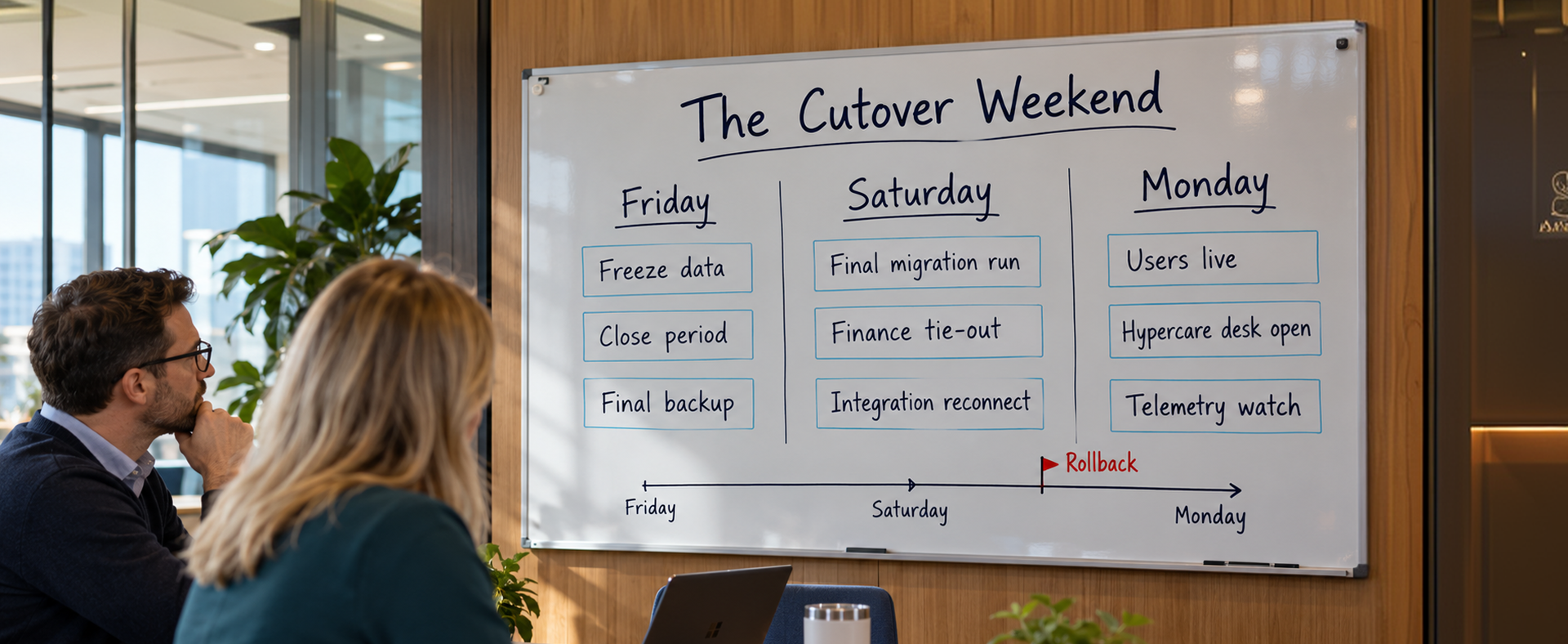
Cutover is a scripted event: freeze the old system, run the final migration, tie out the numbers, and switch users to Business Central.
Before Business Central cutover
- Freeze master data changes in the old ERP
- Post and close the period you are migrating
- Confirm backups and a written rollback plan
After Business Central go-live
User accounts do not migrate, and on-premises users can be mapped to online users only once per environment, so test the mapping in a sandbox.9 Then disable cloud migration on the Cloud Migration Management page, reconnect integrations, and watch telemetry for 30 days. A post-go-live optimization package catches small fixes before they become workarounds.
ERP Upgrade vs Reimplementation: Which Route Fits?
An ERP upgrade keeps your data and history and converts customizations into extensions. A reimplementation starts fresh in Business Central with balances and limited history.
| Factor | Upgrade and migrate | Reimplement |
|---|---|---|
| Best for | Clean data and processes that still fit | Heavy customizations or processes that changed |
| Customizations | Converted to extensions | Mostly replaced by standard features |
| Main risk | Carries old problems forward | Needs more training and change management |
Heavily customized NAV upgrades often become reimplementations. Redefine's Dynamics 365 upgrade services team scores both routes.
How Long Does a Business Central Migration Take, and What Does It Cost?
A typical Dynamics GP to Business Central migration takes about 22 weeks from signed statement of work to go-live, with a range of 14 to 28 weeks, and costs $75,000 to $180,000 for 20 to 50 users with moderate complexity. These figures come from Redefine's GP to Business Central migration practice.
Business Central migration timeline by stage
| Stage | Weeks |
|---|---|
| Discovery and assessment | 1 to 3 |
| System design and configuration | 4 to 10 |
| Data migration and integration build | 11 to 15 |
| User acceptance testing and training | 16 to 19 |
| Cutover, go-live, and hypercare | 20 to 22 |
Business Central migration budget ranges
For a 50-user Business Central rollout, Redefine's Dynamics 365 implementation cost guide puts the first-year budget at $120,000 to $175,000, including $5,000 to $25,000 for data migration.
Redefine project data: Across 47 completed fixed-price implementations, Redefine reports $0 in average unplanned change orders and 94% on-time delivery.
What Are the Most Common Business Central Migration Mistakes?
The most common Business Central migration mistakes are treating it as an IT-only project, moving every historical record, leaving integrations until the end, and testing only once.
Panorama Consulting's 2026 ERP Report found that more than a quarter of organizations exceeded ERP budgets, mostly from technology needs discovered late.10 Already live and seeing these symptoms? A Dynamics 365 health check finds the gaps.
"Migrating a messy ERP to the cloud just gives you a messy ERP someone else hosts."A common Business Central migration mistake
The Complete ERP Migration Checklist for Business Central
Copy this ERP migration checklist into your project plan and assign an owner to every line.
Phase 1: Discovery and scoping
Phase 2: Data cleanup and mapping
Phase 3: Customizations and extensions
Phase 4: Integrations and CRM
Phase 5: Test migrations and UAT
Phase 6: Cutover and stabilization
Price this list with Redefine's Dynamics 365 implementation cost calculator.
The real rule: Every line on this checklist needs a business owner, not just an IT owner.
Frequently Asked Questions
How long does a Business Central migration take?
A typical Dynamics GP to Business Central migration takes about 22 weeks, with a range of 14 to 28 weeks, based on Redefine project data.
How much does a Business Central migration cost?
Redefine reports $75,000 to $180,000 for a GP to Business Central migration with 20 to 50 users and moderate complexity.
Can I migrate all my historical data to Business Central?
You can, but rarely should. Archive history older than one to two years.
Does Microsoft provide a Business Central migration tool?
Yes. The cloud migration tool supports Dynamics GP 2015 or later, Dynamics NAV (after an upgrade to Business Central 14 or later), and Business Central on-premises.
Can Dynamics NAV move straight to Business Central online?
No. Microsoft requires an upgrade to Business Central version 14 or later on-premises first, plus converting customizations to extensions, before running the cloud migration tool.
Will my customizations work in Business Central online?
Not as they are. Legacy C/AL code must become AL extensions or be replaced.
What does not migrate to Business Central automatically?
User accounts, record links and notes, custom reports, and third-party integrations.
Is there a storage limit in Business Central online?
Yes. Business Central online includes 80 GB of default database storage plus allowances per licensed Essentials or Premium user.
What happens to my CRM integration after migration?
You reconnect the Dynamics 365 Sales connection, and repoint and retest Salesforce or HubSpot connectors.
Do I need a Microsoft partner for a Business Central migration?
Most mid-market companies do. Choose a Microsoft Dynamics 365 partner with migrations from your source system.
Final Thoughts: Plan the Move, Not Just the Transfer
Pick your path, clean your data, sort customizations, map every integration, test twice, and go live with a script and a support plan.
Redefine client Parsons Kellogg scaled from under $14 million to over $120 million in annual revenue following its Business Central implementation.
Choosing a partner? Redefine's Dynamics 365 partner fit quiz shows what to look for, even if the answer is not Redefine.
"The data transfer takes a weekend. The decisions behind it take months, so start them now."The Business Central migration rule
Planning a move to Business Central?
Share your current system, user count, and integration list. Redefine will map your migration path, flag the risks, and give you a phased plan and a budget range you can take to leadership.
See the Business Central Data Migration Fast Track
Sources & Citations
Primary research and official Microsoft documentation used for the statistics, dates, and technical claims in this guide. Redefine timeline, cost, and project figures come from the linked Redefine pages in the article:
- Gartner, "What IT Leaders Must Do to Avoid Disappointing ERP Initiatives": by 2027, more than 70% of recently implemented ERP initiatives will fail to fully meet their original business goals.
- Microsoft Dynamics 365 Blog, "Announcing End of Support for Dynamics GP (updated January 2025)": GP product support and updates end December 31, 2029, and security patches end April 30, 2031.
- Microsoft Learn, "Dynamics NAV 2018 Lifecycle": NAV 2018 mainstream support ended in January 2023, and extended support ends in January 2028.
- MSDynamicsWorld, "Directions North America 2026: D365 Business Central Reaches New Customer Milestone": Business Central passed 55,000 customers in April 2026, with more than 2,000 partners.
- Microsoft Learn, "Dynamics GP Migration to Business Central Online": GP 2015 or later required, and configurable migration of setup, master, transactional, and historical data.
- Microsoft Learn, "Upgrade Considerations: Dynamics NAV to Business Central Online": NAV must first be upgraded to Business Central Spring 2019 (version 14) or later, and data from customized tables cannot carry forward.
- Gartner, "Data Quality: Why It Matters and How to Achieve It": 2020 research: poor data quality costs organizations at least $12.9 million a year on average.
- Microsoft Learn, "Prepare and Plan for Cloud Migration from Business Central On-Premises": customizations as the biggest risk, extension data rules, at least two dry runs, under 30 GB and up to 10 companies per run, and 80 GB default storage.
- Microsoft Learn, "Complete Cloud Migration": users and record links are not migrated automatically, user mapping runs once per environment, and integrations and the Dynamics 365 Sales connection must be reconfigured.
- Panorama Consulting Group, "The 2026 ERP Report press release (March 2026)": more than a quarter of organizations exceeded their ERP project budgets, led by additional technology needs.