Redefine Suite
  • Commerce
  • Content (CMS)
  • Product Data (PIM)
  • Orders & Inventory
  • Marketplace & Channels
  • AI & Automation
  • Analytics & Reporting
  • Forms & Workflow
  • Program Store
  • Governance & Security
  • Omnichannel Commerce Platform B2B, DTC, and marketplace from one system
  • B2B Commerce Wholesale, account pricing, and portals
  • DTC Ecommerce Platform Consumer-facing storefronts and checkout
  • Dealer & Distributor Portals Custom portals for channel partners
  • Multi-Brand & Multi-Region Multiple brands from one instance
  • Customer-Specific Pricing Account-level pricing and price lists
  • Quote-to-Order Workflows CPQ and quoting built into commerce
  • Procurement & Punchout Connect to buyer procurement systems
  • Customer Account Management Account hierarchies and self-service
  • Promotions & Merchandising Pricing rules, bundles, and offers
  • Visual Editor for Content Teams No-code page editing and publishing
  • Content Modeling Flexible content types and schemas
  • Publishing Workflows Review, approve, and publish at scale
  • Multi-Site CMS Manage multiple sites from one instance
  • Localization Workflows Translate and localize content efficiently
  • Media Asset Management Centralized digital asset library
  • Content Governance Permissions, versioning, and audit trails
  • Taxonomy & Classification Category structures and attribute sets
  • Product Data Enrichment Enrich product data at scale
  • Bulk Product Data Operations Mass update products across channels
  • Product Content Management Descriptions, images, and rich content
  • Data Validation & Governance Rules-based data quality enforcement
  • Product Localization Localize product data per market
  • Syndication Readiness Export-ready data for every channel
  • Order Management System Centralized order processing and routing
  • Inventory Visibility Real-time stock across all locations
  • Order Routing Engine Smart fulfillment routing logic
  • Multi-Location Inventory Control stock across warehouses and stores
  • Returns & Exception Management Automate returns and handle exceptions
  • Supplier Operations Supplier portals and purchase order management
  • Feed Management Automate product feeds to every channel
  • Category & Attribute Mapping Map products to each marketplace\'s taxonomy
  • Listing Optimization Optimize listings for visibility and conversion
  • Listing Health & Diagnostics Monitor and fix listing issues automatically
  • Channel Sync Keep inventory and pricing in sync everywhere
  • Marketplace Launch Management Launch on new marketplaces fast
  • Supported Marketplaces See all connected marketplace channels
  • AI Content Assistance Generate and optimize product and page content
  • AI Product Data Enrichment Auto-enrich product data using AI
  • AI Workflow Assistance AI-guided process and task automation
  • AI Marketplace Assistance AI optimization for marketplace listings
  • Agentic Commerce AI Autonomous AI agents for commerce operations
  • Conversational Commerce AI AI-powered buying experiences
  • Predictive Commerce Intelligence Forecast demand, trends, and performance
  • AI Catalog Intelligence Smart catalog management and enrichment
  • AI Personalisation Engine Personalise experiences at scale
  • Automation Engine Rules-based and AI-powered workflow automation
  • Executive Dashboards C-suite and leadership reporting
  • Commerce Reporting Sales, orders, and revenue analytics
  • Operations Reporting Fulfillment, inventory, and supplier analytics
  • Marketplace Reporting Channel performance across all marketplaces
  • AI-Powered Commerce Reporting Insights generated automatically by AI
  • Scheduled Reports & Alerts Automated reporting and threshold alerts
  • PIM Data Quality Reporting Track product data completeness and quality
  • Online Form Builder No-code form creation and embedding
  • Approval Workflow Software Multi-step approval routing and tracking
  • Workflow Routing Route work to the right team automatically
  • Document Collection Workflows Collect, validate, and store documents
  • Submission Management Manage form submissions at scale
  • Internal Process Automation Automate repetitive internal operations
  • Workflow Rules Engine Configurable rules for complex logic
  • Team Store Software Company stores for internal teams
  • Company Store Software Branded stores for corporate gifting
  • Redemption Store Software Points, rewards, and redemption storefronts
  • Program Store Administration Manage participants, budgets, and orders
  • Budget & Redemption Controls Per-user spend limits and controls
  • Supplier Catalog Management Manage supplier products within stores
  • Proof & Approval Workflows Artwork proofing and sign-off workflows
  • Kits, Bundles & Packages Build configurable product sets
  • Access & Permissions Management Role-based access control
  • Identity & Security SSO, MFA, and identity management
  • Audit & Traceability Full audit trail of every action
  • Governance Controls Policy enforcement and approval gates
  • Compliance & Privacy GDPR, data residency, and privacy controls
  • Accessibility Compliance WCAG compliance built in
  • Environment & Admin Controls Multi-environment and admin management
  • AI Governance for Commerce Responsible AI controls within the platform
  • See Redefine Suite live Watch how one platform replaces your entire commerce stack — no integrations needed. 5 min · No sign-up required Let's Talk Innovation →
  • Pricing →
Consulting
  • Advisory Services
  • Assessments
  • Digital Transformation End-to-end tech modernisation
  • ERP Consulting Selection, implementation, optimization
  • CRM Consulting CRM selection, strategy, rollout
  • Ecommerce Consulting Platform strategy and growth
  • AWS Consulting Cloud strategy, migration, managed
  • Azure Consulting Azure strategy and architecture
  • IT Consulting Architecture and tech stack
  • Business Consulting Strategy and process improvement
  • Software Dev Consulting Build vs. buy, architecture, vendor
  • Digital Maturity Assessment Benchmark where you are today
  • Technology Stack Audit Gap analysis across your tools
  • Process Audit Operational efficiency review
  • Big 4 Alternative? →
Dynamics 365
  • Services
  • By Modules
  • Pricing & Cost
  • Choosing a Partner
  • D365 Consulting Advisory, planning, licensing
  • D365 Support & Managed Ongoing system care
  • D365 Migration Move from GP, NAV, NetSuite
  • D365 Integrations Connect ERP, ecommerce, tools
  • D365 Optimization Extensions and performance tuning
  • Business Central ERP for growing businesses
  • Finance & Supply Chain Enterprise finance and operations
  • Sales & CRM Pipeline, contacts, customer data
  • Customer Service Support, field service, ticketing
  • D365 Commerce Retail and ecommerce module
  • D365 Cost Calculator Popular Get an instant estimate
  • D365 Health Check Struggling with D365? We'll diagnose it
  • Partner Fit Quiz Find out if we're the right fit
  • 30-Day Assessment →
AI
  • Strategy & Advisory
  • Build & Run
  • Enterprise AI Consulting AI strategy for large organizations
  • Generative AI Consulting GenAI strategy and rollout
  • AI Governance & Risk Responsible AI and compliance
  • AI Readiness Assessment Are you ready for AI?
  • AI ROI Assessment Build the business case first
  • AI Data Readiness Is your data ready for AI?
  • AI Governance Assessment Assess your AI risk exposure
  • AI Chatbot Development Chatbots that resolve real queries
  • Agentic AI Solutions New Autonomous agents that take action
  • AI Agent Development New Custom AI agents for your workflow
  • AI Managed Services We operate your AI models
  • AI Staff Augmentation Embed AI engineers in your team
  • Hire AI Developers Dedicated AI talent on demand
  • AI Discovery Workshop Find your top 3 AI opportunities in 90 minutes. No jargon · No sales pitch Book workshop →
  • All AI services →
ECommerce
  • Shopify
  • BigCommerce
  • Adobe Commerce
  • Amazon
  • Shopify Development Custom theme and app dev
  • Custom Development Bespoke functionality from scratch
  • Theme Development Custom themes and templates
  • App Development Custom apps and integrations
  • Headless Shopify New Composable Shopify builds
  • Speed Optimization Core Web Vitals and page speed
  • Shopify Web Design Storefront UX and redesigns
  • Store Design End-to-end store design
  • Landing Page Design High-converting campaign pages
  • UX Audit Storefront UX and conversion review
  • Shopify SEO Technical SEO and organic growth
  • Shopify CRO Conversion rate optimization
  • Shopify Support Retainer and emergency support
  • Shopify Retainer Ongoing dev and support
  • Emergency Support Popular Critical issues resolved fast
  • Migrate to Shopify Popular From Magento, WooCommerce, BigCommerce
  • Shopify Plus Popular Enterprise Shopify at scale
  • BigCommerce Development Custom theme and app dev
  • BigCommerce Design UX, redesigns, and storefront
  • Theme Development Custom BigCommerce themes
  • App Development Custom apps and integrations
  • Speed Optimization Performance and Core Web Vitals
  • BigCommerce SEO Search optimization and traffic growth
  • BigCommerce PPC Paid search and advertising
  • BigCommerce CRO Conversion rate optimization
  • BigCommerce Integrations ERP, CRM, Klaviyo, D365
  • BigCommerce Support Managed and emergency support
  • Emergency Support Popular Critical issues resolved fast
  • BigCommerce Migration From Shopify, Magento, WooCommerce
  • Growth Retainer Ongoing optimization and dev
  • AC Development Custom module and extension dev
  • AC Design Theme design, UX, front-end
  • AC Consulting Strategy, platform selection, roadmap
  • AC Performance Speed, scalability, Core Web Vitals
  • AC Security Patches, hardening, and audits
  • AC Accessibility WCAG compliance and accessibility
  • AC SEO Technical SEO and organic growth
  • AC Support SLA-backed ongoing support
  • AC Managed Services Fully managed Adobe Commerce
  • Emergency Support Popular Critical issue? We respond fast
  • AC Migration Move from Magento or Shopify
  • Magento Upgrade Version upgrades and platform health
  • Store Audit Full platform health review
  • Account Management Seller and Vendor Central
  • Seller Account Management Full Seller Central management
  • Vendor Central Management Full Vendor Central management
  • Listing Optimization Titles, bullets, and keywords
  • Catalog Management Listing health and feed management
  • Amazon PPC Sponsored ads and advertising
  • Full-Funnel Advertising Complete Amazon advertising strategy
  • A+ Content Enhanced brand content
  • Amazon Brand Store Storefront design and management
  • Storefront Launch New Amazon storefront setup
  • Account Audit Full account health review
  • SEO Audit Listing and keyword review
  • Full-service Amazon agency Account management, PPC, A+ content, and brand store. See All Services →
  • Account Audit →
  • Amazon PPC →
Data & Analytics
  • Power BI Services
  • Integrations
  • Power BI Consulting BI strategy and roadmap
  • Power BI Implementation Full deployment and dashboards
  • Power BI Development Custom reports and visuals
  • Dashboard Development Purpose-built executive dashboards
  • Power BI Managed Services Ongoing management and support
  • ROI Assessment Understand the value before investing
  • Hire Power BI Developers Dedicated talent on demand
  • Power BI + Dynamics 365 Native D365 analytics
  • Power BI + Business Central ERP dashboards from BC data
  • Power BI + SAP Connect and visualise SAP data
  • Power BI Migration Move from legacy BI tools
  • All Power BI services →
Design
  • Design Services
  • Audit and Reviews
  • Ecommerce Web Design Storefront design built to convert
  • Web Design Services Business websites built to perform
  • B2B Web Design Enterprise and portal design
  • Enterprise Web Design Large-scale and design systems
  • Landing Page Design High-converting campaign pages
  • UX / UI Design Research, interaction, interfaces
  • Conversion-Focused Design Design driven by data and CRO
  • Mobile App Design iOS and Android UX
  • Brand Identity Design Logo, visual language, guidelines
  • Hire a UX/UI Designer Dedicated design talent on demand
  • Shopify UX Audit Shopify-specific UX and conversion review
  • UX Audit We review your site and give you a prioritized improvement list. Delivered within 48 hours Get an audit →
Development
  • New Software
  • Modernise & Support
  • Custom Software Development Bespoke applications built for you
  • Web Application Development Scalable web apps, front and back
  • Mobile App Development iOS, Android, cross-platform
  • Cross-Platform App Development One codebase, all platforms
  • Progressive Web Apps Fast, installable web applications
  • SaaS Product Development From MVP to scalable multi-tenant
  • MVP Development Validate your idea fast
  • Enterprise Software Large-scale custom software
  • API Development REST and GraphQL APIs
  • Data Engineering Pipelines, warehouses, infrastructure
  • QA & Test Automation Automated testing and quality
  • Ecommerce Development Custom builds and extensions
  • Legacy App Modernisation Replatform, re-architect, replace
  • Cloud Migration AWS, Azure, or Google Cloud
  • Legacy App Rescue Emergency and planned rescue
  • Staff Augmentation Developers embedded in your team
  • Dedicated Dev Team Full team managed by us
  • Application Support SLA-backed maintenance
  • Healthcare Software HIPAA-compliant healthcare software
  • Fintech Software Secure, regulated fintech solutions
  • Manufacturing Software Custom software for manufacturers
  • Discovery Sprint Define scope, architecture, and plan before writing a line of code. Fixed cost · 1 week Book a sprint →
  • Software Audit →
  • Code Audit →
Marketing
  • Klaviyo - Email & SMS
  • PPC & CRO
  • SEO Services
  • Social & Paid Media
  • Klaviyo Email Marketing Campaigns, automations, list growth
  • Klaviyo SMS Marketing SMS flows and campaigns
  • Klaviyo Setup Onboarding, migration, flow build
  • Klaviyo Managed Services We run your account end to end
  • Klaviyo Deliverability Fix inbox placement and open rates
  • Abandoned Cart Flow Recover lost sales automatically
  • Post-Purchase Flow Drive repeat purchases and reviews
  • Welcome Flow Onboard new subscribers properly
  • All Klaviyo Flows Full flow library setup
  • Retention Marketing Keep customers coming back
  • Migrate to Klaviyo Move from Mailchimp or any ESP
  • Klaviyo Audit Full account health review
  • Conversion Rate Optimization CRO audits, A/B testing, UX growth
  • Content Marketing Strategy, creation, and publishing
  • B2B Marketing Demand gen and lead nurture
  • Marketing Strategy Audit-first strategy and planning
  • Digital Marketing Audit Full-channel marketing review
  • Ecommerce SEO SEO built for online stores
  • Technical SEO Site architecture, speed, crawlability
  • Enterprise SEO Large-scale SEO for complex sites
  • Local SEO Rank in local search and Google Maps
  • AIO / GEO Services New Optimize for AI and generative search
  • Shopify SEO Platform-specific Shopify SEO
  • Google Ads Agency Certified Google Ads management
  • Meta Ads Agency Facebook and Instagram advertising
  • LinkedIn Ads Agency B2B LinkedIn advertising
  • YouTube Ads Agency Video advertising on YouTube
  • TikTok Ads Agency TikTok advertising and creative
  • Remarketing Services Re-engage visitors across channels
  • Google Ads Audit Find wasted ad spend and underperforming campaigns. Get an audit → Meta Ads Agency →
  • All marketing services →
Integrations
  • Connect By Type
  • Popular Pairs
  • CRM Integrations HubSpot, Salesforce, Dynamics CRM
  • Ecommerce Integrations Shopify, BigCommerce, Adobe Commerce
  • SAP Integrations Connect SAP to any system
  • Sage Integrations Sage 50, 100, and 200
  • Marketplace Integrations Amazon, eBay, Walmart, Wayfair
  • Payment Integrations Stripe, PayPal, Authorize.net
  • Shipping & 3PL FedEx, UPS, DHL, ShipStation
  • Marketing Tools Klaviyo, Mailchimp, ActiveCampaign
  • EDI Integrations EDI setup, compliance, management
  • API Integrations Connect systems via REST and GraphQL
  • Data Integrations Sync and consolidate data
  • Cloud Integrations Cloud and on-premise connections
  • Shopify + NetSuite Bi-directional sync
  • Shopify + HubSpot Connect Shopify to HubSpot CRM
  • Shopify + QuickBooks Sync orders with QuickBooks
  • Dynamics 365 + SAP D365 and SAP bi-directional
  • Ecommerce + ERP Any ecommerce to any ERP
  • Integration broken? Our Rescue service gets your data flowing correctly. Most rescues within 48 hours. Get help now →
  • Integration Audit →
  • Order Sync →
  • All Integrations services →
Estimate Project
Estimate Project
Footer
Enterprise Technology, Commerce & Digital Transformation

Book a Call

Services
  • Redefine Suite
  • Consulting
  • Dynamics 365
  • AI
  • ECommerce
  • Data & Analytics
  • Design
  • Development
  • Marketing
  • integrations
Platforms
  • Shopify
  • BigCommerce
  • Adobe Commerce
  • Amazon
Company
  • About Us
  • Blog
  • Case Studies
  • Contact Us
  • Privacy Policy
  • Terms & Conditions
Follow Us
Facebook - Redefine LLC
X - Redefine LLC
linkedin - Redefine LLC
instagram - Redefine LLC
Contact
  • Address: 400 Boston Post Rd Unit 1B Sudbury, MA 01776
  • Email: [email protected]
Microsoft
We are the Leader in Microsoft Implementation and Deployment
SAP
Transform and Grow your business with SAP Silver Partners
Shopify
Get Expert Knowledge and Support from our Shopify Partners
Big Commerce
Grow Your Business With the Best Big Commerce Solutions
Klaviyo
Get Expert Email Support from Our Klaviyo Silver Partners
Baymard Certified
Increase Conversions with Our Baymard Certified Team
Redefine Innovations is the ecommerce technology and consulting brand operated by Redefine LLC.
© 2026 Redefine LLC. All rights reserved.
Privacy Policy
Terms of use
Sitemap
Dynamics 365·Business Central & Dynamics GP

Dynamics GP End of Life: Key Dates (2026-2031) and Migration Options

Three Microsoft dates decide your GP plan. Here they are with their sources, what each one changes for your finance team, how the migration options compare, and a checklist you can start this quarter.

Umang PatelBy Umang PatelNov 4, 2026Update: Nov 5, 2026
Dynamics GP End of Life: Key Dates (2026-2031) and Migration Options
For founders & ops leaders

Planning a merger, acquisition, or supply-chain move?

  • Custom ecommerce & ERP integrations that support growth
  • Connect suppliers, systems & sales channels
  • Scalable tech to run acquired businesses
  • 20+ years across integration projects
Get a free quote →

No obligation — just a clear view of what your integration would take.

Growth & strategy insights, no fluff

One short email a month on integration, ecommerce, and scaling smart.

You're in — check your inbox to confirm.

The short version

  • You have time, but not much slack. Product and tax updates stop on December 31, 2029. The 2029 year-end update is the last one Microsoft ships, and you would close 2029 without Microsoft support. Plan from that date, not from 2031.
  • Your version may have an earlier date. GP 2016 extended support ended July 14, 2026, and GP 2018 extended support ends January 11, 2028, unless you move to GP 18.x.
  • Business Central is the shortest path, not the only one. Business Central online has a built-in migration tool for GP 2015 or later. Dynamics 365 Finance or another ERP fits some businesses better.
  • Most teams should not move every historical line. Move open balances and summary history, then keep the detail in a snapshot or archive you can still report on.

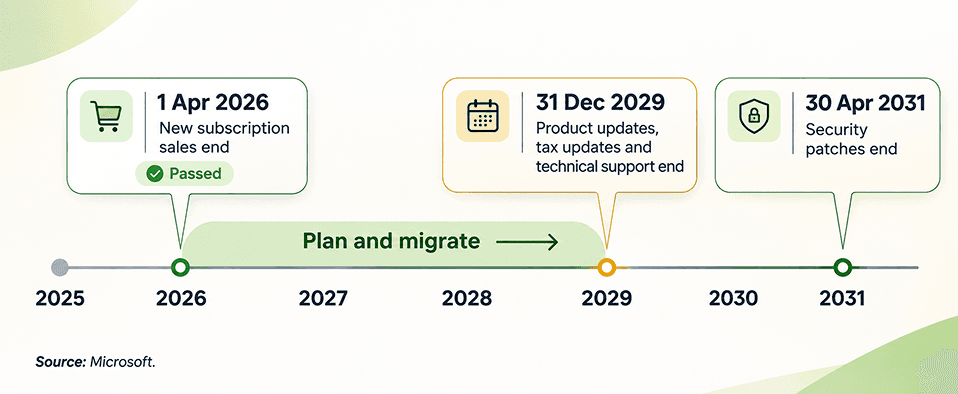
Dynamics GP reaches end of life in three steps. Microsoft stopped selling GP subscriptions to new customers on April 1, 2026, ends product updates, tax updates and technical support on December 31, 2029, and ends security patches on April 30, 2031 (source: Microsoft). GP keeps running after that, but without fixes, tax updates or Microsoft help.
In this article

  1. When Is Dynamics GP End of Life?
  2. Which GP Version Are You On, and Does It End Sooner?
  3. What Happens to Dynamics GP After Support Ends?
  4. Your Options: Business Central, Dynamics 365 Finance or Another ERP
  5. How Much Dynamics GP History Should You Migrate?
  6. How Long Does a GP Migration Take, and What Does It Cost?
  7. Checklist: What to Start This Quarter
  8. Frequently Asked Questions
  9. Your Next Step
  10. Sources & Citations
Dynamics GP end of life timeline showing April 1 2026, December 31 2029 and April 30 2031
i

Who this is for: "Our GP partner says we have time, but I need a plan before support ends." This guide is for the finance lead or controller who owns Dynamics GP and has to take a dated, sourced plan to the CFO or board. You need the real deadlines, a fair look at the options, an answer on how much history to keep, and a short list of things to start this quarter, without a sales pitch for one ERP.

Dynamics GP is not switching off tomorrow. It is, however, on a fixed clock.

Microsoft is discontinuing Dynamics GP in stages, and the end of support is already dated. If you run finance on Dynamics GP, you have probably heard three different versions of the deadline: 2026, 2029 and 2031. All three are real. They just mean different things. One has already passed, one stops your tax updates, and one stops your security patches.

This guide puts each date next to its Microsoft source, explains what it changes for your team, and compares the realistic ways forward. We cover Business Central, Dynamics 365 Finance, other ERPs, and staying on GP for a while. We also cover the question most articles skip: how much GP history to bring with you. If you want to see how a move like this runs end to end, our Dynamics 365 migration services page shows the stages.

You will finish with a dated timeline for your board and a checklist you can start this quarter.

When Is Dynamics GP End of Life?

Dynamics GP end of life runs in three stages. New customers could license GP subscriptions until April 1, 2026.1 Product enhancements, tax updates and technical support for GP 18.x end on December 31, 2029, and security patches end on April 30, 2031.2

For example, a company on GP 18.x can still take the June, October and December updates through 2029. Its 2030 payroll tax tables, though, will not come from Microsoft.

DateWhat endsWhat it means for youSource
1 Apr 2026 (passed)New GP subscription sales to new customersExisting customers keep running GP. No new GP instances for new buyers.Microsoft Dynamics 365 blog, 5 Jun 2025
31 Dec 2029Product enhancements, regulatory and tax updates, technical supportThe 2029 year-end update is the last one Microsoft ships. You would close 2029 in early 2030 without Microsoft support.Microsoft Learn lifecycle page
30 Apr 2031Security updates and patches; Service Plan coverage; subscription renewals; adding users to perpetual licensesOfficial end of life. GP still opens, but runs unpatched.Microsoft Learn lifecycle page; Microsoft Dynamics 365 blog

Microsoft has moved one of these dates before. It first set support to end on September 30, 2029, then pushed it to December 31, 2029, which is why some older articles still show September.

If you plan to add users or renew a subscription before 2031, confirm your license position early. Our Dynamics 365 licensing advisory team can check what your current agreement still allows.

!

The date that matters most: For most finance teams, December 31, 2029 is the real deadline. It is the last date Microsoft ships tax and regulatory updates for GP.

Which GP Version Are You On, and Does It End Sooner?

Your GP version decides your real deadline. Only GP 18.x follows the 2029 and 2031 dates. Older versions follow Microsoft's fixed lifecycle, and most of those have already ended.2

To check yours, open GP and go to Help, then About Microsoft Dynamics GP. The version number tells you which row below applies.

VersionLifecycle policySupport status (as of Nov 2026)
GP 2013 and 2013 R2FixedExtended support ended 11 Apr 2023
GP 2015 and 2015 R2FixedExtended support ended 8 Apr 2025
GP 2016 and 2016 R2FixedExtended support ended 14 Jul 2026
GP 2018 and 2018 R2FixedExtended support ends 11 Jan 2028
GP 18.x (18.5 and later)ModernSupported to 31 Dec 2029; security patches to 30 Apr 2031, if you take at least one of the three yearly updates

One detail matters for GP 2018 users. Installing any compatible tax release or hotfix moves the system to version 18.5 or later, which puts it on the modern lifecycle. So a GP 2018 site that keeps taking tax updates is effectively on the 2029 timeline.

While you are checking the version, count your users by role and list every third-party (ISV) add-on and custom report. Those three facts shape every option below, and they are the first questions any partner will ask.

If nobody has a full list of what is bolted onto GP, a technology stack assessment builds that inventory in a few days.

What Happens to Dynamics GP After Support Ends?

After December 31, 2029, Dynamics GP keeps working, but Microsoft stops shipping tax updates, regulatory changes, fixes and technical support. After April 30, 2031, security patches stop too, so the system runs unpatched.2 Nothing deletes your data or locks you out.

Here is a concrete example. A US company running payroll in GP after 2029 has to update tax tables and year-end forms itself, or buy that work from a third party, every year. Any problem with a GP service pack has no Microsoft fix behind it.

What changes after December 31, 2029

  • No new tax tables, year-end forms or regulatory changes from Microsoft
  • No technical support cases with Microsoft
  • Security patches continue, but only when Microsoft judges them necessary

What changes after April 30, 2031

  • No security patches, and no Service Plan coverage
  • Subscriptions can no longer renew, and perpetual licenses can no longer add users

Microsoft has said these changes apply on April 30, 2031.1

Can you stay on GP for a while?

Yes, as a bridge. Some teams keep GP stable while they plan, especially if a recent year-end went badly or backups have never been tested. That is a sensible short-term step, not a destination. If that is you, our Dynamics GP rescue program makes GP safe first, then plans the move on your timeline.

Your Options: Business Central, Dynamics 365 Finance or Another ERP

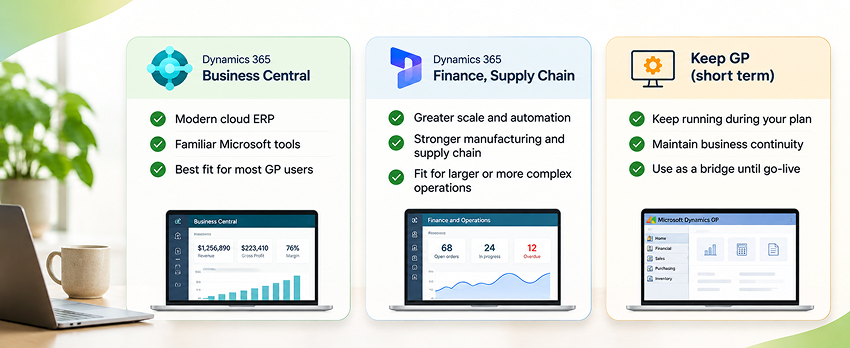
Choose Business Central if you want the most direct path off GP with a Microsoft migration tool. Choose Dynamics 365 Finance if you run many legal entities, complex supply chains or global operations. Choose another ERP only if a clear business reason points you outside Microsoft. Stay on GP only as a short bridge.

OptionLicense cost (list)EffortRiskBest fit
Dynamics 365 Business Central (online)Essentials $80, Premium $110, Team Members $8 per user/month, paid yearlyModerate. Microsoft cloud migration tool for GP 2015 or later moves masters, open items and historyLow to moderate. Add-ons need replacements; processes changeMost GP customers: one or a few companies, finance plus distribution
Dynamics 365 Finance (with Supply Chain Management if needed)Finance $210 per user/month, paid yearlyHigh. A reimplementation, not a tool-based moveModerate to high. Longer project, bigger teamMulti-entity, multi-country, complex manufacturing or supply chain
Another ERP (for example NetSuite, Sage Intacct, Acumatica)Vendor quoteHigh. Full reimplementation and data mappingModerate to high. New vendor, new partner, new skillsA strategic reason outside the Microsoft stack
Stay on GP for now (on GP 18.x)Your current planLow now, higher laterRises after 31 Dec 2029 (no tax updates)A bridge while you plan, not an end state

Prices from Microsoft's pricing pages, checked November 4, 2026.3,4 Microsoft points GP customers to Business Central first and builds the migration tooling for that path.1

Business Central

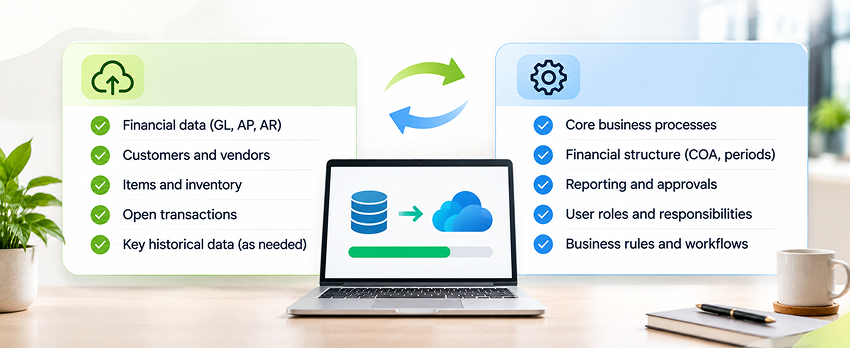
Business Central feels familiar to GP users and shares the Microsoft stack you already know, including Excel, Outlook and Power BI. The migration tool handles chart of accounts, customers, vendors, items, open transactions and history. See what a Business Central implementation covers beyond the data move.

Dynamics 365 Finance

Finance suits larger groups that GP was already stretching. It costs more per user and takes longer, so pick it for scale, not for prestige.

Another ERP

If you are seriously weighing NetSuite or Sage Intacct, compare them on your own processes and data, not feature lists, and ask each vendor to demo with your real chart of accounts.
Matrix comparing Dynamics GP migration options by effort and business complexity

How Much Dynamics GP History Should You Migrate?

Most companies should move open balances, master data and summary general ledger history, then keep detailed transactions in a read-only snapshot or archive. Moving every historical line into a new ERP is rarely worth the cost.

Microsoft's tool supports this split. You choose the oldest historical year to bring across as summary GL by fiscal period. An optional GP Historical Snapshot then moves detailed GL, receivables, payables, sales order, purchase receipt and inventory history into separate tables for reporting.5

History optionWhat movesEffortRiskBest fit
A. Open items onlyMasters, open AR and AP, open POs, on-hand stock, balancesLowestOld detail lives only in GPClean break, GP kept read-only
B. Plus summary GL historyOption A plus GL summary by fiscal period from the oldest year you pickLowNo line detail in Business CentralMost mid-market finance teams
C. Plus Historical SnapshotOption B plus detailed GL, AR, AP, SOP, POP receipt and inventory history in extension tablesModerateReporting needs setupTeams that run multi-year trend or audit reports
D. Archive outside the ERPHistory held in a GP read-only copy, a cloud-hosted GP, or a data lake archiveLow to moderateTwo places to look; storage costsLong retention rules, very large databases
E. Full re-posted historyEvery historical transaction rebuilt in the new ERPHighestCostly reconciliationOnly when a regulator requires it

Limits to know before you decide

  • Open receivables and payables migrate at their remaining balance, not the original document amount
  • Undeposited receipts do not migrate, so deposit them in GP first
  • GP account segments become dimensions, with a limit of eight in Business Central
  • 1099 data migrates from tax year 2024 onward5

Agree the retention rule with your auditors before you pick an option. Snapshot data can feed Power BI reports, and an archive can sit in Azure, so old detail stays readable without living in the new ERP.

Once the scope is agreed, a Business Central data migration fast track moves it in tested steps.
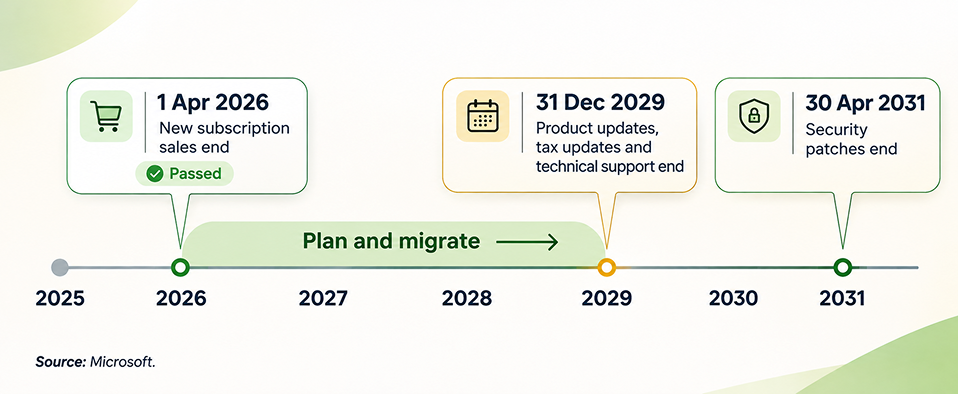
Diagram showing which Dynamics GP data moves to Business Central, which goes to a snapshot, and which is archived

How Long Does a GP Migration Take, and What Does It Cost?

A single-company GP to Business Central move can run in about 12 weeks. A published fixed-scope offer on Microsoft AppSource quotes that, including data transfer.6 Multi-entity or heavily customized moves, and reimplementations on another ERP, take considerably longer.

Cost has two parts: yearly licenses and the one-time project. Licenses are easy to estimate. For example, 25 Business Central Essentials users cost 25 x $80 x 12 = $24,000 a year at list price, and the same 25 users on Premium cost $33,000 a year.

The project cost depends on five things:

  • How much history you move (options A to E above)
  • How many companies and charts of accounts you consolidate
  • How many ISV add-ons and custom reports you replace or retire
  • How many integrations you rebuild (banks, payroll, ecommerce, EDI)
  • Whether you migrate directly or redesign processes along the way
Planning stepTypical timeWhy it matters
Assessment and option choice4 to 6 weeks (Redefine estimate)Sets scope, history option and budget
Single-company Business Central moveAbout 12 weeksWhat a published fixed-scope AppSource offer quotes
Multi-entity or another ERPLonger; scoped per projectReimplementation, not a tool-based move
Buffer before 31 Dec 2029 (Redefine guidance)At least one full year-end on the new ERPAim to close at least one year on the new ERP before GP support ends

To put a number on your own scope, try the Dynamics 365 implementation cost calculator.

Checklist: What to Start This Quarter

Start with eight steps. They give you a plan your board can approve. In our experience they take about six to eight weeks of part-time effort; the effort on each step is a Redefine planning estimate, not a Microsoft figure.

  1. Confirm your GP version. Check Help, then About Microsoft Dynamics GP, and match it to the version table. Effort: 1 hour.
  2. Count your users by role. Split full finance users from occasional and approval-only users, because license types differ. Effort: 1 day.
  3. List every ISV add-on and custom report. Mark each one keep, replace or retire. Effort: 1 to 2 weeks.
  4. Run Microsoft's migration assessment. Microsoft's GP to Business Central process starts with a readiness assessment, and the migration tool needs GP 2015 or later. Effort: 1 to 2 days.
  5. Agree how much history moves. Pick options A to E with your auditors and record the retention rule. Effort: 1 week.
  6. Map your integrations. List bank feeds, payroll, ecommerce, EDI and reporting connections, and decide how each one reconnects. Effort: 1 to 2 weeks.
  7. Choose the target ERP and partner. Get a written scope, timeline and price for your top option. Effort: 4 to 6 weeks.
  8. Set a go-live window and budget. Pick a date away from year-end close, then take the plan to the board. Effort: 1 day.

For step 6, our ERP integration services team maps every connection line by line. Train key users early, so they test the new system with your own data.

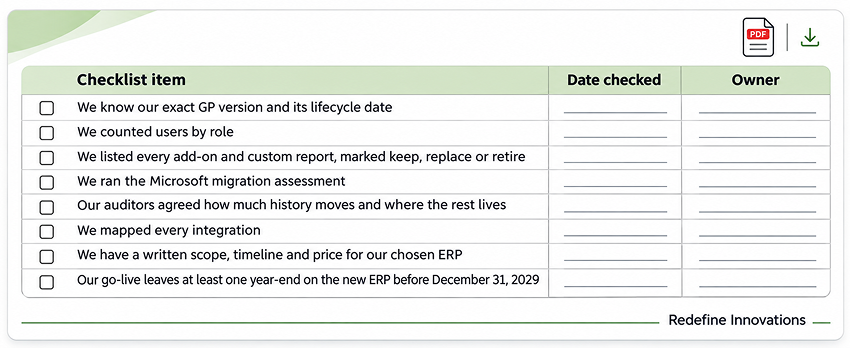
  • We know our exact GP version and its lifecycle date
  • We counted users by role
  • We listed every add-on and custom report, marked keep, replace or retire
  • We ran the Microsoft migration assessment
  • Our auditors agreed how much history moves and where the rest lives
  • We mapped every integration
  • We have a written scope, timeline and price for our chosen ERP
  • Our go-live leaves at least one year-end on the new ERP before December 31, 2029
Printable Dynamics GP end of life migration checklist
"The GP deadline rarely causes the problem. Starting the plan too late does."
A common lesson from ERP migrations

Frequently Asked Questions

Is Dynamics GP being discontinued?

Yes, in stages. Microsoft stopped selling GP subscriptions to new customers on April 1, 2026, ends support and tax updates on December 31, 2029, and ends security patches on April 30, 2031. Existing GP keeps running after those dates, and Microsoft points GP customers to Dynamics 365 Business Central as the replacement.

Can I still buy Dynamics GP or add users?

New customers could license GP subscriptions only until April 1, 2026. For existing customers, Microsoft says two things end on April 30, 2031: subscriptions can no longer renew, and perpetual licenses can no longer add users.1 Terms differ by license type, so check your own agreement before you plan to grow on GP.

Will my GP add-ons work in Business Central?

No. GP add-ons do not carry over. Business Central uses its own extensions, so each add-on needs a Business Central equivalent from the same vendor, a different app, standard Business Central features, or retirement. List them early, because replacements drive both cost and timeline.

Does Microsoft charge for the GP migration tool?

The cloud migration tool is built into Business Central online, so there is no separate tool to buy, and it supports GP 2015 or later.7 You still pay for Business Central licenses and, usually, a partner to plan the move, map data, replace add-ons, test and train your team.

Should we migrate now or wait until closer to 2029?

Start planning now, even if you go live later. You want at least one year-end close on the new ERP while GP is still supported, and a plan made in 2026 or 2027 leaves room to fix surprises in testing, add-on replacement or data mapping before that deadline.

Can we host GP in Azure instead of migrating?

You can, and it can make sense as a bridge or as a read-only archive for history. Hosting changes where GP runs, not its support dates, so tax updates still stop after December 31, 2029. Confirm your SQL Server and GP versions support the target environment first.

Your Next Step

Dynamics GP gives you a clear runway, and December 31, 2029 marks the end of it. Pick an option this quarter and you can go live on your terms, with history handled and at least one year-end on the new system before GP support stops.

When you are ready to turn this into a plan, our Dynamics GP to Business Central migration service starts with a review of your GP setup, modules and add-ons, then gives you a written data map and step-by-step plan. Redefine has delivered 550+ projects over 25+ years.

For a look at how we run Dynamics 365 data work, see the Parsons Kellogg case study, where stock accuracy reached 99.0%. That was a Dynamics 365 data project, not a GP migration.

"Plan to the 2029 tax cutoff, not the 2031 security cutoff."
The short version of this guide

Need a dated GP plan for your board?

Bring your GP version, user count and add-on list. We will map your options side by side, recommend how much history to move, and give you a dated plan for your board. If staying on GP for now is the right answer, we will say so.

Get My GP Migration Plan →

Book a Business Central discovery sprint

Sources & Citations

Official Microsoft pages and a Microsoft marketplace listing used for the dates, prices and timelines in this guide:

  1. Microsoft Dynamics 365 blog, Mike Morton, "Explore migration options for Microsoft Dynamics GP and Microsoft Dynamics SL customers" (5 Jun 2025): 1 Apr 2026 as the final day for new customers to license GP subscriptions; 30 Apr 2031 end of Service Plan coverage, subscription renewals and user adds on perpetual licenses.
  2. Microsoft Learn, Dynamics GP lifecycle and support dates (page last updated 25 Sep 2024, checked 4 Nov 2026): GP 18.x support, product and tax updates end 31 Dec 2029; security updates end 30 Apr 2031; fixed lifecycle dates for GP 2013 to GP 2018; hotfix rule for GP 2018.
  3. Microsoft, Dynamics 365 Business Central pricing (checked 4 Nov 2026): Essentials $80, Premium $110 and Team Members $8 per user per month, paid yearly.
  4. Microsoft, Dynamics 365 Finance pricing (checked 4 Nov 2026): Dynamics 365 Finance $210 per user per month, paid yearly.
  5. Microsoft Learn, Migrate Dynamics GP to Business Central online (page last updated 15 Jan 2026): what the cloud migration tool moves, the oldest historical year setting, the GP Historical Snapshot, and known limits.
  6. Microsoft AppSource, Enavate Xcelerate GP to Business Central migration offer (checked 4 Nov 2026): example of a fixed-scope partner offer that typically runs about 12 weeks, including data transfer.
  7. Microsoft Learn, Dynamics GP to Business Central online end-to-end migration overview (page dated 13 Dec 2024): GP 2015 or later prerequisite and the eight-stage migration process, including the migration assessment.

Umang Patel

Umang Patel

Co-owner | Ecommerce Architecture, Systems & Integrations

Umang Patel has worked in ecommerce and technology since 2001. He specializes in backend systems, ecommerce architecture, ERP and platform integrations, automation, and reverse engineering complex business processes. At Redefine Innovations, he leads technology and project teams building scalable systems across both B2B and DTC ecommerce environments.
Areas of expertise: Ecommerce Architecture • Backend Systems • ERP Integration • Automation • Headless Commerce • Reverse Engineering
More articles →Work With Us
PreviousNext

Keep reading

Ecommerce Channel Management: Amazon, Walmart and Your Store
Article

Ecommerce Channel Management: Stop Overs...

What Is a B2B Portal? Features, Types and Costs for Manufacturers
Article

What Is a B2B Portal? Features, Types an...

What Is EDI? A Plain-English Guide for Retail Suppliers
Article

What Is EDI? A Plain-English Guide for R...

Turn Your Innovative Ideas Into Working Solutions
Tell us what you need, where you are stuck, and what success looks like. Our team will review your requirements and provide a tailored quote for the right service.
Let's Talk Innovation